Can I Turn My Car Radio Into Bluetooth With This Guide
Can I Turn My Car Radio Into Bluetooth? Absolutely! This guide walks you through every method to add wireless streaming to your old car stereo. You’ll learn about Bluetooth adapters, FM transmitters, and head unit replacements, so you can enjoy hands-free calling and music from your phone without buying a new radio.
Have you ever sat in your car, looked at that old radio, and thought, Can I Turn My Car Radio Into Bluetooth? It is a question many drivers ask, especially when they see everyone else streaming music wirelessly. The good news is that you do not need to buy a whole new stereo system. With a few simple gadgets and a little patience, you can bring modern Bluetooth connectivity to almost any vehicle. This guide will show you exactly how to do it, step by step.
Adding Bluetooth to your car radio changes the way you listen to music and make calls. You get wireless streaming, hands-free calling, and seamless smartphone integration. Whether you drive a classic car with a vintage radio or a newer model with an old CD player, there is a Bluetooth solution that fits. In this article, we will explore every option, compare costs, and share expert tips to ensure you get the best sound quality without the hassle.
Key Takeaways
- Easy Upgrade Path: You can add Bluetooth to almost any car radio using an AUX Bluetooth receiver or an FM transmitter.
- Multiple Options Exist: Choose from plug-and-play adapters, wireless FM transmitters, or a full head unit replacement based on your budget and car model.
- Hands-Free Safety: Bluetooth enables wireless hands-free calling, keeping your eyes on the road and hands on the wheel.
- No New Radio Needed: Many older car stereos still have an AUX port or cassette deck that can accept a simple Bluetooth adapter.
- Sound Quality Varies: A direct AUX Bluetooth receiver usually offers better audio quality than an FM transmitter, which can pick up interference.
- Quick Installation: Most Bluetooth add-ons take less than 10 minutes to set up and require no special tools or wiring knowledge.
📑 Table of Contents
- Why Upgrade Your Car Radio to Bluetooth?
- Can I Turn My Car Radio Into Bluetooth? Yes, Here is How!
- Step-by-Step: Installing a Bluetooth Adapter in Your Car
- Comparing Bluetooth Upgrade Options
- Common Mistakes to Avoid When Adding Bluetooth to Your Car Radio
- Expert Tips for the Best Bluetooth Car Audio Experience
- Final Thoughts: Can I Turn My Car Radio Into Bluetooth
Why Upgrade Your Car Radio to Bluetooth?
Older car radios were built for AM and FM signals, cassette tapes, or CDs. They do not have the wireless features we rely on today. Upgrading to Bluetooth connectivity brings your car entertainment system into the modern age. You can stream music directly from your phone, answer calls without touching your device, and even use voice assistants like Siri or Google Assistant.
The Problem with Old Radios
Most older car stereos lack an auxiliary input or a USB port that supports audio streaming. If your radio has a cassette player, you might have used a cassette adapter in the past, but those often produce muffled sound. FM transmitters were another workaround, but they can be noisy and limited in range. The core issue is that old radios were not designed for the wireless audio world we live in now.
What Bluetooth Brings to the Table
When you add Bluetooth, you unlock several benefits. Wireless streaming lets you play any song from your phone without cables. Hands-free calling keeps you safe by letting you answer calls through your car speakers. Smartphone integration means you can control your music from the steering wheel or a dashboard mount. The audio quality also improves with modern Bluetooth codecs like aptX, which delivers near-CD quality sound over the air.
Can I Turn My Car Radio Into Bluetooth? Yes, Here is How!
The answer to Can I Turn My Car Radio Into Bluetooth is a resounding yes. There are four main methods, each suited to different car models and budgets. You can choose a simple plug-in adapter, a wireless FM transmitter, a full head unit replacement, or even a clever hack using your existing CD changer port. Let us break down each option so you can pick the best one for your ride.
Option 1: Use a Bluetooth Receiver with an AUX Input
If your car radio has an auxiliary input (the 3.5mm headphone jack), this is the easiest and most affordable method. You buy a small Bluetooth receiver that plugs into the AUX port and pairs with your phone. The receiver then sends the audio signal directly to the car stereo. This method preserves the best sound quality because it uses a direct wired connection for the final stretch.
These Bluetooth adapters are tiny and often run on a USB cable for power. You can plug the USB cable into a cigarette lighter adapter or a USB port in the dashboard. Once paired, your phone connects automatically every time you start the car. Popular brands like Mpow, TaoTronics, and 1Mii make reliable models that cost between $15 and $40.
Option 2: Go Wireless with an FM Transmitter
An FM transmitter is a great choice if your car radio has no AUX input. This device plugs into your car’s cigarette lighter or 12V socket and broadcasts your phone’s audio over an empty FM frequency. Your car radio picks up that signal and plays the music. It is a completely wireless solution that works with any radio, even those without any modern inputs.
Most FM transmitters let you choose the frequency. You tune your car radio to match, and then your phone streams through the transmitter. The sound quality is decent, but it can be affected by local radio interference. For the best results, choose a transmitter with a direct USB charging port and a built-in microphone for calls. Prices range from $10 to $35.
Option 3: Replace the Head Unit Entirely
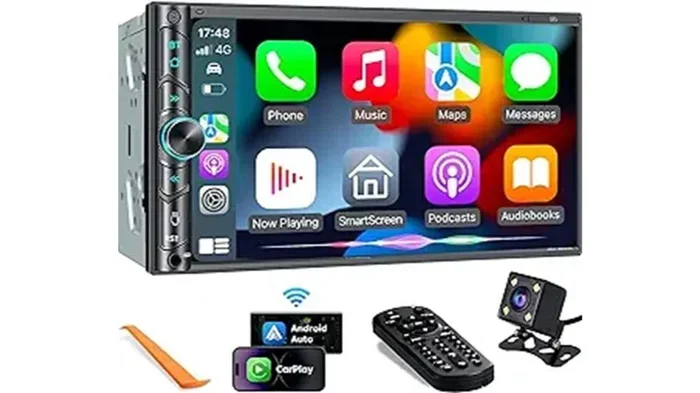
If you want a full car audio upgrade, replacing the head unit is the most thorough solution. A new Bluetooth head unit gives you a modern interface, touchscreen, Apple CarPlay, Android Auto, and of course, built-in Bluetooth. This option costs more and requires some installation effort, but it transforms the entire driving experience.
You will need to match the new head unit to your car’s dashboard size. Single-DIN and double-DIN are the two common sizes. Many aftermarket units from brands like Pioneer, Kenwood, and Sony come with Bluetooth, USB, and auxiliary inputs. Installation involves removing the old radio, wiring in a harness adapter, and securing the new unit. If you are not comfortable with car electronics, a local installer can do it for you.
Option 4: Bluetooth Adapters for Older Systems
Some older cars have a CD changer port or a proprietary data connector behind the radio. You can use a Bluetooth adapter module that taps into that connection. This method is less common but very effective for certain models. It hides the adapter completely and provides a clean, integrated Bluetooth experience. You may need to check your car’s service manual or consult a stereo shop to find the right adapter.
Step-by-Step: Installing a Bluetooth Adapter in Your Car
Adding Bluetooth to your car radio is a DIY-friendly project. The exact steps depend on which method you choose, but the general process is straightforward. Here is a detailed walkthrough for the most popular options.
What You Will Need
- Bluetooth receiver or FM transmitter
- USB cable or car charger for power
- Auxiliary cable (if your receiver uses one)
- Free cigarette lighter or USB port
- Your smartphone
Installing the AUX Bluetooth Receiver
- Plug the Bluetooth receiver into the AUX input on your car radio.
- Connect the receiver’s USB cable to a power source.
- Turn on your car radio and set it to AUX mode.
- On your phone, go to Bluetooth settings and turn it on.
- Put the receiver in pairing mode (usually by holding the power button).
- Select the receiver from your phone’s list of available devices.
- Once paired, play music on your phone and adjust the volume on both the phone and the car radio.
Setting Up the FM Transmitter
- Plug the FM transmitter into your car’s 12V socket.
- Tune your car radio to an empty FM frequency, like 88.1 or 107.9.
- Set the FM transmitter to the same frequency using its buttons or app.
- On your phone, connect to the transmitter via Bluetooth (it may appear as a device name like “FM Transmitter”).
- Play music and adjust the volume on the transmitter and your car radio.
Replacing the Head Unit
Replacing the head unit is a bigger project. Start by purchasing a compatible Bluetooth head unit. Remove the old radio bezel, disconnect the wiring harness, and connect the new harness adapter. Mount the new unit, reconnect the power and antenna cables, and test the Bluetooth pairing before securing the dashboard panels. Always disconnect the car battery negative terminal before starting any electrical work.
Comparing Bluetooth Upgrade Options
To help you decide, here is a quick comparison of the four methods. Each has its own strengths depending on your car and needs.
| Method | Cost | Ease of Installation | Sound Quality | Best For |
|---|---|---|---|---|
| AUX Bluetooth Receiver | $15 – $40 | Very Easy (Plug and Play) | Excellent (Direct wired) | Cars with AUX input |
| FM Transmitter | $10 – $35 | Easy (No wiring) | Good (Can have static) | Cars without AUX or USB |
| Head Unit Replacement | $150 – $400 | Moderate (Wiring required) | Best (Factory quality) | Full car audio upgrade |
| CD Changer Bluetooth Adapter | $30 – $80 | Moderate (Hidden install) | Very Good (Integrated) | Older cars with CD changers |
The AUX Bluetooth receiver is the go-to choice for most people because it is cheap, fast, and reliable. The FM transmitter is the only option if your car has no AUX port at all. Replacing the head unit is ideal if you want a complete modern infotainment system with large screens and app support.
Common Mistakes to Avoid When Adding Bluetooth to Your Car Radio
Even with a simple upgrade, you can run into problems if you are not careful. Here are the most common mistakes people make when trying to add Bluetooth to an old car radio, and how to avoid them.
Ignoring Compatibility
Not every Bluetooth receiver works perfectly with every phone. Before you buy, check that the adapter supports your phone’s Bluetooth version. Most modern receivers work with Bluetooth 4.0 and above, but older models may have connection drops. Also, ensure the receiver has the right input for your car stereo, whether it is AUX, USB, or a proprietary connector.
Choosing the Cheapest FM Transmitter
It is tempting to grab the cheapest FM transmitter online, but a poor-quality one will deliver static, drop calls, and interfere with other radio stations. Look for a transmitter with a dedicated ground wire, a built-in microphone, and a frequency display. Spending a little more upfront saves you frustration later.
Forgetting to Charge the Device
Bluetooth receivers and FM transmitters need power. If you plug a receiver into a 3.5mm jack but forget to connect the USB power cable, it will not work. Always check that the device is charging or powered before you assume it is broken. Some receivers have a built-in battery that needs to be charged for the first use.
Overlooking Sound Quality Settings
Many people do not realize that Bluetooth audio quality can be affected by your phone’s settings. On Android, you may need to enable “HD Audio” or “aptX” in the Bluetooth developer options. On iPhone, the connection is usually automatic, but you should ensure the volume is turned up on both the phone and the car stereo for the best balance.
Expert Tips for the Best Bluetooth Car Audio Experience
Once you have added Bluetooth, a few small tweaks can make a big difference in your daily driving experience. These expert tips help you get the most out of your wireless car audio setup.
Keep Your Phone Charged on the Road
Streaming music drains your phone battery faster than normal use. Invest in a quality car charger that plugs into the cigarette lighter or USB port. A charger with Quick Charge or Power Delivery technology will keep your phone topped up, even during long trips. This ensures your Bluetooth connection stays stable and your music never stops.
Use High-Quality Audio Files
Bluetooth can only transmit so much data. If you stream low-bitrate songs from a free music service, the sound will be compressed and flat. Use high-quality files or a streaming service that offers at least 320kbps or lossless audio. This is especially noticeable with an AUX Bluetooth receiver, which can deliver crisp, clear sound when fed good source material.
Pair Multiple Devices Easily
Most Bluetooth receivers can remember several paired devices. This is handy if you share your car with a passenger or a spouse. You can pair your phone and your partner’s phone, and the receiver will automatically connect to the one that played audio last. Some transmitters even allow two phones to be connected simultaneously for music sharing.
Clean the AUX Port Regularly
Dust and lint can build up inside the AUX input, causing crackling sounds or intermittent cutouts. Use a can of compressed air or a small brush to gently clean the port every few months. A solid connection ensures you get the best possible sound quality from your Bluetooth adapter.
Final Thoughts: Can I Turn My Car Radio Into Bluetooth
The answer is a clear and enthusiastic yes. Can I Turn My Car Radio Into Bluetooth is no longer a question of “if” but “how.” Whether you choose a simple AUX Bluetooth receiver, an FM transmitter, a full head unit replacement, or a hidden CD changer adapter, you can bring wireless streaming and hands-free calling to your car. The key is to match the solution to your car’s existing inputs and your budget.
Upgrading your car radio with Bluetooth is one of the most satisfying and affordable car audio improvements you can make. It takes less than an hour, costs under $50 for most options, and instantly modernizes your driving experience. You will wonder how you ever drove without it. Start with the method that fits your car best, follow the steps in this guide, and enjoy your music the wireless way.
Frequently Asked Questions
Do I need any special tools to add Bluetooth to my car radio?
For most methods like AUX receivers or FM transmitters, you need no special tools at all. You just plug the device into the AUX port or cigarette lighter. If you are replacing the head unit, you will need a screwdriver and a wiring harness adapter, which usually comes with the new unit. A local installer can handle the wiring if you prefer not to DIY.
Will adding Bluetooth ruin my car’s original sound quality?
Not at all. Using an AUX Bluetooth receiver actually preserves the original sound quality of your car radio because the audio signal travels through a direct wired connection. FM transmitters can introduce a tiny bit of static, but a good-quality model with a clear frequency will sound great. Only a full head unit replacement changes the original speakers and amplifier, which can improve sound quality significantly.
Can I use Bluetooth with a car radio that only has a cassette player?
Yes, you can. You have two great options. You can use a Bluetooth cassette adapter, which looks like a cassette tape and plays wirelessly from your phone. Alternatively, you can use an FM transmitter, which works with any radio regardless of the input type. Both methods are simple and require no permanent modifications to your car.
Is Bluetooth in a car safe for hands-free calling?
Absolutely. Bluetooth hands-free calling is designed to keep your eyes on the road and hands on the wheel. The audio comes through your car speakers, and the microphone picks up your voice. Most modern Bluetooth adapters and head units support caller ID announcement and voice dialing, making it even safer and more convenient than holding your phone.
How far can my phone be from the Bluetooth adapter while driving?
Bluetooth Class 2 devices, which are used in most car adapters, have a range of about 30 feet (10 meters). Since your phone will typically sit in a cup holder or on a dashboard mount, this range is more than enough. You can even leave your phone in your pocket or bag without losing the connection. The signal stays strong as long as the phone is inside the car.
What is the difference between Bluetooth and AUX input for music streaming?
AUX input requires a physical cable to connect your phone to the car stereo, while Bluetooth is completely wireless. AUX provides a direct analog signal, which some audiophiles prefer for its pure sound. Bluetooth offers convenience and freedom from cables, and modern codecs like aptX deliver excellent quality. For most drivers, Bluetooth is the better choice because it eliminates cable clutter and allows seamless pairing.