Can I Use Vinegar To Clean My Computer Screen Safely
Using vinegar to clean a computer screen is generally not recommended. While vinegar is a popular natural cleaner, its acidity can damage anti-glare coatings and LCD screen surfaces. Learn the risks, safe alternatives, and proper techniques for display panel cleaning in this complete guide.
You just noticed a smudge on your computer screen. It is right there in the middle of your display, blocking your view of that important spreadsheet. You grab the bottle of white vinegar sitting on your kitchen counter. It is natural. It is cheap. It cleans everything else around the house. So why not use it on your screen?
Here is the thing. Can I use vinegar to clean my computer screen safely? The short answer is no. Not really. While vinegar works wonders on kitchen counters and bathroom tiles, it can cause real trouble for your computer display. Let us walk through exactly why that is, what you should do instead, and how to keep your screen looking brand new without any risky shortcuts.
We have all been there. A stubborn fingerprint or a streak of dried coffee sits right on the middle of our monitor. We want it gone fast. The internet is full of quick home remedies. Vinegar is one of the most popular ones. But just because something works on your countertop does not mean it is safe for delicate electronic screen care. Your screen has special coatings. These coatings are designed to reduce glare, protect against scratches, and enhance color clarity. Vinegar can eat away at those coatings over time.
In this article, we will cover everything you need to know about cleaning your monitor with vinegar. We will look at what happens when vinegar touches a screen, safer alternatives, step-by-step methods for proper cleaning, and common mistakes to avoid. By the end, you will know exactly how to handle screen smudges removal the right way every single time.
Key Takeaways
- Vinegar can harm your screen: The acetic acid in vinegar may strip protective coatings from monitors and laptop screens.
- Use safer alternatives: Distilled water and dedicated screen cleaners are much better choices for computer display care.
- Microfiber cloths are essential: Always use a soft microfiber cloth to avoid scratches during screen cleaning.
- Avoid household cleaners: Many common cleaning agents contain chemicals that can damage electronic screens.
- Prevention is key: Regular dusting and careful handling reduce the need for deep monitor cleaning.
- Check your manufacturer’s guide: Different screen types have different care requirements.
- When in doubt, go gentle: The safest approach is always the least aggressive cleaning method.
📑 Table of Contents
- Is Vinegar Safe for Cleaning Computer Screens?
- How to Clean Your Computer Screen Safely
- What Happens If You Use Vinegar on Your Screen?
- Best Alternatives to Vinegar for Screen Cleaning
- Common Mistakes When Cleaning Computer Screens
- Expert Tips for Keeping Your Screen Spotless
- Why People Turn to Vinegar for Screen Cleaning
- When to Call a Professional
- Conclusion
Is Vinegar Safe for Cleaning Computer Screens?
The honest answer is that vinegar poses real risks to most modern screens. White vinegar contains acetic acid, typically around 5% concentration. That might sound weak. But for delicate screen surfaces, even a small amount of acid can cause problems. Let us break down the specific concerns.
How Vinegar Affects Screen Coatings
Most modern monitors and laptops use special coatings on the screen surface. These include anti-glare coatings, oleophobic layers, and anti-reflective treatments. These coatings make your screen look better and feel smoother to the touch. Vinegar’s acetic acid can degrade these coatings over time. Once the coating is damaged, you cannot undo it. Your screen might develop permanent discoloration, uneven brightness, or a rough texture.
Think of it this way. You would not pour lemon juice on a freshly waxed car. The acid strips the wax. The same principle applies here. Vinegar strips the protective layer on your LCD screen or LED display.
Which Screens Are Most at Risk?
Not all screens react the same way to vinegar. Here is a quick look at common screen types and their vulnerability:
- Laptop screens: These often have delicate anti-glare coatings. Very vulnerable to vinegar damage.
- Desktop monitors: Similar risk, especially with matte finish displays.
- Touchscreen devices: Oleophobic coatings on touchscreens can be degraded by acid.
- Old CRT monitors: Less of a concern for coatings, but still not recommended due to other risks.
- Matte vs. glossy screens: Both can be damaged, but matte screens with anti-glare coatings are particularly sensitive.
The bottom line is that no major manufacturer recommends using vinegar for screen cleaning. Apple, Dell, HP, and Samsung all advise against using household cleaners on their displays.
How to Clean Your Computer Screen Safely
So if vinegar is off the table, what should you use? Fortunately, cleaning your screen safely is actually very simple. You need just a few basic supplies and a little patience.
What You Will Need
- A soft microfiber cloth (the kind that comes with glasses)
- Distilled water
- A spray bottle (optional)
- A dedicated screen cleaning solution (optional)
Step-by-Step Cleaning Process
- Power off your computer. This makes it easier to see smudges and prevents any electrical risk. A dark screen also shows dirt more clearly.
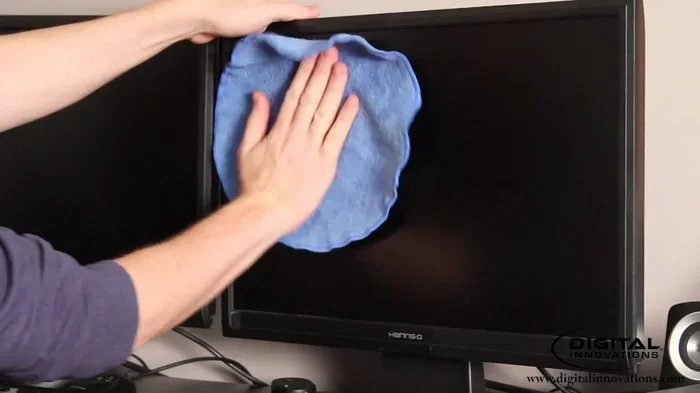
- Dust the screen first. Use a dry microfiber cloth to gently wipe away loose dust and particles. Always wipe in one direction, not in circles.
- Lightly dampen your cloth. If you need more cleaning power, use distilled water. Put a small amount on the cloth, not directly on the screen. Never spray liquid directly onto your display.
- Gently wipe the screen. Use light pressure and slow, even strokes. Do not press hard. Let the damp cloth do the work.
- Dry the screen. Use a dry part of the microfiber cloth to remove any remaining moisture. Make sure the screen is completely dry before turning your computer back on.
Quick Tips for Best Results
Here are some fast tips that make a big difference in your display panel cleaning routine:
- Never use paper towels or regular cloth. They can scratch your screen.
- Clean your screen once a week to prevent buildup.
- Wash your microfiber cloth regularly so it does not transfer dirt back onto the screen.
- Work in a well-lit room so you can see every streak and smudge.
- Let the screen cool down before cleaning if it has been on for hours.
What Happens If You Use Vinegar on Your Screen?
You might be thinking, “What is the worst that could happen?” The truth is, the damage can be more significant than you expect. Let us look at the potential consequences.
Immediate Effects
If you wipe vinegar on your screen, you might notice immediate streaking. The liquid evaporates quickly and leaves behind mineral deposits. These deposits can look like cloudy spots or haze. In many cases, these marks are difficult to remove without professional help.
Long-Term Damage
Repeated use of vinegar causes cumulative damage. Over weeks and months, the acid slowly breaks down protective coatings. You might notice:
- Fading of the anti-glare finish
- Increased screen glare in certain lighting
- Discoloration or yellowing of the display
- Reduced color accuracy and clarity
- Rough or uneven texture on the screen surface
Once these changes occur, there is usually no way to reverse them. You might need to replace the entire screen or monitor. That can be expensive and completely unnecessary.
Expert Insights
According to screen repair professionals, vinegar damage is one of the most common causes of coating failure. Many people do not realize the harm until it is too late. The damage often looks like natural screen aging, which makes it hard to trace back to the cleaning method. This is why experts strongly advise sticking to manufacturer-recommended cleaning products.
Best Alternatives to Vinegar for Screen Cleaning
You have plenty of safe and effective options for cleaning your monitor. Let us compare the most popular alternatives.
Comparison Table: Vinegar vs. Safe Alternatives
| Cleaning Method | Safety for Screens | Effectiveness | Cost |
|---|---|---|---|
| White Vinegar | Poor – can damage coatings | Good for smudges | Very low |
| Distilled Water | Excellent | Good for light dust | Very low |
| Microfiber Cloth (dry) | Excellent | Good for daily dust | Low |
| Dedicated Screen Cleaner | Excellent | Excellent for stubborn smudges | Moderate |
| Water + Isopropyl Alcohol (70%) | Good (in small amounts) | Very good for grease | Low |
| Tap Water | Fair – may leave mineral spots | Fair | Very low |
Recommended Safe Options
Distilled water is your best friend for everyday computer maintenance. It leaves no mineral deposits and is completely safe for all screen types. Pair it with a quality microfiber cloth, and you have a cleaning setup that works beautifully.
Dedicated screen cleaning sprays are another excellent choice. Look for products specifically designed for computer display care. These sprays are formulated to be residue-free and safe for coated surfaces. Brands like Whoosh!, Screen Mom, and 3M make reliable options.
A mix of distilled water and isopropyl alcohol (70% or less) works well for greasy fingerprints. Use about a 70/30 water-to-alcohol ratio. Apply it to the cloth, never directly to the screen. This combination is gentle yet effective for cutting through oil and grime.
Common Mistakes When Cleaning Computer Screens
Even with the best intentions, people make mistakes that can harm their screens. Here are the most common errors to avoid during monitor maintenance.
Using Household Cleaners
This is the biggest mistake. People reach for window cleaner, all-purpose spray, or even hand soap. These products contain chemicals that are far too harsh for screen surfaces. Ammonia, bleach, and harsh solvents can cause immediate and permanent damage. Always stick to products made specifically for screens or simple distilled water.
Using the Wrong Cloth
Paper towels, old t-shirts, and rough fabrics can scratch your screen. Microfiber cloths are specifically designed to be gentle on delicate surfaces. They lift dirt and oils without abrasion. Keep a dedicated microfiber cloth for your screen and never use it for other tasks.
Spraying Liquid Directly on the Screen
This is a very common error. When you spray liquid directly onto your display, it can seep into the edges and reach internal components. Always apply liquid to the cloth first. Then gently wipe the screen with the damp cloth.
Pressing Too Hard
Applying too much pressure does not clean better. It can damage the pixels or push liquid into the screen edges. Use a light touch and let the cleaning solution do the work for you.
Cleaning While the Screen Is On
It is much harder to see dirt on a lit screen. Power off your monitor before cleaning. You will spot smudges and streaks much more easily, and you will avoid any risk of moisture interacting with active display components.
Expert Tips for Keeping Your Screen Spotless
Prevention is always better than cure. Here are some expert-backed strategies for maintaining a clean computer display without frequent deep cleaning sessions.
Build a Daily Habit
Take 30 seconds at the end of each day to wipe your screen with a dry microfiber cloth. This prevents dust and oils from building up. A little daily care saves you from needing intensive cleaning sessions later.
Keep Your Workspace Clean
Dust and particles in the air settle on your screen over time. Keep your workspace tidy and consider an air purifier if you work in a dusty environment. Less dust in the air means less dust on your screen.
Wash Your Hands Before Working
Natural oils from your hands transfer to the screen when you touch it. Clean hands mean fewer smudges. This simple habit can significantly reduce the frequency of screen cleaning.
Use a Screen Protector
For laptops, a quality screen protector adds an extra layer of defense. It absorbs oils and scratches that would otherwise reach your actual display. Replacing a screen protector is far cheaper than replacing a damaged screen.
Store Your Computer Properly
When not in use, close your laptop lid or cover your monitor. This protects against dust accumulation and accidental spills. A simple dust cover can make a huge difference in long-term display panel cleaning needs.
Why People Turn to Vinegar for Screen Cleaning
It is worth understanding why vinegar is so popular for cleaning in general. Vinegar is a natural acid that cuts through grease, kills bacteria, and dissolves mineral deposits. It is non-toxic, affordable, and environmentally friendly. These qualities make it a go-to for many household cleaning tasks.
The problem is that screens are not countertops. They have specialized coatings and delicate surfaces that react differently to acidic substances. What makes vinegar effective on a kitchen surface makes it risky for a computer screen. The key is understanding that not all cleaning solutions work universally. Just because something is natural does not mean it is safe for every surface.
Many people also share vinegar cleaning tips online without understanding the potential consequences. Social media is full of “life hacks” that sound great but can cause real damage. Always verify cleaning advice with trusted sources, especially when it involves expensive electronics.
When to Call a Professional
If you have already used vinegar on your screen and noticed damage, it might be time to seek professional help. Signs that you need professional assistance include persistent hazing, visible coating damage, or color changes that do not go away with gentle cleaning. A professional screen repair service can assess the damage and recommend the best course of action.
For minor issues, a dedicated screen cleaning product might be enough to improve the appearance. But for significant coating damage, replacement may be the only option. This is exactly why prevention and proper cleaning methods matter so much.
Conclusion
So, can I use vinegar to clean my computer screen safely? The answer is clear. Vinegar is too acidic for the delicate coatings on modern screens. It can cause immediate streaking and long-term coating damage that cannot be reversed. The risks far outweigh any cleaning benefits.
Instead, stick to safe and proven methods. Use distilled water, a quality microfiber cloth, or a dedicated screen cleaning solution. These alternatives are just as effective and completely safe for your display. A little proper care goes a long way in keeping your screen looking crisp and clear for years to come.
Remember that computer display care does not have to be complicated. Simple habits like daily dusting, clean hands, and proper storage make a huge difference. Your screen is one of the most important parts of your computer. Treat it well, and it will serve you beautifully for a long time.
Take a few minutes today to check your cleaning supplies. Make sure you have a good microfiber cloth and some distilled water on hand. Your future self will thank you when your screen stays looking perfect without any costly repairs or replacements.
Frequently Asked Questions
Can I use white vinegar diluted with water to clean my screen?
Even diluted vinegar still contains acetic acid that can damage screen coatings over time. It is much safer to use plain distilled water or a dedicated screen cleaner. The dilution does not make it safe enough for delicate display surfaces.
What is the best way to remove stubborn screen smudges?
A microfiber cloth lightly dampened with distilled water works best for most smudges. For tougher grease marks, a small amount of isopropyl alcohol mixed with distilled water on the cloth can help. Always apply the solution to the cloth, never directly to the screen.
Is it okay to use baby wipes on a computer screen?
Most baby wipes contain moisturizing chemicals and fragrances that can leave residue on your screen. They may also be too wet and allow liquid to seep into the edges. Stick to a dry or slightly damp microfiber cloth for safe and effective cleaning.
How often should I clean my computer screen?
A quick wipe with a dry microfiber cloth once a week is usually enough for daily maintenance. If you work in a dusty environment or notice smudges frequently, you may need to clean it every few days. Deep cleaning with a damp cloth can be done once or twice a month.
Can I use vinegar on an old CRT monitor?
While older CRT monitors have fewer delicate coatings, vinegar is still not recommended. The acid can damage the glass surface and any protective layers over time. It is always better to use safer cleaning methods regardless of your monitor type.
Are screen cleaning wipes safe for all monitors?
Most pre-moistened screen cleaning wipes are safe for modern displays. Look for wipes that are specifically designed for screens and are ammonia-free. Always check the label and, when in doubt, test on a small corner first before cleaning the entire screen.