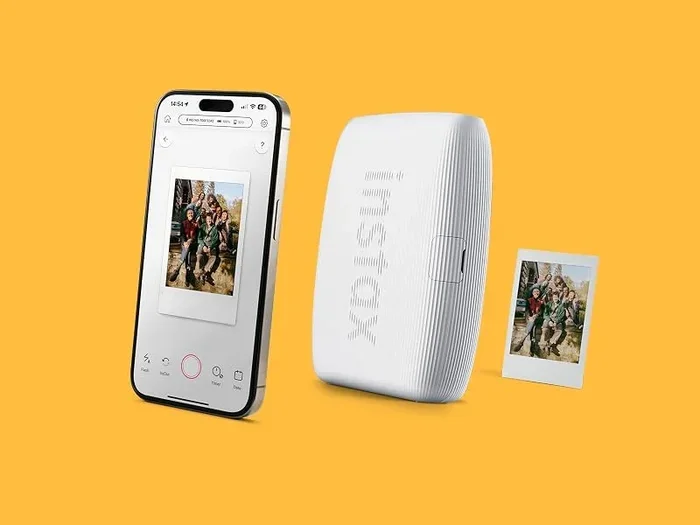
Can Instax Print From Phone Instantly With These Tips
Yes, you can Instax print from phone directly using Instax Link cameras and the Instax app. This guide covers Bluetooth printing, step-by-step setup, and pro tips for getting perfect instant photos from your smartphone. Learn how to turn your phone gallery into real, tangible prints in minutes.
Have you ever wondered if can Instax print from phone without any hassle? The short answer is yes. Instax cameras have evolved into powerful wireless printing devices that connect straight to your smartphone. You can pull up a photo from your gallery, hit print, and hold a physical copy in your hands within seconds.
Whether you are planning a party, a trip, or just want to print your favorite social media posts, Instax phone printing makes it incredibly easy. In this guide, we will walk you through everything you need to know. From setup to print settings, we have got you covered with practical tips and real-world advice.
The process is simpler than most people think. You do not need any cables or complicated equipment. Just a compatible Instax camera, your phone, and the Instax app. Let us dive in and explore how wireless printing with Instax works and how you can get started today.
Key Takeaways
- Instax cameras can print directly from your phone using Bluetooth and the Instax app for seamless wireless photo printing.
- The Instax Mini Link and Instax Link models are the best options for phone-to-print printing with high-quality results.
- Bluetooth connectivity makes the process simple and fast, letting you print photos in under a minute from your smartphone.
- Print settings and photo editing tools in the app help you customize your instant prints before sending them to the printer.
- Common mistakes like low battery and wrong film can ruin your printing experience, so avoid these pitfalls.
- Instax film types and print quality vary, so choosing the right film matters for your final output.
- Mobile printing with Instax is affordable and fun, making it a great accessory for social events and everyday memories.
📑 Table of Contents
- Understanding Instax Printing Technology
- Can Instax Print From Phone? Here Is the Full Answer
- Step-by-Step Guide to Printing from Your Phone
- Tips for Better Instax Prints from Your Phone
- Comparing Instax Phone Printing Options
- Maximizing Your Instax Phone Printing Experience
- The Joy of Instant Photos from Your Phone
- Conclusion
Understanding Instax Printing Technology
Before we get into the how-to, let us understand the technology behind Instax mobile printing. Instax cameras use a special printing mechanism that transfers images onto instant film. When you pair your phone with an Instax camera, you are essentially using the camera as a portable printer.
How Instax Cameras Work as Printers
Instax cameras like the Instax Mini Link and Instax Link models are designed with Bluetooth connectivity built in. When you turn on Bluetooth on your phone, the camera appears as a available device. You pair them, and that is it. Your phone and camera are now connected.
Once paired, you can select any photo from your phone gallery and send it to the camera. The camera then processes the image and prints it onto Instax film. The entire process takes less than a minute. You do not need Wi-Fi or an internet connection. The Bluetooth printing happens directly between your phone and the camera.
The Role of the Instax App
The Instax app is the bridge between your phone and your camera. It is available for both Android and iOS devices. Once you download the app, it guides you through the pairing process step by step. The app also gives you access to print settings and editing tools.
Inside the app, you can adjust brightness, contrast, and filters. You can also add frames and text to your photos before printing. This makes the app a powerful tool for photo transfer and editing right on your phone. The app also lets you check battery life and film levels on your camera.
Can Instax Print From Phone? Here Is the Full Answer
So, can Instax print from phone? Absolutely. But the answer depends on which Instax model you own. Not all Instax cameras support phone printing. The models designed for mobile printing are the Instax Mini Link and Instax Link series. These cameras were built from the ground up with smartphone connectivity in mind.
Older Instax models like the Instax Mini 11 or Instax Wide 300 do not support direct phone printing. They are designed to take photos using the built-in viewfinder and print them manually. If you want to print from your phone, you need one of the newer Instax Link models that support Bluetooth printing.
Instax Mini Link vs Instax Link
The Instax Mini Link prints small square photos, typically 2 by 2 inches. It is compact and perfect for on-the-go printing. The Instax Link model offers a wider format, giving you larger prints. Both connect to your phone via Bluetooth and use the same Instax app.
Here is a quick comparison to help you choose:
- Instax Mini Link: Prints square photos, very portable, great for social media content.
- Instax Link Wide: Prints wider format photos, better for group shots and landscapes.
- Both models: Use Bluetooth, work with the Instax app, and support instant photo printing from your phone.
Bluetooth vs Wi-Fi Printing
Bluetooth connectivity is the primary method for Instax phone printing. Unlike some printers that require Wi-Fi, Instax cameras use a direct Bluetooth connection. This means you do not need a router or internet access. You can print photos anywhere, even in places without Wi-Fi.
The Bluetooth range is typically around 10 meters or 30 feet. As long as your phone is within range of the camera, the connection stays stable. Some users wonder about Wi-Fi printing options, but Instax cameras do not use Wi-Fi for photo printing. The direct Bluetooth approach keeps things simple and reliable.
Step-by-Step Guide to Printing from Your Phone
Now that you know can Instax print from phone, let us walk through the exact steps. This process is the same for both the Instax Mini Link and Instax Link models.
Step 1: Download the Instax App
Go to the App Store or Google Play Store and search for the Instax app. Download and install it on your phone. The app is free and works with both Android and iOS. Make sure your phone has Bluetooth turned on before you proceed.
Step 2: Turn on Your Instax Camera
Press the power button on your Instax camera. The camera will enter pairing mode automatically. You will see a Bluetooth icon flash on the screen, which means it is ready to connect.
Step 3: Pair Your Phone with the Camera
Open the Instax app on your phone. Tap the connect button. The app will search for available Instax cameras nearby. Select your camera from the list. Once paired, the app will confirm the connection. You are now ready to print.
Step 4: Select and Edit Your Photo
Open your phone gallery inside the app. Browse through your photos and tap the one you want to print. Use the editing tools to adjust the image. You can crop, apply filters, add frames, or insert text. These features help you customize your instant camera prints before sending them to the printer.
Step 5: Insert Instax Film and Print
Make sure your Instax camera has film loaded. Open the film door, insert a new pack of Instax film, and close the door. Tap the print button in the app. The camera will start printing your photo. Within 60 seconds or less, you will have a physical print in your hands.
Step 6: Enjoy Your Print
Wait for the print to finish. Instax film needs a few minutes to develop fully. The image will appear gradually as the film reacts to light. Once developed, you have a tangible photo you can hold, gift, or display.
Tips for Better Instax Prints from Your Phone
Getting great prints from your phone is easy when you follow a few simple guidelines. These tips will help you improve your print quality and avoid common issues.
Quick Tips for Great Prints
- Use high-resolution photos: Photos with more pixels produce sharper prints. Avoid sending very small or compressed images.
- Check your battery: Low battery can cause printing errors. Charge your Instax camera fully before a printing session.
- Keep the camera steady: Place the camera on a flat surface while printing to avoid blurry results.
- Use fresh film: Old or expired film can produce faded or uneven prints. Always check the expiration date.
- Adjust print settings: Use the app to tweak brightness and contrast for the best results on Instax film.
Common Mistakes to Avoid
Many people run into problems when they do not follow the right steps. Here are the most common mistakes to watch out for.
- Forgetting to pair the camera: Always make sure your phone and camera are connected through the app before you try to print.
- Using the wrong film type: Each Instax model uses a specific film type. Check your camera manual to make sure you have the right one.
- Ignoring battery warnings: If the app shows low battery, charge the camera first. Printing with low power can damage the print.
- Printing in bright sunlight: While Instax film develops in light, extreme glare can affect the final image quality.
- Skipping photo editing: Taking a few extra seconds to adjust your photo in the app can make a big difference in the final print.
Expert Insights on Instax Phone Printing
Instax phone printing has come a long way in recent years. The Bluetooth connectivity in newer models is fast and stable. Users report that the print quality is impressive for a portable printer. The colors are vibrant and the film develops beautifully within minutes.
Experts recommend using the Instax app for the best experience. The app gives you more control over your prints than any other method. It also allows you to create collages and print multiple photos on a single sheet. This is a great feature for party favors and event giveaways.
One thing to keep in mind is that mobile printing with Instax is best for small to medium batches. If you need to print hundreds of photos, a traditional printer might be more efficient. But for casual printing and fun memories, Instax is hard to beat.
Comparing Instax Phone Printing Options
When it comes to can Instax print from phone, you have a few options to consider. Here is a comparison of the main features across different Instax models that support phone printing.
- Instax Mini Link: Compact size, square prints, Bluetooth connection, app-based editing, prints in under 60 seconds.
- Instax Link Wide: Wider format, larger prints, same Bluetooth and app features, great for group photos.
- Instax Mini Link 2: Updated version with improved print quality, new color options, and faster pairing.
All of these models use the same Instax app for photo transfer and printing. The main difference is the print size and format. Choose the model that best fits your needs and budget.
Maximizing Your Instax Phone Printing Experience
To get the most out of your Instax wireless printing, consider a few extra tips. These small adjustments can make a big difference in your overall experience.
First, organize your phone photos before printing. Create a dedicated album for Instax-worthy images. This saves time when you are browsing for photos in the app. Second, keep extra film on hand. Nothing kills the fun faster than running out of film mid-party.
Third, experiment with the app features. Try different filters and frames to find your style. The Instax app offers a lot of creative tools that can make your prints stand out. Fourth, print photos at events and share them with guests. This is one of the best uses of Instax phone printing and always a hit at parties.
Finally, take care of your camera. Keep it clean, store it properly, and charge the battery regularly. A well-maintained Instax camera will give you years of reliable mobile printing performance.
The Joy of Instant Photos from Your Phone
There is something magical about holding a physical photo moments after taking it. Instax phone printing brings that magic to your fingertips. You no longer need a computer or a cable. Just your phone, an Instax camera, and a pack of film.
Instant camera printing has become a popular trend for good reason. People love the tactile experience of holding a print they just created. It is a wonderful way to preserve memories in a digital world. Whether you are printing selfies, landscapes, or candid moments, the result is always exciting.
The Instax Mini Link and Instax Link models have made phone-to-print printing more accessible than ever. The process is fast, the quality is great, and the experience is fun for all ages. Once you start printing from your phone, you will wonder how you ever lived without it.
Conclusion
Can Instax print from phone? Yes, it absolutely can. With the right Instax model and the Instax app, you can print photos directly from your smartphone using Bluetooth. The process is simple, fast, and incredibly fun. Whether you are at a party, on a trip, or just hanging out at home, Instax phone printing lets you turn digital memories into physical keepsakes in under a minute.
Follow the steps in this guide, avoid common mistakes, and experiment with the editing tools in the app. You will be printing beautiful instant photos in no time. So grab your Instax camera, charge the battery, load some film, and start printing from your phone today.
Can Instax Print From Phone FAQs
Do I need Wi-Fi to print from my phone with Instax?
No, you do not need Wi-Fi. Instax cameras use Bluetooth to connect directly to your phone. This means you can print photos anywhere without an internet connection. The direct Bluetooth connection makes the process simple and reliable.
Which Instax models can print from a phone?
The Instax Mini Link and Instax Link series support phone printing. These models have Bluetooth built in and work with the Instax app. Older models like the Instax Mini 11 do not support direct phone printing. Always check the model specifications before purchasing.
How long does it take to print a photo from my phone?
Most Instax cameras print a photo in under 60 seconds. The actual printing time varies depending on the model and print settings. After printing, the Instax film needs a few minutes to fully develop. The image appears gradually as the film reacts to light.
Can I edit my photos before printing them with Instax?
Yes, the Instax app includes editing tools that let you adjust brightness, contrast, and filters. You can also add frames, text, and crop your photos before sending them to the camera. These features help you customize your prints and get the best results.
Is Instax phone printing expensive?
The Instax camera is a one-time purchase, and film packs are reasonably priced. The app is free to download. Compared to traditional photo printing services, mobile printing with Instax is quite affordable. It is a fun and cost-effective way to create physical photos from your phone.
Can I print multiple photos at once from my phone?
Yes, the Instax app allows you to create collages and print multiple photos on a single sheet. This feature is great for parties and events. You can select several photos from your phone gallery and arrange them into a layout before sending the print job to your camera.