Can You Have A Gfci Outlet With Usb Charging Built In
Yes, you can absolutely have a GFCI outlet with USB charging built in. These combo units combine ground fault circuit interrupter protection with convenient USB charging ports, making them ideal for kitchens, bathrooms, and outdoor spaces. This guide covers everything you need to know about GFCI outlets with USB ports, from installation and NEC code compliance to the best products on the market.
Have you ever been in the kitchen, trying to charge your phone while making dinner, and realized there is no outlet nearby? Or maybe you have a GFCI outlet in your bathroom, but it does not have a USB port for your electric toothbrush or razor charger. The good news is that you do not have to choose between safety and convenience anymore. GFCI outlets with USB charging built in are a real thing, and they are changing the way we power our devices at home.
A ground fault circuit interrupter outlet protects you from electrical shocks, and adding a USB charging port means you can plug in your devices directly without using a clunky adapter. These combo units are becoming more popular in modern homes, and for good reason. In this article, we will walk you through everything you need to know about GFCI outlets with USB. We will cover how they work, where to install them, what to look for when buying one, and whether they are worth the investment.
Whether you are a homeowner planning a renovation or just someone who wants a safer, more convenient charging setup, this guide has you covered. Let us dive in.
Key Takeaways
- Built-In USB + GFCI Protection: You can get both safety and convenience in one outlet, eliminating the need for bulky adapters.
- NEC Code Compliant: GFCI outlets with USB ports meet modern electrical codes for kitchens, bathrooms, garages, and outdoor areas.
- Easy Installation: Most USB GFCI outlets are straightforward to install, but hiring a licensed electrician is always recommended.
- USB-C and USB-A Options: Modern units support both USB-C fast charging and traditional USB-A ports for all your devices.
- Cost-Effective Safety Upgrade: These outlets are affordable and add significant value and safety to any home.
- Tamper-Resistant Features: Most models include tamper-resistant shutters for extra protection, especially in homes with children.
- Smart Options Available: Some smart GFCI outlets with USB connect to apps for remote control and energy monitoring.
📑 Table of Contents
- What Is a GFCI Outlet with USB Charging?
- Benefits of Having a GFCI Outlet with USB Built In
- Where Should You Install GFCI Outlets with USB?
- How to Choose the Right GFCI Outlet with USB
- Installation Tips for GFCI Outlets with USB
- Top GFCI Outlets with USB on the Market
- Are GFCI Outlets with USB Worth It?
- Common Mistakes People Make with GFCI USB Outlets
- Expert Tips for Getting the Most Out of Your GFCI USB Outlet
- Quick Tips for Choosing and Using GFCI USB Outlets
- Conclusion
What Is a GFCI Outlet with USB Charging?
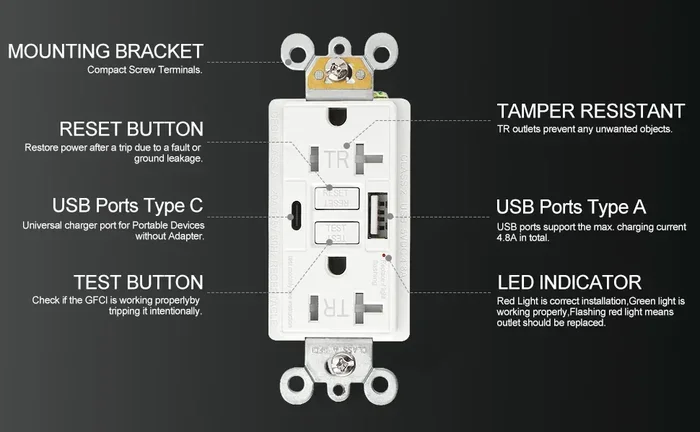
A GFCI outlet with USB is a single electrical outlet that includes both ground fault circuit interrupter protection and one or more built-in USB ports. The GFCI part monitors the electrical current flowing through the circuit. If it detects a difference between the incoming and outgoing current, it trips the circuit in milliseconds. This prevents electrical shocks, which is especially important in areas near water.
The USB part lets you charge your phone, tablet, smartwatch, or any other USB-powered device directly from the wall. No need for a separate USB adapter or power brick. You just plug in a USB cable and go.
How Does the GFCI Protection Work?
The ground fault circuit interrupter works by constantly monitoring the balance of electrical current. If electricity starts to “leak” — say, through your body if you touch a faulty appliance — the GFCI detects the imbalance and cuts power almost instantly. This happens in as little as 1/40th of a second. That speed is what makes GFCI outlets so effective at preventing electrocution.
Traditional GFCI outlets have the test and reset buttons on the face. When you press the test button, the outlet trips. Pressing the reset button restores power. The USB GFCI combo outlets work the same way, but they also have USB-A and USB-C ports built right into the outlet body.
What Devices Can You Charge via USB on These Outlets?
Most GFCI outlets with USB come with at least one USB-A port and sometimes a USB-C port as well. Here are some common devices you can charge directly:
- Smartphones (iPhone, Android)
- Tablets (iPad, Samsung Galaxy Tab)
- Smartwatches and fitness trackers
- Wireless earbuds and their cases
- Portable speakers
- Electric toothbrushes
- Bluetooth keyboards and mice
The charging speed depends on the amperage of the USB port. Many modern USB GFCI outlets support 2.4 amps or more, which is enough for fast charging most phones and tablets.
Benefits of Having a GFCI Outlet with USB Built In
Switching to a GFCI outlet with USB charging offers several real advantages for your home. Here is why more homeowners are making the switch.
1. Enhanced Electrical Safety
The number one benefit is electrical safety. GFCI outlets are required by the National Electrical Code (NEC) in areas where water and electricity are close. This includes kitchens, bathrooms, garages, outdoor receptacles, and basements. By combining GFCI protection with USB charging, you get the best of both worlds in a single outlet.
You no longer need to use a USB adapter plugged into a regular outlet near a sink or bathtub. The USB GFCI combo keeps your charging setup safe and code-compliant.
2. Cleaner, Clutter-Free Countertops
Think about how many USB adapters and power bricks clutter your countertops. With a built-in USB outlet, you eliminate all that extra hardware. Just plug in a USB cable, and your device charges directly from the wall. Your counters look cleaner, and you have more space for cooking or other tasks.
3. Faster and More Convenient Charging
Many USB GFCI outlets now support USB-C fast charging and higher amperage. This means you can charge your devices faster than you would with a standard USB adapter plugged into a regular outlet. Plus, you do not have to fumble around looking for an available power outlet — the charging is right there, built in.
4. Code Compliance Made Easy
If you are renovating a kitchen or bathroom, you need GFCI-protected outlets to meet NEC code requirements. Choosing a GFCI outlet with USB ensures you are compliant while also adding modern convenience. You do not have to install a separate USB charger and worry about whether it is up to code.
5. Future-Proofing Your Home
More devices are moving toward USB-C charging. Having a GFCI outlet with USB-C built in means your home is ready for the future. You will not need to replace outlets every few years as charging standards change.
Where Should You Install GFCI Outlets with USB?
Not every outlet in your home needs to be a GFCI outlet with USB. The NEC requires GFCI protection in specific areas. Here is where installing a USB GFCI combo makes the most sense.
Kitchens
The kitchen is the number one place where you need GFCI protection. Countertop outlets near sinks, dishwashers, and refrigerators should all be GFCI-protected. Adding USB ports to these outlets lets you charge your phone or tablet while cooking or keeping an eye on food in the oven.
Bathrooms
Bathrooms are another area where GFCI outlets are required. With a GFCI outlet with USB, you can charge your electric toothbrush, hair dryer, or phone without worrying about water exposure. The GFCI protection adds a critical layer of safety in this wet environment.
Garages and Outdoors
GFCI protection is required for all outdoor outlets and garage receptacles. While you might not charge your phone in the garage as often, having a USB port on a GFCI outlet is handy for charging power tools, wireless drills, or even electric lawn equipment.
Basements and Laundry Rooms
Basements and laundry rooms are also damp or potentially wet areas. A GFCI outlet with USB in these spaces provides both electrical safety and a convenient charging spot for your devices while you do chores.
How to Choose the Right GFCI Outlet with USB
Not all GFCI outlets with USB are created equal. Here are the key factors to consider before you buy.
USB Port Type and Quantity
Look for outlets that offer both USB-A and USB-C ports. USB-C is the future of charging, and having it built in ensures compatibility with newer devices. Some models offer two or even three USB ports, which is great if you have multiple devices to charge at once.
Amperage and Charging Speed
Check the amperage rating of the USB ports. A 2.4-amp port charges most phones and tablets quickly. Some premium USB GFCI outlets offer Quick Charge or Power Delivery technology for even faster speeds. If you have USB-C fast charging devices, look for outlets that support at least 18W or higher.
GFCI Certification and Quality
Make sure the GFCI outlet you buy is UL-listed or ETL-certified. This means it has been tested and meets safety standards. Cheap, uncertified electrical outlets can be a fire hazard. Always buy from reputable brands and trusted retailers.
Tamper-Resistant Features
Many GFCI outlets with USB include tamper-resistant shutters. These shutters prevent children from inserting objects into the power outlet slots. This is an important safety feature, especially in homes with young kids.
Smart Features
Some newer models offer smart GFCI outlets with USB that connect to your home Wi-Fi. You can control them through a smartphone app, set schedules, and monitor energy usage. These are great if you want a smart home charging station in your kitchen or living room.
Installation Tips for GFCI Outlets with USB
Installing a GFCI outlet with USB is similar to installing a standard GFCI outlet. Here are some tips to keep in mind.
Step-by-Step Installation Overview
While we recommend hiring a licensed electrician, here is a general overview of the process:
- Turn off the power at the circuit breaker before you start any work.
- Remove the old outlet from the electrical box.
- Connect the wires to the new GFCI USB outlet following the manufacturer’s instructions. Typically, you connect the line wires to the LINE terminals and the load wires to the LOAD terminals.
- Secure the outlet in the electrical box and attach the faceplate.
- Turn the power back on and test the GFCI function by pressing the test button. The outlet should trip.
- Press the reset button to restore power, and test the USB ports with a device to confirm they work.
When to Call a Professional
Electrical work can be dangerous if you do not know what you are doing. If you are not comfortable working with electrical wiring, always hire a licensed electrician. A professional can ensure the GFCI outlet with USB is installed correctly and meets all local electrical codes. A mistake with wiring can lead to electrical fires or shock hazards.
Common Mistakes to Avoid
- Skipping the GFCI test: Always test the outlet after installation by pressing the test button.
- Replacing only one outlet in a circuit: If you have a value-added network or complex wiring setup, consult an expert on the best approach for your home’s specific electrical layout. You can learn more about electrical communication systems and wiring setups to understand how different configurations affect your home’s safety.
- Using the wrong wire gauge: Make sure the wiring matches the amperage rating of the GFCI outlet.
- Ignoring local codes: Always check with your local building authority for specific requirements in your area.
If you want to understand more about how proprietary systems and safety standards work together in electrical design, you can read about proprietary operating systems and their advantages and disadvantages for a broader perspective on closed vs. open systems in technology.
Top GFCI Outlets with USB on the Market
There are many great GFCI outlets with USB available. Here are some popular options to consider.
- Leviton Decora GFCI with USB: A reliable, affordable option with a USB-A port and tamper-resistant features. Works well in kitchens and bathrooms.
- Hubbell GFCI USB Outlet: Known for durability and high-quality USB-C and USB-A ports. A great choice for fast charging.
- Eaton GFCI with USB Charging: Offers smart features and energy monitoring in some models. Ideal for tech-savvy homeowners.
- Legrand Radiant GFCI USB Outlet: Sleek design with dual USB ports and solid GFCI protection. A popular choice for modern remodels.
When shopping, compare the amperage, USB port types, and certifications to find the best fit for your needs and budget.
Are GFCI Outlets with USB Worth It?
The short answer is yes. GFCI outlets with USB charging built in are a smart investment for any home. They provide essential electrical safety, add modern convenience, and help keep your living spaces clutter-free. The cost is minimal compared to the peace of mind you get from having GFCI protection and fast USB charging in one outlet.
These outlets are especially valuable in areas like kitchens, bathrooms, and outdoor spaces where water and electricity are in close proximity. The built-in USB ports mean you do not need to buy separate USB adapters or worry about using third-party charging accessories near water.
If you are planning a home renovation or just upgrading your electrical outlets, GFCI outlets with USB should be at the top of your list. They are a simple upgrade that makes a big difference in both safety and daily convenience.
Common Mistakes People Make with GFCI USB Outlets
Even though GFCI outlets with USB are easy to use, some common mistakes can reduce their effectiveness or lifespan.
- Not testing the GFCI monthly: The NEC recommends testing your GFCI outlets once a month. Press the test button to make sure the outlet trips properly.
- Overloading the USB ports: Do not plug in devices that draw more power than the USB port is rated for. Check the amperage rating and match it to your devices.
- Ignoring the reset button: If the outlet trips and you cannot reset it, there may be a wiring issue or a faulty device connected. Do not keep resetting it repeatedly — call an electrician.
- Using non-compatible USB cables: Cheap or damaged USB cables can cause slow charging or even damage your devices. Use quality cables that are rated for the amperage you need.
- Skipping the tamper-resistant feature: If you have young children, always choose a tamper-resistant GFCI outlet. This is a simple but important safety measure.
For more information on how electrical systems and safety devices work, check out our guide on advantages and disadvantages of proprietary operating systems to understand the broader context of how closed and open systems impact safety and reliability in technology.
Expert Tips for Getting the Most Out of Your GFCI USB Outlet
Here are some expert tips to help you get the best performance from your GFCI outlet with USB.
- Label your outlets: After installation, label the GFCI outlet so everyone in your household knows it has GFCI protection. This is especially helpful for renters or guests.
- Use the right USB cable: For fast charging, use a cable that supports the amperage of the USB port. A good quality USB-C cable can make a big difference in charging speed.
- Keep the outlet dry: Even though GFCI outlets are designed for wet areas, keeping the outlet and its USB ports dry extends their lifespan.
- Replace outlets every 15-20 years: GFCI outlets have a limited lifespan. If your outlet is old, replace it even if it still works. The GFCI circuitry can degrade over time.
- Consider whole-home GFCI protection: Some electricians recommend installing GFCI circuit breakers at the panel for broader protection. This is a great option for older homes that do not have GFCI outlets in every required location.
These small steps go a long way in keeping your home safe and your devices charged efficiently.
Quick Tips for Choosing and Using GFCI USB Outlets
- Always check for UL or ETL certification before purchasing.
- Choose outlets with both USB-A and USB-C for maximum device compatibility.
- Look for at least 2.4 amps per port for fast charging speeds.
- Test your GFCI outlet monthly by pressing the test and reset buttons.
- Hire a licensed electrician if you are unsure about any part of the installation.
- Consider smart GFCI USB outlets if you want remote control and energy monitoring.
- Match the outlet to your room’s needs — kitchens and bathrooms need GFCI protection the most.
Conclusion
GFCI outlets with USB charging built in are a fantastic upgrade for any modern home. They combine essential electrical safety with the everyday convenience of USB device charging. Whether you are outfitting a new kitchen, renovating a bathroom, or upgrading your garage, a GFCI outlet with USB is a smart, practical choice.
These outlets are easy to install, affordable, and code-compliant. They eliminate the clutter of USB adapters and give you a clean, modern charging solution right from the wall. With options ranging from basic USB-A models to smart GFCI outlets with USB-C fast charging, there is a perfect choice for every home and budget.
If you have been wondering whether you can have a GFCI outlet with USB, the answer is a resounding yes. Make the switch today and enjoy safer, more convenient charging in every room of your home.
Frequently Asked Questions
Can I Replace a Regular Outlet with a GFCI Outlet That Has USB Ports?
Yes, you can replace a standard outlet with a GFCI outlet with USB as long as the wiring is compatible. Most homes with modern wiring can support this swap easily. However, if your home has older wiring, it is best to have a licensed electrician assess the situation before making any changes.
Do GFCI Outlets with USB Ports Meet NEC Code Requirements?
Yes, GFCI outlets with USB ports meet NEC code requirements for kitchens, bathrooms, garages, and outdoor areas. The GFCI protection is built into the outlet, and the USB ports are simply an added convenience. Always check with your local building inspector to confirm compliance in your specific area.
What Is the Difference Between a GFCI Outlet with USB and a Regular USB Outlet?
A regular USB outlet provides power through USB ports but does not include ground fault circuit interrupter protection. A GFCI outlet with USB adds life-saving electrical shock protection. This is especially important in areas near water, such as kitchens and bathrooms.
How Fast Can You Charge Devices via the USB Ports on GFCI Outlets?
Charging speed depends on the amperage of the USB port. Most GFCI USB outlets support 2.4 amps or higher, which is sufficient for fast charging most smartphones and tablets. Some premium models support USB-C Power Delivery for even faster speeds.
Can You Use a GFCI Outlet with USB in Outdoor Areas?
Yes, GFCI outlets with USB are designed for both indoor and outdoor use. They are perfect for garages, patios, and pool areas where you need GFCI protection and a convenient way to charge devices like phones, tablets, or electric tools.
Do GFCI Outlets with USB Ports Need Special Maintenance?
Not really. The main maintenance is testing the GFCI function once a month by pressing the test button. You should also keep the USB ports clean and free of dust. If the outlet trips frequently or will not reset, it is time to replace it or consult an electrician.