Can You Make A Non Bluetooth Device Bluetooth Enabled
Yes, you can make a non Bluetooth device Bluetooth enabled using affordable adapters, transmitters, and converters. Whether you want to wirelessly stream audio from your phone to an old stereo, add wireless connectivity to your car radio, or turn a vintage speaker into a Bluetooth enabled device, there is a simple solution for almost every situation. This guide walks you through the best methods, products, and tips to get your gear wirelessly connected in minutes.
Key Takeaways
- Bluetooth adapters and transmitters are the easiest and most affordable way to make non Bluetooth devices wireless.
- USB Bluetooth dongles work great for computers and TVs that support USB connections.
- Car radios can become Bluetooth enabled using FM transmitters, aux Bluetooth adapters, or direct replacement units.
- Old speakers and stereos can be upgraded with Bluetooth receiver modules for wireless streaming.
- Compatibility checks before buying any adapter save time, money, and frustration.
- Pairing process is usually simple and takes less than a minute once the right adapter is in place.
- Wireless audio quality has improved significantly, and modern Bluetooth 5.0+ adapters deliver excellent sound.
📑 Table of Contents
- What Does It Mean to Make a Non Bluetooth Device Bluetooth Enabled?
- Methods to Add Bluetooth to Non Bluetooth Devices
- Making Your Car Radio Bluetooth Capable
- Turning Old Speakers and Stereos Bluetooth Enabled
- Adding Bluetooth to TVs and Home Theater Systems
- Things to Consider Before You Start
- Expert Insights on Bluetooth Upgrades
- Key Takeaways
- Conclusion
What Does It Mean to Make a Non Bluetooth Device Bluetooth Enabled?
Making a non Bluetooth device Bluetooth enabled means adding wireless connectivity to gear that was originally designed to work with cables only. Think about your old stereo system, your car radio, or even a desktop computer that lacks built-in wireless features. These devices still work perfectly fine. They just need a small bridge to connect to your phone, tablet, or laptop without wires.
The bridge usually comes in the form of a Bluetooth adapter, a Bluetooth transmitter, or a Bluetooth receiver. Each one serves a slightly different purpose, but they all achieve the same goal: wireless freedom. You get to stream music, take calls, or share audio without dragging cables across the room.
The good news is that this process is simple and inexpensive. Most Bluetooth adapters cost between $10 and $50. You do not need to be a tech expert either. With a few basic steps, you can upgrade almost any device to support wireless audio and data transfer.
Before you dive in, it helps to understand the difference between a Bluetooth transmitter and a Bluetooth receiver. A transmitter sends audio out from a device. A receiver pulls audio into a device. Once you know which one you need, the rest is easy.
Methods to Add Bluetooth to Non Bluetooth Devices
There are several reliable ways to make a non Bluetooth device Bluetooth enabled. The right method depends on the type of device you own and what you want to achieve. Here are the most popular approaches that work across different gadgets and setups.
Bluetooth Adapters and Dongles
A Bluetooth adapter or dongle is the simplest solution for most devices. You plug it into a USB port or an audio jack, and your device becomes Bluetooth capable almost instantly. These tiny gadgets are plug-and-play, meaning you do not need to install complicated software.
USB Bluetooth dongles work great with laptops, desktop computers, and smart TVs. They create a wireless bridge between your device and your phone or speaker. Just plug in the dongle, pair your device, and you are streaming.
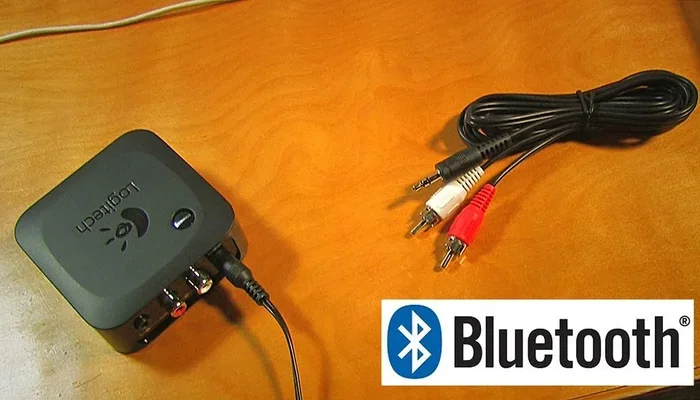
For devices with a 3.5mm audio jack, you can use a Bluetooth receiver that plugs directly into the jack. This is perfect for older stereos, speakers, and headphones that only have a wired connection. The receiver picks up the Bluetooth signal from your phone and converts it into audio through the headphone jack.
Bluetooth Transmitters for Wired Devices
A Bluetooth transmitter takes audio from a non Bluetooth device and sends it wirelessly to a Bluetooth speaker or headphones. This is ideal when your device can only output audio through a cable. You connect the transmitter to the audio output, and it broadcasts the signal to any nearby Bluetooth speaker.
Many people use Bluetooth transmitters with older car radios. You plug the transmitter into the aux port or cigarette lighter, and then pair your phone with it. Now you can play music from your phone through your car speakers without any wires.
Some transmitters also act as receivers, giving you two-in-one functionality. This is a smart buy if you are not sure which direction your audio needs to flow. Look for models labeled TX/RR, which means they work as both transmitter and receiver.
Firmware and Software Updates
In some cases, a device already has the hardware for Bluetooth but it is disabled or outdated. A simple firmware update can unlock Bluetooth capability. This is common with smart TVs, soundbars, and some car stereos that have hidden Bluetooth chips.
Check your device manufacturer website for the latest software. Download and install the update following their instructions. After the update, go into your device settings and look for Bluetooth options. If the option appears, your device is now Bluetooth enabled.
This method does not work for every device. Older gadgets that were never designed with Bluetooth hardware cannot be upgraded through software alone. For those, you will need a physical adapter or transmitter.
Making Your Car Radio Bluetooth Capable
One of the most common questions people ask is how to make a car radio Bluetooth enabled. Driving around with a phone cord tangled across the dashboard is frustrating. The good news is that there are several easy ways to add wireless connectivity to your car audio system.
You can use a Bluetooth FM transmitter that plugs into your car’s cigarette lighter. It broadcasts your phone’s audio over an open FM frequency to your car radio. Simply tune your radio to the same frequency, and you are listening wirelessly. This method works with almost any car, even very old models.
Another option is an aux Bluetooth adapter. You plug it into your car’s aux input and pair it with your phone. The audio streams directly through your car speakers with better quality than FM transmitters. Some adapters also charge your phone while you drive, which is a nice bonus.
If your car radio is really old and has no aux input, you can consider a more permanent solution. Replacing the factory radio with a Bluetooth enabled head unit gives you modern features like wireless streaming, hands-free calling, and even smartphone integration. This is a bigger project but delivers the best long-term results.
For those wondering specifically about making their car radio wireless, you can read more about making your car radio Bluetooth capable for detailed options.
Turning Old Speakers and Stereos Bluetooth Enabled
Do you have a great set of old speakers that sound amazing but only work with cables? You do not need to replace them. A small Bluetooth receiver can make any speaker or stereo wireless in seconds.
Bluetooth receivers are compact devices that connect to your speaker’s input port. They receive the wireless audio signal from your phone and convert it into sound through the speaker. Most receivers plug into a 3.5mm aux port or RCA inputs, which are found on nearly every stereo system.
The process is simple. Plug the receiver into your speaker. Power it on. Pair it with your phone or tablet. That is it. Now you can stream music from any app without any cables. Your old speakers suddenly feel brand new again.
If you own Bose speakers, there are specific options for upgrading them wirelessly. You can find detailed guidance on making old Bose speakers Bluetooth if you have this brand.
For stereo systems, the same principle applies. A Bluetooth stereo adapter connects to your stereo’s input and receives wireless audio from your devices. This is a popular upgrade for people who love the warm sound of vintage stereos but want the convenience of wireless streaming.
Some Bluetooth receivers also include a built-in amplifier, which can boost your speaker’s volume and sound quality. This is especially useful for portable speakers that have weak built-in amps. The receiver gives them the power they need to fill a room with sound.
Adding Bluetooth to TVs and Home Theater Systems
Many older TVs and home theater systems lack Bluetooth, which can be annoying when you want to use wireless headphones or stream audio to a speaker. Adding Bluetooth to these devices opens up a lot of new possibilities.
For TVs, a Bluetooth audio transmitter is the go-to solution. You plug it into the TV’s audio output, and it sends the audio wirelessly to your Bluetooth headphones or speaker. This is perfect for late-night watching when you do not want to disturb anyone else in the house.
Some smart TVs have a hidden Bluetooth feature that just needs to be enabled. Check your TV settings for any Bluetooth or wireless audio options. If your TV runs Android TV or a similar smart platform, you might be able to download a Bluetooth app from the app store.
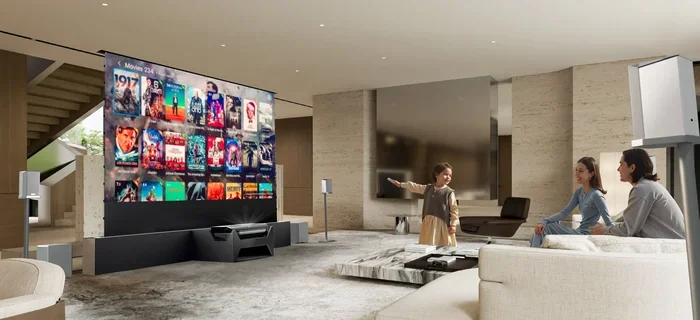
Home theater systems with multiple speakers can also benefit from Bluetooth upgrades. A central Bluetooth receiver connected to your receiver or amplifier distributes wireless audio to all your speakers at once. This setup keeps your living room looking clean while giving you full wireless control.
For TVs that need a connection solution, you can also explore options like using Bluetooth headphones with your TV to find the right setup for your viewing experience.
Things to Consider Before You Start
Before you buy any Bluetooth adapter or transmitter, there are a few things you should keep in mind. These tips help you choose the right product and avoid common mistakes.
Check compatibility first. Not every adapter works with every device. Make sure the Bluetooth adapter you buy matches your device’s input ports. If your speaker has RCA inputs, buy a receiver with RCA outputs. If your TV only has optical audio out, look for a transmitter that supports optical input.
Consider Bluetooth version. Newer Bluetooth versions offer better range, faster connection, and improved audio quality. Bluetooth 5.0 is the current sweet spot for most users. It provides strong range up to 30 feet and reliable connections. If you can afford it, go with a 5.0 or newer adapter.
Think about audio quality. Most Bluetooth adapters support standard audio codecs like SBC and AAC. Some premium models support aptX or LDAC, which deliver near-lossless audio quality. If you are an audiophile, look for adapters that support these codecs. For casual listening, standard Bluetooth quality is more than enough.
Power source matters. Some Bluetooth adapters need a USB power source, while others run on batteries. Battery-powered transmitters are great for cars because you can plug them into the cigarette lighter. USB-powered adapters work best for home devices that always have a power outlet nearby.
Range expectations. Bluetooth has a limited range, typically 10 to 30 feet. If you move too far from the connected device, the audio will cut out. This is fine for most home and car setups. If you need longer range, look for adapters with extended range capabilities or consider a Wi-Fi based streaming solution.
Latency can be an issue. Some Bluetooth adapters introduce a slight delay between the audio source and the speaker. This is noticeable when watching videos or playing games. Look for low-latency adapters if this matters to you. Many modern adapters have solved this problem with aptX Low Latency support.
Price vs. quality. You do not need to spend a lot of money to get good results. Most Bluetooth adapters in the $15 to $40 range deliver excellent performance for everyday use. Save the premium options for situations where audio quality is critical, like a dedicated home theater setup.
Quick Tips for Best Results
- Always update your adapter firmware after purchase for the latest features and bug fixes.
- Keep your adapter away from other wireless devices to avoid interference.
- Restart both devices if pairing fails the first time.
- Store your adapter in a safe place when not in use to prevent damage.
- Test the connection distance before committing to a permanent setup.
Common Mistakes to Avoid
- Buying the wrong type of adapter (transmitter vs receiver) for your setup.
- Ignoring compatibility with your device’s input ports.
- Choosing the cheapest option without checking Bluetooth version.
- Forgetting to charge battery-powered adapters before first use.
- Placing the adapter too far from the source device, causing connection drops.
Expert Insights on Bluetooth Upgrades
Adding Bluetooth to older devices is one of the best value upgrades you can make. Instead of replacing perfectly good gear, a small adapter breathes new life into it. This approach is not only cost effective but also environmentally friendly.
Technology experts recommend starting with a versatile adapter that works as both transmitter and receiver. This way, you get the most flexibility out of one purchase. You can use it with your car stereo on one day and your home speakers the next.
Another expert tip is to keep your Bluetooth adapters in a central location. Placing them in a visible spot reduces the chance of accidentally unplugging them. It also helps maintain a strong signal between your devices.
Finally, do not overlook the importance of a clean connection. Dust and debris in audio ports can cause pairing issues. A quick wipe of your ports before connecting a new adapter can save you a lot of troubleshooting time.
Key Takeaways
- Bluetooth adapters and transmitters make non Bluetooth devices wireless quickly and affordably.
- USB dongles are ideal for computers and TVs with available USB ports.
- Bluetooth receivers work best for speakers, stereos, and headphones that need an audio input.
- Bluetooth transmitters send audio from non Bluetooth devices to wireless speakers and headphones.
- Car radios can be upgraded with FM transmitters, aux adapters, or full head unit replacements.
- Old speakers and stereos gain wireless capability with a simple plug-in Bluetooth receiver module.
- Compatibility and Bluetooth version are the two most important factors when choosing an adapter.
Conclusion
Making a non Bluetooth device Bluetooth enabled is easier than most people think. With the right adapter, transmitter, or receiver, you can turn almost any wired device into a wireless one. Whether it is your car radio, your old stereo, or a television that needs a modern upgrade, the solution is affordable and straightforward.
The key is understanding what type of device you have and what kind of wireless connection you need. A Bluetooth receiver pulls wireless audio into your speaker. A Bluetooth transmitter sends audio out from your device to a wireless speaker. Once you know the difference, picking the right product becomes simple.
Bluetooth enabled devices give you the freedom to move, the convenience of wireless control, and the joy of streaming without cables. You do not need to replace your favorite old gear. Just add a small adapter, and your device joins the wireless revolution.
Start with one device that frustrates you the most. Maybe it is your car radio that only plays CDs. Maybe it is your stereo that needs a cable for every phone. Pick one, buy the right adapter, and experience the difference wireless audio makes. Once you make that first upgrade, you will wonder why you did not do it sooner.
The world of wireless connectivity is at your fingertips. A few dollars and a few minutes of setup time open up a whole new way to enjoy your devices. Make your non Bluetooth devices Bluetooth enabled today, and never look back.
Frequently Asked Questions
Can I make any non Bluetooth device Bluetooth enabled?
Most devices can be made Bluetooth enabled with the right adapter or transmitter. Devices with audio output jacks, USB ports, or RCA inputs are the easiest to upgrade. Very old devices without any modern ports may need a more creative solution or may not be compatible with available adapters.
How much does it cost to make a device Bluetooth enabled?
Bluetooth adapters range from $10 to $50 for most models. Premium adapters with advanced codecs like aptX cost $50 to $100. Car Bluetooth FM transmitters start around $15. Overall, upgrading to wireless is one of the most affordable tech improvements you can make.
Do I need technical skills to add Bluetooth to my device?
No technical skills are needed. Most Bluetooth adapters are plug-and-play. You plug the adapter into the correct port, download any required app, pair your device, and you are done. The process usually takes less than five minutes.
Will adding Bluetooth reduce my audio quality?
Modern Bluetooth adapters, especially those supporting Bluetooth 5.0 and codecs like aptX, deliver excellent audio quality. You may notice a very slight difference compared to a wired connection, but for everyday listening, the quality is more than satisfactory.
Can I use a Bluetooth adapter with my car radio?
Yes, you can make your car radio Bluetooth enabled using an FM transmitter, an aux Bluetooth adapter, or by replacing the factory radio with a Bluetooth head unit. Each option suits different car models and budgets.
How far can I be from the connected device with a Bluetooth adapter?
Most Bluetooth adapters have a range of 10 to 30 feet. Bluetooth 5.0 adapters can reach up to 40 feet in open spaces. Walls and other obstacles reduce the range, so keep your adapter within a reasonable distance from the source device for the best experience.