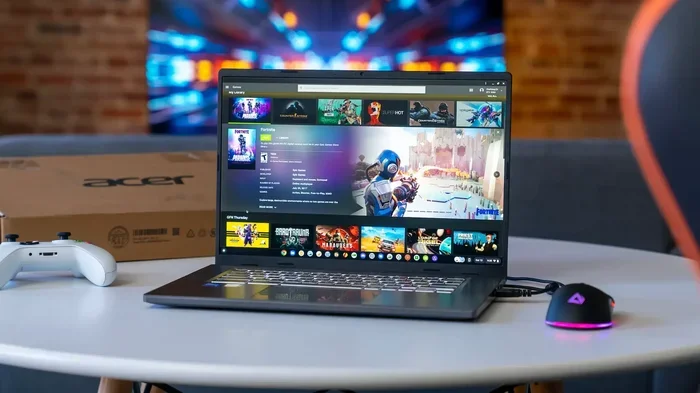
Can You Play Gta 5 On Chromebook And Run The Full Game
Can you play GTA 5 on a Chromebook and run the full game? Yes, but it requires some workarounds. You can use cloud gaming services like GeForce Now, or stream the game from another PC using Steam Link. Chromebooks are not built for heavy gaming, but with the right setup, you can enjoy Rockstar’s masterpiece on your lightweight laptop. This guide covers every method, requirement, and tip you need to know.
So, can you play GTA 5 on a Chromebook and run the full game? It is a question that a lot of gamers ask these days. Chromebooks are affordable, lightweight, and great for everyday tasks. But when it comes to demanding games like Grand Theft Auto V, things get tricky. The short answer is yes — but it is not as simple as clicking “install” and playing. You need the right method, a decent internet connection, and some patience. This guide walks you through everything you need to know.
GTA 5 is one of the most popular games ever made. Rockstar Games designed it for powerful PCs and consoles. A Chromebook is not built to handle games like that natively. Chrome OS runs on lightweight hardware, and it does not support Windows games directly. However, technology has come a long way. You can now stream games from the cloud or from another computer. These workarounds open the door to playing GTA 5 on a Chromebook without breaking the bank.
In this article, we will explore every way you can run GTA 5 on a Chromebook. We will look at cloud gaming platforms, remote streaming options, and what your Chromebook needs to handle the job. We will also cover common mistakes, tips for better performance, and answer the most frequently asked questions. Whether you have a budget Chromebook or a high-end model, this guide has you covered.
Key Takeaways
- Yes, you can play GTA 5 on a Chromebook: Using cloud gaming or remote streaming, the full game is accessible on Chrome OS.
- GeForce Now is the easiest method: No powerful hardware needed — just a stable internet connection.
- Steam Link lets you stream from your own PC: Great option if you already own GTA 5 on another computer.
- Your internet speed matters a lot: A fast, stable connection is essential for smooth gameplay.
- Not all Chromebooks are equal: Higher-end models with more RAM will perform better.
- Controls can be tricky: You may need a keyboard, mouse, or controller for the best experience.
- Performance depends on your setup: Cloud gaming shifts the heavy lifting to remote servers.
📑 Table of Contents
- Understanding Chromebook Gaming Limitations
- Can You Play GTA 5 On Chromebook Using GeForce Now
- Streaming GTA 5 From Your PC Using Steam Link
- Can You Play GTA 5 On Chromebook Using Android Apps
- Optimizing Your Chromebook for GTA 5 Gaming
- Expert Insights on Chromebook Gaming
- Frequently Asked Questions
- Conclusion
Understanding Chromebook Gaming Limitations
Why Chromebooks Struggle With Heavy Games
Chromebooks run on Chrome OS, which is a lightweight operating system. It is designed for web browsing, document editing, and simple tasks. The hardware inside most Chromebooks is not built for heavy gaming. You typically find low-power processors, limited RAM, and basic integrated graphics. GTA 5 needs a much more powerful setup to run smoothly.
The game requires a decent CPU, a dedicated or strong integrated GPU, and at least 8 GB of RAM. Most Chromebooks come with 4 GB of RAM or less. Their processors are energy-efficient but not performance-oriented. This means you cannot just download GTA 5 from the Chrome Web Store and expect it to work.
What Chrome OS Can and Cannot Do
Chrome OS supports Android apps and Linux applications. But GTA 5 is a Windows game. You cannot install the Windows version of GTA 5 directly on Chrome OS. There is no native GTA 5 app for Chromebooks. This is where alternative methods come into play. You need to find a way to access the game without running it locally on your device.
Cloud gaming and remote streaming solve this problem. They do the heavy lifting on a different machine. Your Chromebook just receives the video feed and sends your inputs back. This means the power of the game does not depend on your Chromebook’s hardware. It depends on the remote server or the PC you are streaming from.
Can You Play GTA 5 On Chromebook Using GeForce Now
What Is GeForce Now?
GeForce Now is a cloud gaming service by NVIDIA. It lets you play PC games on any device with a screen and an internet connection. The game runs on NVIDIA’s powerful servers. You stream the gameplay to your device in real time. This is currently one of the best ways to play GTA 5 on a Chromebook.
To use GeForce Now, you need a Chromebook with a web browser. That is it. You do not need a powerful machine. You do not need to install Windows. You just need a good internet connection. The service is free with a basic tier, and it works well for casual gaming.
How To Set Up GeForce Now on Your Chromebook
Setting up GeForce Now is straightforward. Follow these steps to get started:
- Open the Google Chrome browser on your Chromebook.
- Go to the GeForce Now website and sign up for a free account.
- Link your Steam account to GeForce Now. You need to own GTA 5 on Steam.
- Search for GTA 5 in the GeForce Now library.
- Click on the game and hit “Play.”
- Wait for the game to load on NVIDIA’s servers.
- Enjoy the full game on your Chromebook screen.
GeForce Now offers different subscription tiers. The free tier gives you 1-hour gaming sessions. The paid plans unlock longer sessions and better streaming quality. For GTA 5, the free tier works fine for most players. The game runs at 1080p with a stable connection.
Internet Speed Requirements for GeForce Now
Your internet connection is the most important factor here. GeForce Now needs a stable and fast connection to deliver smooth gameplay. Here are the recommended speeds:
- Minimum: 15 Mbps for 720p streaming.
- Recommended: 25 Mbps for 1080p streaming.
- Ideal: 50 Mbps or higher for the best experience.
If your Wi-Fi signal is weak, you may experience lag or stuttering. Use a wired Ethernet connection if possible. You can also connect your Chromebook to a 5 GHz Wi-Fi band for better speeds. Avoid gaming on public Wi-Fi networks. The latency is usually too high for a good experience.
Streaming GTA 5 From Your PC Using Steam Link
What Is Steam Link?
Steam Link is a feature from Valve that lets you stream games from your gaming PC to another device. If you already own GTA 5 on a powerful Windows PC, you can stream it to your Chromebook. Steam Link is available as a Chrome OS app. It works over your local network or even over the internet.
This method is great because you do not need a cloud gaming subscription. You use the power of your own PC. The game runs on your desktop computer, and your Chromebook becomes a wireless monitor. The experience is very smooth if both devices are on the same network.
How To Set Up Steam Link on Chromebook
Here is how you can stream GTA 5 from your PC to your Chromebook:
- Install Steam Link on your Chromebook from the Google Play Store.
- Make sure your PC and Chromebook are on the same Wi-Fi network.
- Open Steam Link on your Chromebook.
- It will automatically detect your PC running Steam.
- Pair the two devices using the PIN displayed on screen.
- Open Steam on your PC and launch GTA 5.
- The game will now stream to your Chromebook.
Steam Link supports controller input. You can use a Xbox or PlayStation controller with your Chromebook. This makes the experience much better than using a touchscreen or trackpad. A keyboard and mouse setup works well too, especially for GTA 5’s controls.
Steam Link vs. GeForce Now: Which Is Better?
| Feature | Steam Link | GeForce Now |
|---|---|---|
| Requires a gaming PC | Yes | No |
| Internet needed | Local network preferred | Anywhere with internet |
| Cost | Free | Free tier available |
| Game library | Your own Steam library | GeForce Now library |
| Setup complexity | Moderate | Very simple |
| Offline play | No | No |
| Best for | PC owners | Non-PC owners |
Both methods work well for playing GTA 5 on a Chromebook. If you already have a gaming PC, Steam Link is the way to go. If you do not own a powerful computer, GeForce Now is your best bet. Each method has its pros and cons, but both deliver the full GTA 5 experience.
Can You Play GTA 5 On Chromebook Using Android Apps
GTA 5 Mobile and Android Version
There is no official GTA 5 Android app for Chromebooks. Rockstar Games has not released GTA 5 for mobile devices. Some people try to sideload APK files, but this is not recommended. Modified APK files can contain malware and viruses. They can also cause stability issues on your Chromebook.
Some users have tried using GTA: San Andreas as an alternative. The older GTA game is available on Android. It is not GTA 5, but it offers a similar open-world experience. If you just want to explore a city and complete missions, San Andreas can be a fun substitute on a Chromebook.
Why Emulators Are Not a Good Idea
You might find guides online about using emulators to run GTA 5 on a Chromebook. Emulators mimic one system on another. But GTA 5 is not an older console game. It is a modern PC game that needs real hardware power. Emulators cannot provide that. Any guide suggesting you can emulate GTA 5 on a Chromebook is misleading or false.
Avoid downloading random emulator files from untrusted websites. These often contain malware. They can compromise your Chromebook’s security. Stick to proven methods like cloud gaming and Steam Link for the safest experience.
Optimizing Your Chromebook for GTA 5 Gaming
Best Chromebooks for Gaming GTA 5
Not all Chromebooks are created equal. Some models handle cloud gaming better than others. If you want the best experience, look for a Chromebook with these specs:
- Processor: Intel Core i5 or AMD Ryzen 5 or higher.
- RAM: 8 GB minimum, 16 GB ideal.
- Storage: 64 GB or more for game caching and updates.
- Display: 1080p IPS panel for sharp visuals.
- Wi-Fi: Wi-Fi 5 or Wi-Fi 6 for fast, stable connections.
Higher-end Chromebooks like the Acer Chromebook Spin 714 or the Lenovo IdeaPad Flex 5 Chromebook handle game streaming well. Budget Chromebooks with 4 GB RAM may struggle with smooth streaming. The game may stutter or lag on weaker hardware.
Quick Tips for Better Performance
Here are some practical tips to improve your GTA 5 experience on a Chromebook:
- Close all unnecessary tabs: Every open tab uses memory and processing power.
- Use a wired connection: Ethernet gives you the most stable speeds.
- Update Chrome OS: The latest updates include performance improvements.
- Lower the streaming quality: In GeForce Now, reduce the resolution if you experience lag.
- Use a Bluetooth controller: It makes gameplay much more comfortable.
- Keep your Chromebook plugged in: Gaming drains battery quickly.
- Restart your router: A fresh connection can reduce latency significantly.
Common Mistakes To Avoid
Many people run into problems when trying to play GTA 5 on a Chromebook. Here are the most common mistakes:
- Trying to install the Windows version directly: This will not work on Chrome OS.
- Using a weak Wi-Fi connection: Slow internet ruins the cloud gaming experience.
- Ignoring controller setup: Playing with a trackpad is frustrating for GTA 5.
- Downloading fake APK files: These can harm your device and waste your time.
- Expecting native performance: A Chromebook will never run GTA 5 like a gaming PC.
- Not checking your Steam library: You need to own GTA 5 on Steam for GeForce Now.
Expert Insights on Chromebook Gaming
What Gaming Experts Say
Cloud gaming experts agree that Chromebooks are surprisingly capable for game streaming. The key is your internet connection, not your Chromebook’s hardware. A mid-range Chromebook with a strong Wi-Fi connection can deliver a smooth GTA 5 experience. The game looks and plays almost the same as it does on a high-end PC.
Many tech reviewers now recommend cloud gaming for Chromebook users. Services like GeForce Now and Xbox Cloud Gaming have changed what lightweight laptops can do. You do not need a $1,500 gaming laptop anymore. A $300 Chromebook can run demanding games with the right setup.
The Future of Chromebook Gaming
Chromebook gaming is improving fast. Google continues to add gaming features to Chrome OS. Support for Linux games is growing. Cloud gaming services are expanding their libraries. In the near future, playing games like GTA 5 on a Chromebook will become even easier.
Rockstar Games has not announced a native Chrome OS version of GTA 5. But with cloud streaming, the gap between Chromebooks and gaming PCs is shrinking. More players are discovering that they do not need expensive hardware to enjoy great games.
Frequently Asked Questions
Can you play GTA 5 on a Chromebook without internet?
No, you cannot play GTA 5 on a Chromebook without internet. Both GeForce Now and Steam Link require an active internet connection. The game runs on remote servers or another PC, and you stream the video feed to your Chromebook. Without internet, there is no way to access or play the game.
Is GTA 5 free on GeForce Now?
No, GTA 5 is not free on GeForce Now. You need to own the game on Steam first. Once you have purchased GTA 5 on Steam, you can link your Steam account to GeForce Now and play it through the cloud service. GeForce Now itself has a free tier, but you still need to own the game.
Can you use a controller to play GTA 5 on a Chromebook?
Yes, you can use a controller to play GTA 5 on a Chromebook. Both Steam Link and GeForce Now support Xbox and PlayStation controllers. You can connect your controller via Bluetooth or USB. Make sure your controller is paired with your Chromebook before launching the game. This makes the experience much more comfortable than using a keyboard and trackpad.
What internet speed do you need to play GTA 5 on a Chromebook?
You need at least 15 Mbps for a basic 720p stream. For 1080p gameplay, 25 Mbps or higher is recommended. A 50 Mbps connection will give you the best experience with minimal lag. A wired Ethernet connection is always better than Wi-Fi for reducing latency. If possible, plug your Chromebook directly into your router with an Ethernet cable.
Can you play GTA 5 online on a Chromebook?
Yes, you can play GTA 5 online on a Chromebook. Both GeForce Now and Steam Link support GTA 5’s online multiplayer mode. You can join other players, complete heists, and explore Los Santos together. Make sure you have a stable connection and a Rockstar Games Social Club account linked to your Steam profile.
Is it legal to stream GTA 5 on a Chromebook?
Yes, it is completely legal. You are using official services like GeForce Now and Steam Link to access a game you own. Cloud gaming is a legitimate way to play PC games on different devices. As long as you have purchased GTA 5 on Steam and use authorized streaming platforms, you are not violating any terms of service.
Conclusion
So, can you play GTA 5 on a Chromebook and run the full game? The answer is a clear yes. You cannot install GTA 5 natively on Chrome OS. But you can stream it using GeForce Now or Steam Link. Both methods deliver the complete GTA 5 experience, including the online multiplayer mode.
Your Chromebook does not need to be a gaming machine. The heavy lifting happens on remote servers or your own gaming PC. All you need is a stable internet connection and a compatible Chromebook. With the right setup, you can explore Los Santos, complete missions, and enjoy everything GTA 5 has to offer.
Follow the tips in this guide to get the best performance. Avoid common mistakes like downloading fake APK files or relying on weak Wi-Fi. Choose the method that fits your setup. Whether you use GeForce Now or Steam Link, you will be driving through San Andreas in no time. Start your setup today and experience one of the greatest games ever made on your Chromebook.