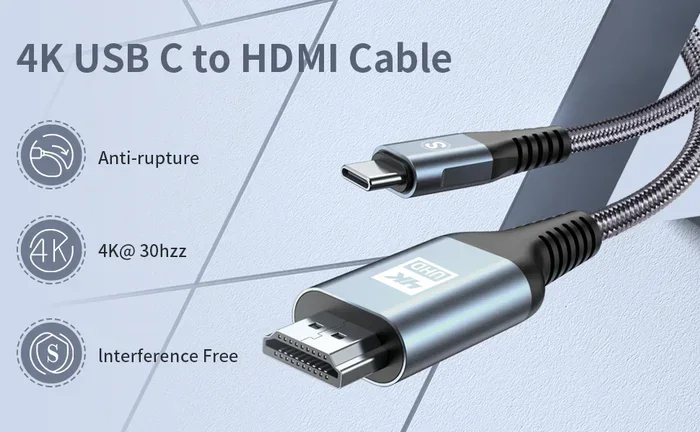
Can You Play Music Through Usb C To Aux The Easy Way
Yes, you can play music through USB C to aux with the right adapter or cable. This simple solution lets you connect modern USB C devices to older aux ports in cars, speakers, and headphones. Keep reading to discover the easiest ways to get high-quality wired audio from your phone or laptop today.
You just bought a sleek new phone with no headphone jack. You hop in the car and see that old aux port on the dashboard. You think, can you play music through USB C to aux? The answer is a simple yes. You just need the right adapter or cable to make it work.
In this guide, we walk you through everything you need to know. You will learn how USB C to aux connections work, which adapters to buy, and how to get the best audio quality. Whether you are in a car, at home, or on the go, this guide has you covered.
Key Takeaways
- USB C to aux works easily: A simple adapter or cable bridges modern devices with older aux ports.
- You get better audio quality: Wired connections often sound cleaner than Bluetooth.
- No apps or pairing needed: Just plug in and play.
- Not all adapters are equal: Some have built-in DAC chips for superior sound.
- Works in cars, homes, and studios: Great for cars without Bluetooth and older speakers.
- Watch for compatibility: Check your device and adapter type before buying.
📑 Table of Contents
- What Is USB C to Aux and How Does It Work?
- Can You Play Music Through USB C To Aux? The Simple Answer
- Best Ways to Connect USB C Devices to Aux Ports
- Does USB C to Aux Sound Good? Audio Quality Explained
- Common Uses for USB C to Aux Connections
- Quick Tips for Getting the Best USB C to Aux Experience
- Common Mistakes People Make with USB C to Aux
- Expert Insights: What Audio Pros Say About USB C to Aux
- Key Takeaways
- Conclusion
What Is USB C to Aux and How Does It Work?
A USB C to aux adapter or cable connects your modern device to older audio equipment. Your phone or laptop sends a digital audio signal through the USB C port. The adapter converts that signal into an analog signal that your aux cable can read.
Think of it like a translator. Your phone speaks digital. Your car stereo or speaker speaks analog. The adapter helps them understand each other. This is why some adapters have a small chip inside. That chip is called a DAC, or digital-to-analog converter.
Why Do You Need This Connection?
Many new phones and laptops dropped the 3.5mm headphone jack. Apple started this trend years ago. Now most Android phones follow the same path. But your car, your old headphones, and your portable speaker still use that standard aux port.
So what do you do? You use a USB C to 3.5mm adapter. It is a small, affordable gadget that fills the gap. No Bluetooth needed. No pairing headaches. Just a clean, wired connection every time.
Can You Play Music Through USB C To Aux? The Simple Answer
The short answer is yes. You absolutely can play music through USB C to aux. But the experience depends on a few things. The quality of your adapter matters. The type of device you use matters too.
Some USB C to aux cables are passive. They do not have a DAC chip inside. They rely on your phone to handle the digital-to-analog conversion. Other cables are active. They have their own DAC built in. Active cables tend to sound better.
Passive vs Active Adapters
Passive adapters are cheap and simple. They work fine for basic listening. But they may not give you the best sound. Active adapters cost a little more. They include a DAC chip that improves audio quality. For most people, an active adapter is the better choice.
Here is a quick look at the differences.
- Passive adapters: No built-in DAC. Relies on your device. Budget-friendly. Good for casual listening.
- Active adapters: Has its own DAC chip. Better sound quality. Works well with all devices. Slightly more expensive.
Best Ways to Connect USB C Devices to Aux Ports
There are a few different ways to make this connection work. Let us break them down so you can pick the best option for your needs.
Option 1: USB C to Aux Cable
This is the simplest solution. You buy a USB C to aux cable. One end plugs into your phone. The other end plugs into your car stereo or speaker. That is it. No extra boxes. No charging. Just audio.
These cables come in different lengths. You can find short ones for your car. You can also find longer ones for your desk at home. Look for cables with a braided jacket. They last longer and feel more durable.
Option 2: USB C to 3.5mm Adapter Dongle
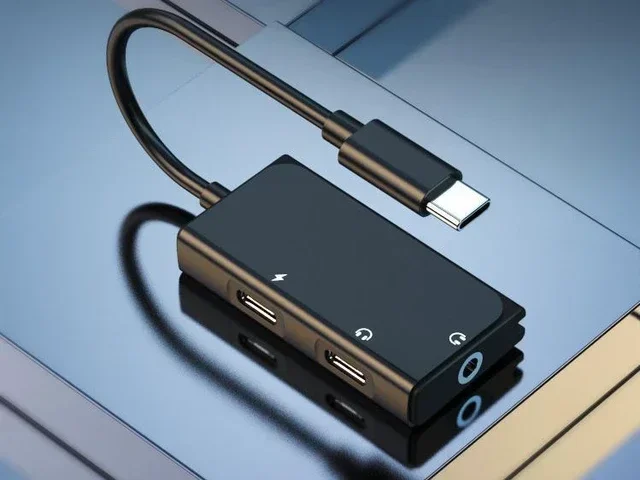
A dongle adapter is a small plug-in device. It has a USB C end on one side. It has a 3.5mm aux jack on the other. You plug the dongle into your phone. Then you plug your aux cable into the dongle.
Many phone makers include a free dongle in the box. Apple, Samsung, and Google all do this. If you lost yours, you can buy a replacement for just a few dollars. These work well for most everyday uses.
Option 3: USB C DAC Adapter
A DAC adapter is the premium choice. It has a dedicated digital-to-analog converter chip inside. This gives you the best possible audio quality from your device. Audiophiles and music lovers swear by these.
Popular brands like Fiio, Apple, and AudioQuest make great USB C DACs. They are a bit pricier. But if you care about sound quality, they are worth every penny.
Does USB C to Aux Sound Good? Audio Quality Explained
Many people wonder about audio quality when they switch to a wired USB C connection. The good news is that wired audio almost always sounds better than Bluetooth. Bluetooth compresses audio. Wired connections do not.
When you use a USB C to aux setup, you get a cleaner, more detailed sound. Bass hits harder. Vocals sound clearer. High notes do not get distorted.
Factors That Affect Sound Quality
Several things impact how your music sounds through a USB C to aux setup.
- The DAC chip: A better DAC means better sound. Active adapters have better DACs than passive ones.
- The cable quality: Cheap cables can introduce noise. A well-built cable reduces interference.
- Your source audio: High-quality music files sound better than compressed streams.
- The aux port itself: A clean, undamaged aux port makes a big difference.
If you want the best sound, invest in a good USB C DAC adapter. Pair it with a quality aux cable. You will notice the difference right away.
Common Uses for USB C to Aux Connections
This type of connection is more useful than you might think. People use USB C to aux setups in many different situations. Let us look at the most common ones.
Using It in Your Car
Many older cars do not have Bluetooth. They only have an aux input. A USB C to aux cable is a lifesaver in this situation. You plug one end into your phone. You plug the other into the car stereo. Your playlists, podcasts, and audiobooks play through the car speakers.
This also works great for navigation apps. You hear turn-by-turn directions through your car speakers. No need for a Bluetooth connection or a phone mount with built-in speakers.
Connecting to Home Speakers
Do you have a set of older powered speakers at home? They might only have an aux input. A USB C adapter lets you connect your phone or laptop directly. The sound quality beats Bluetooth every time.
This is great for casual listening, dinner parties, or even home workouts. Just set your device down and let the music fill the room.
Recording and Studio Use
Some musicians and content creators use USB C to aux for recording. It provides a clean, low-latency audio signal. This works well for voiceovers, simple music recording, and podcasting.
A USB C DAC adapter ensures the audio signal stays clean from source to recording device. This is a budget-friendly option for home studios.
Quick Tips for Getting the Best USB C to Aux Experience
Follow these simple tips to get the most out of your USB C to aux setup. They will save you time and frustration.
- Buy an active adapter with a DAC chip. It will sound noticeably better than a passive one.
- Check your phone settings. Some phones need you to select USB C audio output in the sound settings.
- Use a short, high-quality cable. Longer cables can lose signal strength.
- Keep your adapter plugged in securely. A loose connection causes crackling and dropouts.
- Avoid cheap no-name adapters. They often have poor DAC chips and noisy output.
- Test with different audio apps. Some apps bypass the system audio path and may need extra settings.
Common Mistakes People Make with USB C to Aux
Avoid these common pitfalls to keep your audio setup running smoothly.
Buying a Passive Adapter When You Need Active
Many people buy the cheapest adapter they find. If you want good sound, a passive adapter may not cut it. Look for one with a built-in DAC. It makes a real difference in clarity and volume.
Ignoring Phone Software Settings
Some phones do not automatically route audio through the USB C port. You may need to go into your sound settings and select the USB C output. Check your phone manual or settings if no sound comes out.
Using a Damaged or Worn Cable
A frayed or bent cable causes static and interruptions. Inspect your cable regularly. Replace it if you see any damage. A new cable costs very little and fixes many audio problems.
Assuming All USB C Ports Are the Same
Not all USB C ports support audio output. Some phones use USB C only for charging and data. Check your device specs to confirm it supports audio through USB C before buying an adapter.
Expert Insights: What Audio Pros Say About USB C to Aux
Audio engineers and tech reviewers agree on one thing. Wired connections through a USB C to aux setup deliver cleaner sound than wireless options. The signal stays digital until it hits the DAC. Then it converts to analog cleanly.
Experts also recommend buying from trusted brands. Companies like Fiio, Apple, and AudioQuest test their DAC adapters thoroughly. They ensure consistent audio output and long-lasting build quality.
One pro tip from audio specialists. If you listen to high-resolution music files, a dedicated USB C DAC is a must. It unlocks the full detail in your music library. You will hear nuances you never noticed before.
Key Takeaways
- USB C to aux works easily: A simple adapter or cable bridges modern devices with older aux ports.
- You get better audio quality: Wired connections often sound cleaner than Bluetooth.
- No apps or pairing needed: Just plug in and play.
- Not all adapters are equal: Some have built-in DAC chips for superior sound.
- Works in cars, homes, and studios: Great for cars without Bluetooth and older speakers.
- Watch for compatibility: Check your device and adapter type before buying.
Conclusion
So, can you play music through USB C to aux? Absolutely. It is one of the easiest and most reliable ways to get wired audio from a modern device. Whether you are in your car, at home, or in a studio, the right adapter makes it work every time.
The key is choosing the right type of adapter. Go with an active USB C to aux cable or DAC adapter for the best sound. Avoid cheap, no-name options that cause noise and dropouts. Take care of your cables and adapters, and they will serve you well for years.
Now you have everything you need to get started. Grab a USB C to aux adapter, plug in your favorite music, and enjoy the clean, reliable sound of a wired connection. You will wonder why you ever relied on Bluetooth alone.
FAQs
Can you play music through USB C to aux on any phone?
Most modern phones with a USB C port support audio output. However, some budget phones only use USB C for charging and data. Check your phone specifications to confirm it supports USB C audio before buying an adapter.
Do I need a special app to use USB C to aux?
No, you do not need any special app. The adapter works at the hardware level. Just plug it in and your phone should automatically route audio through the USB C port. If it does not, check your phone sound settings.
Is USB C to aux better than Bluetooth for audio?
Yes, in most cases. Wired connections do not compress audio. They deliver a cleaner, more detailed sound. Bluetooth uses lossy compression that reduces audio quality. A USB C to aux setup gives you better bass, clearer vocals, and less distortion.
Can I charge my phone while using USB C to aux?
This depends on the adapter you use. Passive adapters usually do not support charging and audio at the same time. Active USB C hubs with multiple ports often let you charge and listen at the same time. Look for a hub adapter if you need both features.
Why is there no sound when I plug in my USB C to aux adapter?
This usually happens for a few reasons. Your phone may not be set to output audio through USB C. The adapter may be faulty or incompatible. Try a different adapter or check your phone sound settings. Also, make sure the aux cable is plugged in firmly.
How much does a good USB C to aux adapter cost?
Passive adapters cost between five and fifteen dollars. Active adapters with DAC chips range from fifteen to fifty dollars. Premium USB C DAC adapters can cost fifty dollars or more. You get what you pay for in terms of sound quality and build durability.