Can You Turn Your Smartphone Into A Walkie Talkie For Free
Yes, you can turn your smartphone into a walkie talkie for free using dedicated apps that use Wi-Fi or cellular data. Apps like Zello, HeyTell, and Brisam let you communicate instantly without needing a real radio. This guide covers the best free options, setup steps, and tips to get the most out of your walkie talkie app experience.
Have you ever wished your phone could work like a walkie talkie? Maybe you’re planning a hiking trip, organizing a family event, or just want a fun way to stay in touch. The good news is that you can absolutely turn your smartphone into a walkie talkie for free. No special equipment needed. No monthly fees. Just a few taps and you’re talking.
In this guide, we’ll walk you through everything you need to know. From the best free apps to setup tips and real-world use cases, you’ll have a clear picture of how this works. Let’s dive right in.
Key Takeaways
- Free walkie talkie apps exist: You don’t need to buy expensive hardware to get two-way radio functionality on your phone.
- Zello is the top pick: It works like a real walkie talkie and is used by professionals worldwide.
- No internet needed for some apps: Certain apps use Bluetooth or local Wi-Fi to communicate offline.
- Setup takes minutes: Downloading an app and creating an account is all you need to start.
- Great for families and teams: These apps support group channels for easy group communication.
- Works on any smartphone: Both Android and iOS devices support free walkie talkie apps.
📑 Table of Contents
- What Is a Smartphone Walkie Talkie?
- Why Use Your Phone as a Walkie Talkie?
- Best Free Walkie Talkie Apps for Your Phone
- How to Set Up Your Phone as a Walkie Talkie
- Walkie Talkie Apps vs Traditional Radios
- Tips for Getting the Best Experience
- Common Mistakes to Avoid
- Can You Use Your Phone Without Internet?
- Is It Safe and Private?
- Real-World Uses for Smartphone Walkie Talkies
- Final Thoughts
What Is a Smartphone Walkie Talkie?
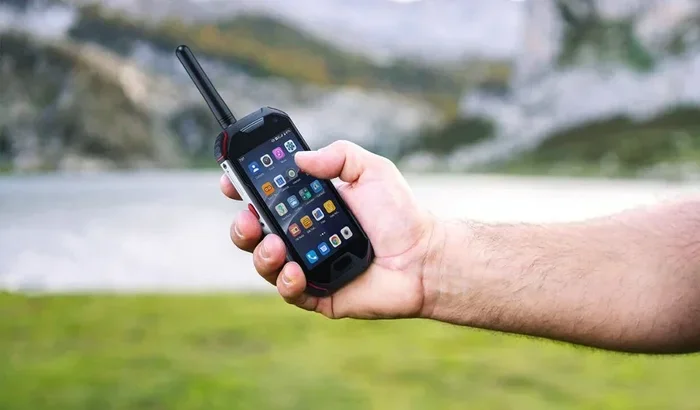
A smartphone walkie talkie is an app that turns your phone into a two-way radio. Instead of using traditional radio frequencies, these apps use your internet connection or Bluetooth to send voice messages. You press a button, talk, and the other person hears you instantly. It’s just like a real radio, but it lives inside your phone.
The concept of push to talk (PTT) has been around for decades. Businesses like construction crews and security teams have used it for years. Now, thanks to free apps, anyone can enjoy this simple and reliable form of wireless communication. You don’t need a handheld radio or a special license. Your phone does all the work.
Here’s why this matters. Traditional walkie talkies have limited range. They need batteries charged. And you can only talk to people on the same frequency. A smartphone walkie talkie removes all those limits. You can talk to someone across town or across the world, as long as you have a signal.
Why Use Your Phone as a Walkie Talkie?
You might be wondering, why bother? Isn’t a regular phone call good enough? There are actually some great reasons to use a walkie talkie app instead of making a call.
Instant Communication
With a push to talk app, you press a button and your voice goes out immediately. There’s no dialing, no ringing, and no waiting for the other person to pick up. It’s perfect for quick messages. Think about how fast it is to shout something to someone across a room. A walkie talkie app works the same way, but over any distance.
Group Communication Made Easy
Most free walkie talkie apps let you create group channels. This means you can talk to multiple people at once. Planning a big family reunion? Organizing a team event? A group channel keeps everyone on the same page without endless back-and-forth phone calls.
Works Without Internet in Some Cases
Some apps use Bluetooth or local Wi-Fi to connect devices directly. This means you can communicate even when you don’t have cell service. If you’re hiking in a remote area or at a crowded event where the network is overloaded, these apps can still work. Just like a real radio, they don’t need a cell tower.
It’s Completely Free
The best part? Most of these apps are free to download and free to use. You don’t need to buy any extra equipment. You don’t need a special plan. As long as you have a smartphone, you’re good to go. Some apps do offer premium features for a fee, but the core walkie talkie function is always free.
Best Free Walkie Talkie Apps for Your Phone
Not all walkie talkie apps are created equal. Some are better for certain situations than others. Here are the top free options you should try.
Zello
Zello is hands down the most popular free walkie talkie app. It works on both Android and iOS devices. The app turns your phone into a real two-way radio. You can join public channels or create private ones. Zello is so reliable that it’s used by emergency responders and volunteer groups around the world.
One of the best things about Zello is that it works over both Wi-Fi and cellular data. You don’t need a special setup. Just download the app, create an account, and start talking. The app also records your messages, so if someone misses a transmission, they can listen to it later.
Zello does have a premium version, but the free version has everything you need for personal use. It’s the go-to choice for anyone looking for a reliable walkie talkie for smartphones.
HeyTell
HeyTell is another excellent free option. It’s designed to feel just like a real walkie talkie. You hold down a button, record your message, and send it. The other person gets a push notification and can listen right away. HeyTell is simple, clean, and very easy to use.
HeyTell works over cellular data and Wi-Fi. It also has a feature that lets you send voice messages even when the app is closed. This is great if you want quick updates without keeping the app open. It’s one of the best choices for family communication tools.
Brisam Walkie Talkie
Brisam is a newer app that focuses on simplicity. It doesn’t require an account or any personal information. You just open the app, pick a channel, and start talking. It’s ideal for quick, no-fuss communication. Brisam uses radio frequency technology over Wi-Fi, which means it can work in areas with weak cell service.
The app supports group channels and has a clean, intuitive interface. If you want something that just works without any setup hassle, Brisam is worth trying.
Other Notable Options
Here are a few more apps worth checking out:
- TeamWalk: Great for team coordination and group communication.
- Vocable: Offers a simple interface with no account required.
- Two Way Radio: Mimics the feel of a traditional handheld radio on your screen.
How to Set Up Your Phone as a Walkie Talkie
Setting up your phone as a walkie talkie is incredibly simple. Here’s a step-by-step guide to get you started.
Step 1: Choose Your App
Go to the App Store (iPhone) or Google Play Store (Android). Search for one of the apps mentioned above. Zello is our top recommendation for first-time users. Download and install the app.
Step 2: Create an Account
Most apps require a simple account setup. You’ll usually need an email address or phone number. Some apps, like Brisam, don’t require any account at all. Choose whichever option fits your comfort level.
Step 3: Add Contacts
Once you’re in, add the people you want to communicate with. Most apps let you search by username or phone number. You can also join public channels to talk to people you don’t know.
Step 4: Start Talking
That’s it! Press and hold the push-to-talk button, speak, and release. The other person will hear your message instantly. It really is that simple.
Walkie Talkie Apps vs Traditional Radios
You might be wondering how a smartphone walkie talkie compares to a traditional radio. Let’s break it down.
| Feature | Smartphone App | Traditional Radio |
|---|---|---|
| Cost | Free or very low | $30-$200+ per unit |
| Range | Unlimited (with internet) | 1-5 miles typically |
| Setup | Minutes | Requires programming |
| Group Chat | Yes, easy | Limited or none |
| Internet Required | Usually yes | No |
| Battery Life | Drains phone battery | Long-lasting |
| Extra Equipment | None | Radio, batteries, charger |
As you can see, smartphone apps win in almost every category for everyday use. The main advantage of a traditional radio is that it works without any internet connection. If you’re going off-grid for an extended period, a real handheld radio might still be the better choice. But for most situations, a free app on your phone is the smarter option.
Also, keep in mind that you can use a Bluetooth transmitter with your phone to extend your reach in certain scenarios. Some people pair their phone with a Bluetooth speaker to create a makeshift speaker system for group communication. You can even turn your stereo into Bluetooth to use it as a speaker for your walkie talkie app, which is a clever hack for larger groups.
Tips for Getting the Best Experience
Want to make the most of your walkie talkie app? Here are some practical tips.
Use Headphones
Wearing headphones makes a big difference. It keeps your conversations private and prevents echo. If you’re using the app in a noisy environment, headphones with a built-in microphone work best.
Check Your Connection
Most apps need a stable internet connection to work well. If you’re in an area with weak Wi-Fi or spotty cell service, your messages might be delayed. Try switching between Wi-Fi and cellular data to find the best option.
Use Headsets for Outdoor Activities
If you’re using your phone as a walkie talkie outdoors, a simple headset is a game changer. It keeps your hands free and lets you communicate while walking, biking, or doing other activities.
Set Up Channels for Different Groups
Organize your communication by creating separate channels for different groups. One channel for family, one for friends, one for work projects. This keeps things organized and prevents messages from getting mixed up.
Keep Your Phone Charged
Using a walkie talkie app can drain your battery faster than normal use. The app is constantly listening for incoming messages and using your data connection. Keep a portable charger handy, especially for long outings.
Test Before You Need It
Always test your setup before an important event. Make sure everyone can connect and hear each other clearly. A quick five-minute test can save a lot of frustration later.
Common Mistakes to Avoid
Here are some common pitfalls people run into when using their phone as a walkie talkie:
- Forgetting to add contacts: If the other person isn’t in your app contacts, you can’t reach them easily. Always set up your contacts before you need them.
- Ignoring notifications: Walkie talkie apps send push notifications for new messages. Make sure notifications are turned on so you don’t miss anything.
- Using the app in a noisy place without headphones: Background noise can make your messages hard to hear. Headphones solve this problem.
- Assuming it works offline: Most apps need an internet connection. Don’t rely on them in areas with no signal unless the app specifically supports offline mode.
- Not checking battery usage: These apps can be battery hogs. Monitor your phone’s battery and adjust settings if needed.
Can You Use Your Phone Without Internet?
This is one of the most common questions people ask. The honest answer is: it depends on the app. Most free walkie talkie apps need an internet connection to send messages. They use Wi-Fi or cellular data to transmit your voice.
However, some apps use Bluetooth or local Wi-Fi Direct to connect phones without needing the internet. This is similar to how you can use a Bluetooth adapter on your TV to connect devices without any internet. In a local walkie talkie setup, phones connect directly to each other over Bluetooth or a local network.
If you’re going somewhere without internet access, look for apps that specifically advertise offline or local communication features. These apps create a small personal network between nearby devices. It’s not as powerful as having a real internet connection, but it works for short-range communication.
Is It Safe and Private?
Privacy is important when using any communication app. Most walkie talkie apps encrypt your messages, which means your conversations are protected from eavesdroppers. However, the level of privacy varies from app to app.
Zello, for example, uses secure servers and encrypts messages during transmission. But remember, your messages are still stored on their servers temporarily. If you’re discussing sensitive information, you might want to use an app that offers end-to-end encryption.
Also, be careful about joining public channels. Anyone can join some public channels, which means your messages could be heard by strangers. For private conversations, always use private channels or direct messages.
Real-World Uses for Smartphone Walkie Talkies
Now that you know how this works, let’s look at some real situations where a smartphone walkie talkie shines.
- Family outings: Keep everyone connected at amusement parks, beaches, or hiking trails. Parents can check on kids without needing to find them in a crowd.
- Work coordination: Construction sites, event staff, and delivery teams use walkie talkie apps to stay in touch on the job.
- Emergency preparedness: During natural disasters or power outages, a walkie talkie app can be a lifeline when regular phone lines are down.
- Travel groups: When exploring a new city with friends, a walkie talkie app keeps everyone together without the hassle of phone calls.
- Gaming and events: Some people use walkie talkie apps during gaming sessions or large gatherings to coordinate activities.
The versatility of these apps is what makes them so valuable. They’re not just a toy or a novelty. They’re a genuine communication tool that works in many real-world situations.
Final Thoughts
Turning your smartphone into a walkie talkie for free is one of the simplest and most useful things you can do with your phone. Whether you’re hiking in the mountains, coordinating a family event, or just want a fun new way to communicate, the right app makes it easy. Zello stands out as the best overall choice, but apps like HeyTell and Brisam are excellent alternatives depending on your needs.
The best part is that it costs nothing. You already have the most important piece of equipment: your smartphone. Download an app, add your contacts, and start talking. You’ll be surprised how natural and convenient it feels compared to traditional phone calls.
Give it a try today. You might find that your new favorite way to stay connected is already in your pocket.
Frequently Asked Questions
Can I use my smartphone as a walkie talkie without internet?
Some apps support offline communication using Bluetooth or local Wi-Fi Direct. However, most free walkie talkie apps need an internet connection over Wi-Fi or cellular data to send messages. Check the app’s features before relying on it offline.
Are free walkie talkie apps safe to use?
Most reputable apps like Zello use encryption to protect your messages. However, always be cautious about joining public channels and avoid sharing sensitive personal information. Stick to well-known apps with good privacy policies.
Can I talk to someone far away using a walkie talkie app?
Yes! Unlike traditional radios with limited range, smartphone walkie talkie apps work over any distance as long as both people have an internet connection. You can talk to someone across the world just as easily as someone next door.
Do I need a special phone to use walkie talkie apps?
No. Almost any smartphone running Android or iOS can use these apps. You just need a working internet connection and enough battery power. The apps are lightweight and run smoothly on most devices.
Can I use a walkie talkie app with a group of people?
Absolutely. Most free walkie talkie apps support group channels where multiple people can communicate at once. This makes them perfect for family outings, team coordination, and event planning.
Which is the best free walkie talkie app?
Zello is widely considered the best free walkie talkie app. It’s reliable, easy to use, and works on both Android and iOS. It’s used by millions of people worldwide and is trusted by emergency response teams. HeyTell and Brisam are also excellent free alternatives.