Can I Use A Non Apple Usb C Adapter Without Issues
Yes, you can use a non Apple USB C adapter with most Apple devices, but not all adapters are created equal. Choosing the right non Apple USB C adapter means checking for USB-C certification, power delivery support, and data transfer speeds. This guide explains everything you need to know to make a safe, smart choice without spending extra on overpriced Apple accessories.
You just bought a new MacBook, iPad Pro, or iPhone with a USB-C port. And then you realize the original Apple adapter costs a fortune. So you start looking at alternatives. But here is the big question: can you use a non Apple USB C adapter without any problems? The short answer is yes. The longer answer depends on a few important factors that you need to understand before plugging anything into your expensive Apple device.
Apple devices use USB-C for charging and data transfer. But that does not mean every USB-C adapter works the same way. Some adapters are perfectly safe and deliver excellent performance. Others might charge slowly, fail to transfer data, or worse, damage your device. This article breaks down everything you need to know about using a non Apple USB C adapter safely and effectively.
We will cover compatibility, power delivery, data transfer speeds, and the best brands to trust. By the end, you will know exactly what to look for and what to avoid. Let us dive in.
Key Takeaways
- Non Apple USB C adapters work with Apple devices as long as they meet USB-C standards and support the right power delivery wattage.
- USB-C certification matters because uncertified adapters can damage your device or charge slowly.
- Thunderbolt 3 and 4 adapters offer the best performance and full compatibility with MacBooks and iPads.
- Cheap no-name adapters are a common cause of slow charging, data errors, and even hardware damage.
- Check power delivery (PD) ratings before buying to match your device’s charging needs.
- USB-C to HDMI, USB-C to USB-A, and USB-C hubs are the most popular non Apple adapter types.
- Always verify compatibility with your specific Apple device model before purchasing.
📑 Table of Contents
- What Is a USB-C Adapter and Why Does It Matter?
- Can You Use a Non Apple USB C Adapter Safely?
- Power Delivery: What You Need to Know
- Data Transfer Speeds: Does the Adapter Make a Difference?
- Common Uses for Non Apple USB C Adapters
- Best Non Apple USB C Adapters to Buy
- Common Mistakes People Make with Non Apple USB C Adapters
- Expert Insights: What Apple Itself Says About Third-Party Adapters
- Key Takeaways
- Conclusion
What Is a USB-C Adapter and Why Does It Matter?
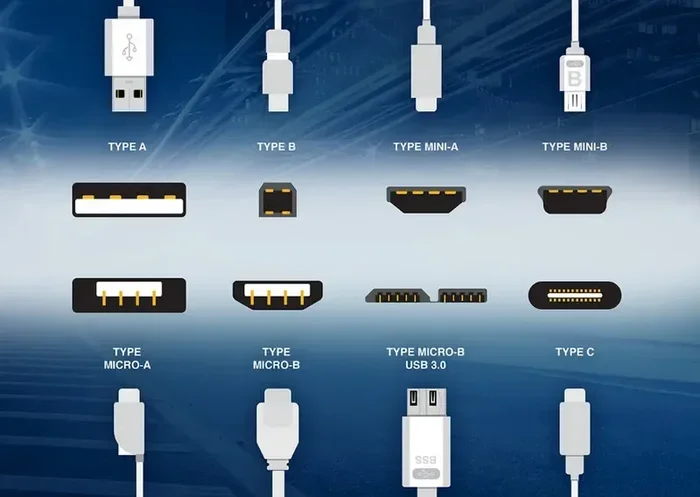
A USB-C adapter is a small device that lets you connect different types of cables, ports, or peripherals to your Apple device. Think of it as a bridge between your laptop or tablet and the things you need to plug in. The USB-C connector is small, reversible, and supports charging, data, and video all through one cable.
Apple uses USB-C on most of its modern devices. The MacBook lineup, iPad Pro, iPad Air, and even the latest iPhone models all rely on USB-C. So having the right adapter is essential for everyday use.
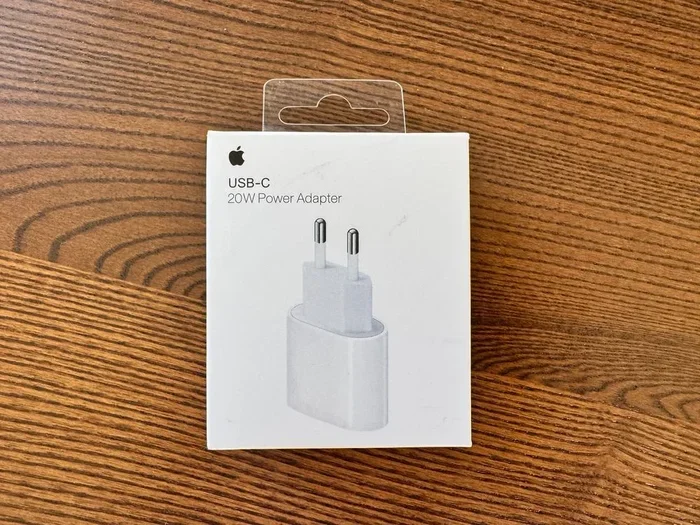
But here is the thing. Not all USB-C adapters are built the same. An Apple USB-C adapter goes through Apple’s strict testing. A non Apple USB C adapter may or may not meet the same standards. That is where things can get tricky.
How USB-C Technology Works
USB-C is more than just a shape. It is a standard that defines how power and data move through a cable. The USB-C connector can handle up to 240 watts of power with USB Power Delivery. It also supports data speeds up to 40 gigabits per second with Thunderbolt 4. These numbers sound impressive, but only certified adapters can deliver them reliably.
When you plug in a non Apple USB C adapter, your device negotiates the connection. It checks what the adapter can handle. If the adapter supports the right protocols, everything works smoothly. If it does not, you might get slow charging or no data transfer at all.
Can You Use a Non Apple USB C Adapter Safely?
Yes, you can use a non Apple USB C adapter safely in most cases. The key is choosing a reputable brand that follows USB-C specifications. Apple does not block third-party adapters. Your device will work with almost any USB-C accessory that meets the standard.
However, there are some risks with cheap or uncertified adapters. These risks include overheating, slow charging, and in rare cases, damage to the USB-C port on your device. This is why it is important to do a little research before buying.
USB-C Certification and MFi Standards
Apple has a program called MFi, which stands for Made for iPhone and iPad. While MFi mainly covers Lightning cables, the principles still apply to USB-C accessories. Apple also supports USB-IF certification, which is the official standard for USB-C devices.
When shopping for a non Apple USB C adapter, look for USB-IF certification. This means the adapter has been tested and meets the official USB standards. Certified adapters are safe, reliable, and work exactly as promised.
Thunderbolt Compatibility
If you own a MacBook Pro or a high-end iPad Pro, you probably use Thunderbolt ports. Thunderbolt 3 and Thunderbolt 4 use the USB-C connector shape. But not every USB-C adapter supports Thunderbolt speeds. If you need high-speed data transfer or external display support, make sure your adapter is Thunderbolt certified.
A regular USB-C adapter will still work for basic charging and data. But for the best performance, especially with external monitors and fast storage drives, go with a Thunderbolt-compatible non Apple USB C adapter.
Power Delivery: What You Need to Know
One of the biggest reasons people buy USB-C adapters is for charging. USB-C Power Delivery, or PD, is a protocol that lets devices negotiate the right amount of power. Your MacBook might need 60 watts. Your iPad might need 20 watts. Your iPhone might need 15 watts.
A good non Apple USB C adapter should support USB PD and deliver the right wattage for your device. If the adapter cannot provide enough power, your device will charge slowly or not charge at all while you use it.
Wattage Matters for Charging Speed
Here is a simple way to think about it. The higher the wattage, the faster your device charges. But you also need to match the wattage to what your device supports. A 100-watt adapter will not make a 60-watt MacBook charge faster than 60 watts. It will just deliver what the device asks for.
Below is a quick comparison of common Apple devices and their charging needs:
- MacBook Air (M2): 30W recommended, supports up to 67W
- MacBook Pro 14-inch: 67W recommended, supports up to 140W
- iPad Pro 12.9-inch: 20W recommended, supports up to 30W
- iPhone 15 Pro: 20W recommended, supports up to 27W
When picking a non Apple USB C adapter for charging, check the wattage rating. Choose one that matches or exceeds your device’s recommended wattage. This ensures fast, safe charging every time.
Fast Charging and PD Protocols
USB Power Delivery is not just about wattage. It also handles the negotiation between your device and the adapter. Modern PD protocols allow devices to draw power efficiently without overheating. A good USB-C charger will adjust the power output based on what your device needs.
Some adapters also support PPS, or Programmable Power Supply. This is an advanced PD feature that allows even more precise voltage control. PPS can help your device charge faster and stay cooler. Look for adapters that support PPS if you want the best charging experience.
Data Transfer Speeds: Does the Adapter Make a Difference?
Charging is one thing. But if you use your USB-C adapter to connect external drives, cameras, or other peripherals, data speed matters a lot. The good news is that a quality non Apple USB C adapter can match Apple’s own speeds for data transfer.
The USB-C standard supports several data transfer modes. USB 3.2 Gen 1 offers speeds up to 5 Gbps. USB 3.2 Gen 2 doubles that to 10 Gbps. And Thunderbolt 3 and 4 push speeds to 40 Gbps. Your adapter needs to support the right mode to hit these speeds.
USB 3.0 vs USB 3.1 vs USB 3.2
The naming can be confusing. Here is a quick breakdown to help you understand:
- USB 3.0 (now called USB 3.2 Gen 1): Up to 5 Gbps speeds. Fine for basic file transfers.
- USB 3.1 (now called USB 3.2 Gen 2): Up to 10 Gbps speeds. Great for large files and external SSDs.
- USB 3.2 Gen 2×2: Up to 20 Gbps speeds. Found on premium adapters and docking stations.
For most users, a USB-C adapter with 10 Gbps support is more than enough. You will be able to transfer a full HD movie in seconds and back up your files quickly. Just make sure the adapter you buy actually supports the speed it claims.
Real-World Data Transfer Tips
Here are a few practical tips to get the best data transfer speeds with your non Apple USB C adapter:
- Use a high-quality USB-C cable. The cable matters just as much as the adapter. A cheap cable can bottleneck your speeds.
- Check your device’s USB port. Not all USB-C ports on Apple devices support the same speeds. A MacBook Air port might be slower than a MacBook Pro port.
- Avoid daisy-chaining too many devices. Connecting multiple peripherals through a single hub can reduce speeds.
- Keep your adapter drivers updated. macOS usually handles this automatically, but it is worth checking.
Common Uses for Non Apple USB C Adapters
People buy non Apple USB C adapters for all kinds of reasons. Let us look at the most popular use cases and what to look for in each one.
USB-C to HDMI Adapters
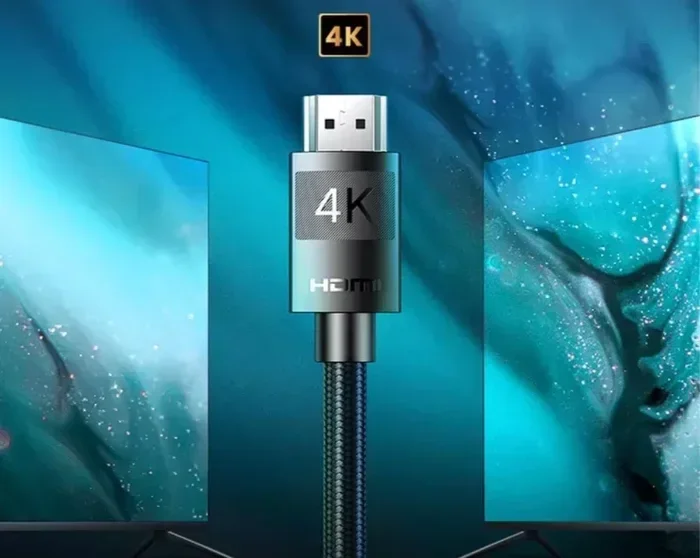
Want to connect your MacBook to a TV or external monitor? A USB-C to HDMI adapter is the go-to solution. Most non Apple USB C adapters in this category work perfectly with Apple devices. Just make sure the adapter supports the resolution you need. For 4K displays, look for adapters that support HDMI 2.0 or higher.
USB-C Hubs and Docking Stations
A USB-C hub adds multiple ports to your laptop in one compact device. You get USB-A ports, HDMI output, SD card slots, and sometimes even Ethernet. These are incredibly useful for people who work with a variety of peripherals.
When choosing a USB-C hub, pay attention to the power delivery passthrough feature. This lets you charge your laptop while using all the other ports. Without passthrough, your laptop might drain faster than it charges.
USB-C to USB-A Adapters
Many people still have USB-A devices like flash drives, keyboards, and mice. A simple USB-C to USB-A adapter lets you use these older peripherals with your new Apple device. These adapters are cheap and widely available. Just make sure the adapter supports the data speeds you need.
USB-C Car Chargers and Travel Adapters
Traveling with your Apple devices? A good USB-C car charger can keep your devices powered on the road. Look for car chargers with multiple USB-C ports and high wattage output. A 65W or 100W car charger can charge your MacBook and iPad at the same time.
Best Non Apple USB C Adapters to Buy
Not all non Apple USB C adapters are worth your money. Here are some brands and models that consistently deliver great performance and reliability.
Top Brands for Third-Party USB-C Adapters
- Anker: Known for reliable charging accessories. Their USB-C adapters and hubs offer solid build quality and fast charging.
- Satechi: A favorite among Mac users. Satechi makes sleek USB-C hubs and docking stations that work seamlessly with Apple devices.
- Belkin: A trusted name in tech accessories. Belkin USB-C adapters are well-certified and durable.
- Ugreen: Offers great value for money. Ugreen makes a wide range of USB-C adapters with good performance.
- HyperDrive: Popular for compact USB-C hubs that are perfect for travel.
What to Look for When Buying
Before you click buy on any non Apple USB C adapter, check these key details:
- USB-IF certification: This guarantees the adapter meets official USB standards.
- Power delivery wattage: Make sure it matches your device’s charging needs.
- Data transfer speed: Check if the adapter supports USB 3.2 or Thunderbolt speeds.
- Build quality: Look for metal housings and sturdy connectors. Cheap plastic adapters tend to break faster.
- Brand reputation: Stick with well-known brands that have positive reviews and good customer support.
Common Mistakes People Make with Non Apple USB C Adapters
Even with the best intentions, people make mistakes when buying and using non Apple USB C adapters. Here are the most common ones and how to avoid them.
Buying the Cheapest Option
A $5 USB-C adapter on Amazon might seem like a great deal. But cheap adapters often cut corners on safety and performance. They might not support the right power delivery wattage or data speeds. In some cases, they can even overheat and damage your device. Spending a little more on a certified adapter saves you from costly repairs.
Ignoring Power Delivery Ratings
Not all USB-C adapters support the same wattage. If you buy a 20W adapter for a 67W MacBook, your laptop will charge very slowly or not charge at all while you use it. Always check the power delivery rating before purchasing.
Assuming All USB-C Cables Are the Same
This is a big one. Not all USB-C cables are created equal. Some cables only support charging, not data. Others only support data, not high-wattage charging. The cable that comes with your non Apple USB C adapter might not be the right one for your needs. Always check what your cable supports before relying on it.
Overloading a USB-C Hub
A USB-C hub with multiple ports is incredibly convenient. But plugging too many power-hungry devices into one hub can cause problems. Your MacBook might not get enough power, and your peripherals might not work properly. Use a powered docking station if you need to connect many devices at once.
Expert Insights: What Apple Itself Says About Third-Party Adapters
Apple does not officially discourage the use of non Apple USB C adapters. In fact, Apple supports the USB-C standard and expects third-party accessories to work with its devices. The company recommends using USB-IF certified accessories and USB Power Delivery compliant chargers.
Apple’s support page states that you can use any USB-C charger and cable that meets the USB-C standard. This means you are not locked into buying Apple-branded accessories. As long as the adapter meets the right specifications, it should work with your Apple device.
That said, Apple does not provide warranty coverage for damage caused by third-party accessories. If a cheap, uncertified adapter fries your USB-C port, you will likely be paying for the repair yourself. This is another strong reason to invest in a quality non Apple USB C adapter from a reputable brand.
Key Takeaways
- Non Apple USB C adapters work with Apple devices as long as they meet USB-C standards and support the right power delivery wattage.
- USB-C certification matters because uncertified adapters can damage your device or charge slowly.
- Thunderbolt 3 and 4 adapters offer the best performance and full compatibility with MacBooks and iPads.
- Cheap no-name adapters are a common cause of slow charging, data errors, and even hardware damage.
- Check power delivery (PD) ratings before buying to match your device’s charging needs.
- USB-C to HDMI, USB-C to USB-A, and USB-C hubs are the most popular non Apple adapter types.
- Always verify compatibility with your specific Apple device model before purchasing.
Conclusion
Using a non Apple USB C adapter is not only possible but also a smart way to save money on accessories. The USB-C standard is universal, which means your Apple devices work with a wide range of third-party adapters and chargers. You just need to choose wisely.
Look for certified adapters from trusted brands. Check the power delivery wattage and data transfer speeds. Avoid the temptation of the cheapest option on the shelf. A little research goes a long way in keeping your devices safe and performing at their best.
The bottom line is simple. You do not need to spend a fortune on Apple-branded adapters. A quality non Apple USB C adapter can deliver the same great performance at a fraction of the cost. Just make sure it meets the right standards, and you will be good to go.
Now that you know what to look for, you can shop with confidence. Whether you need a charging adapter, a USB-C hub, or a docking station, the right third-party accessory will serve you well. Your Apple devices are designed to work with the USB-C ecosystem. Embrace it and enjoy the flexibility and savings that come with it.
Frequently Asked Questions
Will a non Apple USB C adapter damage my MacBook?
A certified non Apple USB C adapter will not damage your MacBook. The risk comes from cheap, uncertified adapters that do not meet USB-C safety standards. Always look for USB-IF certification and buy from reputable brands to avoid any issues.
Can I use a non Apple USB C adapter to charge my iPad Pro?
Yes, you can. Your iPad Pro supports USB-C Power Delivery, so any compliant non Apple USB C adapter that delivers the right wattage will charge your iPad safely and efficiently.
Do non Apple USB C adapters support fast charging?
Many do, but it depends on the adapter’s power delivery rating. Look for adapters that support at least 20W or higher for fast charging. Adapters with PPS support offer the best fast charging performance.
Why is my non Apple USB C adapter charging slowly?
Slow charging usually means the adapter does not support enough wattage or does not support USB Power Delivery. Check the adapter’s wattage rating and make sure it matches your device’s charging requirements.
Are Thunderbolt adapters better than regular USB-C adapters?
Yes, Thunderbolt adapters offer faster data transfer speeds and better video output support. If you need to connect external displays or transfer large files quickly, a Thunderbolt-certified non Apple USB C adapter is the better choice.
Can I use a USB-C hub with my MacBook Air?
Absolutely. MacBook Air models with USB-C ports work with most USB-C hubs. Just make sure the hub supports power delivery passthrough so you can charge your laptop while using other ports.