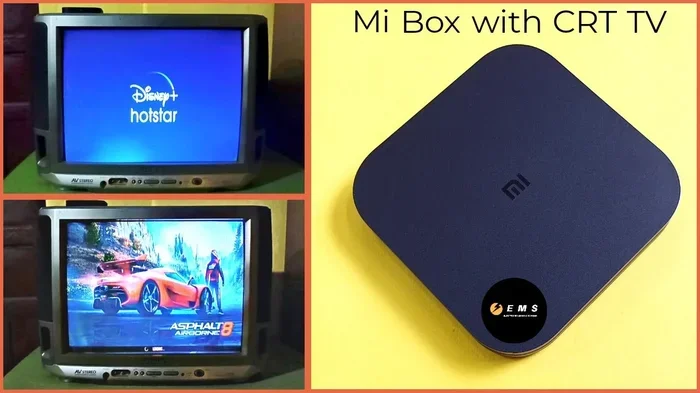
Can You Turn A CRT TV Into A Smart TV With These Tips
Yes, you can turn a CRT TV into a smart TV with the right tools and a few simple steps. Adding a streaming device like a Roku or Amazon Fire Stick gives your old set access to Netflix, YouTube, and more. This guide covers the best methods, devices, and tips to make your CRT television smart without spending a fortune.
If you still have an old CRT TV sitting in your bedroom or garage, you might think it is time to toss it out. But hold on. That old set still has plenty of life left in it. With a few affordable tools and some simple know-how, you can turn a bulky CRT television into a smart TV that streams your favorite shows and movies.
You do not need to spend hundreds of dollars on a brand-new flat screen. In fact, many people are surprised at just how easy it is to add smart TV features to an older set. Whether you want to watch Netflix, browse YouTube, or cast content from your phone, there is a way to make it work on your CRT set.
This guide walks you through every method you can use. From streaming sticks to HDMI adapters, we cover the best options and the pros and cons of each. By the end, you will know exactly how to make your old television smart and get the most out of it.
Key Takeaways
- Streaming devices are the easiest way to add smart features to any CRT TV with an HDMI or composite input.
- You do not need to buy a new TV. A simple adapter or streaming stick transforms your old set into a smart screen.
- Bluetooth and HDMI adapters expand what your CRT TV can do, from wireless audio to modern connections.
- Smart TV features like screen mirroring let you cast phone content right onto your old television.
- Budget-friendly options exist for every price range, so anyone can upgrade their CRT TV experience.
📑 Table of Contents
- Why Turn A CRT TV Into A Smart TV?
- What You Need To Know About CRT TVs
- Method 1: Use A Streaming Device
- Method 2: Use An HDMI Converter Box
- Method 3: Add Bluetooth And Wireless Capabilities
- Method 4: Use A Media Player Or Game Console
- Tips For Getting The Best Experience
- Common Mistakes To Avoid
- Expert Insights
- Conclusion
Why Turn A CRT TV Into A Smart TV?
There are many reasons to give your old CRT TV a second life. Before we dive into the how, let us look at the why. Understanding the benefits helps you decide which method is right for you.
Save Money On A New TV
A new smart TV can cost several hundred dollars. A streaming device costs a fraction of that. You can pick up an Amazon Fire Stick or a basic Roku for under fifty dollars. That is a small price to pay compared to replacing an entire television set.
Reduce Electronic Waste
Throwing away a working TV contributes to electronic waste. CRT monitors contain materials that are not great for landfills. By converting your old set, you keep it out of the waste stream and get more use out of it. This is a simple way to be more environmentally friendly.
Keep A Familiar Setup
Some people love the feel of their old TV setup. The size, the placement, the remote control habits. Converting your CRT TV lets you keep all of that while gaining access to modern streaming apps and wireless connectivity. You get the best of both worlds.
What You Need To Know About CRT TVs
Before you start, it helps to understand what you are working with. CRT stands for Cathode Ray Tube. These TVs use an electron beam to create images on a phosphorescent screen. They are bulky, heavy, and older than the flat panels we use today.
Common Inputs On CRT TVs
Most CRT TVs come with a few common input options. Knowing what inputs your TV has is the first step in choosing the right conversion method.
- RF Antenna Input — The oldest type of connection. Uses a coaxial cable for over-the-air broadcasts.
- Composite Video — The red, white, and yellow RCA cables. Very common on older sets.
- Component Video — Red, green, and blue video cables with separate audio. Better quality than composite.
- S-Video — A round connector that offers better image quality than composite but worse than component.
If your CRT TV only has an antenna input, you may need a converter box. But if it has composite or component inputs, you have more options available. Connecting a CRT TV with component cables is a common setup that works well for streaming.
Limitations Of CRT TVs
CRT TVs have a fixed resolution that is much lower than modern screens. Most display at 480i or 480p. This means you will not get ultra-high-definition streaming. However, standard definition streaming from services like Netflix and YouTube still looks perfectly fine on a CRT set. The experience is much better than watching standard cable or antenna-only channels.
Method 1: Use A Streaming Device
The easiest and most popular way to add smart TV features to a CRT TV is with a streaming device. These small sticks or boxes plug into your TV and connect to your home internet. They give you access to all the major streaming apps.
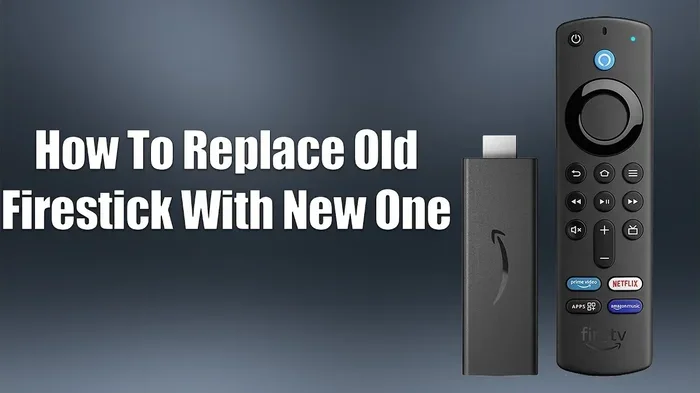
Amazon Fire TV Stick
The Amazon Fire TV Stick is one of the most affordable options. It plugs directly into an HDMI port. If your CRT TV does not have HDMI, you can use an HDMI to composite converter. The Fire Stick supports Netflix, Hulu, Disney Plus, YouTube, and thousands of other apps.
Setup is simple. Plug it in, connect to Wi-Fi, and follow the on-screen instructions. The remote control comes with voice search built in. You can also use the Fire TV app on your phone as a remote.
Roku Streaming Stick
Roku is another excellent choice. Roku devices are known for their simple interface and wide app support. The Roku Streaming Stick works the same way as the Fire Stick. You plug it into an HDMI port and connect to your wireless network.
Roku offers a very user-friendly experience. The remote is straightforward, and the home screen is easy to navigate. If you are new to streaming, Roku is a great place to start. Many people find it the most intuitive option for adding smart TV features to any display.
Google Chromecast
Chromecast works differently from the other options. Instead of a remote, you control it from your phone or tablet. You cast content from apps like Netflix or YouTube directly to your TV. This is a great option if you already use your phone as your primary media control device.
Chromecast also requires an HDMI connection. If your CRT TV lacks HDMI, you will need an adapter. The setup process is quick and the device is very affordable. It is a solid choice for people who want a simple streaming device experience.
Method 2: Use An HDMI Converter Box
If your CRT TV does not have an HDMI input, an HDMI converter box is your best friend. These devices take an HDMI signal and convert it to composite or component video. This lets you use modern streaming devices with older television sets.
How HDMI Converters Work
An HDMI converter box receives a digital HDMI signal and converts it to an analog signal. The analog signal then connects to your CRT TV through composite or component cables. The quality is not as sharp as a true HDMI connection, but it works well enough for streaming content.
Most converter boxes cost between fifteen and thirty dollars. They are a small investment that opens up a lot of possibilities. You can use any HDMI streaming device with your CRT TV once you have the converter in place.
Popular HDMI Converter Options
- Generic HDMI to Composite Converters — Affordable and widely available on Amazon and electronics stores.
- HDMI to Component Converters — Slightly better image quality than composite. A good choice if your CRT has component inputs.
- Audio Extractors — Some converter boxes also separate the audio signal. This lets you connect to external speakers or a sound system.
When choosing a converter, make sure it supports the resolution of your streaming device. Most modern devices output at 1080p, which is more than enough for a CRT TV. The converter will downscale the signal to match your TV’s capabilities.
Method 3: Add Bluetooth And Wireless Capabilities
One of the best ways to modernize a CRT TV is by adding wireless connectivity. Bluetooth and Wi-Fi adapters let you connect to speakers, headphones, and even cast content from your devices. This turns your old TV into a more versatile entertainment center.
Bluetooth Adapters For CRT TVs
A Bluetooth adapter plugs into your TV’s audio output and pairs with wireless speakers or headphones. This is a great way to improve your audio experience without running new wires. You can listen to your shows through a Bluetooth speaker in another room or use wireless headphones for late-night viewing.
Many people also ask whether they can make their TV Bluetooth-capable with an adapter. The answer is yes. A simple Bluetooth transmitter connects to your TV’s audio out port and pairs with any Bluetooth speaker or headphones. This is one of the easiest upgrades you can make to an older television set.
Wi-Fi Adapter For Smart Features
Some CRT TVs have built-in Wi-Fi or Ethernet ports, but most do not. A USB Wi-Fi adapter can add internet connectivity to a TV that has a USB port. This opens the door to built-in smart features if your TV supports them. However, most CRT TVs are too old for this approach, so a streaming device remains the better option.
Method 4: Use A Media Player Or Game Console
Another way to bring smart features to your CRT TV is through a media player or game console. Devices like the Apple TV, Chromecast with Google TV, or even a gaming console can turn your old set into a streaming powerhouse.
Apple TV
Apple TV is a premium option that offers a smooth, polished experience. It supports all major streaming apps and integrates well with other Apple devices. If you are in the Apple ecosystem, Apple TV is a natural choice. The device connects via HDMI, so you will need a converter for most CRT TVs.
Gaming Consoles
Many people forget that gaming consoles like the PlayStation and Xbox double as streaming devices. If you already own a console, you likely have access to Netflix, YouTube, Hulu, and more. Connecting a console to your CRT TV is straightforward. Just use the composite or component cables that come with the system.
The downside is that consoles use more power and take up more space than a simple streaming stick. But if you already have one, it is a free and easy way to add smart TV features to your CRT set.
Tips For Getting The Best Experience
Once you have converted your CRT TV into a smart TV, there are a few tips that can improve your experience. These small adjustments make a big difference in how enjoyable streaming feels on an older television.
Optimize Your Wi-Fi Connection
Streaming requires a stable internet connection. If your Wi-Fi signal is weak in the room with your CRT TV, consider moving your router closer or using a Wi-Fi extender. A strong connection means fewer buffering interruptions and smoother playback.
Adjust The TV Settings
Go into your CRT TV’s settings and adjust the picture mode for video content. Most CRT TVs have a “Movie” or “Normal” picture mode that works best for streaming. Avoid using the “Vivid” or “Game” modes, as they can make the picture look harsh on older screens.
Use A Quality Streaming Service
Not all streaming services look the same on older TVs. Services like Netflix and YouTube adjust their streaming quality based on your connection and device. A faster internet connection means better picture quality. Aim for at least 10 Mbps download speed for smooth standard-definition streaming.
Keep Your Devices Updated
Streaming devices receive regular software updates that add new features and fix bugs. Make sure your streaming device is always running the latest firmware. This keeps everything running smoothly and ensures compatibility with the latest app versions.
Common Mistakes To Avoid
Converting a CRT TV to a smart TV is simple, but there are a few common mistakes people make. Avoiding these pitfalls saves you time, money, and frustration.
- Buying an incompatible streaming device. Not all streaming sticks work with older TVs. Check the requirements before you buy.
- Forgetting about audio connections. Some converter boxes do not pass audio properly. Make sure your setup includes working sound.
- Ignoring Wi-Fi strength. A weak signal leads to constant buffering. Test your Wi-Fi in the TV room before you commit to a setup.
- Overpaying for unnecessary features. A basic streaming stick is all you need. Do not spend extra on features your CRT TV cannot display.
- Skipping the converter box. If your CRT TV lacks HDMI, you need a converter. Trying to force an HDMI connection without one will not work.
Expert Insights
According to home entertainment experts, the best way to convert a CRT TV is with a streaming stick and an HDMI converter. This combination gives you the most app choices and the easiest setup. Experts also recommend starting with a budget-friendly option like the Amazon Fire TV Stick or a basic Roku model.
Technology specialists also point out that CRT TVs still have a loyal fan base. Many people prefer the picture quality and durability of older sets. Converting them to smart TVs lets these users keep their favorite displays while gaining access to modern content. It is a win-win situation that saves money and reduces waste.
If you are unsure which method to choose, start with a streaming stick and a basic HDMI converter. This is the most versatile and affordable approach. You can always upgrade to a more advanced setup later if you want to. The important thing is to take that first step and bring your old TV into the modern era.
For those wondering about other ways to connect modern devices to older TVs, you might find it helpful to learn about using a Bluetooth adapter on your TV to add wireless audio capabilities. Similarly, if you are considering using your TV for more than just streaming, you can explore karaoke features on smart TVs for a fun entertainment upgrade.
Another great option is to connect your phone directly to the TV for casting and mirroring. You can read more about connecting your phone to an HDMI TV to understand the different ways modern phones can interface with older displays. These connections open up even more possibilities for your converted CRT setup.
Conclusion
Turning a CRT TV into a smart TV is easier than most people think. With a streaming device, an HDMI converter, or a Bluetooth adapter, you can bring modern features to your old television. The key is to choose the right method for your setup and budget.
Whether you go with an Amazon Fire Stick, a Roku, or a simple converter box, the result is the same. Your CRT TV becomes a gateway to all the content you love. Netflix, YouTube, Hulu, and countless other apps are just a few clicks away.
Do not let that old TV gather dust in a corner. Give it new life with a simple conversion. You will save money, reduce waste, and enjoy all the benefits of a smart TV without the price tag of a new set. Start your CRT TV conversion today and see how easy it really is.
Frequently Asked Questions
Can any CRT TV be turned into a smart TV?
Most CRT TVs can be converted as long as they have a working video input like composite, component, or RF. You will also need a way to connect to your home Wi-Fi network. If your TV has no inputs at all, conversion is not possible, but this is very rare.
What is the cheapest way to make a CRT TV smart?
The cheapest option is a basic streaming stick like the Amazon Fire TV Stick Lite or a Google Chromecast. These cost around twenty to thirty dollars. You will also need an HDMI converter if your TV lacks an HDMI port, which adds about fifteen to twenty-five dollars.
Will streaming look good on a CRT TV?
Streaming will look good for standard definition content on a CRT TV. The resolution of most CRT sets is 480p, which is enough for clear streaming from Netflix, YouTube, and other services. You will not get 4K or even 1080p quality, but the picture will be much better than regular cable TV.
Do I need an HDMI converter for my CRT TV?
You need an HDMI converter only if your CRT TV does not have an HDMI input. Most CRT TVs use composite or component cables. An HDMI to composite converter lets you use modern streaming devices that output an HDMI signal.
Can I use voice control with a converted CRT TV?
Yes, many streaming devices like the Amazon Fire Stick and Roku come with voice remote controls. You can use voice commands to search for content, launch apps, and control playback. This works the same way it does on a modern smart TV.
Is it worth converting an old CRT TV instead of buying a new one?
It is worth it if the TV still works well and you want to save money. A conversion costs under fifty dollars in most cases. A new smart TV costs three hundred dollars or more. If your CRT TV is in good condition, converting it is a smart and budget-friendly choice.