Can I Use My Bose Speaker With My Tv At Home Today
Yes, you can absolutely use your Bose speaker with your TV at home. Whether you prefer wireless Bluetooth or a stable wired setup, connecting a Bose speaker to your television is straightforward and opens up a world of richer, more immersive sound. This guide walks you through every method, common issues, and expert tips so you can enjoy your favorite shows and movies with premium Bose audio starting today.
If you have been sitting on your couch wondering whether can I use my Bose speaker with my TV, the answer is a resounding yes. Your Bose speaker can transform your ordinary TV watching experience into something truly cinematic. Whether you own a Bose SoundLink, a Bose Home Speaker, or any other portable Bluetooth speaker from the brand, connecting it to your television is easier than you might think.
Many people settle for the built-in TV speakers because they assume external setups are complicated. That could not be further from the truth. Modern Bose speakers are designed to pair seamlessly with televisions, and you have several connection methods to choose from. This guide will walk you through every option step by step.
By the time you finish reading, you will know exactly which method works best for your specific setup. You will also learn how to troubleshoot common problems and get the best possible audio quality from your Bose speaker and TV combination.
Key Takeaways
- Multiple Connection Options: You can connect your Bose speaker to your TV using Bluetooth, HDMI ARC, optical cables, or a 3.5mm aux cable depending on your TV and speaker model.
- Bluetooth Is the Easiest Method: Most modern Bose speakers and TVs support wireless pairing, making setup quick and cable-free.
- Wired Connections Offer Stability: If you experience audio lag or dropouts, a wired connection through HDMI ARC or an optical cable delivers consistent, lag-free sound.
- Troubleshooting Is Simple: Common issues like no sound, pairing failures, or audio delay usually have easy fixes you can do yourself.
- Check Compatibility First: Not all Bose speakers and TVs support the same connection types, so verify your devices before purchasing any cables or adapters.
- Audio Quality Improves Significantly: Using an external Bose speaker with your TV dramatically improves dialogue clarity, bass response, and overall movie-watching or gaming experience.
📑 Table of Contents
- Understanding Your Bose Speaker and TV Compatibility
- Connecting Your Bose Speaker to Your TV via Bluetooth
- Using Wired Connections for Better Stability and Sound Quality
- Setting Up HDMI ARC for Seamless Audio
- Using an Optical Audio Cable as an Alternative
- Troubleshooting Common Connection Issues
- Tips for the Best Audio Experience with Your Bose Speaker and TV
- Comparing Connection Methods at a Glance
- Expert Insights on Using Bose Speakers with TVs
- Can I Use My Bose Speaker With My Tv At Home Today
- Conclusion
Understanding Your Bose Speaker and TV Compatibility
Before diving into the connection methods, it helps to understand what you are working with. Not every Bose speaker connects to every TV in the same way. Your TV model and speaker model both matter when choosing the best connection path.
Types of Bose Speakers You Might Own
Bose makes several speaker lines, and each has different connection capabilities. Here are the most common ones people use with TVs:
- Bose SoundLink Series: These are portable Bluetooth speakers known for great battery life and solid sound quality.
- Bose Home Speaker: A smart speaker that connects via Wi-Fi and Bluetooth, often used for music and casual TV listening.
- Bose Soundbar: While technically different from a standalone speaker, Bose soundbars are a popular TV audio upgrade.
- Bose Portable Smart Speaker: Combines smart assistant features with Bluetooth and Wi-Fi connectivity.
- Bose Wireless Bass Module: Usually paired with a Bose soundbar but can enhance bass in certain setups.
What Your TV Needs to Support External Speakers
Your television needs at least one audio output option. Most modern TVs made in the last decade include multiple options. Here is what to look for on the back or side of your TV:
- Bluetooth: Most smart TVs from brands like Samsung, LG, Sony, and TCL support Bluetooth audio output.
- HDMI ARC Port: This is a special HDMI port that allows audio to flow from your TV to an external device and back.
- Optical Audio Output: A small square port that uses a fiber optic cable to send digital audio.
- 3.5mm Headphone Jack: A standard analog audio output found on many TVs.
- USB Port: Some TVs can output audio through USB, though this is less common.
If your TV has at least one of these options, you can connect a Bose speaker. The method you choose depends on which ports your TV and Bose speaker both support.
Connecting Your Bose Speaker to Your TV via Bluetooth
Bluetooth is the most popular way to connect a Bose speaker to a TV. It is wireless, convenient, and takes only a few minutes to set up. If both your Bose speaker and your TV support Bluetooth, this is the method you should try first.
Step-by-Step Bluetooth Pairing Guide
Follow these simple steps to pair your Bose speaker with your TV wirelessly:
- Turn on your Bose speaker and put it in pairing mode. Most Bose speakers have a dedicated Bluetooth button. Press and hold it until you see a flashing LED light or hear a voice prompt.
- On your TV, go to the Settings menu. Look for Bluetooth or Sound settings. The exact path varies by TV brand.
- Select the option to search for or pair a new Bluetooth device.
- Your TV will scan for nearby devices. Your Bose speaker should appear in the list.
- Select your Bose speaker from the list and wait for the connection to confirm.
- Once paired, go to your TV audio settings and set the Bluetooth Bose speaker as the default audio output.
Tips for a Stable Bluetooth Connection
Bluetooth connections can sometimes be finicky. Here are some tips to keep things running smoothly:
- Keep your Bose speaker within 10 feet of your TV for the strongest signal.
- Remove any physical obstacles between the speaker and the TV, like walls or large furniture.
- Turn off other Bluetooth devices nearby that might interfere with the connection.
- Make sure your Bose speaker is fully charged or plugged in during use.
- If you experience audio lag, try moving the speaker closer to the TV or switching to a wired method.
Limitations of Bluetooth for TV Audio
While Bluetooth is convenient, it does have some drawbacks. The most common issue is audio lag, where the sound does not match the lip movements on screen. This happens because Bluetooth transmits audio with a slight delay. For casual viewing, this is usually fine. But for fast-action movies or competitive gaming, the delay can be distracting.
Another limitation is that Bluetooth compresses audio slightly. You will still get good sound from a Bose speaker, but the absolute best audio quality comes through a wired connection or HDMI ARC.
Using Wired Connections for Better Stability and Sound Quality
If you want the most reliable and highest quality audio, a wired connection is the way to go. Wired connections eliminate audio lag and provide a stronger, more consistent signal. There are two main wired methods to connect your Bose speaker to your TV.
Method 1: Using a 3.5mm Aux Cable
This is the simplest wired option. Many Bose portable speakers have a 3.5mm input port, and many TVs have a headphone jack output.
Here is how to do it:
- Get a standard 3.5mm aux cable, also known as a 3.5mm to 3.5mm cable.
- Plug one end into the headphone jack on your TV.
- Plug the other end into the AUX input on your Bose speaker.
- Turn on your TV and Bose speaker.
- Set your TV volume to about 70% and use your Bose speaker volume to adjust the final sound level.
This method works well for most setups. The audio quality is solid, and there is zero lag. The main downside is the cable limits how far you can place your speaker from the TV.
Method 2: Using an RCA Cable or Adapter
Some older TVs have RCA audio outputs instead of a headphone jack. RCA cables use red and white connectors. If your TV has RCA outputs, you can use an RCA-to-3.5mm adapter cable to connect to your Bose speaker.
- Plug the red and white RCA connectors into the matching RCA ports on your TV.
- Connect the 3.5mm end into your Bose speaker’s AUX input.
- Adjust volumes on both devices for the best balance.
When to Choose Wired Over Bluetooth
You should choose a wired connection if any of these situations apply to you:
- You notice audio lag or delay with Bluetooth.
- You want the best possible audio quality from your Bose speaker.
- Your TV does not support Bluetooth audio output.
- You plan to use the speaker for gaming where timing matters.
- You experience frequent Bluetooth dropouts or interference.
Setting Up HDMI ARC for Seamless Audio
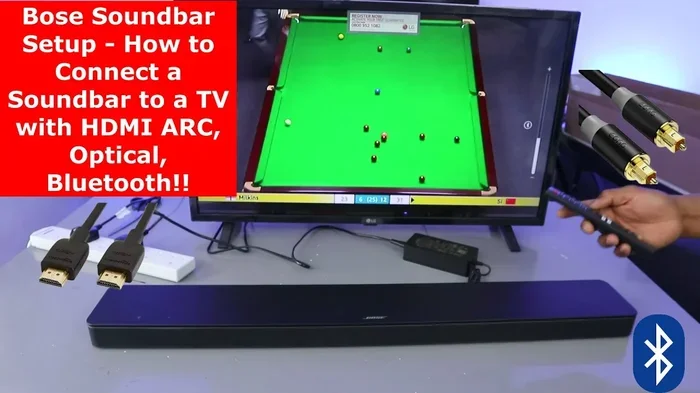
HDMI ARC (Audio Return Channel) is the best connection method if your TV and speaker both support it. It sends high-quality audio through a single HDMI cable and allows your TV remote to control the speaker volume. This is the most seamless and premium experience you can get.
What You Need for HDMI ARC
Here is what you will need before setting up HDMI ARC:
- A TV with an HDMI ARC port. Look for the port labeled “ARC” on the back of your TV.
- A Bose speaker or soundbar with HDMI ARC support. Most Bose soundbars include this feature.
- An HDMI cable that supports ARC. Most modern HDMI cables work, but check the label to be sure.
Step-by-Step HDMI ARC Setup
Follow these steps to set up your Bose speaker using HDMI ARC:
- Connect one end of the HDMI cable to the HDMI ARC port on your TV.
- Connect the other end to the HDMI ARC port on your Bose speaker or soundbar.
- Turn on both devices.
- On your TV, go to Settings and find the Sound or Audio menu.
- Look for HDMI CEC or Control HDMI Devices and turn it on. This allows your TV remote to control the Bose speaker volume.
- Set the TV audio output to HDMI ARC.
- Test the sound by playing any content on your TV.
Benefits of HDMI ARC Over Other Methods
HDMI ARC offers several advantages that make it the top choice for many users:
- Zero Audio Lag: The audio stays perfectly in sync with the video.
- High-Quality Audio: HDMI ARC supports uncompressed digital audio for the best sound.
- Single Remote Control: You can adjust the Bose speaker volume using your TV remote.
- One Cable Solution: Everything runs through a single HDMI cable, keeping your setup clean.
- Two-Way Communication: The TV and speaker can communicate with each other for automatic switching.
If you have the option, HDMI ARC is the connection method to choose. It provides the closest experience to a dedicated home theater system without the complexity.
Using an Optical Audio Cable as an Alternative
If your TV has an optical audio output but no HDMI ARC, you can still get great sound from your Bose speaker. An optical cable, also called a TOSLINK cable, sends digital audio through a thin fiber optic cable.
To use this method, you will need a Bose speaker with an optical input or an optical-to-3.5mm adapter. Plug the optical cable into your TV, connect the other end to your speaker or adapter, and set your TV audio output to optical in the settings menu.
The optical connection provides good digital audio quality and has no audio lag. It is a reliable middle-ground option between Bluetooth and HDMI ARC.
Troubleshooting Common Connection Issues
Even with the simplest setups, you might run into some issues. Here are the most common problems people face when connecting a Bose speaker to a TV, along with practical solutions.
No Sound After Pairing
If you have successfully paired your Bose speaker but hear no sound, try these steps:
- Check that your TV audio output is set to the Bose speaker, not the TV speakers.
- Make sure your Bose speaker is not muted and the volume is turned up.
- Restart both the TV and the Bose speaker, then try pairing again.
- Check if another device is connected to the Bose speaker, which might be intercepting the audio.
Audio Lag or Delay
Audio lag is the most frustrating issue when using Bluetooth with a TV. Here is how to fix it:
- Move the Bose speaker closer to the TV to strengthen the Bluetooth signal.
- Switch to a wired connection like HDMI ARC or a 3.5mm cable.
- Check if your TV has a “Bluetooth audio delay” setting and adjust it.
- Some TVs have a “lip sync” feature that helps align audio with video.
Speaker Keeps Disconnecting
If your Bose speaker keeps losing connection, try these fixes:
- Make sure nothing is blocking the line of sight between the speaker and TV.
- Reduce the number of Bluetooth devices in the area.
- Unpair the speaker and pair it again from scratch.
- Update the firmware on both your Bose speaker and your TV if updates are available.
TV Does Not Detect the Bose Speaker
If your TV cannot find your Bose speaker during pairing:
- Make sure the Bose speaker is in pairing mode.
- Turn Bluetooth off and back on on both devices.
- Reset the Bluetooth settings on your TV.
- Try unpairing any other devices from the Bose speaker first.
Tips for the Best Audio Experience with Your Bose Speaker and TV
Once you have your Bose speaker connected to your TV, you can take a few extra steps to get the best possible sound. These small adjustments make a big difference in your daily viewing experience.
Optimize Speaker Placement
Where you place your Bose speaker matters more than you might think. Here are some placement tips:
- Place the speaker at ear level when you are seated for the best sound imaging.
- Keep the speaker on a stable surface, not inside a closed cabinet.
- Angle the speaker slightly toward your listening position.
- If you have a portable Bose speaker, try placing it near the center of the room for a more balanced sound.
Adjust TV and Speaker Volume Settings
Getting the right volume balance takes a little tweaking:
- Set your TV volume to a fixed level, like 50 or 70, and then use the Bose speaker volume for fine-tuning.
- This prevents the TV from compressing the audio before it reaches the speaker.
- Some Bose speakers have a “TV mode” or “dialogue enhancement” feature. Turn this on for clearer voices.
Use Equalizer Settings
Many Bose speakers and smart TV apps have equalizer settings. Try these adjustments for TV content:
- Boost the mid-range frequencies for clearer dialogue.
- Slightly reduce the high frequencies if the sound feels harsh.
- Add a touch more bass if you enjoy deep, rich sound during action scenes.
Keep Your Devices Updated
Regular firmware updates for both your Bose speaker and your TV can improve Bluetooth performance, fix bugs, and add new features. Check the Bose app for speaker updates and your TV settings menu for system updates.
Comparing Connection Methods at a Glance
Choosing the right connection method can feel overwhelming with so many options. Here is a quick comparison to help you decide.
| Feature | Bluetooth | 3.5mm Aux Cable | HDMI ARC | Optical Cable |
|---|---|---|---|---|
| Wireless | Yes | No | No | No |
| Audio Lag | Yes, slight delay | No lag | No lag | No lag |
| Audio Quality | Good | Very Good | Excellent | Very Good |
| Ease of Setup | Very Easy | Easy | Moderate | Easy |
| Remote Volume Control | Sometimes | No | Yes | No |
| Cable Length | N/A | Limited by cable | Limited by cable | Limited by cable |
| Best For | Casual viewing | Simple setups | Premium home theater | TVs without HDMI ARC |
As you can see, each method has its strengths. Bluetooth wins for convenience. HDMI ARC wins for quality and control. The 3.5mm aux cable is a reliable backup. Choose the one that fits your setup and needs best.
Expert Insights on Using Bose Speakers with TVs
Audio engineers and Bose specialists often share the same advice when it comes to pairing speakers with TVs. The most common recommendation is to use the highest quality connection your devices support. Bluetooth is great for convenience, but HDMI ARC or a wired connection will always deliver better sound.
Another expert tip is to avoid using Bluetooth when multiple wireless devices are competing for the same frequency. Wi-Fi routers, microwaves, and other Bluetooth devices can all cause interference. If you live in a crowded apartment building with lots of wireless signals, a wired connection will give you a much more stable experience.
Finally, experts recommend testing your setup with different types of content. Dialogue-heavy shows and movies will reveal whether your speaker handles voices clearly. Action movies and music will test the bass and overall range. This quick test helps you fine-tune your settings for the best experience across everything you watch.
Can I Use My Bose Speaker With My Tv At Home Today
The short answer is yes. You can use your Bose speaker with your TV at home today using Bluetooth, a wired cable, HDMI ARC, or an optical connection. The method you choose depends on your TV’s available ports, your Bose speaker’s features, and how much audio quality matters to you.
For most people, Bluetooth is the easiest starting point. It requires no cables and takes minutes to set up. If you find the audio lag annoying or want the best possible sound, switching to HDMI ARC or a wired connection is the next logical step.
Remember that connecting an external speaker to your TV is one of the simplest and most affordable upgrades you can make to your home entertainment setup. A good Bose speaker brings clear dialogue, rich bass, and immersive sound to everything you watch. You do not need a complicated home theater system to enjoy better audio.
Take a few minutes today to check your TV’s audio outputs and your Bose speaker’s connection options. Follow the steps in this guide, and you will be enjoying improved TV sound in no time. Once you hear the difference a quality Bose speaker makes, you will wonder why you ever settled for built-in TV speakers.
Conclusion
Connecting your Bose speaker to your TV is one of the easiest ways to dramatically improve your home audio experience. You have multiple connection options available, from wireless Bluetooth to high-quality HDMI ARC and simple wired cables. Each method has its advantages, and the best choice depends on your specific TV, your Bose speaker model, and your personal preferences.
If convenience matters most, Bluetooth is your friend. If audio quality and reliability are your priorities, go with HDMI ARC or a wired connection. And if you run into any issues, the troubleshooting tips in this guide will help you get back on track quickly.
Now that you know the answer to can I use my Bose speaker with my TV, it is time to take action. Pick the connection method that suits your setup, follow the steps, and start enjoying your favorite content with rich, full-bodied Bose sound. Your ears will thank you.
Frequently Asked Questions
Can I connect any Bose speaker to any TV?
Most Bose speakers can connect to most modern TVs, but the method depends on what ports and features both devices support. Check if your TV has Bluetooth, HDMI ARC, a headphone jack, or an optical output. Then check what connection options your Bose speaker has. As long as they share at least one compatible connection type, you can pair them together.
Why does my Bose speaker have audio lag when connected to my TV via Bluetooth?
Audio lag over Bluetooth happens because Bluetooth transmits audio data with a slight processing delay. This delay causes the sound to arrive a fraction of a second after the video. It is more noticeable during fast-action scenes or dialogue-heavy content. To fix this, try moving the speaker closer to the TV, switch to a wired connection, or look for a “lip sync” or “audio delay” setting in your TV menu.
Can I control the Bose speaker volume with my TV remote?
Yes, but only with certain connection methods. HDMI ARC allows your TV remote to control the Bose speaker volume automatically. Bluetooth connections sometimes support remote control through CEC (Consumer Electronics Control) settings. Wired connections like a 3.5mm cable do not support remote volume control, so you will need to adjust the volume directly on the speaker.
What is the best Bose speaker for TV use at home?
The best Bose speaker for TV use depends on your needs. The Bose SoundLink Revolve+ offers great portability and 360-degree sound. The Bose Home Speaker works well as a smart speaker for casual TV listening. For the premium experience, a Bose soundbar with HDMI ARC delivers the best TV audio quality. If you want a budget-friendly option, any portable Bose speaker with a 3.5mm input will work well with a simple aux cable.
Do I need any special cables to connect my Bose speaker to my TV?
It depends on the connection method you choose. Bluetooth requires no cables at all. For a 3.5mm aux connection, you need a standard 3.5mm to 3.5mm cable, which is inexpensive and widely available. HDMI ARC requires an HDMI cable, preferably one rated for high-speed data transfer. Optical audio requires a TOSLINK fiber optic cable. Most of these cables are affordable and easy to find online or at electronics stores.
Will using a Bose speaker with my TV void any warranties?
No, using a Bose speaker with your TV in the intended way does not void any warranties. Connecting external speakers to a TV is a standard and supported use case. However, if you damage a speaker or TV port by using incompatible cables or forcing connections, that would fall outside normal warranty coverage. Always follow the manufacturer guidelines for proper setup and care.