Does Ultraloq Work With Iphone And Android Devices
Yes, Ultraloq smart locks work seamlessly with both iPhone and Android devices. You can control your door lock from anywhere using the Ultraloq app on your smartphone. This guide covers everything you need to know about Ultraloq iPhone compatibility, Android support, setup steps, and helpful tips.
Have you been wondering whether Ultraloq works with your iPhone or Android device? You are not alone. Smart locks have changed the way we think about home security. And the Ultraloq smart lock is one of the most popular options on the market today. But what good is a smart lock if it does not play nice with your phone?
The short answer is yes. Ultraloq locks work with both iPhone and Android devices. You get full control right from your pocket. Whether you use Apple or Google, you are covered. In this guide, we will walk you through everything. We will cover compatibility, setup, features, and common issues. By the end, you will know exactly what to expect.
Smart door locks are no longer a luxury. They are becoming a standard part of home automation. People want the convenience of keyless entry without sacrificing security. Ultraloq delivers on both fronts. And the fact that it works with your phone makes it even better. Let us dive into the details.
Key Takeaways
- Full iPhone Support: Ultraloq locks connect easily to iPhones through Bluetooth and WiFi.
- Android Friendly Too: Android users get the same full feature set as iPhone users.
- Simple Setup: Pairing your lock with your phone takes just a few minutes.
- Remote Access: Lock and unlock your door from anywhere using your phone.
- Voice Assistant Ready: Works with Alexa, Google Assistant, and Apple HomeKit on supported models.
- Multiple Users: You can manage access for family and guests right from your phone.
📑 Table of Contents
- What Is Ultraloq and Why Does Phone Compatibility Matter?
- Does Ultraloq Work With iPhone?
- Does Ultraloq Work With Android Devices?
- How to Connect Ultraloq to Your Smartphone
- What Features Can You Access From Your Phone?
- Common Problems and How to Fix Them
- Quick Tips for the Best Ultraloq Experience
- Expert Insights on Ultraloq and Mobile Compatibility
- Final Thoughts
What Is Ultraloq and Why Does Phone Compatibility Matter?
Ultraloq is a smart lock brand that offers a range of keyless entry solutions. Their locks use multiple ways to open your door. You can use a fingerprint, a code, a physical key, or your phone. The Ultraloq U-Bolt series is their most popular line. These locks combine Bluetooth and WiFi connectivity for a smooth experience.
Phone compatibility matters because your phone is your remote control. You want to lock your door from bed. You want to let in a guest when you are at work. You want alerts when someone enters your home. All of this is possible when your smart lock connects to your phone. Without phone support, you are stuck using only the lock’s built-in methods.
Why People Choose Smart Locks
There are many reasons people switch to smart locks. Here are the top benefits:
- Convenience: No more fumbling for keys. Your phone becomes your key.
- Security: Get instant alerts when someone enters or tries to enter.
- Remote Access: Control your lock from anywhere with an internet connection.
- Guest Access: Send temporary codes or digital keys to visitors.
- Integration: Connect with other smart home devices for automation.
Phone compatibility is the backbone of all these features. If your lock does not connect to your iPhone or Android device, you lose a huge part of the value. That is why checking compatibility before buying is so important.
Does Ultraloq Work With iPhone?
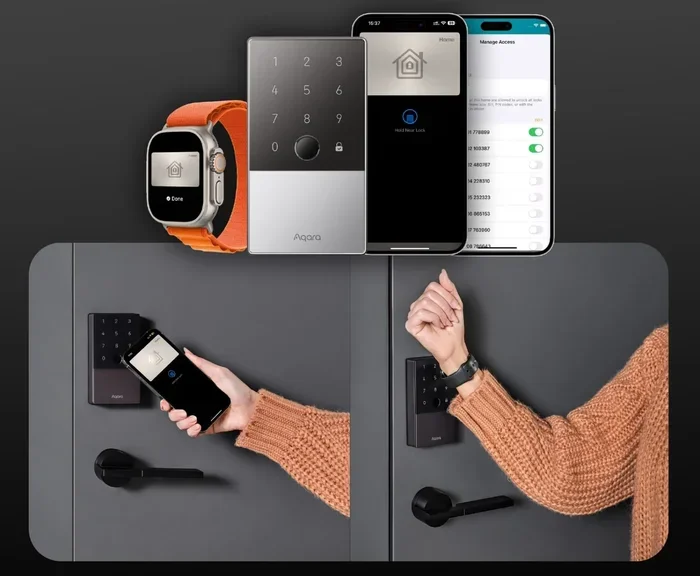
The answer is a clear yes. Ultraloq works with iPhone users. The locks use Bluetooth to connect directly to your phone. And when you add a WiFi module, you get remote access features too. Apple users will be happy to know that Ultraloq iPhone support is strong and reliable.
iPhone Compatibility Requirements
To get the best experience with your iPhone, here is what you need:
- iPhone 8 or newer: These models support Bluetooth 5.0 and above.
- iOS 12 or later: The Ultraloq app requires a relatively recent iOS version.
- Bluetooth enabled: Keep Bluetooth turned on for lock-and-unlock features.
- WiFi connection: Needed for remote access and real-time notifications.
Most people with a modern iPhone will have no issues. The Ultraloq app is available on the Apple App Store. You can download it, pair your lock, and start using it within minutes. The app is well-designed and easy to navigate.
Apple HomeKit Support
Some Ultraloq models support Apple HomeKit. This is a big deal for iPhone users. HomeKit lets you control your lock using Siri. You can say “Hey Siri, lock the door” and it works. You can also add the lock to your Home app. This gives you a central place to manage all your smart home devices.
HomeKit integration also allows automation. For example, you can set a routine that locks your door automatically when you leave home. You can trigger the lock when you arm your security system. The possibilities are great. Just check that your specific Ultraloq model supports HomeKit before buying.
Does Ultraloq Work With Android Devices?
Yes, Ultraloq works with Android devices too. Android users get the same core features as iPhone users. The Ultraloq app is available on the Google Play Store. It works with most Android phones running version 7.0 or higher.
Android Compatibility Requirements
Here is what you need for a smooth Android experience:
- Android 7.0 or higher: Most phones from the last few years meet this requirement.
- Bluetooth 4.0 or higher: Nearly all modern Android phones have this.
- WiFi connectivity: Required for remote access and push notifications.
- Location services: Some features may need location turned on for Bluetooth scanning.
Android users can also take advantage of Google Assistant integration. You can say “Hey Google, lock the door” if your model supports it. This adds a hands-free layer of convenience that many people love. You can also link your Ultraloq lock to routines in the Google Home app.
Ultraloq Android vs iPhone: What Is the Same and What Is Different?
Both platforms offer a very similar experience. The core features are the same. You can lock, unlock, monitor, and manage access on both. Here is a quick comparison:
| Feature | iPhone | Android |
|---|---|---|
| App Availability | Yes (App Store) | Yes (Google Play) |
| Bluetooth Connection | Yes | Yes |
| Remote Access (WiFi) | Yes | Yes |
| Voice Assistant | Siri (HomeKit models) | Google Assistant |
| Push Notifications | Yes | Yes |
| Guest Access | Yes | Yes |
| Auto-Lock | Yes | Yes |
| Fingerprint Support | Yes (lock side) | Yes (lock side) |
As you can see, the differences are minor. Both platforms give you a full-featured smart lock experience. Your choice of phone should not limit your use of Ultraloq.
How to Connect Ultraloq to Your Smartphone
Setting up your Ultraloq smart lock with your phone is straightforward. It should take about 10 to 15 minutes. Here is a step-by-step guide that works for both iPhone and Android users.
Step 1: Download the Ultraloq App
Go to the App Store (iPhone) or Google Play Store (Android). Search for “Ultraloq” and download the app. Make sure you have a stable internet connection during the download. The app is free to install.
Step 2: Create Your Account
Open the app and sign up for an account. You will need a valid email address. Create a strong password. This account is your gateway to all the lock’s features. Keep your login info safe.
Step 3: Install the Lock
Before you can connect the lock to your phone, you need to install it on your door. Ultraloq locks come with detailed instructions. The installation usually takes about 15 to 30 minutes. No special tools are needed for most models. If you are not handy, you can ask a friend or hire a locksmith.
Step 4: Pair the Lock with the App
Once the lock is installed and powered on, open the Ultraloq app. Tap “Add Device.” The app will search for nearby locks. Make sure your phone’s Bluetooth is turned on. Select your lock when it appears. Follow the on-screen prompts to complete the pairing.
Step 5: Connect to WiFi (For Remote Access)
If you want to control your lock from anywhere, you need to connect it to your WiFi network. Go to the app settings for your lock. Choose “WiFi Setup.” Follow the instructions to connect the lock to your home WiFi. Once connected, you will get real-time notifications and remote lock/unlock capability.
Quick Tip: Place your WiFi router close to the door for the strongest signal. A weak WiFi connection can cause delays in notifications.
What Features Can You Access From Your Phone?
Once your Ultraloq lock is paired with your phone, a whole world of features opens up. Here is what you can do from the Ultraloq app:
Lock and Unlock Remotely
This is the most popular feature. You can lock or unlock your door from anywhere. Forgot to lock up before leaving? No problem. Just open the app and tap lock. You can also unlock the door for a delivery person while you are at work. The remote lock feature works as long as your lock is connected to WiFi.
Receive Real-Time Alerts
Get instant notifications when your door is locked or unlocked. You will also receive alerts for failed unlock attempts. This is a great smart home security feature. You always know what is happening at your door.
Manage Guest Access
You can create temporary access codes for guests, cleaners, or dog walkers. Set a time window for when the code works. When the time expires, the code stops working. No need to worry about someone having access to your home forever.
View Access History
The app keeps a log of every lock and unlock event. You can see who entered and when. This is helpful for families with multiple users. It also adds an extra layer of accountability and security.
Use Auto-Lock
Set your lock to automatically lock after a certain time. For example, you can set it to lock 30 seconds after you close the door. This ensures you never forget to lock up. Auto-lock is one of the best features for peace of mind.
Voice Control
If your model supports it, you can use voice commands. Say “Hey Siri, lock the door” or “Hey Google, unlock the front door.” Voice control adds a new level of convenience, especially when your hands are full.
Fingerprint and Keypad Management
You can manage fingerprint registrations and user codes right from the app. Add new fingerprints. Delete old ones. Change the master code. All of this is done through your phone, not at the lock itself.
Common Problems and How to Fix Them
While Ultraloq works well with iPhone and Android, you may run into occasional issues. Here are the most common problems and their solutions.
Lock Not Connecting to Phone
If your lock does not show up in the app, try these steps:
- Make sure Bluetooth is turned on.
- Move closer to the lock.
- Restart the app completely.
- Turn Bluetooth off and back on.
- Restart your phone and try again.
Most connection issues are solved by a simple restart. Be patient and try each step.
Remote Access Not Working
If you cannot control your lock remotely, check these things:
- Is the lock connected to WiFi?
- Is your phone connected to the internet?
- Are push notifications enabled in the app?
- Is your WiFi signal strong at the lock’s location?
Sometimes the WiFi module needs to be reset. Unplug it, wait 10 seconds, and plug it back in. This often fixes remote access problems.
App Crashing or Freezing
If the Ultraloq app keeps crashing, try these fixes:
- Update the app to the latest version.
- Clear the app cache (Android).
- Reinstall the app.
- Check for iOS or Android system updates.
Keeping your phone’s operating system and the app updated is the best way to avoid these issues.
Fingerprint Not Recognizing
If the fingerprint sensor stops working, try re-registering your fingerprint. Clean the sensor with a soft cloth first. Make sure your finger is clean and dry. Moisture or dirt can affect sensor performance.
Quick Tips for the Best Ultraloq Experience
Here are some expert tips to get the most out of your Ultraloq smart lock:
- Keep firmware updated: The app will notify you when updates are available. Always install them for the best performance and security.
- Use strong passwords: Protect your Ultraloq account with a unique, strong password.
- Enable two-factor authentication: If available, turn this on for extra account security.
- Place the lock’s WiFi module strategically: Keep it close to your router for the best signal.
- Check batteries regularly: Low batteries can cause connectivity issues. Replace them before they die completely.
- Teach family members: Make sure everyone in your household knows how to use the app and the lock.
Expert Insights on Ultraloq and Mobile Compatibility
Smart lock experts agree that Ultraloq is one of the most phone-friendly locks on the market. The dual connectivity of Bluetooth and WiFi gives users flexibility. You get fast local control through Bluetooth and remote access through WiFi.
The Ultraloq app receives regular updates that improve iPhone and Android compatibility. The company listens to user feedback and addresses common issues quickly. This commitment to improvement is one reason the brand has such a loyal customer base.
For people building a smart home ecosystem, Ultraloq fits in well. It works with popular voice assistants and can be automated alongside other devices. Whether you are just starting with smart home tech or you are a seasoned user, Ultraloq phone compatibility makes it a great choice.
Final Thoughts
So, does Ultraloq work with iPhone and Android? Absolutely yes. Both platforms get full support with a rich set of features. The setup is simple. The app is intuitive. And the lock itself is reliable and secure.
Whether you are an iPhone user or an Android user, you can enjoy the convenience of keyless entry, remote access, and smart home integration. Ultraloq makes it easy to protect your home while keeping your life simple.
If you have been on the fence about buying a smart door lock, Ultraloq is a solid choice. And the fact that it works so well with your phone makes the decision even easier. Take the leap and upgrade your home security today.
Frequently Asked Questions
Can I control my Ultraloq lock from any phone?
Yes, you can control your Ultraloq lock from any phone that has the Ultraloq app installed and an internet connection. You can even let family members manage the lock from their own phones. Just make sure each person downloads the app and is added as a user.
Do I need WiFi to use Ultraloq with my iPhone or Android?
WiFi is not required for basic lock and unlock functions. Bluetooth handles those. However, you need WiFi for remote access, real-time notifications, and voice assistant integration. If you want the full feature set, WiFi is recommended.
Will Ultraloq work with my old iPhone?
It depends on the model and iOS version. Ultraloq requires iPhone 8 or newer running iOS 12 or later. Older iPhones may not support the app or may have limited functionality. Check your iPhone model and iOS version before purchasing.
Can I use Ultraloq with both an iPhone and an Android phone?
Yes, you can. The Ultraloq app allows multiple users on different platforms. You can have an iPhone user and an Android user both managing the same lock. Each person just needs their own account and the app installed.
Is the Ultraloq app free to download?
Yes, the Ultraloq app is free to download on both the App Store and Google Play Store. Some advanced features may require a subscription or a WiFi module add-on, but the core app and basic features are completely free.
What should I do if the Ultraloq app is not connecting to my lock?
Start by checking that Bluetooth is turned on and you are within close range of the lock. Restart the app and your phone. If that does not work, try unpairing the lock and pairing it again. Also make sure your app is updated to the latest version. Most issues resolve with these simple steps.
=== CONCLUSION ===
Ultraloq works with iPhone and Android devices, giving you full control over your door lock from your phone. The setup is easy, the features are rich, and the app works well on both platforms. Whether you value keyless entry, remote access, or smart home automation, Ultraloq delivers. Take a few minutes today to check your phone compatibility and start enjoying the convenience of a smart lock.