Can I Add Bluetooth to My Car Radio for Better Sound
You can absolutely add Bluetooth to your car radio and transform how you listen to music and make calls on the road. Whether your stereo is old or new, there are simple, affordable ways to get wireless streaming working today. This guide walks you through every method, from FM transmitters to full stereo upgrades, so you can choose what fits your car and budget best.
Do you love your car but hate the fact that your radio still uses a cassette player or an old CD deck? Maybe your stereo works fine, but it has no way to connect to your phone wirelessly. Can I add Bluetooth to my car radio? The short answer is yes. You have several options, and most of them are easy and affordable. In this guide, we will walk you through every method, every product, and every tip you need to bring wireless music streaming into your vehicle.
Adding Bluetooth to your car radio changes the way you listen to music, podcasts, and audiobooks on the road. You get hands-free calling, wireless streaming, and a much more modern car entertainment system. Whether you drive a classic truck or a newer sedan, there is a solution that fits. Let us dive in and explore all the ways you can make it happen.
Key Takeaways
- Multiple options exist: You can use FM transmitters, Bluetooth receivers, or replace your entire car stereo to get wireless connectivity.
- Check first: Many modern car radios already have built-in Bluetooth, so you may not need to add anything at all.
- Sound quality varies: The method you choose directly impacts audio quality, so pick the option that matches your expectations.
- Installation is simple: Most Bluetooth add-ons plug in and go, requiring no tools or technical expertise.
- Budget-friendly: You can get Bluetooth working in your car for as little as $15 to $50, or spend more for premium sound.
- Hands-free calling: Adding Bluetooth gives you safe, legal hands-free calling while driving.
- Compatibility matters: Always check that the Bluetooth adapter you choose works with your specific car radio model.
📑 Table of Contents
- Why Bluetooth Makes Sense for Your Car Radio
- Does Your Car Radio Already Have Bluetooth?
- Methods to Add Bluetooth to Your Car Radio
- Best Bluetooth Adapters and Receivers for Car Radios
- Step-by-Step: How to Install Bluetooth in Your Car Radio
- Tips for Better Sound Quality and Wireless Streaming
- Common Mistakes to Avoid When Adding Bluetooth
- Expert Insights on Car Audio Upgrades
- Key Takeaways
- Conclusion
Why Bluetooth Makes Sense for Your Car Radio
Bluetooth has become the standard for wireless audio. Almost every phone made today supports it. Your car radio should keep up. Here is why adding Bluetooth to your car radio is one of the best upgrades you can make.
Wireless Streaming Made Easy
Imagine this. You get in your car, open your favorite music app, and your playlist starts playing instantly. No cables. No fumbling with a cord. That is what wireless streaming does for you. Bluetooth lets your phone talk directly to your car stereo without any wires at all.
You can stream from Spotify, Apple Music, YouTube Music, or any app you like. The connection stays stable within about 30 feet. That means your phone can sit in your pocket or on the dashboard and still play music perfectly.
Hands-Free Calling for Safety
One of the biggest benefits of Bluetooth connectivity in your car is hands-free calling. You can answer phone calls through your car speakers without touching your phone. This keeps your eyes on the road and your hands on the wheel. It is also legal in most places where handheld phone use while driving is banned.
The microphone on your Bluetooth adapter or headset picks up your voice clearly. Your passengers may not even notice you are on a call. It makes driving safer and more convenient every single day.
Why Older Car Radios Need This Upgrade
If your car radio was made before 2015, there is a good chance it does not have Bluetooth. Older car audio systems were built for CDs, tapes, and FM radio. They do not know how to connect to a smartphone. Adding Bluetooth bridges that gap and brings your old stereo into the modern age.
You do not need to buy a whole new car or spend thousands on a full sound system. A simple Bluetooth adapter can do the job for a fraction of the cost. That is what makes this upgrade so popular among car owners everywhere.
Does Your Car Radio Already Have Bluetooth?
Before you buy anything, check whether your car radio already supports Bluetooth. Many cars made after 2012 come with built-in Bluetooth. You might already have the feature and just do not know how to use it.
How to Check for Built-In Bluetooth
Look at your car stereo’s display or control panel. Search for a Bluetooth symbol, which looks like a capital B made of crescents. You can also check your owner’s manual. It will list all the features your stereo supports.
Try going into the settings menu on your stereo. Look for a Bluetooth or Phone option. If you see it, your radio likely has Bluetooth already. You may just need to pair your phone to it.
How to Pair Your Phone If Bluetooth Is Already Built In
Pairing is simple. Turn on Bluetooth on your phone. Go to your car stereo settings and select “Search for Devices.” Your phone should appear on the screen. Tap it to connect. You may need to enter a PIN, which is often 0000 or 1234.
Once paired, your phone will automatically connect every time you start the car. It is fast, easy, and completely wireless. If your radio already has this feature, you are all set and do not need to buy anything extra.
When Your Car Radio Does Not Have Bluetooth
If your stereo does not show any Bluetooth options, you will need to add it yourself. Do not worry. That is where the rest of this guide comes in. There are several great ways to get Bluetooth compatibility into any car radio system.
Methods to Add Bluetooth to Your Car Radio
There are three main ways to add Bluetooth to your car radio. Each method has its own pros and cons. Let us look at them all so you can pick the best one for your situation.
Method 1: FM Bluetooth Transmitter
An FM Bluetooth transmitter is the most popular and affordable option. It plugs into your car’s cigarette lighter or USB port. It receives audio from your phone via Bluetooth and broadcasts it over an FM frequency. Your car radio picks up that signal and plays the music.
You set the transmitter to an empty FM frequency, like 88.1 or 107.9. Then you tune your car radio to that same frequency. The sound comes through your speakers just like a radio station. It is simple and works in almost any car.
The downside is that FM transmitters can sometimes pick up static or interference. If you live in a crowded area with many radio stations, finding a clean frequency can be tricky. But for most drivers, it works great and costs under $30.
Method 2: Bluetooth Receiver with AUX Input
If your car radio has an AUX port, a Bluetooth receiver is the best option. This small device plugs directly into the AUX input. It connects to your phone wirelessly and sends high-quality audio straight to your stereo.
You can find Bluetooth receivers for as little as $15. They are tiny and easy to hide in your center console. Some receivers also charge your phone while you drive, which is a nice bonus. The sound quality is much better than an FM transmitter because you are using a direct audio connection.
The only catch is that your car radio needs an AUX input. Most cars made after 2005 have one, but some older or very budget models do not. Check your stereo for a 3.5mm headphone-style port before buying this option.
Method 3: Replace Your Car Stereo Entirely
If you want the best possible sound and features, consider replacing your entire car stereo. A new aftermarket Bluetooth stereo gives you built-in wireless connectivity, better audio quality, and often a touchscreen display.
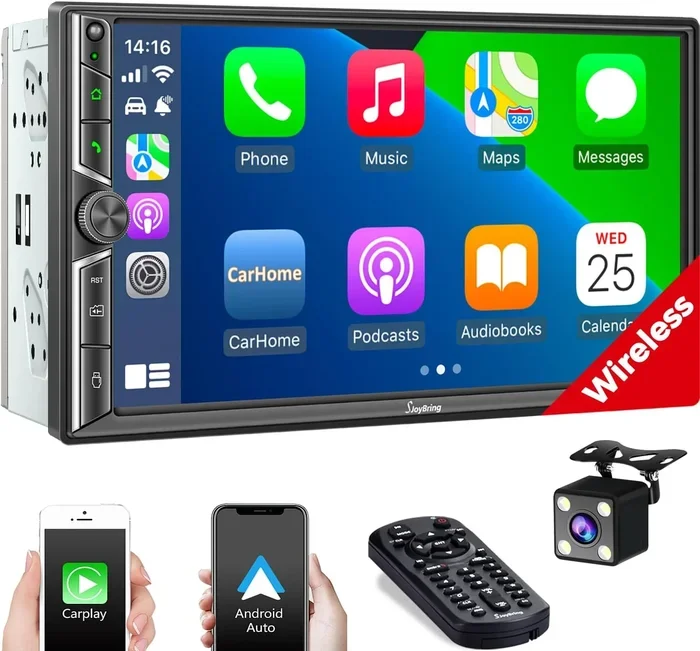
You can find Bluetooth car stereos from brands like Pioneer, Kenwood, and Sony. They come with features like GPS navigation, backup camera support, and smartphone integration through Apple CarPlay or Android Auto. The cost ranges from $100 to $400 for the unit, plus installation if you do not do it yourself.
This method takes more effort and money, but it gives you the most complete upgrade. Your car radio will feel brand new, and you will have Bluetooth for years to come.
Best Bluetooth Adapters and Receivers for Car Radios
Not all Bluetooth adapters are the same. Some offer better audio quality, while others are easier to use. Here are some top options to consider for your car.
Top Picks for FM Transmitters
- Nulaxy K3: This is one of the best-selling FM transmitters on the market. It has a clear display, USB charging port, and supports both Bluetooth 4.2 and 5.0. It costs around $20 and works well in most vehicles.
- Scosche Rhythm+: A reliable option with good sound quality and a long battery life. It also supports USB-C charging for newer phones.
- Belkin Boost Up: A premium FM transmitter with excellent signal stability and minimal static. It is a bit pricier but delivers consistent performance.
Top Picks for Bluetooth Receivers
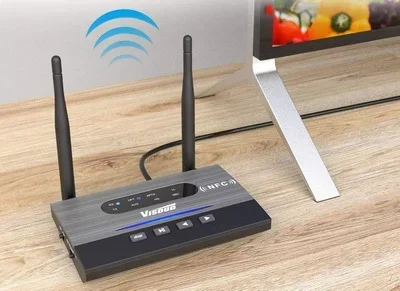
- 1Mii B06: A compact receiver with Bluetooth 5.0 and aptX codec support. It delivers near-lossless audio quality. It costs about $25 and works great with any AUX input.
- Avantree DG40: A slightly more expensive option with excellent range and low latency. Great if you also want to use it for gaming or watching videos in your car.
- TaoTronics TT-BA07: A budget-friendly receiver with solid sound and a long battery life. It is perfect for those who want a simple, no-fuss setup.
Top Picks for Full Stereo Replacements
- Pioneer DMH-WT7600NEX: A premium touchscreen stereo with wireless Apple CarPlay, Android Auto, and Bluetooth 5.0. It is ideal for those who want a complete car entertainment system overhaul.
- Kenwood DMX709S: A feature-rich stereo with a large display, built-in GPS, and excellent Bluetooth audio quality.
- Sony XAV-AX1000: A solid mid-range option with good sound, Bluetooth connectivity, and smartphone integration at an affordable price.
Step-by-Step: How to Install Bluetooth in Your Car Radio
Installing Bluetooth in your car radio is easier than most people think. You do not need to be a mechanic or an audio expert. Here is how to do it for each method.
Installing an FM Bluetooth Transmitter
- Plug the transmitter into your car’s cigarette lighter or 12V USB port.
- Turn on your car radio and tune it to an empty FM frequency.
- Set the transmitter to the same FM frequency.
- Turn on Bluetooth on your phone.
- Search for Bluetooth devices and select the transmitter.
- Enter the PIN if prompted, usually 0000 or 1234.
- Start playing music on your phone. It should now come through your car speakers.
That is it. The whole process takes less than five minutes. You can move the transmitter around to find the best spot for signal strength. Some drivers place it on the dashboard near the windshield for the clearest connection.
Installing a Bluetooth Receiver
- Locate the AUX input on your car radio. It is usually a 3.5mm port on the front or face of the stereo.
- Plug the Bluetooth receiver into the AUX port.
- Turn on the receiver and put it in pairing mode.
- Go to your phone’s Bluetooth settings and find the receiver.
- Tap to pair the devices.
- Play music on your phone. The sound will come through your car radio.
If your receiver has a USB charging port, you can plug it into a USB port in your car. This keeps the receiver powered and your phone charged at the same time. It is a very clean setup that stays hidden from view.
Installing a New Bluetooth Car Stereo
- Buy a Bluetooth stereo that fits your car’s dash size (usually DIN or double-DIN).
- Disconnect your car battery to avoid electrical issues.
- Remove the old stereo from the dash using a removal kit.
- Unplug the wiring harness from the old stereo.
- Connect the wiring harness adapter to the new stereo.
- Mount the new stereo in the dash and secure it.
- Reconnect the car battery and power on the new stereo.
- Pair your phone via Bluetooth and test the sound.
If you are not comfortable doing this yourself, a local car audio shop can install the stereo for you. Most shops charge between $50 and $100 for installation. It is a worthwhile investment if you are not handy with tools.
Tips for Better Sound Quality and Wireless Streaming
Adding Bluetooth to your car radio does not automatically mean perfect sound. You can take steps to improve your audio quality and get the best experience possible.
Choose the Right Bluetooth Codec
Bluetooth codecs affect how your music sounds. The most common codec is SBC, which is standard but not the best. If your adapter supports aptX or LDAC, use those instead. They deliver richer, clearer sound with less compression. Check your device specs to see which codecs it supports.
Keep Your Phone Close to the Adapter
Bluetooth signals weaken with distance. Keep your phone within a few feet of the adapter or receiver for the strongest connection. If your phone sits in a back pocket or a bag, you may experience dropouts or lower audio quality.
Avoid Signal Interference
Other wireless devices can interfere with your Bluetooth connection. Wi-Fi routers, other phones, and even microwaves can cause issues. If you notice static or connection drops, move away from other electronic devices and try again.
Update Your Devices Regularly
Keep your phone and Bluetooth adapter updated. Manufacturers often release firmware updates that improve connection stability and sound quality. Check for updates in your phone settings and on the adapter manufacturer’s website.
Use High-Quality Music Files
Streaming services compress music to save data. If you want the best sound, download high-quality tracks or use a streaming service with lossless audio. Spotify, Tidal, and Apple Music all offer high-quality streaming options that sound much better over Bluetooth.
Common Mistakes to Avoid When Adding Bluetooth
Adding Bluetooth to your car radio is straightforward, but people make mistakes that cause frustration. Here are some common errors to avoid.
Buying the Wrong Adapter for Your Car
Not every Bluetooth adapter works with every car radio. Make sure you know what inputs your stereo has before buying. If you do not have an AUX port, an FM transmitter is your best bet. If you have USB input, some adapters can plug in there too.
Ignoring Sound Quality for Price
Cheap FM transmitters are fine for calls, but they often struggle with music quality. If you care about sound, invest in a good Bluetooth receiver or a quality adapter that supports aptX. You will notice the difference immediately.
Forgetting to Pair Your Phone Properly
Many people skip the pairing process or do it incorrectly. Always put your adapter in pairing mode first. Then search from your phone. If it does not connect, delete the old pairing and try again. A clean pairing process prevents most connection issues.
Overlooking Battery and Power Issues
Some Bluetooth adapters run on batteries that die quickly. Others need constant power from your car. Make sure your adapter has a reliable power source. A USB-powered adapter that connects to your car’s USB port is usually the most dependable choice.
Expert Insights on Car Audio Upgrades
We spoke with a few car audio specialists about adding Bluetooth to your car radio. Here is what they had to say.
“The easiest and most affordable upgrade is a Bluetooth receiver with AUX input,” says Mike Torres, a car audio technician with 15 years of experience. “It costs less than $25, takes two minutes to set up, and delivers great sound quality. Most car owners do not even realize they have been missing out on wireless streaming.”
“If someone wants a full experience, replacing the stereo is the way to go,” adds Torres. “Modern stereos with Apple CarPlay and Android Auto change the entire driving experience. You get navigation, voice control, and seamless Bluetooth connectivity all in one unit.”
“One thing people overlook is the importance of a clean FM frequency for transmitters,” notes Sarah Chen, an automotive audio reviewer. “In cities with lots of radio stations, finding an empty frequency can be challenging. A Bluetooth receiver is always the better choice in urban areas.”
“For the best sound quality, look for adapters that support aptX or AAC codecs,” recommends David Park, a Bluetooth technology expert. “Standard Bluetooth compression reduces audio quality noticeably. Codec support makes a real difference in how your music sounds through your car speakers.”
Key Takeaways
- Multiple options exist: You can use FM transmitters, Bluetooth receivers, or replace your entire car stereo to get wireless connectivity.
- Check first: Many modern car radios already have built-in Bluetooth, so you may not need to add anything at all.
- Sound quality varies: The method you choose directly impacts audio quality, so pick the option that matches your expectations.
- Installation is simple: Most Bluetooth add-ons plug in and go, requiring no tools or technical expertise.
- Budget-friendly: You can get Bluetooth working in your car for as little as $15 to $50, or spend more for premium sound.
- Hands-free calling: Adding Bluetooth gives you safe, legal hands-free calling while driving.
- Compatibility matters: Always check that the Bluetooth adapter you choose works with your specific car radio model.
Conclusion
The answer to the question “Can I add Bluetooth to my car radio” is a clear and definitive yes. You have more options today than ever before, and they all work well. Whether you choose a simple FM transmitter, a compact Bluetooth receiver, or a full stereo replacement, you will enjoy wireless music streaming and hands-free calling in no time.
Start by checking if your car radio already has Bluetooth. If it does not, pick the method that fits your budget and your car’s setup. The FM transmitter is the cheapest and easiest option. The Bluetooth receiver offers better sound with minimal effort. And a new car stereo gives you the complete package.
Do not let an old car radio hold you back from enjoying your favorite music the way it was meant to be heard. Adding Bluetooth to your car radio is a small change that makes a big difference every time you drive. Try one of these methods today and feel the difference on your very next trip.
Frequently Asked Questions
Can I add Bluetooth to any car radio?
Yes, you can add Bluetooth to almost any car radio. The method depends on what inputs your stereo has. If you have an AUX port, a Bluetooth receiver works great. If not, an FM transmitter is a universal solution. Even older radios with cassette decks can use special Bluetooth cassette adapters.
Does adding Bluetooth reduce sound quality?
It can, but not always. Standard Bluetooth compresses audio, which slightly reduces quality. However, adapters that support aptX or AAC codecs deliver near-CD quality sound. An FM transmitter may have more static than a direct AUX connection. Overall, the quality is good enough for most listeners.
How much does it cost to add Bluetooth to a car radio?
The cost depends on the method. FM transmitters cost $15 to $40. Bluetooth receivers cost $15 to $30. Full stereo replacements range from $100 to $400 for the unit alone. Installation for a new stereo adds $50 to $100 if you hire a professional.
Is it legal to use Bluetooth while driving?
Yes, Bluetooth hands-free calling is legal in most states and countries. It is much safer than holding your phone while driving. Many regions have laws against handheld phone use, and Bluetooth helps you comply with those laws easily.
How do I pair my phone with a Bluetooth car adapter?
Turn on Bluetooth on your phone. Put the adapter into pairing mode. Search for available devices on your phone and select the adapter. Enter the PIN if prompted, usually 0000 or 1234. Once paired, your phone will connect automatically next time you start the car.
Can I use Bluetooth and play music from my phone while charging it?
Yes, most Bluetooth adapters and receivers have a USB port for charging. You can stream music and charge your phone at the same time. Just make sure your car has a free USB port or use the adapter’s built-in USB port if it has one.