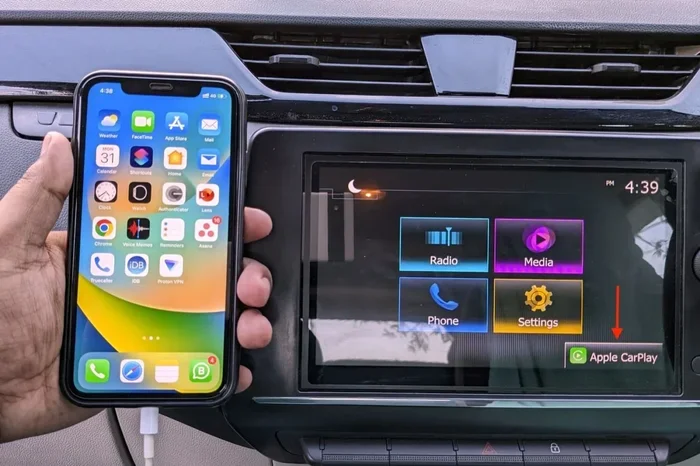
Can You Use Apple Carplay With Bluetooth for Music and More
Yes, you can use Apple CarPlay with Bluetooth, but it depends on your car and iPhone model. Wireless Apple CarPlay streams music, maps, and calls through a Bluetooth connection without any cables. This guide covers setup steps, common problems, and expert tips to help you get the most out of your Apple CarPlay With Bluetooth experience.
Have you ever wondered whether you can use Apple CarPlay With Bluetooth to enjoy your favorite music and apps while driving? You are not alone. Millions of drivers want to go wireless with their car infotainment systems, and the good news is that it is possible in many cases.
Apple CarPlay brings your iPhone experience right to your car screen. You get maps, music, messages, and more, all without taking your eyes off the road. But how does Bluetooth fit into the picture? And can you truly go fully wireless? Let us break it all down in simple terms.
In this article, we will walk you through everything you need to know about using Apple CarPlay With Bluetooth. From setup steps to troubleshooting tips, you will find practical advice that works whether you drive a new sedan or an older model. We will also compare Bluetooth to USB connections so you can pick the best option for your needs.
Key Takeaways
- Wireless CarPlay uses Bluetooth: You can stream music, get directions, and make calls without plugging in a cable.
- Not all cars support it natively: Some vehicles need a software update or a Bluetooth adapter to work with Apple CarPlay.
- Bluetooth and USB both work: Each has pros and cons for audio quality, convenience, and reliability.
- Setting up is simple: Just pair your iPhone, enable CarPlay in settings, and you are good to go.
- Common issues have easy fixes: Most Bluetooth CarPlay problems can be solved with a quick restart or settings check.
- Accessories help older cars: Bluetooth transmitters and adapters can add wireless CarPlay to almost any vehicle.
📑 Table of Contents
- What Is Apple CarPlay and How Does Bluetooth Fit In?
- Can You Use Apple CarPlay With Bluetooth Wirelessly?
- How to Set Up Apple CarPlay Using Bluetooth
- Bluetooth vs. USB Connection for Apple CarPlay
- Common Apple CarPlay Bluetooth Problems and Fixes
- Tips for the Best Apple CarPlay Bluetooth Experience
- Can You Make Your Car Bluetooth Capable for CarPlay?
- Conclusion
What Is Apple CarPlay and How Does Bluetooth Fit In?
Apple CarPlay is a smart system that mirrors key parts of your iPhone onto your car’s display. It was designed by Apple to keep drivers connected while staying safe. You can access phone calls, text messages, music apps like Spotify and Apple Music, and navigation tools like Google Maps and Apple Maps.
Bluetooth plays a big role in this setup. It is the wireless technology that lets your iPhone talk to your car without a cable. When you pair your phone via Bluetooth, you can make calls, stream audio, and in some cases, use the full CarPlay interface without plugging anything in.
How Bluetooth Connects Your Phone to Your Car
Bluetooth uses short-range radio waves to create a connection between two devices. In the car world, this means your iPhone and your car’s infotainment system can communicate wirelessly. Once paired, the devices remember each other and reconnect automatically when you get in the car.
The Bluetooth connection handles audio streaming and call audio. For basic functions like playing music and taking calls, Bluetooth works great. But Apple CarPlay With Bluetooth goes further by sending screen data too, which requires a stronger and more stable connection.
Can You Use Apple CarPlay With Bluetooth Wirelessly?
The short answer is yes, but with some important details. Wireless Apple CarPlay was introduced by Apple in iOS 12. This means newer iPhones and newer car models can use CarPlay without any cables. The connection relies on both Bluetooth and Wi-Fi working together behind the scenes.
Here is something many people do not know. Bluetooth alone does not carry all the data that CarPlay needs. When you use wireless CarPlay, your phone actually uses Bluetooth for the initial handshake and then switches to a Wi-Fi Direct connection for the heavy lifting. So it is really a Bluetooth and Wi-Fi combo that makes Apple CarPlay With Bluetooth work wirelessly.
Which Cars Support Wireless Apple CarPlay?
Many modern cars now come with wireless CarPlay built in. Brands like BMW, Mercedes-Benz, Honda, Toyota, and Ford have added support in their newer models. If your car was made after 2019 or 2020, there is a good chance it supports wireless Apple CarPlay.
However, older cars may not have this feature. If your car’s infotainment system only supports wired CarPlay, you can still use Bluetooth for calls and audio. But to get the full CarPlay screen experience, you might need a cable or an aftermarket adapter.
What You Need for Wireless CarPlay
To use Apple CarPlay With Bluetooth wirelessly, you need a few things in place. First, your iPhone must be running iOS 12 or later. Most people today are on much newer versions, so this is usually not a problem. Second, your car must support wireless CarPlay natively or through a compatible head unit. Third, both your phone and car must have Bluetooth and Wi-Fi turned on.
Some cars require you to enable wireless CarPlay in the settings menu. This is usually found under the Bluetooth or infotainment settings. Once enabled, your iPhone will prompt you to connect the next time you get in the car.
How to Set Up Apple CarPlay Using Bluetooth
Setting up Apple CarPlay With Bluetooth is straightforward. Follow these steps and you will be streaming music and getting directions in no time.
- Turn on Bluetooth on your iPhone. Go to Settings, then Bluetooth, and make sure it is switched on.
- Turn on Wi-Fi as well. Wireless CarPlay needs both Bluetooth and Wi-Fi to work properly.
- Start your car or turn on the infotainment system.
- Go to the Bluetooth settings on your car screen and look for your iPhone.
- Select your iPhone from the list of available devices to pair it.
- Follow any on-screen prompts on both your car and your phone to complete the connection.
- Open CarPlay from your car’s app menu. You should see your CarPlay home screen appear.
Once paired, your iPhone will automatically connect to your car every time you get in. This makes the process seamless and hands-free, which is exactly what you want while driving.
Setting Up Bluetooth CarPlay on Older Cars
If your car does not support CarPlay at all, you still have options. You can use Bluetooth for basic audio streaming and hands-free calling. But if you want the full CarPlay experience, consider a Bluetooth adapter or a CarPlay-enabled receiver. These devices plug into your car’s audio system and add modern connectivity.
For example, some drivers use a Bluetooth transmitter for their car to add wireless capabilities to older audio systems. This is a simple and affordable way to enjoy streaming music and take calls without wires. Just keep in mind that a basic Bluetooth transmitter will not give you the full CarPlay interface. It mainly handles audio streaming and calls.
Bluetooth vs. USB Connection for Apple CarPlay
When it comes to Apple CarPlay With Bluetooth, many drivers wonder whether Bluetooth or USB is better. Both options have their strengths. Let us compare them so you can decide what works best for you.
| Feature | Bluetooth | USB Cable |
|---|---|---|
| Wireless Convenience | No cables needed | Requires plugging in |
| Setup Speed | Fast once paired | Quick plug-and-play |
| Audio Quality | Good, but compressed | Better, less compressed |
| Reliability | Can have interference | Very stable |
| Full CarPlay Features | Yes, wireless CarPlay | Yes, all features |
| Charging | Phone charges separately | Phone charges while connected |
| Best For | Newer cars, clean setup | Older cars, maximum reliability |
Most drivers find that Bluetooth is the more convenient option. You do not have to deal with cables, and your phone charges on its own. However, if audio quality is your top priority, a USB connection delivers a cleaner, more detailed sound.
For many people, the choice comes down to their car model. If your car supports wireless CarPlay, Bluetooth is the way to go. If your car only has a USB port for CarPlay, you will want to use a cable for the best experience. Some drivers keep both options available and switch between them depending on the situation.
Can You Use Both Bluetooth and USB at the Same Time?
Yes, in many cases you can. Your car’s system can handle Bluetooth for calls and Wi-Fi for the CarPlay data connection, even if you also have a USB cable plugged in. This can actually improve stability. If you notice your wireless CarPlay dropping, try plugging in a USB cable as a backup. It can help maintain a steady connection.
Common Apple CarPlay Bluetooth Problems and Fixes
Even though Apple CarPlay With Bluetooth works well most of the time, it is not perfect. Every driver has run into issues at some point. Here are the most common problems and how to fix them.
CarPlay Does Not Connect Automatically
If your CarPlay does not connect when you get in the car, the first thing to check is your Bluetooth and Wi-Fi settings. Make sure both are turned on. Then go to your iPhone’s CarPlay settings and make sure your car is set as the preferred device. Sometimes a simple restart of both your phone and your car’s infotainment system solves the problem.
Audio Cuts Out or Crackles
Bluetooth audio interference can cause crackling or dropouts. This happens when other wireless devices nearby compete for the same signal. To fix this, move your phone closer to the car’s antenna, which is usually near the front windshield. You can also try turning off other Bluetooth devices in the car, like headphones or speakers.
If the problem persists, unpair your phone from the car and then pair it again. This refreshes the connection and often resolves audio issues. Keeping your iPhone and car software up to date also helps prevent these problems.
CarPlay Screen Freezes or Goes Black
A frozen or black CarPlay screen is frustrating but usually easy to fix. Try disconnecting Bluetooth on your phone and then reconnecting it. You can also restart your iPhone and try again. If the problem happens often, check for iOS updates. Apple regularly releases fixes for CarPlay connectivity bugs.
Calls Work but Music Does Not Stream
This is a common issue with Bluetooth CarPlay. Your phone connects for calls but does not stream music through the car speakers. The fix is usually to check your car’s audio source setting. Make sure it is set to Bluetooth Audio or CarPlay, not just Bluetooth Phone. This tells the car to use the Bluetooth connection for music streaming, not just calls.
Tips for the Best Apple CarPlay Bluetooth Experience
Getting the most out of Apple CarPlay With Bluetooth is all about a few smart habits. Here are some tips that make a big difference.
- Keep your iPhone updated. Apple releases updates that improve CarPlay stability and Bluetooth performance. Always install the latest iOS version.
- Restart your car’s infotainment system regularly. Just like your phone, your car’s computer benefits from a fresh start. Turn it off and back on once a week.
- Forget old Bluetooth pairings. If your car has connected to many devices in the past, clear out the old ones. This keeps your connection clean and fast.
- Place your phone in a good spot. For the strongest Bluetooth signal, keep your iPhone in a mount near the center of the dashboard. Avoid the glove box or back seat.
- Use Siri for hands-free control. You can ask Siri to play music, make calls, or get directions without touching your phone. This is safer and more convenient while driving.
- Consider a Bluetooth car adapter for older vehicles. If your car does not support CarPlay at all, a Bluetooth adapter can add modern wireless features. Look for one that supports audio streaming and hands-free calling.
Expert Insight: Why Bluetooth CarPlay Is Getting Better Every Year
Apple and car manufacturers are constantly improving wireless CarPlay. Newer versions of iOS use smarter Bluetooth protocols that reduce lag and improve connection stability. Wi-Fi Direct technology also plays a bigger role now, allowing faster data transfer between your phone and car screen.
Some car makers are even switching to Bluetooth-only CarPlay setups that do not need Wi-Fi at all. This simplifies the connection process and makes wireless CarPlay more reliable. As more cars adopt these newer standards, the experience of using Apple CarPlay With Bluetooth will only get smoother.
If you are still using a wired connection, now is a great time to explore wireless options. Many aftermarket head units and adapter kits make the switch easy and affordable. You do not need to buy a new car to enjoy wireless CarPlay.
Can You Make Your Car Bluetooth Capable for CarPlay?
If your older car does not have Bluetooth or CarPlay built in, you are not out of luck. There are several ways to add wireless capabilities to almost any vehicle. The right solution depends on your car’s audio system and your budget.
Option 1: Bluetooth Car Adapter
A Bluetooth car adapter plugs into your car’s audio input, such as the AUX port or CD changer port. It creates a wireless bridge between your phone and your car speakers. These adapters are affordable and easy to install. They handle audio streaming and calls well, but they do not provide the full CarPlay screen interface.
Option 2: Aftermarket Head Unit
Replacing your car’s factory head unit with an aftermarket one is the most thorough solution. Many modern head units support both wireless CarPlay and Bluetooth. You get the full CarPlay experience with maps, music, and calls on a big screen. Brands like Pioneer, Kenwood, and Alpine offer great options at different price points.
Some drivers also explore options like making their car radio Bluetooth capable with a simple add-on module. These small devices integrate into your existing system and add wireless connectivity without a full head unit replacement. They are a great middle-ground option for drivers who want wireless audio without a major upgrade.
Option 3: Bluetooth Transmitter
A Bluetooth transmitter is the simplest and cheapest option. It plugs into your car’s AUX or cigarette lighter port and broadcasts audio to your car speakers over Bluetooth. It works well for music and calls, but it does not support the visual CarPlay interface. It is a good choice for drivers who mainly want wireless audio.
For drivers who want to upgrade their car’s audio without replacing the whole system, these options are worth exploring. Each one brings you closer to the Apple CarPlay With Bluetooth experience, even if your car is older.
Conclusion
Using Apple CarPlay With Bluetooth is a convenient and modern way to enjoy your favorite music, get directions, and stay connected while driving. Whether your car supports wireless CarPlay natively or you need an adapter to add the feature, the options are plentiful and accessible.
The key takeaway is that Bluetooth works well with Apple CarPlay for most drivers. Wireless CarPlay uses Bluetooth and Wi-Fi together to deliver a cable-free experience that is clean and easy to use. If you run into issues, the fixes are usually simple and quick. Keep your devices updated, maintain good Bluetooth settings, and consider accessories like adapters or transmitters for older cars.
Now that you know how Apple CarPlay With Bluetooth works, you can make the best choice for your driving setup. Whether you go wireless or stick with a USB cable, the goal is the same: a safer, more enjoyable driving experience. Try these tips today and see how much smoother your next drive can be.
Frequently Asked Questions
Can I use Apple CarPlay with Bluetooth without Wi-Fi?
No, wireless Apple CarPlay needs both Bluetooth and Wi-Fi to work. Bluetooth handles the initial pairing, and Wi-Fi carries the data for the CarPlay interface. You cannot use the full wireless CarPlay experience with Bluetooth alone.
Why does my Apple CarPlay Bluetooth connection keep dropping?
Bluetooth connections can drop due to interference from other devices or distance from the car’s antenna. Try moving your phone closer to the dashboard, restarting both devices, or unpairing and re-pairing the connection. Keeping your iPhone and car software updated also helps prevent drops.
Can I use Apple CarPlay with Bluetooth in any car?
Not every car supports Apple CarPlay, even with Bluetooth. Your car needs to have a compatible infotainment system. If your car does not support CarPlay, you can still use Bluetooth for audio and calls, or add wireless features with an aftermarket adapter or head unit.
Is Bluetooth CarPlay audio quality as good as USB?
USB generally delivers better audio quality because it sends an uncompressed signal. Bluetooth compresses audio slightly, which most people do not notice in everyday driving. If you are an audiophile who cares about every detail, USB is the better choice for music quality.
How do I switch between Bluetooth and USB for Apple CarPlay?
Simply unplug the USB cable if you want to use Bluetooth, or plug in the cable if you want to switch to USB. Your car should recognize the change and switch modes automatically. You can also adjust this in your car’s source or input settings.
Can I make phone calls through Apple CarPlay using Bluetooth?
Yes, Bluetooth CarPlay supports hands-free calling. You can make and receive calls through your car’s speakers and microphone using Siri or your car’s call controls. This works safely without you needing to touch your phone while driving.