Did Any CRT TVs Have HDMI Ports And How To Use Them
No mainstream CRT TVs came with built-in HDMI ports. CRT technology predates HDMI by nearly a decade, but you can still connect HDMI devices to a CRT TV using an analog-to-digital converter or HDMI adapter. This guide covers everything you need to know about CRT TV HDMI compatibility, including the best converters, setup tips, and common mistakes to avoid.
Did any CRT TVs have HDMI? It is a question that pops up more often than you might think. If you have an old CRT television sitting in a garage or basement, you might wonder whether it can keep up with modern devices. The short answer is no. But the full story is much more interesting.
CRT stands for Cathode Ray Tube. This was the dominant display technology for decades. CRT TVs ruled living rooms from the 1950s all the way through the early 2000s. HDMI, on the other hand, did not become mainstream until around 2003 to 2004. By that time, flat-screen TVs like LCD and plasma were already starting to take over. So the timing never aligned for CRT manufacturers to include HDMI ports.
But here is the good news. You can still connect HDMI devices to a CRT TV. You just need the right HDMI adapter or analog-to-digital converter. Whether you want to hook up a retro console, a streaming stick, or a modern Blu-ray player, there are ways to make it work. This guide will walk you through everything you need to know.
Key Takeaways
- CRT TVs did not have HDMI ports: The technology existed before HDMI became standard in the mid-2000s.
- You need an HDMI converter box: An analog-to-digital converter bridges the gap between modern HDMI devices and old CRT displays.
- Composite and component video were the standard inputs: CRT TVs relied on composite video, component video, and SCART adapters for connectivity.
- Picture quality depends on the converter: A good upscaling device can significantly improve the screen resolution you see on a CRT TV.
- Retro gaming benefits from HDMI adapters: Using an HDMI adapter with a CRT TV can reduce input lag and improve display technology performance for older consoles.
- Avoid common setup mistakes: Wrong cable choices and poor signal conversion can ruin your viewing experience.
📑 Table of Contents
The Short Answer: Did Any CRT TVs Have HDMI?
The honest answer is no. No mainstream CRT TV ever came factory-installed with an HDMI port. Every single CRT television relied on older connection types. These included composite video cables, component video inputs, SCART adapters, and RF antenna connections. Some higher-end models even offered VGA connection options for computer use.
Why is that? It all comes down to timing. CRT technology peaked in the 1990s and early 2000s. The HDMI standard was introduced in 1999 but did not gain widespread adoption until the mid-2000s. By the time HDMI became popular, the market had already shifted toward flat-panel displays. Manufacturers stopped producing CRT TVs around 2006 to 2008 in most countries.
So if you are looking for a CRT TV with a built-in HDMI port, you will be searching for a very long time. There were a few experimental or niche models from Asia, but nothing that ever reached mass production or mainstream stores. The legacy TV world simply operated on different standards.
That does not mean your CRT TV is useless with modern gear. It just means you need a bridge between the old and the new. And that is exactly what this article is about.
Why CRT TVs Didn’t Include HDMI Ports
Understanding why CRT TVs never got HDMI ports helps you appreciate the technology gap. It is not just about missing a port. It is about two completely different eras of video output technology.
The Technology Timeline
CRT technology dates back to the early 20th century. The first CRT television sets hit the market in the late 1920s. For over 70 years, this was the only game in town. The signals these TVs received were analog. They carried picture information through electrical waves over composite video or RF antenna connections.
HDMI is a digital signal standard. It was developed by a group of electronics companies in the late 1990s. The first HDMI specification launched in 2002. It was designed for a new generation of digital displays. Flat-panel TVs, projectors, and computer monitors were the target. CRT technology was already on its way out by the time HDMI arrived.
The mismatch is clear. CRT TVs were built to process analog signals. HDMI sends a completely digital signal. The two technologies do not speak the same language without a translator. That translator is the converter box.
Analog vs Digital Signals
Analog signals work by sending continuous electrical waves. They carry picture and sound information through varying voltage levels. This is how CRT televisions have always worked. The electron beam inside the tube scans the screen and recreates the image based on those electrical signals.
Digital signals work differently. They send data in binary code, ones and zeros. HDMI transmits both audio and video through a single digital cable. This is why you need a converter to translate digital HDMI signals into the analog format a CRT TV can understand.
The difference matters a lot when you are setting up your system. Using the wrong approach will lead to a blank screen, poor picture quality, or no sound at all.
How To Connect HDMI To A CRT TV
Now for the practical part. You have a CRT TV and you want to connect an HDMI device. What do you do? You need an HDMI converter box that takes the digital HDMI signal and converts it to an analog output your CRT can use.
What You Need Before You Start
Before you buy anything, gather these items. You will need your CRT TV with its original cables. You will need an HDMI cable to connect your source device. Most importantly, you need a reliable analog-to-digital converter or HDMI to composite converter. Some converters also include VGA connection options, which can be useful depending on your TV model.
Here is a simple shopping list to keep in mind:
- HDMI to composite converter box or HDMI to component converter
- Composite video cables (red, white, and yellow RCA cables)
- HDMI cable for your source device
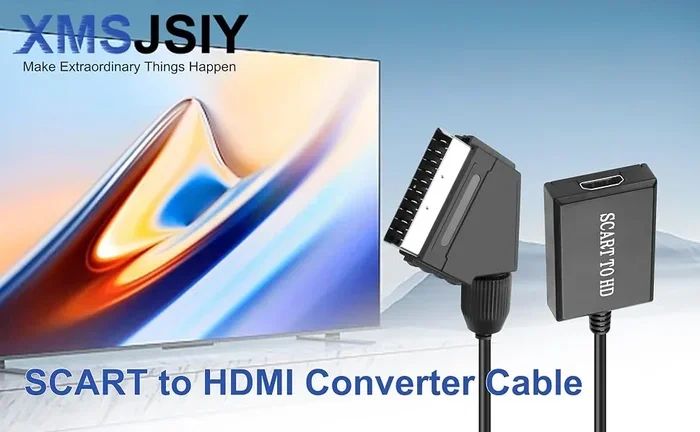
- SCART adapter if your CRT TV uses SCART inputs
- Power supply for the converter box
Step-by-Step Connection Process
Setting up your HDMI-to-CRT connection is straightforward once you have the right gear. Follow these steps and you will be watching in no time.
First, plug your HDMI cable into your source device. This could be a streaming stick, a game console, or a Blu-ray player. Run the other end of the HDMI cable into the input port on your converter box.
Next, connect the converter box to your CRT TV. Use the composite video cables for the basic setup. Plug the yellow RCA cable into the video output on the converter. Plug the red and white cables into the audio outputs. Connect the other ends to the matching inputs on your CRT TV.
Power on the converter box. Switch your CRT TV to the correct input channel. Most CRT TVs use channel 3 or 4 for composite inputs. You should see a picture on your screen now.
If your converter box has an upscaling device feature, turn it on. This will help improve the screen resolution and make the image look sharper on your CRT display. Adjust the converter settings until the picture looks clear and stable.
One important tip. Keep your cables as short as possible. Longer cables can cause signal loss, especially with analog connections. This is especially true for component video setups where you are splitting the signal across three separate cables.
Best Adapters And Converters For HDMI On CRT TVs
Not all converters are created equal. Some deliver excellent picture quality while others introduce lag, distortion, or color issues. Choosing the right HDMI adapter makes all the difference.
Top Converter Options
When shopping for a converter, look for these features. A good converter should support both audio and video conversion. It should offer composite video and component video output options. The best units also include SCART adapter compatibility for European CRT TVs.
Some converters are designed specifically for retro gaming. These units prioritize low input lag and clean signal conversion. If you are connecting a classic game console like a SNES, Sega Genesis, or PlayStation 2, look for converters that advertise gaming compatibility.
For general home use, a basic HDMI to composite converter works perfectly. These are affordable and easy to set up. They handle streaming sticks, DVD players, and older devices with ease.
What To Look For In A Converter
Here are the key features to check before buying:
- Signal conversion quality: Look for converters that handle digital to analog conversion cleanly without introducing noise or artifacts.
- Output options: Choose a unit that offers both composite and component outputs for maximum flexibility with your CRT television.
- Audio support: Make sure the converter handles stereo audio. Some budget models drop the audio signal entirely.
- Resolution support: A good converter should handle standard definition signals well. CRT TVs typically display at 480i or 480p resolution.
- Build quality: Sturdy construction and reliable connectors last longer and provide a more stable connection.
Tips For The Best Picture Quality When Using HDMI With CRT TVs
Getting the best possible picture from your CRT TV through an HDMI setup takes a little tweaking. Here are some practical tips that make a real difference.
Adjust Your Converter Settings
Most HDMI converter boxes come with adjustment options. Spend a few minutes exploring the menu. You can usually adjust brightness, contrast, and color saturation. These settings let you tune the picture to match what your CRT TV displays best.
Start with the default settings and then make small changes. Push the contrast up gradually until the whites look clean but not washed out. Adjust brightness so the blacks look deep without losing detail in dark scenes.
Use Component Video When Possible
If your CRT TV has component video inputs, always use them instead of composite. Component video splits the signal into three separate cables. This delivers a noticeably sharper and more colorful image compared to the single composite cable.
The difference is especially visible when you are watching high definition content. Even though a CRT TV cannot display true HD, the component connection makes standard definition content look much better.
Keep Your CRT TV Clean
This sounds simple but it matters. Dust and grime on the CRT screen can reduce picture clarity. Use a soft microfiber cloth to gently clean the screen before you start watching. Never use harsh chemicals or abrasive materials on a CRT screen.
Match Your Source Device Output
Some modern devices let you choose the output resolution. If your streaming stick or console has this option, set it to 480p or 480i. This matches the native resolution of most CRT TVs and prevents unnecessary upscaling that can cause picture issues.
Common Mistakes When Using HDMI With CRT TVs
Even with the right gear, people make mistakes that ruin their experience. Avoid these common pitfalls and you will have a much smoother setup.
Using The Wrong Converter Type
The biggest mistake is buying the wrong type of converter. Some converters are designed for the opposite direction. They convert analog to digital, not digital to analog. Always double-check that your converter supports HDMI to composite or HDMI to component conversion. Buying the wrong one will leave you with a blank screen.
Ignoring Audio Connections
HDMI carries both audio and video. When you convert the signal, the audio needs a separate path. Many people forget to connect the red and white audio cables from the converter to their CRT TV. The result is a great picture with no sound. Always check both your audio and video connections before troubleshooting other issues.
Using Long or Cheap Cables
Long cables and budget cables can introduce signal degradation. With analog connections like composite video and component video, signal strength matters. Keep your cables short and use quality brands. A five-dollar cable from a reputable brand beats a two-dollar no-name cable every time.
Expecting True HD Quality
It is important to manage your expectations. A CRT TV cannot display high definition content the way a modern flat-screen TV can. The display technology simply is not capable of it. What you will get is a clean standard definition picture that looks great in its own right. Embrace the CRT aesthetic rather than expecting modern HD clarity.
Overlooking Power Supply Issues
Some converter boxes need their own power source. Do not assume they draw power from the HDMI connection alone. Always check the converter specifications and have the right power adapter ready. A converter without power will not work, no matter how good your cables are.
Conclusion
So did any CRT TVs have HDMI? The answer remains no. No mainstream CRT television ever included an HDMI port. But that does not mean you are stuck with an outdated setup. With the right HDMI adapter, analog-to-digital converter, or HDMI converter box, you can connect modern devices to your old CRT TV and enjoy them on a big screen.
The key is understanding the technology gap between analog CRT displays and digital HDMI signals. Once you have the right converter and cables, the setup is simple and rewarding. Whether you are into retro gaming, watching classic DVDs, or streaming your favorite shows, a CRT TV can still deliver a fantastic experience.
Take your time choosing the right converter. Use component video when you can. Adjust your settings for the best picture. And enjoy the unique charm that only a CRT television can provide. Your old TV still has plenty of life left in it.
Frequently Asked Questions
Can I connect a modern streaming stick to a CRT TV?
Yes, you can. You will need an HDMI to composite converter or an HDMI adapter that converts the digital signal to analog. Once connected through the converter, most streaming sticks work perfectly on a CRT TV. Just make sure your converter supports audio and video output.
Will a CRT TV display high definition content?
Not in true high definition. CRT TVs have a maximum screen resolution of about 480p or 480i. The display technology simply cannot render HD pixels. However, a good converter can upscale the signal so it looks as clear as possible on your CRT screen.
What is the best cable to use with a CRT TV and HDMI converter?
Component video cables offer the best picture quality when paired with an HDMI converter. They provide separate color and brightness channels for a sharper image. Composite video cables work too but deliver a lower quality picture with more color bleeding.
Do CRT TVs have any input lag when using HDMI converters?
CRT TVs naturally have very low input lag because of how the display technology works. The electron beam draws each frame instantly. However, some cheap HDMI converter boxes can add lag. Choose a converter designed for low latency if you are using it for gaming.
Can I use a SCART adapter with an HDMI converter for my CRT TV?
Yes. Many European CRT TVs use SCART inputs. You can find SCART adapters that work with most HDMI converter boxes. Just make sure the adapter supports both audio and video signals. Check the converter specifications before purchasing to confirm compatibility.
Are HDMI to CRT converters expensive?
Most HDMI converter boxes are quite affordable. Basic models range from twenty to fifty dollars. Higher-end units with better upscaling device features and lower input lag may cost more. For casual viewing and retro gaming, a budget converter works just fine.