How Do I Connect My Airpods To My United Flight Quickly
Connecting your Airpods to a United Airlines flight is simple and takes just a few minutes. This guide covers the exact steps to pair your wireless earbuds with United’s in-flight Bluetooth system, troubleshoot common issues, and enjoy the best audio experience at 35,000 feet. Follow our tips for a hassle-free flight.
Key Takeaways
- United Airlines supports Bluetooth on most flights: You can connect your Airpods directly to the seatback entertainment screen without extra equipment.
- Preparation is key: Charge your Airpods fully before the flight and put them in pairing mode for a smooth connection.
- Use airplane mode with Bluetooth enabled: This is the safest and most reliable way to connect wireless earbuds during a flight.
- Troubleshooting is straightforward: Resetting your Airpods, moving closer to the screen, or restarting the connection usually fixes most issues.
- A Bluetooth transmitter can help: If direct pairing does not work, a transmitter offers an alternative wireless connection method.
- Other airlines support Airpods too: Delta, American, and Southwest also offer Bluetooth audio options for wireless earbuds.
📑 Table of Contents
- How United Airlines In-Flight Entertainment Works with Wireless Earbuds
- Step-by-Step: Connecting Your Airpods to United In-Flight Entertainment
- Comparing Connection Methods for In-Flight Audio
- Troubleshooting Common Airpods Connection Issues on United Flights
- Tips for the Best In-Flight Audio Experience with Airpods
- Can You Use Airpods on Other Airlines?
- Final Thoughts: Enjoy Your United Flight with Airpods
How United Airlines In-Flight Entertainment Works with Wireless Earbuds
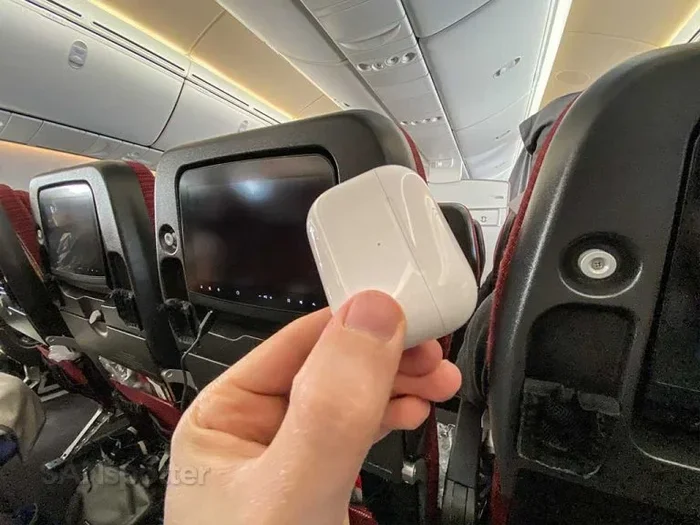
Flying with United Airlines can be a great experience, especially when you have your favorite music or movies to keep you entertained. But if you are wondering whether you can use your Airpods during a United flight, the answer is yes. United Airlines offers Bluetooth connectivity on many of its aircraft, which means you can go wireless and ditch those tangled earbuds for good.
Connecting your Airpods to a United flight is not as complicated as it might seem. Whether you have the standard Airpods, Airpods Pro, or Airpods Max, the process follows a similar pattern. You just need to know a few simple steps, and you will be listening to your favorite content in no time. This guide will walk you through everything you need to know, from preparation to troubleshooting.
Many travelers ask, can I use any Bluetooth headphones with my entertainment system? The answer depends on the aircraft and the system in place. United has been upgrading its fleet with modern entertainment options that support wireless connections. However, not every single flight or aircraft type offers the same experience. Let us break down exactly how this works and what you can expect.
Before you board your next United flight, it helps to understand the basics of how the in-flight entertainment system handles Bluetooth devices. This knowledge will make the connection process smoother and save you frustration mid-flight. Airpods are designed to pair easily with most Bluetooth-enabled systems, and United is no exception. The airline has invested heavily in its entertainment platform to keep passengers happy on long and short flights alike.
Understanding United’s In-Flight Bluetooth System
United Airlines uses a system called United Wi-Fi and its in-flight entertainment platform to offer passengers a range of options. On newer aircraft, you will find seatback screens that support Bluetooth audio streaming. This means you can connect your Airpods directly to the screen without any extra equipment. Older aircraft may not have this feature, but many still offer USB or auxiliary connections as a backup.
The Bluetooth feature on United flights allows you to stream audio from the seatback screen to your wireless earbuds. You do not need any special app or additional hardware in most cases. Just put your Airpods in pairing mode, search for the device on the screen, and you are good to go. It is a simple process that takes about one to two minutes.
It is worth noting that United’s Bluetooth system is designed specifically for audio streaming from the entertainment screen. You cannot use it to connect to the internet or stream from your own phone directly. The connection is between your Airpods and the seatback screen only. This keeps the system secure and prevents interference with the aircraft’s communication systems.
Which Airpods Models Work Best with United Flights
Most Airpods models are compatible with United’s in-flight Bluetooth system. Here is a quick look at which models work well:
- Airpods (1st, 2nd, and 3rd generation): All three generations connect easily to United’s Bluetooth system. The 3rd generation offers the best battery life for long flights.
- Airpods Pro: These work great with United flights. The active noise cancellation feature is a bonus when you want to block out engine noise.
- Airpods Max: The over-ear design provides excellent comfort for long flights, and the Bluetooth connection is stable and reliable.
When you are preparing for a flight, make sure your Airpods are fully charged. Nothing is worse than having your earbuds die halfway through a movie. A full charge typically gives you several hours of playback, which is more than enough for most domestic flights.
If you are also curious about pairing Airpods with other devices, you might want to check out our guide on Can I Pair My Airpods To My Switch. It covers the pairing process in detail and offers tips that apply to connecting Airpods with any Bluetooth-enabled device.
Step-by-Step: Connecting Your Airpods to United In-Flight Entertainment
Now that you understand the basics, let us get into the step-by-step process. Following these steps will help you connect your Airpods to the United in-flight entertainment system quickly and easily. Even if you are not tech-savvy, you will find this process straightforward.
Step 1: Prepare Your Airpods for Pairing
Before you can connect, you need to put your Airpods into pairing mode. Here is how to do it:
- Place both Airpods in their charging case.
- Open the lid of the case.
- Press and hold the small button on the back of the case until the LED light flashes white.
- Your Airpods are now in pairing mode and ready to connect.
This process puts your Airpods into what is called Bluetooth discovery mode. During this time, they will broadcast their presence to nearby devices, including the seatback entertainment screen on your United flight. Make sure the case lid stays open while you complete the next steps.
Step 2: Access the United Entertainment System
Once your Airpods are in pairing mode, it is time to access the in-flight entertainment system. Follow these steps:
- Wake up the seatback screen by touching it or pressing the power button.
- Navigate to the settings or connectivity menu.
- Look for the Bluetooth or wireless audio option.
- Select “Search for Devices” or “Pair New Device.”
- Your Airpods should appear in the list of available devices.
- Tap on your Airpods to complete the connection.
Once connected, you should hear a confirmation sound in your Airpods, and the screen will display a connected status. From that point on, all audio from the entertainment system will stream directly to your Airpods. You can now enjoy movies, TV shows, music, or games without any wires.
Step 3: Adjust Audio Settings for the Best Experience
After connecting your Airpods, you may want to adjust the audio settings. Most United entertainment systems let you control volume directly from the seatback screen. However, you can also adjust the volume using your Airpods if they support that feature. The Airpods Pro and Airpods Max both have built-in volume controls on the earbuds themselves.
It is also worth noting that some passengers prefer to use a Bluetooth transmitter for better audio quality. If you are interested in this option, you might find our article on Can I Use Any Bluetooth Headphones With My Tv helpful. It explains how Bluetooth transmitters work and why they can improve your wireless audio experience in different settings.
Comparing Connection Methods for In-Flight Audio
When it comes to listening to audio on a United flight, you have a few different options. Here is a comparison of the most common methods:
| Method | Pros | Cons |
|---|---|---|
| Bluetooth Direct | Wireless, easy to set up, no extra equipment needed | Not available on all aircraft, signal can be weak in back rows |
| Bluetooth Transmitter | Works on any aircraft with a headphone jack, better range | Requires extra equipment, needs batteries or charging |
| Aux Cable | Works on every aircraft, reliable connection | Wired, can be uncomfortable, shared jacks on some seats |
For most passengers, the direct Bluetooth connection is the best option. It is fast, wireless, and does not require any extra gear. However, if your aircraft does not support Bluetooth, the Bluetooth transmitter is an excellent backup option. And if you prefer a guaranteed connection, the aux cable always works.
Troubleshooting Common Airpods Connection Issues on United Flights
Even with the best preparation, sometimes things do not go as planned. Your Airpods might not connect right away, or the audio might cut out during your flight. This section covers the most common issues and how to fix them quickly so you can get back to enjoying your content.
Your Airpods Do Not Show Up on the Screen
If your Airpods do not appear in the list of available devices, do not panic. This is a common issue, and it usually has a simple fix. First, make sure your Airpods are still in pairing mode. The white flashing light should still be active. If it has stopped flashing, put them back in the case and repeat the pairing process.
Another common cause is that your Airpods are still connected to your phone or another device. Bluetooth devices can remember previously paired connections, which sometimes causes interference. Turn off Bluetooth on your phone or put your phone in airplane mode to eliminate this possibility.
Also, try moving your seat closer to the seatback screen. Bluetooth signals can be weak over long distances, and being too far from the source can prevent a successful connection. If you are seated in the back of the plane, this could be the culprit.
Audio Keeps Cutting Out or Freezing
If your Airpods connect but the audio keeps cutting out, the issue is usually related to signal interference or low battery. Here are some steps to try:
- Check your Airpods battery: Low battery can cause audio dropouts. Make sure both earbuds have enough charge before your flight.
- Move closer to the seatback screen: Reducing the distance between your Airpods and the screen can improve signal strength.
- Restart the connection: Disconnect your Airpods from the screen and reconnect them from scratch.
- Remove other Bluetooth devices: Other wireless devices in the cabin can cause interference. Turn off any unnecessary Bluetooth connections.
Sometimes the issue is with the entertainment system itself. In that case, you can ask a flight attendant for assistance. They are trained to help with in-flight entertainment problems and can often reset the system for you. Do not hesitate to ask for help early in the flight so you have time to enjoy your content.
What to Do If the Bluetooth Option Is Not Available
Not all United aircraft have Bluetooth-enabled entertainment systems. If you do not see a Bluetooth option on your seatback screen, you still have options. You can use the provided headphone jack with a standard aux cable. Alternatively, you can ask the flight crew if a Bluetooth transmitter is available for passengers who want to go wireless.
Some travelers also wonder about using their Airpods with other entertainment setups. If you are interested in how Bluetooth headphones work with different systems, you might enjoy reading about Can I Listen To My Samsung Tv With Bluetooth Headphones. It covers Bluetooth audio connections across different devices and platforms.
Tips for the Best In-Flight Audio Experience with Airpods
Getting your Airpods connected is only half the battle. To truly enjoy your flight, you want the best possible audio experience. Here are some practical tips to help you get the most out of your Airpods while flying United.
Charge Your Airpods Before the Flight
This might seem obvious, but it is worth repeating. Always charge your Airpods and their case before heading to the airport. A full charge gives you around 4.5 to 6 hours of listening time depending on the model. For long-haul flights, this might not be enough, so having a charged case with you is essential.
Pro tip: If you have a USB-C cable, you can charge your Airpods case during the flight using the seatback USB port. Many United aircraft now include USB ports for passenger charging. Just make sure you have the right cable in your carry-on bag. This small preparation can make a big difference on a long flight.
Use Noise Cancellation for a Better Experience
If you have Airpods Pro or Airpods Max, take advantage of the active noise cancellation feature. Airplane cabins can be surprisingly loud, with engine noise and chatter competing with your audio. Turning on noise cancellation helps you focus on your music or movie without needing to raise the volume too high.
Just be aware that noise cancellation uses more battery power. If you are on a very long flight, you might want to balance noise cancellation with regular mode to conserve battery life. This way, you get the best of both worlds: a quiet listening environment and enough power to last the entire flight.
Keep Your Airpods Case Handy
Your Airpods case does more than just store your earbuds. It also serves as a charging backup and a reset tool. If you run into connection issues, placing your Airpods back in the case and taking them out again can often reset the Bluetooth connection. Keep the case within easy reach in your seat pocket or carry-on bag.
Another benefit of keeping your case nearby is that it protects your Airpods during turbulence or when you are moving around the cabin. The case provides a safe and secure place to store them when you are not using them. This also prevents them from getting lost or damaged during the flight.
Download Content Before You Fly
While United offers a selection of movies and shows through its entertainment system, you might want to download your own content beforehand. This way, you are not limited by the available selection. You can use your phone or tablet to download shows from streaming services and listen through your Airpods using the in-flight Wi-Fi or offline mode.
Downloading content before your flight ensures you have something to watch even if the in-flight entertainment system is slow or unavailable. It is a simple step that can save you from boredom on a long-haul flight. Plus, you get to choose exactly what you want to watch or listen to.
Can You Use Airpods on Other Airlines?
The short answer is yes. Many major airlines now support Bluetooth connections for wireless headphones, including Delta, American, and Southwest. The process is generally similar to what we described for United. However, each airline has its own entertainment system, so the exact steps may vary slightly.
When you travel with Airpods on different airlines, the key is to check the seatback screen for a Bluetooth or wireless audio option as soon as you sit down. Some airlines require you to connect through their app first, while others allow direct pairing. Being prepared and knowing the general process makes it easy to connect your Airpods no matter which airline you choose.
It is also worth noting that the quality of Bluetooth audio can vary between airlines. Some systems offer high-quality streaming, while others may compress the audio slightly. In most cases, the difference is barely noticeable, and you will still enjoy a great wireless listening experience. The convenience of going wireless is well worth the minor potential difference in audio quality.
Final Thoughts: Enjoy Your United Flight with Airpods
Connecting your Airpods to a United flight is a straightforward process that can greatly enhance your travel experience. From the moment you board to the moment you land, wireless audio lets you enjoy movies, music, podcasts, and more without the hassle of tangled cords or uncomfortable headphone jacks.
Remember to charge your Airpods before your flight, follow the simple pairing steps, and do not be afraid to ask a flight attendant for help if you run into any issues. United Airlines has made it easy to go wireless, and your Airpods are the perfect companion for a comfortable and entertaining flight.
Next time you board a United flight, skip the shared earbuds and bring your own Airpods. You will thank yourself for it. Happy travels, and enjoy the wireless freedom!
Frequently Asked Questions
Can I connect my Airpods to any United flight?
Most United flights offer Bluetooth connectivity, but not every aircraft in the fleet has the same system. Newer planes are more likely to support wireless audio streaming. If your flight does not have Bluetooth, you can still use the provided headphone jack with an aux cable.
Do I need to download an app to connect my Airpods on United?
No, you do not need to download any app. United’s in-flight entertainment system allows you to pair your Airpods directly through the seatback screen’s Bluetooth settings. Just make sure your Airpods are in pairing mode and follow the on-screen instructions.
Why won’t my Airpods show up on the United entertainment screen?
This usually happens when your Airpods are not in pairing mode or are still connected to another device. Make sure the white light is flashing on your case, turn off Bluetooth on your phone, and move closer to the seatback screen. Restarting the pairing process often fixes the issue.
Can I use my Airpods during takeoff and landing?
Yes, you can use your Airpods during all phases of the flight, including takeoff and landing. United allows the use of Bluetooth devices once the aircraft is at the gate and the door is open. Always follow the crew’s instructions regarding electronic devices.
How long will my Airpods battery last on a United flight?
Standard Airpods last about 4.5 to 5 hours on a single charge, while Airpods Pro and Airpods Max can last up to 6 hours or more. For very long flights, bring your charging case so you can top up your Airpods during the flight using the seatback USB port.
What should I do if the audio keeps cutting out on my Airpods during the flight?
Audio cutting out is usually caused by low battery, distance from the screen, or interference from other devices. Try recharging your Airpods, moving closer to the seatback screen, and disconnecting other Bluetooth devices. If the problem persists, ask a flight attendant for assistance with the entertainment system.