Differences Between Fields Records In A Database Explained
Understanding the differences between fields and records in a database is essential for anyone working with data. Fields are the columns that hold specific types of information, while records are the rows that store complete sets of data. This guide explains both concepts clearly with real-world examples and practical tips.
Every database you use relies on two core building blocks: fields and records. These two concepts might sound simple, but they form the foundation of how all digital information gets stored, organized, and retrieved. Whether you are managing a small personal list or a massive corporate system, understanding the differences between fields records in a database is absolutely essential.
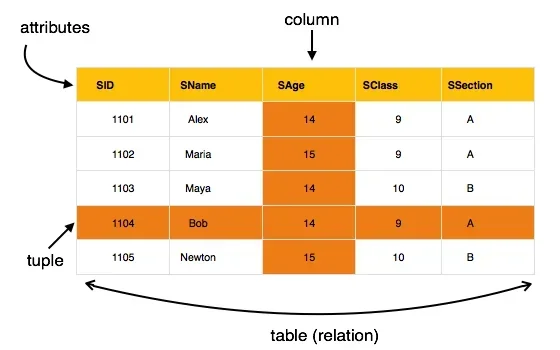
Think of a database like a spreadsheet. The columns represent fields, and the rows represent records. Each field holds one specific type of information, and each record brings all those pieces together into one complete entry. When you mix these up or misunderstand how they work, your data becomes messy and hard to use. That is why this guide breaks everything down in plain language.
In this article, you will learn exactly what fields are, what records are, and how they differ from each other. We will walk through real examples, highlight common mistakes, and share expert tips that make database management much easier. By the end, you will feel confident navigating any database structure with clarity.
Key Takeaways
- Fields define the structure: They are the columns in a database table that hold specific types of data like names or dates.
- Records hold complete data: Each row in a table is a record that contains all the information for one entry.
- They work together: Fields and records combine to form the backbone of any relational database system.
- Data types matter: Choosing the right data type for each field ensures accuracy and efficiency.
- Common mistakes happen: Confusing fields with records is a frequent error that can lead to data integrity issues.
- Expert tips help: Following best practices in field and record design saves time and prevents problems down the road.
📑 Table of Contents
What Are Fields in a Database?
A field is the smallest unit of data in a database. It represents a single piece of information within a table. If you picture a spreadsheet, a field is one cell in a column. Each column in a table is a field, and every field holds the same kind of data for every record in that table.
For example, imagine a table for a library. One field might be “Book Title.” Another field could be “Author Name.” Each field has a specific data type that tells the database what kind of information it stores. Some fields hold text, others hold numbers, and some store dates or boolean values like true or false.
Types of Fields You Will Encounter
Not all fields are the same. Different databases use different field types to organize information properly. Here are the most common ones you will come across:
- Text fields: These store short strings of letters and numbers. Think of a first name or a zip code.
- Number fields: These hold numeric values used for calculations. Examples include prices, quantities, or ages.
- Date fields: These store calendar dates in a format the database can sort and compare easily.
- Boolean fields: These hold only two values: true or false. They work great for yes-or-no questions.
- Auto-increment fields: These generate a unique number automatically for each new entry. They often serve as the primary key.
Why Field Properties Matter
Each field has properties that control how it behaves. These properties include the field name, data type, size limit, and whether the field can be left empty. Setting these correctly is part of good database design. When you get field properties right, your data integrity stays strong and your data entry process becomes smooth.
For instance, if you set a number field to accept only values between 1 and 100, the database will reject anything outside that range. This simple rule prevents bad data from sneaking in and causing problems later. Field properties are like guardrails that keep your database clean and reliable.
Understanding fields also helps when you work with relational databases. In a relational system, fields in one table can link to fields in another table through keys. This connection is what makes modern databases so powerful and flexible.
What Are Records in a Database?
A record is a complete set of related data stored in a single row of a database table. While a field holds one small piece of information, a record brings all those pieces together into one meaningful unit. If a field is a single puzzle piece, a record is the completed puzzle.
Going back to our library example, one record would represent a single book. That record would contain the book title, the author name, the publication date, and the genre. Each field in that row holds a different detail, but together they describe one complete entity.
How Records Are Organized
Records follow a consistent structure within a table. Every record in the same table has the same fields, but the values inside those fields are different. This uniformity is what makes databases so efficient at searching and sorting information.
Here is how records typically work in practice:
- Each row equals one record. No two rows represent the same entry.
- Every record has a unique identifier. This is usually the primary key field that distinguishes one record from another.
- Records can be added, updated, or deleted. These operations let you keep your database current and accurate.
- Records can be queried and filtered. You can pull out specific records based on criteria you set.
The Role of Records in Data Management
Records are the heart of any information management system. Without records, a database would just be an empty structure with no actual content. Every time you add a new customer, log a transaction, or store a patient file, you are creating a new record.
Good record management means keeping your records consistent and free of duplicates. When two records hold the same information, it creates confusion and wastes space. That is why many databases use unique identifiers and validation rules to keep each record distinct and accurate.
In larger systems, records can be linked across multiple tables. This is where the power of relational databases really shines. A single customer record in one table can connect to many order records in another table, creating a rich web of related data storage that makes powerful queries possible.
Key Differences Between Fields and Records
Now that you understand what each one does, let us look at the differences between fields records in a database side by side. This comparison will make the concepts crystal clear.
| Aspect | Field | Record |
|---|---|---|
| Definition | A single column that holds one type of data | A single row that holds a complete set of data |
| Also Called | Column, attribute, or data element | Row, tuple, or entry |
| Contains | One value per record | Multiple values, one from each field |
| Structure | Vertical arrangement in a table | Horizontal arrangement in a table |
| Example | “Email Address” column | One user’s complete profile row |
| Uniqueness | Same field name repeats in every row | Each record is typically unique |
| Data Type | Defined once for the entire column | Inherits data types from all its fields |
The simplest way to remember the difference is this: fields go up and down, records go left to right. Fields define the categories of information you are tracking, and records fill in the details for each individual item in those categories.
Another way to think about it is like a form. The labels on the form are the fields. The completed information you write in each blank is the record. Every time you fill out a new form, you create a new record with values for every field.
These differences matter a lot when you are designing a database or writing queries. If you confuse a field with a record, you might try to search in the wrong place or structure your tables incorrectly. That leads to wasted time and frustrated users. Keeping these concepts straight is a basic but critical skill for anyone working with database management systems.
In real-world applications, the distinction also affects performance. Queries that target specific fields run faster because the database only needs to scan one column. Queries that target entire records take more resources because the database has to pull data from every field in matching rows. Understanding this difference helps you write better, faster queries.
How Fields and Records Work Together
Fields and records are not independent concepts. They depend on each other to create a functioning data structure. A table with fields but no records is just an empty template. A table with records but no fields has no organization. Together, they create a system that stores and retrieves information efficiently.
The relationship between fields and records is at the core of relational database design. Each table has a defined set of fields that describe what kind of information it stores. Then, each record populates those fields with actual data. This organized pairing is what makes databases so much more powerful than simple file folders or spreadsheets.
Consider a hospital system. The fields might include patient name, date of birth, diagnosis, and treatment plan. Each patient fills out one record with values for every field. When a doctor needs to find all patients with a specific diagnosis, the database scans the records and pulls out the matching ones based on the field values. This entire process relies on the clear separation and cooperation between fields and records.
In practice, many systems extend this basic structure with additional features. Indexes speed up searches on specific fields. Constraints enforce rules about what values records can contain. Relationships connect fields across different tables. All of these advanced features build on the simple foundation of fields and records working side by side.
Even in electronic commerce communication, where data flows rapidly between systems, the field-and-record structure remains fundamental. Transactions get stored as records, and each record contains fields for items, prices, timestamps, and customer details. The advantages and disadvantages of using a value added network for electronic commerce communication often depend on how efficiently these records and fields are structured and transmitted across networks.
Similarly, the operating system your database runs on can influence how fields and records are handled at the system level. The advantages and disadvantages of a proprietary operating system sometimes include optimized database engines that handle field indexing and record retrieval faster than generic alternatives.
Common Mistakes When Working with Fields and Records
Even experienced users make mistakes with fields and records. Knowing what these errors are can help you avoid them and keep your database running smoothly.
Mixing Up Fields and Records
The most common mistake is treating a field like a record or vice versa. This usually happens when someone tries to store multiple pieces of information in a single field. For example, putting a first name and last name in the same field makes searching and sorting much harder. Each piece of information deserves its own field.
Ignoring Data Types
Every field needs the right data type. If you set a date field to accept text, you lose the ability to sort by date or perform date calculations. Choosing the correct data type for each field is one of the simplest yet most important steps in database design.
Creating Duplicate Records
Duplicate records waste space and create confusion. If two records hold the same customer information, which one is correct? Always use unique identifiers and validation rules to prevent duplicates from entering your system.
Overlooking Field Size Limits
Every field has a maximum size. If you set a text field too small, some entries will get cut off. Set it too large, and you waste storage space. Choosing the right field size is a balancing act that improves both performance and data quality.
Skipping Field and Record Documentation
It is easy to forget to document what each field and record represents. But when you come back to a database months later, clear documentation saves hours of confusion. Write down the purpose of every field and the meaning of every record type.
Expert Tips for Better Field and Record Design
Designing a database well takes practice and attention to detail. These expert tips will help you create field and record structures that are clean, efficient, and easy to maintain.
Start with a clear plan. Before you build a single table, map out what information you need to store. List every field you will need and define the data type for each one. This planning step prevents costly redesigns later.
Use descriptive field names. Names like “Field1” or “Data” tell you nothing. Use clear names like “Customer_Email” or “Order_Date” that anyone can understand at a glance.
Normalize your data. Normalization means organizing fields and records to reduce redundancy. Split large tables into smaller, related tables and connect them through keys. This keeps your data organization lean and efficient.
Test with real data. Before launching a database, populate it with sample records and run actual queries. This reveals problems with field design or record structure that you might not notice on paper.
Back up regularly. No matter how well you design your fields and records, data loss can happen. Regular backups protect all the hard work you put into building your database structure.
Learn from real-world applications. In fields like medicine, databases track patient histories, treatment plans, and billing records. The ways computers are used in medicine depend heavily on well-designed fields and records to ensure patient safety and accurate treatment. Medical databases prove that solid field and record design has life-or-death consequences.
Keep learning. Database technology evolves constantly. New tools and techniques emerge that make field and record management even easier. Stay curious, keep experimenting, and never stop improving your database management skills.
Conclusion
The differences between fields records in a database are fundamental to understanding how any database works. Fields are the columns that define what type of information gets stored. Records are the rows that hold the actual data for each entry. Together, they create the organized, structured system that makes modern data management possible.
By now, you should feel confident identifying fields and records, understanding their unique roles, and avoiding the common mistakes that trip up so many people. Whether you are building a simple contact list or a complex enterprise system, these concepts remain the same. Master them, and you master the basics of database design.
Take what you have learned and apply it to your own projects. Review your current databases and check whether your fields and records are organized clearly. Make adjustments where needed, and you will see an immediate improvement in how your data behaves. The more you practice, the more natural these concepts will become.
Remember, every great database starts with a solid understanding of its most basic components. Fields and records are those components. Get them right, and everything built on top of them will be stronger, faster, and more reliable.
Frequently Asked Questions
What is the main difference between a field and a record?
A field is a single column that holds one type of information, like a first name. A record is a complete row that contains all the information for one entry, combining values from every field. Think of a field as a category and a record as the full answer for one item in that category.
Can a field exist without a record in a database?
Technically yes, a table can have fields defined but contain no records. However, a database with no records serves no practical purpose. The real power of a database comes alive when fields are populated with actual records that hold meaningful data.
What is a primary key field?
A primary key field is a special field that gives each record a unique identifier. No two records can share the same primary key value. This unique identifier makes it easy to find, update, or delete specific records without affecting any others.
How many fields can a record have?
A record can have as many fields as the database designer defines for that table. There is no strict limit, but practical best practices suggest keeping the number of fields manageable. Too many fields in a single table can make the database slow and hard to maintain.
Why is data type selection important for fields?
Choosing the right data type ensures that each field stores information in a consistent and usable format. It prevents errors, saves storage space, and allows the database to perform operations like sorting and calculations correctly. Wrong data types lead to corrupted or unusable data.
How do fields and records relate to database tables?
A database table is made up of fields (columns) and records (rows). The fields define the structure and data types, while the records fill that structure with actual information. Together, they form the basic unit of storage in any relational database system.