Do Bluetooth Led Lights Need Wi Fi to Connect and Control
Most Bluetooth LED lights do not need WiFi to connect and work. They use a direct wireless signal between your phone and the lights. However, WiFi becomes important when you want remote access, voice control, or smart home integration. Understanding this difference helps you choose the right lighting setup for your needs.
Do Bluetooth LED lights need WiFi? This is one of the most common questions people ask when shopping for smart lighting. The short answer is no. Most Bluetooth LED lights work perfectly fine without any internet connection at all. They pair directly with your phone or tablet using Bluetooth technology.
But the full story is more interesting than that. There are situations where WiFi adds real value. And some LED light setups actually benefit from having both Bluetooth and WiFi built in. Let us walk through everything you need to know about how these wireless lights connect and what you can expect from each type of connection.
WiFi connectivity plays a role in many smart home setups, and understanding when it matters for LED lights is key to making the right choice.
## What Are Bluetooth LED Lights?
Bluetooth LED lights are wireless lights that use Bluetooth technology to connect to your device. You control them using a smartphone app. No cables, no hubs, and no internet required. Just pair your phone with the lights and you are good to go.
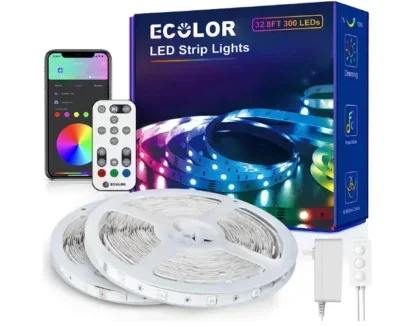
These lights come in many forms. You will find LED strips, smart bulbs, light bars, and even LED panels that use Bluetooth. Most of them support color changes, brightness adjustments, and preset lighting modes. Some even let you sync lights to music or create custom scenes.
Smart home devices like these are becoming more popular because they are easy to set up and affordable.
The biggest advantage of Bluetooth LED lights is simplicity. You do not need a router, a modem, or an internet service provider. You just need a Bluetooth-enabled device and the lights themselves. This makes them a great option for renters, dorm rooms, or anyone who wants quick lighting upgrades.
### How Bluetooth LED Lights Connect to Your Device
The connection process is straightforward. First, you download the manufacturer’s app on your phone. Then you turn on the LED lights and put them in pairing mode. Your phone searches for available Bluetooth devices and finds the lights. You tap to connect, and that is it.
Bluetooth uses short-range radio waves to transmit data. This means the lights and your phone must be within a certain distance. Most Bluetooth connections work up to about 30 feet. Walls and obstacles can reduce that range. But for a single room or small apartment, this works very well.
## How Do Bluetooth LED Lights Work Without WiFi?
This is where things get interesting. Bluetooth LED lights create their own small wireless network. They do not need to talk to the internet to function. Your phone becomes the remote control, and the lights respond directly to your commands.
When you change colors or adjust brightness, your phone sends a signal through Bluetooth. The LED controller inside the lights receives that signal and adjusts the LEDs accordingly. This all happens in real time. There is no lag, no buffering, and no internet required.
### What You Can Do Without WiFi
You might wonder what you can actually do without an internet connection. The answer is quite a lot. Here is what Bluetooth LED lights can do on their own:
- Change colors: Pick from millions of colors using the app.
- Adjust brightness: Dim or brighten the lights to your preference.
- Use preset modes: Music sync, breathing effects, rainbow cycles, and more.
- Create custom scenes: Save your favorite lighting combinations.
- Set timers: Schedule lights to turn on or off at specific times.
- Control multiple lights: Group several Bluetooth lights together for synchronized effects.
All of these features work without WiFi. You do not need to worry about losing your connection or your lights going dark when the internet drops. Bluetooth operates on its own frequency and does not depend on your router.
Wireless signals like Bluetooth and WiFi each serve different purposes in smart home setups.
## When Do Bluetooth LED Lights Need WiFi?
There are certain situations where WiFi becomes important. If you just want basic lighting control in one room, Bluetooth is all you need. But if you want more advanced features, WiFi opens up a whole new level of functionality.
### Remote Control From Anywhere
With Bluetooth alone, you must be within range of the lights. You cannot control them from work or while you are on vacation. WiFi changes this. When LED lights connect to your home WiFi network, you can control them from anywhere with an internet connection.
This is incredibly useful for security. You can turn lights on while you are away to make your home look occupied. You can also check on your lights remotely through the app. This feature alone makes WiFi a valuable addition for many users.
### Voice Assistant Integration
Do you use Alexa, Google Assistant, or Siri? These voice assistants need WiFi to communicate with your lights. Bluetooth LED lights that also support WiFi can connect to your voice assistant ecosystem. This lets you say things like “turn off the living room lights” or “set the bedroom to blue.”
Without WiFi, voice control simply does not work. The voice assistant cannot reach the lights through Bluetooth alone. So if hands-free control matters to you, WiFi is a must.
### Smart Home Automation and Routines
WiFi enables smart home routines and automation. You can set up schedules where lights turn on at sunset and off at bedtime. You can create scenes that trigger multiple lights at once. Some systems even let you link your LED lights with other smart devices like door sensors, cameras, or weather alerts.
Personal hotspots can sometimes substitute for WiFi, but they are not ideal for permanent smart home setups.
These automation features require a stable WiFi connection. They also usually require a smart hub or a compatible smart home platform. But once set up, they make your lighting feel truly smart and responsive.
## Bluetooth vs WiFi LED Lights: Key Differences
Not all LED lights are the same. Some rely only on Bluetooth. Others use WiFi. And many modern lights support both. Understanding the differences helps you pick the right option for your space.
### Range Comparison
Bluetooth has a limited range of about 30 feet. WiFi can reach throughout your entire home, especially with a good router. If you want whole-house lighting control, WiFi is the clear winner. But for a single room or a small area, Bluetooth works just fine.
### Speed and Responsiveness
Bluetooth connections tend to be faster for direct control. When you tap a button in the app, the light responds almost instantly. WiFi connections can sometimes have a slight delay because the signal has to travel through your router and internet. For everyday use, this difference is usually unnoticeable.
### Power Consumption
WiFi uses more power than Bluetooth. This means WiFi LED lights may drain batteries faster in battery-powered setups. Bluetooth LED lights are generally more energy-efficient for the connection itself. However, most LED lights plug into an outlet or USB port, so this difference matters less in practice.
### Setup and Complexity
Bluetooth lights are simpler to set up. You just pair them with your phone. WiFi lights require you to connect them to your home network, which can sometimes be tricky. You may need to enter your WiFi password, configure the network, and troubleshoot connection issues.
### Cost Considerations
Bluetooth-only LED lights are usually cheaper. They have fewer features and less hardware. WiFi-enabled lights cost a bit more because they include WiFi chips and often support more advanced features. Lights that support both Bluetooth and WiFi tend to be the most expensive option.
### Comparison Table
| Feature | Bluetooth Only | WiFi Only | Both Bluetooth and WiFi |
|---|---|---|---|
| Internet Required | No | Yes | No (but WiFi adds features) |
| Range | Up to 30 feet | Whole home | Both |
| Voice Control | No | Yes | Yes |
| Remote Access | No | Yes | Yes |
| Smart Routines | Limited | Full support | Full support |
| Setup Difficulty | Easy | Moderate | Moderate |
| Price | Lower | Higher | Highest |
## Can You Use Both Bluetooth and WiFi Together?
Many modern LED light systems support both Bluetooth and WiFi simultaneously. This gives you the best of both worlds. You can use Bluetooth for quick, local control. And you can use WiFi for remote access, voice commands, and automation.
These dual-mode lights usually default to Bluetooth when you are nearby. They switch to WiFi when you are outside Bluetooth range. Some systems also let you choose which connection to use at any time. This flexibility is very appealing for users who want convenience without sacrificing features.
Wireless connectivity options continue to evolve, and dual-mode LED lights represent a smart approach to flexible control.
### Popular Brands That Offer Dual-Mode Support
Several well-known brands now offer LED lights with both Bluetooth and WiFi. Some of these include brands that make smart strips, bulbs, and light bars. The apps that come with these products often let you manage everything from one place. You can create groups, set schedules, and adjust colors with ease.
When shopping, look for lights that clearly state they support both connection types. Not all LED lights that claim to be “smart” actually support WiFi. Some only use Bluetooth. Reading the product specifications carefully saves you from disappointment.
## Tips for Setting Up Bluetooth LED Lights
Setting up Bluetooth LED lights is usually quick and painless. But a few tips can make the process even smoother. Here is what works best based on real-world experience.
- Keep your phone close during pairing. Bluetooth range is short at first. Stay within a few feet of the lights while setting them up.
- Turn off other Bluetooth devices temporarily. This reduces interference and helps your phone find the lights faster.
- Download the official app. Third-party apps may not work correctly or could compromise your security. Always use the manufacturer’s app.
- Update your phone’s Bluetooth settings. Make sure your phone’s Bluetooth is turned on and set to discoverable mode.
- Restart both devices if pairing fails. A simple restart of your phone and the lights often fixes connection issues.
- Check for interference from USB 3.0 ports. USB 3.0 can sometimes interfere with Bluetooth signals. Try moving your phone away from USB hubs during setup.
### Common Mistakes to Avoid
Many users run into avoidable problems. One common mistake is trying to control Bluetooth lights from too far away. Remember the 30-foot limit. Another mistake is forgetting to update the app. Manufacturers often release updates that fix bugs and add new features.
Some people also try to connect too many Bluetooth lights at once. Most apps handle around 10 to 20 devices, but performance can degrade with too many. If you notice lag or delays, try reducing the number of connected lights.
## Expert Insights on Bluetooth LED Lighting
Smart lighting experts agree that Bluetooth LED lights are perfect for simple, affordable setups. They are ideal for accent lighting, bedroom ambiance, and gaming setups. The ease of use and low cost make them accessible to everyone.
However, experts also note that WiFi-enabled lights are better for serious smart home integration. If you are building a connected home, lights that support WiFi give you more control and flexibility. The best choice depends on what you want to achieve with your lighting.
Wireless technology continues to evolve, and LED lighting is no exception to this trend toward smarter, more connected solutions.
For most casual users, Bluetooth-only lights are more than enough. You get reliable control, great colors, and a simple setup. For power users who want full home automation, WiFi-enabled or dual-mode lights are the way to go.
## Key Takeaways
Key Takeaways
- Bluetooth LED lights work independently: They connect directly to your phone or tablet without needing an internet connection.
- WiFi is only needed for advanced features: Remote control, voice assistants, and smart home routines require a WiFi connection.
- Bluetooth has a limited range: Typically around 30 feet, which is fine for most rooms but not for whole-house control.
- Some lights support both Bluetooth and WiFi: These give you the best of both worlds for flexibility and control.
- No hub is usually needed for Bluetooth: You can pair lights directly from your device without extra equipment.
- Setup is simple: Most Bluetooth LED lights connect in minutes using a free mobile app.
Key Takeaways
- Bluetooth LED lights do not need WiFi to work: They connect directly to your phone and function without any internet connection.
- WiFi unlocks advanced features: Remote access, voice control, and smart home automation all require WiFi.
- Dual-mode lights offer maximum flexibility: They let you switch between Bluetooth and WiFi depending on your needs.
- Bluetooth range is limited: Plan your setup accordingly, especially for larger spaces.
- Setup is simple and fast: Most Bluetooth LED lights connect in just a few minutes.
- Cost varies by features: Bluetooth-only lights are the most affordable, while dual-mode lights cost more.
## Conclusion
So do Bluetooth LED lights need WiFi? The answer depends on what you want from them. For basic, local control in a single room, Bluetooth is all you need. No WiFi, no router, no internet. Just pair and play.
But if you want to step into the world of smart home automation, remote control, and voice commands, WiFi becomes essential. Many LED lights now support both Bluetooth and WiFi, giving you the flexibility to choose how you want to control your lighting.
Wireless lighting setups continue to grow in popularity, and understanding the connection options helps you make informed decisions.
Take some time to think about your needs. Consider the size of your space, how many lights you want to control, and whether you want advanced smart features. With the right choice, your LED lights can transform any room into a customized, vibrant space.
Start simple if you are new to smart lighting. A Bluetooth LED strip is a great first step. You can always upgrade to WiFi or dual-mode lights later as your needs grow. The beauty of these wireless systems is that they are flexible and expandable.
Frequently Asked Questions
Can I control Bluetooth LED lights without a phone?
Most Bluetooth LED lights require a phone or tablet for initial setup and control. Some models come with physical remote controls, but these are less common. Always check the product description to see what control options are included.
Do Bluetooth LED lights work if the power goes out?
No. Bluetooth LED lights need power to function. If they are plugged into an outlet, they will turn back on when power returns. Battery-powered Bluetooth lights will need recharging after an outage.
Can I connect Bluetooth LED lights to multiple phones?
Yes, most Bluetooth LED light apps allow multiple phones to connect. However, only one phone can typically control the lights at a time. Some brands support shared control where multiple users can adjust settings simultaneously.
Is Bluetooth safe for LED lights?
Yes, Bluetooth is completely safe for LED lights. It uses low-energy radio waves that do not harm the lights or your devices. Bluetooth technology has been used in consumer electronics for decades without safety concerns.
How many Bluetooth LED lights can I connect at once?
This varies by brand and app. Most systems support between 10 and 20 Bluetooth devices at once. If you try to connect too many, you may experience delays or connection drops. Check your specific product manual for exact limits.
Can I use Bluetooth LED lights outdoors?
Yes, but check the IP rating of the lights first. Outdoor use requires weather-resistant lights, typically rated IP65 or higher. Bluetooth range may also be reduced outdoors due to interference from other wireless devices and obstacles.