Do I Need An RF Modulator Heres What You Should Know
An RF modulator converts audio and video signals into a format your TV can understand through a coaxial connection. You may need one if you have an older TV without HDMI ports or want to connect a modern device to an analog display. This guide covers everything from basic setup to common mistakes and alternatives.
Do I need an RF modulator? Its a question many people ask when they have an older TV and a newer device that just wont connect the old way. The short answer is: it depends on your setup. If you want to plug a gaming console, a DVD player, or a streaming device into a TV that only has a coaxial antenna input, then yes, you do. An RF modulator bridges that gap and saves you from buying a brand new television.
Over the years, TV technology has changed dramatically. Older sets relied on antenna connections and VHF or UHF frequencies to display channels. Modern devices use HDMI and digital signals. When these two worlds collide, an RF modulator becomes your best friend. It takes the audio and video from a modern source and turns it into a signal your older TV can read.
RF modulators are simple, inexpensive, and surprisingly useful. Whether you are setting up a retro gaming station, connecting a security camera to an old monitor, or trying to watch a DVD player on a television from the 1990s, this little device does the heavy lifting. Let me walk you through everything you need to know.
Key Takeaways
- What an RF modulator does: It converts AV signals into RF signals that travel through coaxial cables to your TV.
- You likely need one if: You own an older TV without HDMI inputs or want to share a single antenna signal across multiple devices.
- RF modulators are affordable: Most basic models cost between $10 and $40, making them a budget-friendly solution.
- They work with many devices: Game consoles, DVD players, streaming boxes, and cameras can all use an RF modulator.
- Common mistakes to avoid: Using the wrong output type, skipping the power source, or mismatching channel frequencies.
- Alternatives exist: HDMI to RCA converters and modern smart TVs may eliminate the need for an RF modulator entirely.
📑 Table of Contents
- What Is an RF Modulator and How Does It Work?
- When Do You Actually Need an RF Modulator?
- How to Choose the Right RF Modulator
- Setting Up Your RF Modulator: Step by Step
- Common Mistakes People Make With RF Modulators
- RF Modulators vs. Other Signal Conversion Options
- Do You Need an RF Modulator for Over-the-Air TV?
- Expert Insights on RF Modulators
- Final Thoughts
What Is an RF Modulator and How Does It Work?
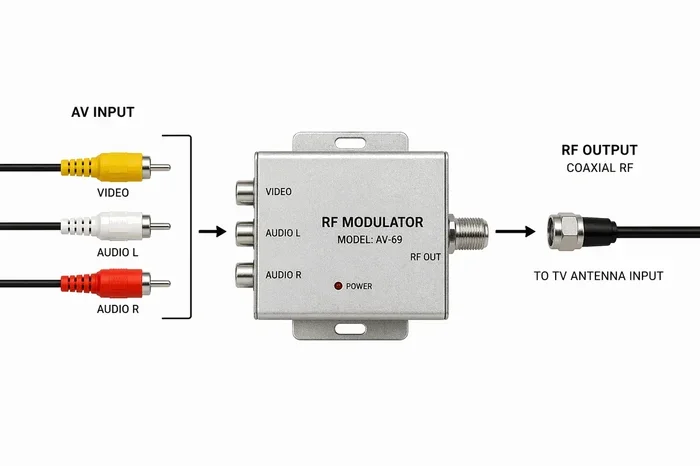
An RF modulator is a small electronic device that takes audio and video inputs and converts them into a radio frequency signal. That signal then travels through a coaxial cable to your TV. Your TV tunes into that signal like it would tune into a broadcast channel, usually on channel 3 or channel 4.
Think of it like a translator. Your new device speaks digital, but your old TV only understands analog over the air. The RF modulator translates the message so both sides can understand each other. It takes composite or component inputs, mixes them with a carrier frequency, and sends the result out through a coaxial cable.
The Basic Signal Path
Here is how the signal flows in a typical setup:
- Your source device sends audio and video through RCA cables or HDMI.
- The RF modulator receives those signals and converts them.
- The modulator outputs an RF signal through a coaxial cable.
- Your TV tunes to the assigned channel and displays the content.
This process might sound complicated, but in practice, it is very straightforward. You plug in your cables, set the channel on both the modulator and the TV, and you are good to go. Most RF modulators come with clear instructions and require no technical expertise.
What Frequencies Do RF Modulators Use?
Most RF modulators broadcast on VHF or UHF frequencies. The most common output channels are channel 3 and channel 4, which sit in the VHF range. Some models allow you to choose from a wider range of channels, which helps if those two channels are already in use by a local broadcast station in your area.
If you live in an area with crowded broadcast frequencies, you may need to select a less common channel on your RF modulator. This is especially true in cities where many over-the-air signals compete for space. Always check your local TV listings to avoid interference.
When Do You Actually Need an RF Modulator?
Not everyone needs an RF modulator. But certain situations make them essential. Let me break down the most common reasons people reach for one.
You Have an Older TV Without HDMI Ports
This is the number one reason people buy RF modulators. If your television was made before HDMI became standard, it likely only has antenna inputs, composite inputs, or both. A modern streaming stick, game console, or Blu-ray player will not connect directly. An RF modulator solves this problem by converting the HDMI or digital signal into something your old TV can handle.
For example, if you want to use a modern streaming device like a Roku or Amazon Fire Stick on a vintage TV, you need a way to bridge the gap. An RF modulator makes that possible without replacing the TV.
You Want to Split a Signal Across Multiple TVs
Some people use RF modulators to send the same signal to multiple televisions around a home or business. A single source device can feed into the modulator, and the coaxial output can be split using a signal splitter to reach several TVs. This setup is common in hotels, rental properties, and older apartment buildings.
You Are Setting Up a Security Camera System
Many security cameras output via composite or HDMI. If you want to view those cameras on a monitor that only has a coaxial input, an RF modulator does the trick. This is a popular setup for home security systems where the user wants to monitor feeds on an older TV or dedicated monitor.
You Are Building a Retro Gaming Setup
Retro gamers love RF modulators because they allow classic consoles to connect to modern displays or vice versa. If you have an old CRT TV and want to hook up an NES, SNES, or Sega Genesis, a modulator helps you get clean signal without purchasing expensive replacement hardware.
How to Choose the Right RF Modulator
Not all RF modulators are created equal. Choosing the right one depends on your specific needs, devices, and setup. Here are the key factors to consider.
Input Type Matters
Before buying an RF modulator, check what inputs your source device has. Most modulators accept composite (RCA) inputs, which use red, white, and yellow cables. Some higher-end models also accept HDMI input, which gives you more flexibility.
If your device only has HDMI output, make sure you buy a modulator with an HDMI port. If you only have composite cables, a basic RCA input modulator will work fine. You can also use an HDMI to RCA converter alongside a basic modulator if needed.
Channel Selection and Flexibility
As I mentioned earlier, most modulators default to channel 3 or channel 4. However, some models let you select from a broader range of channels. This feature is helpful if you experience interference or want to run multiple modulators in the same location without signal overlap.
Look for a modulator that offers channel selection rather than a fixed output. It gives you much more control over your setup.
Build Quality and Brand Reputation
Cheap RF modulators can introduce signal noise, static, or poor color reproduction. Spending a little extra on a reputable brand pays off in signal quality and longevity. Look for models with positive reviews and solid build quality. A modulator in the $20 to $35 range usually offers a good balance of price and performance.
Power Source Considerations
Most RF modulators need external power, typically through a USB cable or a wall adapter. Make sure your setup includes a convenient power source. Some modulators can draw power from the connected device through USB, which simplifies things.
Setting Up Your RF Modulator: Step by Step
Setting up an RF modulator is straightforward. Follow these steps for a smooth installation.
- Connect your source device to the modulator. Use RCA cables or an HDMI cable depending on your modulator model. Match the colors for composite connections: yellow for video, red and white for audio.
- Connect a coaxial cable from the modulator to your TV. Screw the coaxial connector tightly onto both the modulator output and the TV antenna input.
- Power on the modulator. Plug in the power supply or connect via USB if supported.
- Set your TV to the correct channel. Use your TV remote to tune to channel 3 or channel 4, or whichever channel your modulator is set to output.
- Adjust the modulator channel if needed. If you see interference or no signal, try switching to a different output channel on the modulator.
- Test the audio and video. Play content on your source device and check for clear picture and sound on the TV.
For tips on getting the best signal through coaxial connections, check out our guide on getting HD through a coax cable.
Quick Tips for Better Performance
- Use shorter coaxial cables to reduce signal loss.
- Keep the modulator away from other electronic devices that cause interference.
- Make sure all connections are snug and secure.
- Update firmware if your modulator model supports it.
- Test on channel 3 first, then try channel 4 if you experience issues.
Common Mistakes People Make With RF Modulators
Even though RF modulators are simple devices, people still run into problems. Here are the most common mistakes and how to avoid them.
Using the Wrong Cable Type
Not all cables are the same. Using a damaged or incompatible cable can cause poor picture quality or no signal at all. Always use quality RCA cables, composite cables, or coaxial cables rated for the job. Avoid cheap, thin cables that degrade the signal.
Ignoring Channel Conflicts
If your local TV station broadcasts on channel 3 or channel 4, your RF modulator output will interfere with it. This causes ghosting, static, or a double image. Switch your modulator to a different channel to avoid this problem.
Forgetting to Power the Modulator
Some people assume the modulator gets power from the connected device. Most models need their own power source. Always double-check that the power LED is on before troubleshooting other issues.
Expecting HD Quality from an Analog Output
An RF modulator outputs an analog signal, which means it cannot deliver true high-definition picture quality. If you need HD output, consider using a different connection method or upgrading your display. For more on getting HD signals through coax, see our article on can I get HD through a coax cable.
Not Matching Audio and Video Inputs Correctly
Mixing up the red and white audio cables or the yellow video cable can result in no sound or a black-and-white picture. Always match the color-coded connections carefully.
RF Modulators vs. Other Signal Conversion Options
Sometimes an RF modulator is not the best solution. Let me compare it with a few alternatives so you can make an informed decision.
| Feature | RF Modulator | HDMI to RCA Converter | Smart TV Upgrade |
|---|---|---|---|
| Cost | $10 – $40 | $15 – $50 | $200+ |
| Signal Quality | Standard definition | Standard to high definition | Full HD or 4K |
| Compatibility | Older TVs with coax input | Older TVs with RCA input | Modern TVs with HDMI |
| Setup Complexity | Very simple | Simple | Plug and play |
| Best Use Case | Antenna-style TV input | Direct RCA input on TV | Replacing old hardware |
If your TV has RCA inputs but no coaxial input, you might not need an RF modulator at all. An HDMI to RCA converter connects directly to those RCA ports. For more on this option, check out our guide on converting HDMI to RCA.
On the other hand, if you want the best possible picture and have a modern TV, skip the modulator entirely and use HDMI connections. An antenna hook-up guide for smart TVs can also help you understand how modern TVs handle signal inputs differently.
Do You Need an RF Modulator for Over-the-Air TV?
Some people wonder if they need an RF modulator to use an antenna with a modern TV. The answer is usually no. Most modern smart TVs have built-in tuners that accept antenna signals directly through a coaxial input. You plug the antenna into the TV, run a channel scan, and start watching.
However, if you want to split an antenna signal to multiple TVs, you might use an RF modulator on one or more of those TVs. This lets each TV display the antenna signal on a dedicated channel without needing a separate tuner.
If you are exploring antenna setups for your smart TV, our article on hooking up an antenna to a smart TV covers this in more detail.
Expert Insights on RF Modulators
From years of testing and reviewing consumer electronics, here is what experts want you to know about RF modulators.
They are not just for old TVs. While the primary use case involves older displays, RF modulators also serve niche purposes like commercial signage, surveillance setups, and multi-room audio video distribution.
Quality varies wildly. The cheapest modulators on the market often produce noticeable static and color issues. Spending a little more gets you a cleaner signal and a longer-lasting device.
They are one-way devices. An RF modulator only sends signals in one direction. It does not convert TV signals back to a format your devices can read. If you need bidirectional conversion, you need a different type of equipment.
Final Thoughts
So, do you need an RF modulator? If you have an older TV without HDMI ports and want to connect modern devices, the answer is yes. This small, affordable device opens up a world of possibilities for using your existing hardware without expensive upgrades.
RF modulators are simple to set up, easy to use, and widely available. Whether you are connecting a game console, a DVD player, a security camera, or a streaming device to an older television, this tool gets the job done. Just remember to check your input types, avoid channel conflicts, and use quality cables for the best results.
Before you buy, consider whether your TV has any other input options. If it has RCA composite inputs, you might get by with a simpler converter. But for pure coaxial antenna-style connections, nothing beats a reliable RF modulator.
Take a few minutes to evaluate your setup, pick the right model, and enjoy your favorite content on any screen in your home.
Frequently Asked Questions
Can I use an RF modulator with any TV?
Most TVs with a coaxial antenna input will work with an RF modulator. This includes older CRT TVs and some basic flat-screen models. Check your TV’s inputs to confirm it has a coaxial port before purchasing.
Do RF modulators support HD quality?
Standard RF modulators output analog signals, which limits them to standard definition. If you need HD quality, consider using HDMI connections or an HDMI to RCA converter instead of relying solely on an RF modulator.
What is the difference between an RF modulator and a signal splitter?
An RF modulator converts audio and video signals into a radio frequency signal for TV display. A signal splitter divides one signal into multiple outputs. They serve different purposes, though both are useful in home entertainment setups.
Can I run two RF modulators on the same TV?
Yes, but each modulator must output on a different channel. You would tune your TV to channel 3 for one device and channel 4 for another, or select two unused channels to avoid interference between them.
Are RF modulators still manufactured today?
Yes, RF modulators are still widely available and actively manufactured. Many brands produce them for retro gaming, security systems, and older TV setups. You can find them online or at most electronics retailers.
Will an RF modulator work with a digital antenna?
An RF modulator converts your device’s output into an RF signal for your TV. It does not convert the TV’s antenna input back into a digital signal. If your TV has a digital tuner, it can receive over-the-air broadcasts directly without needing a modulator.