Do Projection Screens Really Work For Home Theater
Do projection screens really work for home theater? The short answer is yes — a dedicated projection screen transforms your movie nights, gaming sessions, and streaming into a cinematic experience. Unlike walls or sheets, proper home theater screens deliver sharper images, better colors, and superior contrast. Whether you choose a fixed frame screen, a portable projection screen, or a motorized screen, the right setup makes a huge difference. This guide covers everything you need to know about choosing and using a projection screen for your home entertainment space.
You have a projector. You have a blank wall. So why bother with a projection screen? That is a question many first-time buyers ask. The honest truth is that a home theater screen does far more than just show an image. It shapes the way you see every color, every shadow, and every detail. Think of it like this — a wall is a canvas, but a proper screen is a masterpiece frame.
Whether you are building a dedicated home theater room or just want better movie nights in your living room, the screen you choose matters a lot. Not all screens are the same. Some work great in dark rooms. Others handle daylight surprisingly well. And some are designed for portability, while others are built to stay put forever. In this guide, we will walk through everything you need to know about do projection screens really work and whether they are worth the investment for your home entertainment setup.
The world of indoor projection has changed a lot in recent years. Projectors themselves have become cheaper and brighter. But many people still underestimate the role of the screen. A great projector paired with a poor screen will never deliver the best picture. A decent projector on a quality screen can surprise you. Let us break down exactly why that is.
Key Takeaways
- Projection screens significantly improve image quality compared to projecting on walls or blank surfaces.
- Screen material and gain directly affect brightness, contrast, and viewing angles in your setup.
- Fixed frame, portable, and motorized screens each serve different needs and room types.
- Ambient light rejection technology helps maintain picture quality even in well-lit rooms.
- Choosing the right screen size depends on your projector’s throw ratio and room dimensions.
- Proper setup and placement are just as important as the screen itself for a great experience.
📑 Table of Contents
- What Is a Projection Screen and Why Does It Matter
- Types of Projection Screens for Home Theater
- Do Projection Screens Actually Make a Difference
- How to Choose the Right Projection Screen
- Common Mistakes People Make With Projection Screens
- Expert Tips for Getting the Most Out of Your Projection Screen
- Final Verdict: Are Projection Screens Worth It
What Is a Projection Screen and Why Does It Matter
A projection screen is a smooth, specially designed surface that reflects light from your projector back to your eyes. It sounds simple, but the science behind it is fascinating. The screen material controls how light spreads, how bright the image looks, and how accurate the colors appear. When you project onto a regular wall, the light scatters in every direction. Some of it gets absorbed. Some of it bounces back at the wrong angle. The result is a dull, washed-out picture.
A proper home theater screen solves these problems. It reflects light in a controlled way. This means sharper edges, deeper blacks, and more vivid colors. The screen material plays a huge role here. Different materials have different screen gain ratings, which measure how much light they bounce back. A higher gain means a brighter image, but it can also narrow your viewing angle. Lower gain screens offer wider viewing angles but may not be as bright.
Another important factor is ambient light rejection. Many modern home entertainment spaces are not completely dark. You might have windows, lamps, or overhead lights. Special screen materials are designed to filter out ambient light and keep your image crisp. Without this technology, even a bright projector struggles in a sunny room. This is one of the biggest reasons a dedicated screen makes such a noticeable difference.
How Screen Gain Affects Your Picture
Screen gain is probably the most misunderstood spec in the projection world. It is measured on a scale, usually from 1.0 upward. A gain of 1.0 means the screen reflects light roughly the same way a standard white wall would. Anything above 1.0 amplifies the brightness. Anything below 1.0 reduces it but widens the sweet spot where the image looks its best.
- Gain 1.0 to 1.1: Great for dark rooms with wide seating arrangements.
- Gain 1.2 to 1.5: Good balance of brightness and viewing angle for most setups.
- Gain 1.5 and above: Very bright, ideal for rooms with some ambient light.
Choosing the right gain depends on your room lighting and how many people will be watching. If your family likes to spread out on a couch, a lower gain screen gives everyone a better view. If you watch movies with the lights on, a higher gain screen keeps things visible.
Types of Projection Screens for Home Theater
Not all projection screens are built the same way. Different types serve different purposes. Some are permanent installations. Others are easy to set up and take down. Understanding the options helps you pick the right one for your space and budget.
Fixed Frame Screens
A fixed frame screen is the gold standard for dedicated home theater rooms. It mounts to the wall or ceiling and stays in place permanently. The screen is stretched tight across a rigid frame, which means it stays perfectly flat. No wrinkles, no waves, no sagging. This gives you the smoothest possible surface for the sharpest image.
Fixed frame screens come in many sizes and materials. You can find 4K projection-ready screens that handle ultra-high-definition content beautifully. They also tend to have excellent contrast ratio performance because the frame blocks any light from bleeding around the edges. The downside? They are not portable. Once you install one, it stays there.
Portable Projection Screens
A portable projection screen is perfect for people who want flexibility. These screens fold up or roll into a carrying case. You can set them up in the living room for movie night and pack them away the next morning. They are great for backyard movie events, camping trips, or even office presentations.
The trade-off is image quality. Portable screens are usually lighter and thinner than fixed options. They may have slight wrinkles or uneven surfaces. For casual use, this does not matter much. But if you are a serious home theater enthusiast, a portable screen might not deliver the same level of detail and color accuracy.
Motorized and Retractable Screens
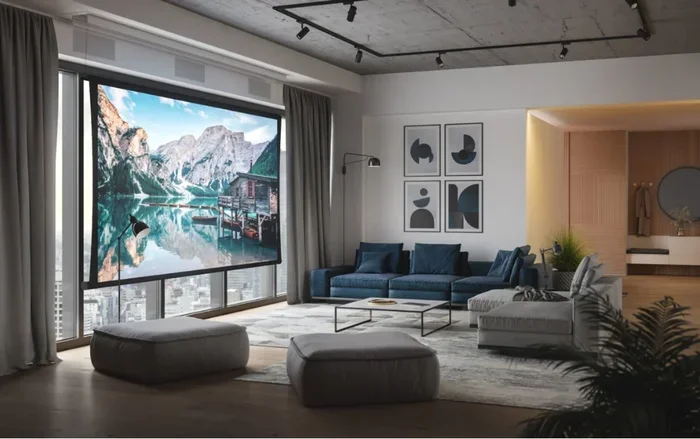
A motorized screen rolls up into a ceiling or wall-mounted housing. You can lower it when you want to watch something and raise it when you are done. This is a popular choice for people who use their home entertainment space for multiple purposes. During the day, the screen disappears and the room functions as a normal living space.
Motorized screens look sleek and professional. They come in both fixed and retractable formats. Some models even include built-in speakers or lighting integration. The main downside is cost. A quality motorized screen can be significantly more expensive than a simple pull-down or fixed frame option.
DIY and Homemade Screens
Some people build their own projection screens using paint, fabric, or PVC pipes. This can work in a pinch, and there are plenty of tutorials online. However, a DIY screen rarely matches the performance of a purpose-built option. The surface may not be perfectly flat. The material may not have the right screen gain or viewing angle properties. If you are serious about picture quality, a commercial screen is the better choice.
Do Projection Screens Actually Make a Difference
This is the question most people really want answered. And the answer is a clear yes — projection screens make a real, noticeable difference. But how big of a difference depends on several factors.
First, consider what you are projecting onto. A bare wall is never perfectly smooth. Even the smoothest drywall has tiny imperfections. These imperfections scatter light and soften the image. A projection screen provides a uniform surface that eliminates this problem. Colors look more accurate. Text looks sharper. Fine details in dark scenes become visible.
Second, think about contrast. A good home theater screen has a black border or backing that absorbs stray light. Without it, light bleeds around the edges of the image. The picture looks less defined and less immersive. With a proper screen, the image feels like it floats in front of you. This is especially important during movie nights with dark scenes or atmospheric films.
Third, consider the viewing experience as a whole. A dedicated screen creates a focal point. It tells your brain that this is a special setup meant for watching something big. Even the room feels different when you have a proper screen mounted on the wall. It transforms a casual TV alternative into a genuine home theater experience.
Wall vs. Screen: A Real Comparison
To understand the difference, imagine watching a bright daytime scene on a white wall versus a white projection screen. On the wall, the image looks flat and slightly faded. Colors do not pop. The edges might be a bit fuzzy. Now imagine the same scene on a quality screen. The colors are richer. The blacks are deeper. The highlights shine through with more clarity. The difference is subtle at first but becomes obvious once you see both side by side.
Many people who start with a wall projection end up buying a screen within weeks. The improvement is that noticeable. If you have ever wondered whether the investment is worth it, trust the experience of thousands of home theater enthusiasts who made the switch.
How to Choose the Right Projection Screen
Buying a projection screen does not have to be overwhelming. But with so many options available, it helps to know what to look for. Here are the key factors that will guide your decision.
Consider Your Room Size and Viewing Distance
The size of your screen should match your room. A massive screen in a small room feels overwhelming and can cause eye strain. A tiny screen in a large room looks underwhelming. A good starting point is to measure your viewing distance — the distance from the screen to where you sit. As a general rule, your screen should be about one-third to one-half the width of your viewing distance for a comfortable experience.
Also think about your projector’s throw ratio. This determines how far the projector needs to be from the screen to produce a given image size. If your projector has a short throw, you can place it closer and still get a big picture. A long throw projector needs more space. Make sure your room can accommodate both the projector placement and the screen size you want.
Pick the Right Screen Material
Screen material is one of the most important decisions you will make. Different materials serve different purposes:
- Matte white: The most versatile option. Works well in dark rooms and offers wide viewing angles.
- Gray screens: Boost contrast in rooms with some ambient light. Great for living rooms with windows.
- High-gain screens: Maximum brightness. Best for rooms that cannot be fully darkened.
- Acoustic transparent screens: Allow sound to pass through. Ideal for setups where speakers sit behind the screen.
Your choice depends on your room conditions and what you watch most. If you mostly watch movies with the lights off, a matte white screen is hard to beat. If your living room gets plenty of sunlight, a gray or high-gain screen will serve you better.
Think About Aspect Ratio
Screen aspect ratio determines the shape of your image. The most common ratios are 16:9 and 2.35:1 (cinematic widescreen). If you watch mostly streaming content and TV shows, 16:9 is the standard. If you are a serious movie fan who wants that true cinema feel, a 2.35:1 screen is the way to go. Some screens even offer adjustable aspect ratios so you can switch between formats.
Budget Considerations
Projection screens range from under $50 for basic portable options to over $1,000 for premium fixed frame or motorized models. You do not need to spend a fortune to get a noticeable improvement over a wall. Even a mid-range pull-down screen in the $100 to $200 range can dramatically boost your picture quality. The key is to match the screen to your needs rather than chasing the most expensive option.
Common Mistakes People Make With Projection Screens
Even enthusiastic buyers sometimes make avoidable mistakes when setting up their home theater screen. Learning from these errors can save you time, money, and frustration.
Choosing the Wrong Screen Size
One of the most common mistakes is going too big or too small. A screen that is too large for your room forces you to move your head constantly to see the edges. A screen that is too small feels underwhelming and defeats the purpose of having a projector. Measure your space carefully before you buy. Consider where the projector will sit and what size image it produces at that distance.
Ignoring Room Lighting
Many people buy a screen without thinking about the lighting in their room. If you have big windows and no curtains, a standard matte white screen will look washed out during the day. You need a screen designed to handle ambient light. Similarly, if your room is completely light-controlled, you can take full advantage of a high-gain or specialized material.
Skipping the Screen Border
A projection screen without a proper black border looks unfinished and loses contrast around the edges. The black border absorbs stray light and creates a clean frame for the image. It is a small detail that makes a big visual impact. Always choose a screen with a built-in border if possible.
Forgetting About Screen Flatness
A wrinkled or sagging screen ruins the image quality no matter how good your projector is. Fixed frame screens stay flat by design. Pull-down screens can develop wrinkles over time if they are low quality. If you notice waves or creases in your screen, it might be time to replace it or invest in a better option.
Expert Tips for Getting the Most Out of Your Projection Screen
Once you have your home theater screen set up, a few simple tips can help you get the best possible experience.
- Calibrate your projector: Use the built-in calibration tools or a setup disc to optimize brightness, contrast, and color settings for your specific screen.
- Position the screen away from windows: Even with ambient light rejection, direct sunlight on the screen will hurt your picture quality.
- Keep the screen clean: Dust and fingerprints reduce image sharpness. Use a soft microfiber cloth and screen-safe cleaning solution.
- Match your screen to your projector type: Short-throw, long-throw, and ultra-short-throw projectors all work best with certain screen types and sizes.
- Consider wireless streaming: If you stream content often, having reliable wireless connectivity in your room helps. Can wireless Wi Fi work anywhere in your home? Not always — but a strong signal in your theater room makes a big difference when casting content to your projector.
Another often-overlooked aspect is audio. Your screen handles the visuals, but sound completes the experience. If you are using a quality microphone or speaker setup in your theater room, make sure the placement does not interfere with the projected image. For those building a full setup, having the right audio equipment matters just as much as the visuals.
Final Verdict: Are Projection Screens Worth It
The answer is a definitive yes. Projection screens really do work, and they work better than projecting onto a bare wall or makeshift surface. They improve image sharpness, color accuracy, contrast, and overall immersion. Whether you are a casual movie watcher or a dedicated home theater enthusiast, a proper screen elevates the entire experience.
You do not need to spend a fortune to see real improvements. Even an affordable portable projection screen or a basic pull-down model can transform your setup. The key is choosing the right size, material, and type for your room and watching habits. Once you make the switch, you will wonder how you ever watched movies on a wall.
Think of a projection screen as the finishing touch on your home entertainment setup. Your projector does the heavy lifting by creating the image. The screen ensures that image looks its absolute best. Together, they create something magical — a true cinematic experience right in your own home.
So if you have been on the fence about buying a screen, now is the time. Your next movie night will never feel the same.
Frequently Asked Questions
Can I just project onto a white wall instead of buying a screen?
You can, but the picture quality will not be as good. Walls are never perfectly smooth, and they absorb some light. A dedicated projection screen reflects light more evenly and produces sharper, more colorful images. The difference is especially noticeable in dark scenes and fine details.
What size projection screen should I get for my room?
Measure your viewing distance — the space between the screen and your main seating position. A screen that is about one-third to one-half the width of your viewing distance works well for most setups. Also consider your projector’s throw ratio to make sure it can produce your desired screen size from your chosen placement.
Do projection screens work in rooms with windows or natural light?
Yes, but you need the right type of screen. Look for screens with ambient light rejection or a gray screen material. These are designed to maintain image quality even when some light is present. For best results, still try to minimize direct sunlight on the screen during viewing.
Are motorized screens better than manual pull-down screens?
Motorized screens offer convenience and a sleek look, but they cost more. Manual pull-down screens are more affordable and work just as well for image quality. Choose a motorized screen if you want the screen to disappear when not in use. A pull-down screen is a great budget-friendly option.
Does screen material really matter for picture quality?
Absolutely. Screen material affects brightness, contrast, color accuracy, and viewing angle. A matte white screen works well in dark rooms. Gray screens handle ambient light better. High-gain screens boost brightness. Choosing the right material for your room conditions makes a significant difference in how your image looks.
Can I use a projection screen for gaming as well as movies?
Yes, projection screens work great for gaming. The large screen size and immersive experience are a major advantage for gaming. Just make sure your projector has low input lag for smooth gameplay. Also consider a screen with a fast response material that keeps motion looking crisp during fast-paced games.
=== CONCLUSION ===
Do projection screens really work for home theater? Without a doubt. A proper projection screen takes your home entertainment from average to extraordinary. It sharpens your image, deepens your colors, and creates an experience that a bare wall simply cannot match. Whether you choose a fixed frame screen, a portable projection screen, or a motorized screen, the right choice depends on your room, your budget, and your viewing habits.
Start with the basics — measure your space, understand your projector’s capabilities, and pick a screen material that suits your lighting conditions. Avoid common mistakes like choosing the wrong size or ignoring room lighting. And remember, the screen is just one part of the equation. Pair it with a quality projector, good audio, and a comfortable seating arrangement, and you have a home theater setup that rivals any commercial cinema.
The investment pays off every time you press play. So go ahead, pick the right screen, and turn your living room into the best movie theater you will ever visit.