Do Wi Fi Extenders Give Full Speed To All Your Devices
Do WiFi extenders give full speed? The short answer is no, not always. A WiFi range extender can reduce your internet speed because it rebroadcasts the signal from your router, which introduces some loss. However, choosing the right wireless signal booster and placing it correctly can help you get close to full speed on most home network devices.
Have you ever walked into a room in your home and noticed your internet speed drops to a crawl? You are not alone. Many households deal with WiFi dead zones — those frustrating spots where the wireless signal is weak or disappears completely. This is exactly where a WiFi extender promises to help.
But here is the big question most people ask: Do WiFi extenders give full speed to all your devices? The honest answer is more complicated than a simple yes or no. A wireless signal booster can improve network coverage, but it usually cannot deliver the same top speed your router provides directly. Let us break down exactly why that happens and what you can do about it.
In this guide, we will walk you through how WiFi extenders work, what speed loss you can expect, and how to get the best possible connection speed from your setup. Whether you are streaming movies, working from home, or just browsing the web, this article has you covered.
Key Takeaways
- WiFi extenders do not always deliver full speed: They rebroadcast your router’s signal, which causes some speed loss.
- Placement matters a lot: The position of your WiFi extender directly affects how much speed you lose.
- Dual-band and tri-band extenders perform better: They offer more bandwidth and reduce speed drops.
- Mesh WiFi systems are a better alternative: They provide faster and more reliable network coverage than traditional extenders.
- Your internet plan and router matter too: A WiFi extender cannot make your internet faster than what your ISP provides.
- Older devices slow things down: The speed of your connected device also plays a big role in overall performance.
📑 Table of Contents
- What Is a WiFi Extender and How Does It Work?
- Do WiFi Extenders Give Full Speed?
- Factors That Affect WiFi Extender Speed
- WiFi Extender vs Mesh WiFi System
- How to Get the Best Speed From Your WiFi Extender
- Common Mistakes People Make with WiFi Extenders
- When Should You Use a WiFi Extender?
- Conclusion
What Is a WiFi Extender and How Does It Work?
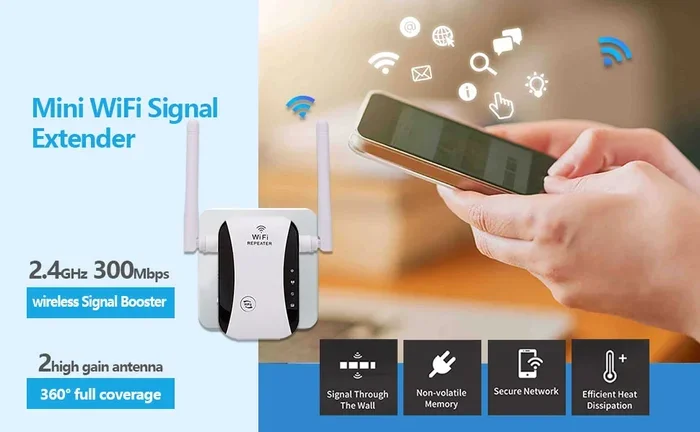
A WiFi extender is a device that picks up your existing wireless signal from your router and rebroadcasts it to areas that need better coverage. Think of it like a megaphone for your router’s signal. It does not create a new internet connection. It simply repeats the signal your router already sends out.
How a WiFi Repeater Works
Most WiFi extenders are also called WiFi repeaters. They work in a simple way:
- The extender receives the wireless signal from your router.
- It processes that signal.
- It sends the rebroadcast signal to areas with weak WiFi coverage.
This process sounds simple, but it takes time. Every time the extender receives and retransmits the signal, there is a small delay. This delay is one of the main reasons connection speed drops when you use an extender.
Single-Band vs Dual-Band vs Tri-Band Extenders
Not all wireless signal boosters are the same. They come in different types based on the bands they support:
- Single-band extenders work on the 2.4GHz band only. They are affordable but slower and more prone to interference.
- Dual-band extenders use both 2.4GHz and 5GHz bands. They offer better throughput and less interference.
- Tri-band extenders add a second 5GHz band. They provide the best bandwidth for heavy usage.
If you want the best network performance, a dual-band or tri-band extender is the way to go. Single-band models are fine for light browsing but will not give you full speed.
Do WiFi Extenders Give Full Speed?
This is the question everyone wants answered. The truth is that a WiFi extender will almost always reduce your speed to some degree. The amount of speed loss depends on several factors. Let us look at why this happens and what you can expect.
Why Speed Drops Happen with Extenders
When your WiFi extender rebroadcasts your router’s signal, it has to do two things at once: receive data and send data. Most basic extenders use the same radio and channel to do both. This is called half-duplex communication, and it cuts your potential bandwidth in half.
Here is a simple way to think about it:
- Your router sends a signal at full speed to the extender.
- The extender receives that signal and then sends it out again.
- Because it is doing both jobs at the same time, it can only use half the wireless bandwidth.
This means if your router delivers 100 Mbps, your extender might only give you 50 Mbps or less. That is a big speed drop, and it is the main reason do WiFi extenders give full speed is such a common question.
How Much Speed Can You Expect to Lose?
The speed loss from a WiFi range extender varies widely. Here are some general numbers:
- Single-band extenders: You may lose 50% or more of your original speed.
- Dual-band extenders: You might lose 20% to 40% of your speed.
- Tri-band extenders: Speed loss is usually around 10% to 20%.
These numbers depend heavily on your router placement, the distance between the extender and the router, and the quality of the extender itself. A well-placed, high-quality extender will lose less speed than a cheap one placed too far from the router.
Do All Devices Lose Speed When Connected to an Extender?
Not all devices experience the same speed loss. Here is what affects it:
- Device age: Older wireless adapters in laptops and phones cannot take advantage of newer WiFi standards like WiFi 6.
- Distance from the extender: The closer your device is to the extender, the stronger the signal and the less speed you lose.
- WiFi standard: Devices that support WiFi 5 or WiFi 6 will get better speeds through an extender than older WiFi 4 devices.
- Usage type: Light tasks like reading emails lose less noticeable speed than heavy tasks like 4K streaming or online gaming.
So to answer do WiFi extenders give full speed to all your devices: No, not all devices will get full speed. But some devices may barely notice the difference.
Factors That Affect WiFi Extender Speed
Several factors determine how much speed you lose when using a WiFi extender. Understanding these can help you get the best possible internet speed from your setup.
Router Placement and Extender Positioning
The single most important factor is where you place your extender. If you put it too far from the router, it will receive a weak signal and rebroadcast an even weaker one. If you put it too close, it may not extend coverage to the areas that need it.
Best practices for placement:
- Place the extender halfway between your router and the dead zone.
- Keep it within good signal strength range of the router.
- Avoid placing it behind walls, metal objects, or large appliances.
- Do not place it in a closet or on the floor.
A good WiFi signal strength between the router and the extender is essential. If the extender receives a weak signal, it has nothing strong to rebroadcast.
Interference from Other Devices
Wireless interference is a real problem in most homes. Microwaves, baby monitors, cordless phones, and even neighboring WiFi networks can all disrupt your wireless signal. This interference causes speed drops and connection instability.
The 2.4GHz band is especially vulnerable to interference because it is used by so many devices. The 5GHz band is less crowded and usually delivers better throughput, but it has a shorter range.
Your Internet Plan and Router Speed
Here is something many people overlook: a WiFi extender cannot make your internet faster than what your Internet Service Provider (ISP) gives you. If your plan offers 200 Mbps and your router delivers 180 Mbps, the extender will give you less than 180 Mbps.
If you want full speed throughout your home, you need to start with a fast internet plan and a capable router. The extender just spreads that signal — it does not boost it beyond what your router provides.
WiFi Standard and Hardware Quality
Not all WiFi extenders are created equal. The WiFi standard your extender supports matters a lot:
- WiFi 4 (802.11n): Older and slow. Not recommended for modern internet plans.
- WiFi 5 (802.11ac): Good for most homes. Supports gigabit speeds on the 5GHz band.
- WiFi 6 (802.11ax): The latest standard. Offers the best network performance and handles many devices well.
Buying a WiFi extender that matches or exceeds your router’s WiFi standard is one of the best ways to minimize speed loss.
WiFi Extender vs Mesh WiFi System
When people search for answers to do WiFi extenders give full speed, they often discover mesh WiFi systems as an alternative. Let us compare the two so you can decide which is better for your home.
What Is a Mesh WiFi System?
A mesh WiFi system replaces your router with multiple nodes that work together to cover your entire home. Unlike a WiFi extender, mesh nodes communicate with each other intelligently. They create a single, seamless network with one name and password.
Key Differences
Here is how a WiFi extender compares to a mesh WiFi system:
- Speed: Mesh systems typically lose less speed than traditional extenders because they use dedicated backhaul channels.
- Coverage: Mesh systems are designed to cover large homes more evenly.
- Ease of setup: Mesh systems are usually easier to set up and manage through a phone app.
- Price: Mesh systems cost more than basic WiFi extenders.
- Seamless roaming: With mesh, your devices switch between nodes automatically. With an extender, you may need to switch networks manually.
If you have a large home or need consistent full speed in every room, a mesh system is usually the better choice. But for smaller homes or budget setups, a good WiFi extender can still do the job.
How to Get the Best Speed From Your WiFi Extender
If you already have a WiFi extender or plan to buy one, there are several things you can do to maximize your internet speed. These tips will help you get as close to full speed as possible.
1. Choose the Right Extender for Your Needs
Not all wireless signal boosters are the same. Look for an extender that supports the latest WiFi standard and offers dual-band or tri-band capability. Brands like Netgear, TP-Link, and ASUS make reliable options at various price points.
2. Place Your Extender Strategically
As we mentioned earlier, placement is everything. Put your WiFi extender where it can still receive a strong signal from the router. A good rule of thumb is to place it where your WiFi signal strength is still at least two bars.
3. Use the 5GHz Band When Possible
The 5GHz band is faster and less crowded than the 2.4GHz band. If your devices support it, connect them to the 5GHz band through your extender for better connection speed.
4. Keep Your Extender Firmware Updated
Manufacturers release firmware updates that improve performance and fix bugs. Check your extender’s app or admin panel regularly to make sure you have the latest version.
5. Limit the Number of Connected Devices
The more devices connected to your extender, the more the bandwidth gets shared. If too many devices are connected at once, everyone’s speed will drop. Prioritize the devices that need the most speed.
6. Restart Your Equipment Regularly
It sounds simple, but restarting your router and extender can fix many network performance issues. A quick restart clears cached data and refreshes connections.
Common Mistakes People Make with WiFi Extenders
Avoiding these mistakes can save you a lot of frustration and help you get better WiFi coverage and speed.
Placing the Extender Too Far from the Router
This is the most common mistake. If the extender is too far away, it receives a weak signal and has nothing good to rebroadcast. Always make sure the extender is close enough to the router to get a strong signal.
Buying a Cheap Single-Band Extender
Budget extenders might seem like a good deal, but they often cannot keep up with modern internet speeds. A single-band extender will bottleneck your connection speed no matter how fast your internet plan is.
Expecting the Extender to Boost Your Internet Speed
A WiFi extender does not boost your internet speed. It extends your wireless coverage. If you have a slow internet plan, an extender will not fix that. It only spreads the signal you already have.
Ignoring Interference
If your extender is near a microwave or a thick wall, your WiFi signal strength will suffer. Move it to a more open location and away from other electronics.
When Should You Use a WiFi Extender?
Despite their limitations, WiFi extenders are still useful in many situations. Here are some times when a wireless signal booster makes sense:
- You have a small home with one or two weak spots.
- You rent and cannot install a full mesh WiFi system.
- You have a tight budget and need a quick fix for WiFi dead zones.
- You only need better coverage for light tasks like browsing and email.
- Your current router is outdated and you are not ready to replace it yet.
In these cases, a WiFi extender can be a practical and affordable solution. Just manage your expectations about speed.
Conclusion
So, do WiFi extenders give full speed to all your devices? The honest answer is no, not always. A WiFi range extender will reduce your speed to some degree because it has to receive and rebroadcast the signal. The amount of speed loss depends on the type of extender, its placement, and the devices you are using.
However, that does not mean extenders are useless. With the right WiFi extender, smart placement, and a few best practices, you can get close to full speed and eliminate those annoying WiFi dead zones. For the best network coverage and speed, consider a dual-band or tri-band extender, or upgrade to a mesh WiFi system if your budget allows.
The key takeaway is this: a WiFi extender improves coverage, but it is not a magic speed booster. Set realistic expectations, choose quality hardware, and follow the tips in this guide. You will be surprised at how much better your home network can perform.
FAQs
Can a WiFi extender make my internet faster?
No, a WiFi extender cannot make your internet faster than what your ISP provides. It only extends the wireless coverage of your existing connection. It may even reduce speed slightly because it rebroadcasts the signal. To get faster internet, you need to upgrade your internet plan or your router.
Why does my WiFi extender slow down my internet?
A WiFi extender slows down your internet because it has to receive and retransmit the signal. This process takes time and reduces the available bandwidth. Single-band extenders slow things down more than dual-band or tri-band models. The further the extender is from the router, the more speed you will lose.
Do mesh WiFi systems give full speed?
Mesh WiFi systems typically lose less speed than traditional WiFi extenders because they use dedicated backhaul channels. They can deliver close to full speed in most cases. However, no system can exceed the speed provided by your ISP or your router’s capabilities.
How far should a WiFi extender be from the router?
Place your WiFi extender about halfway between your router and the area with weak signal. It should be close enough to the router to receive a strong signal but far enough to extend coverage to the dead zone. A good signal strength indicator on your extender’s app can help you find the sweet spot.
Can I use multiple WiFi extenders in my home?
Yes, you can use multiple WiFi extenders, but each one will add some speed loss. Using too many extenders can actually hurt your network performance. If you need to cover a very large area, a mesh WiFi system is usually a better choice than chaining multiple extenders together.
What is the difference between a WiFi extender and a WiFi repeater?
A WiFi extender and a WiFi repeater are essentially the same thing. Both devices receive your router’s wireless signal and rebroadcast it to extend coverage. Some brands use the terms interchangeably. The key difference is in the quality and features of the device, not the function it performs.