Do Wifi Pods Actually Work Everything You Should Know
Do wifi pods actually work? Yes, they do. Wifi pods, also known as mesh wifi nodes, are small devices that spread wireless coverage across your home. They eliminate dead zones, boost internet speed in distant rooms, and create a seamless network. Whether you live in a small apartment or a large house, wifi pods can transform your connectivity. This guide covers everything you need to know about how they work, their pros and cons, and whether they are worth your money.
Do wifi pods actually work? If you have ever walked into a room and lost your wifi signal, you know how frustrating weak coverage can be. Many homeowners are turning to wifi pods to solve this problem. But do these small devices really deliver on their promises? Let us find out.
Wifi pods are part of a mesh wifi system. They work together with your main router to spread wireless internet throughout your home. Instead of relying on one single router to cover every room, you place pods in different areas. Each pod creates a strong signal node that connects to the others. The result is a seamless network with fewer dead zones.
In this article, we will explore how wifi pods work, what they can do, and whether they are worth buying. We will also compare them to traditional range extenders and share tips for getting the best results. By the end, you will know everything you need about do wifi pods actually work and whether they fit your home setup.
Key Takeaways
- Wifi pods work effectively: They use mesh technology to extend coverage throughout your home.
- They eliminate dead zones: Wifi pods fill in coverage gaps where your router signal is weak.
- Easy to set up: Most mesh wifi systems are app-controlled and simple to install.
- They are not the same as range extenders: Mesh pods create one unified network, unlike traditional extenders.
- Speed can vary: Your internet speed depends on your ISP plan and the number of pods you use.
- They are worth the investment: For homes with wifi coverage issues, pods provide a reliable long-term solution.
📑 Table of Contents
What Are Wifi Pods?
Wifi pods are small wireless devices that work as part of a mesh network. You place them around your home to extend your wifi coverage. Each pod connects wirelessly to your main router and to other pods. Together, they form one unified network. This is different from a traditional range extender, which creates a separate network name.
Most mesh wifi systems come with a starter pack. This usually includes one main router and one or two pods. You can buy extra pods separately if your home needs more coverage. Popular brands include Eero, Google Nest Wifi, Netgear Orbi, and TP-Link Deco.
How Do Wifi Pods Connect?
Each pod connects to the others using a dedicated wireless backhaul channel. This means the pods talk to each other on a separate frequency. It keeps your main network fast and stable. Some higher-end systems use a wired backhaul option. This means you connect pods using an Ethernet cable for even better performance.
The main router connects directly to your modem. It receives the internet signal from your Internet Service Provider (ISP). Then it shares that signal with the pods. Each pod rebroadcasts the signal to cover more area. This creates a web of coverage throughout your home.
Do Wifi Pods Actually Work?
So, do wifi pods actually work? The short answer is yes. They are one of the best ways to improve wifi coverage in your home. But how well they work depends on several factors. Let us break this down.
How Mesh Technology Makes It Work
Mesh wifi technology is the secret behind how pods work. Instead of one router doing all the work, the pods share the load. Each pod acts as a mini router. It sends and receives data to and from your devices. This creates a strong, reliable network across your entire home.
When you move from room to room, your phone or laptop automatically connects to the nearest pod. This is called seamless roaming. You do not have to switch networks manually. The connection stays strong and fast. This is a huge advantage over traditional range extenders.
Real-World Performance
In real-world tests, wifi pods perform very well. Most users report noticeable improvements in coverage. Dead zones that used to have no signal now have full bars. Streaming videos, video calls, and online gaming all work better with pods.
However, performance can vary. The number of pods you use matters. The layout of your home matters too. Thick walls, long hallways, and multiple floors can affect signal strength. But even in challenging setups, wifi pods still deliver solid results.
Wifi Pods vs Range Extenders
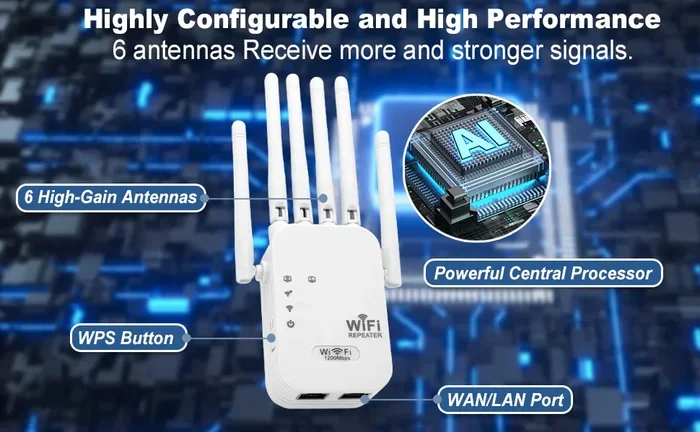
Many people confuse wifi pods with range extenders. They are not the same thing. A range extender rebroadcasts your router signal. But it creates a separate network name. This can cause confusion and slower speeds.
Wifi pods create one unified network. Your devices stay connected to the strongest signal automatically. Mesh pods also use dedicated backhaul channels. This keeps your network speed high. Range extenders often cut your speed in half because they share the same channel.
If you want to learn more about how different wifi devices handle signals, check out how your phone connects to 2.4 GHz wifi for more technical insights.
| Feature | Wifi Pods | Range Extenders |
|---|---|---|
| Network Name | One unified name | Separate network name |
| Seamless Roaming | Yes | No |
| Speed Loss | Minimal | Up to 50% |
| Setup Difficulty | Easy (app-based) | Easy to moderate |
| Price | Higher | Lower |
| Coverage | Whole home | Single room or area |
Benefits of Using Wifi Pods
There are many reasons to consider wifi pods for your home. Here are the biggest benefits:
- Whole-home coverage: Wifi pods spread your signal to every room. No more dead zones in the bathroom or the backyard.
- Easy setup: Most mesh systems use a simple app. You can set up your pods in under 30 minutes.
- Automatic updates: Mesh systems update their firmware automatically. This keeps your network secure and running smoothly.
- Parental controls: Many mesh systems include built-in parental controls. You can manage screen time and block content for kids.
- Scalable: You can add more pods as your home grows or your needs change.
- Better device handling: Mesh systems manage multiple devices efficiently. This is great for smart homes with many connected gadgets.
Do Wifi Pods Work for Large Homes?
Do wifi pods actually work in large homes? Absolutely. In fact, large homes benefit the most from mesh wifi pods. A single router often cannot reach every corner of a big house. Wifi pods fill in the gaps and keep your signal strong.
For homes over 2,000 square feet, most experts recommend at least three pods. This gives you reliable coverage on every floor and in every room. Larger homes over 3,000 square feet may need four or five pods.
How Many Pods Do You Need?
The number of pods you need depends on your home size and layout. Here is a simple guide:
- Small homes (under 1,000 sq ft): One pod may be enough, along with your main router.
- Medium homes (1,000 to 2,000 sq ft): Two to three pods should cover your space well.
- Large homes (2,000 to 3,000 sq ft): Three to four pods will provide solid coverage.
- Very large homes (over 3,000 sq ft): Four to six pods may be needed for full coverage.
Keep in mind that walls and floors affect wifi signals. Brick walls, concrete floors, and metal studs can block signals. You may need extra pods in these cases. The best approach is to place pods where you notice weak signals first.
Can You Use Wifi Pods Outdoors?
Some people wonder if wifi pods work outside. Most standard pods are designed for indoor use only. They are not weatherproof. However, some mesh systems offer outdoor pods or weather-resistant models.
If you need wifi in your backyard or garage, you have a few options. You can place an indoor pod near a window that faces the outdoor area. This can sometimes extend coverage outside. For reliable outdoor coverage, consider a pod designed for outdoor use or a weather-resistant access point.
If you are exploring other wifi-related topics, you might find it helpful to read about whether Google Wifi can serve as an access point for extended outdoor coverage.
Common Mistakes With Wifi Pods
Even though wifi pods are easy to use, people still make mistakes. Here are common errors to avoid:
- Placing pods too far apart: Each pod needs to be within range of another pod. If you place them too far apart, the signal weakens. A good rule is to keep pods within 30 to 40 feet of each other.
- Hiding pods in closets: Pods need to be in open spaces. Hiding them behind furniture or in closets blocks their signal. Place them on shelves or tables in central locations.
- Using old pods with new routers: Always use pods from the same mesh system. Mixing brands or models can cause compatibility issues.
- Not updating firmware: Keep your mesh system updated. Manufacturers release updates that improve performance and fix bugs.
- Expecting pods to boost your internet speed: Pods extend coverage. They do not increase your internet plan speed. If you have a slow plan, pods will not fix that. You need to upgrade your plan from your ISP for faster speeds.
Quick Tips for Best Results
Follow these simple tips to get the most out of your wifi pods:
- Place your main router in a central location in your home.
- Position pods in areas where you notice weak signals.
- Keep pods away from thick walls and metal objects.
- Use the mesh system app to run a wifi speed test and check coverage.
- Restart your system occasionally to keep it running smoothly.
- If you need the best connection for gaming or streaming, consider using an Ethernet cable for the main router connection.
Are Wifi Pods Worth the Money?
This is the big question. Are wifi pods worth buying? For most people, the answer is yes. If you have wifi dead zones or slow speeds in certain rooms, pods can make a big difference. They are especially useful in homes with multiple floors or thick walls.
Mesh wifi systems cost more than a single router. But they also cost less than hiring a professional to run Ethernet cables through your walls. Plus, they are much easier to set up and manage. The convenience and improved coverage make them a smart investment for most households.
You can find mesh wifi starter kits for as low as $100. Higher-end systems with three or more pods range from $200 to $500. The price depends on the brand and features. Think of it as an investment in better wifi for your entire home.
When considering your home network setup, it is also worth understanding how other wifi devices work. For example, you might want to explore whether adding an antenna to your wifi router can improve signal strength as an alternative or complement to pods.
Security is another important factor. Mesh wifi systems are generally safe. They use encryption to protect your network. Most systems also include built-in security features. These help keep hackers out and your data safe. Still, you should use strong passwords and keep your system updated.
If you are worried about wifi security, you might also want to check what others can do with your wifi password to understand the importance of network protection.
Final Verdict: Do Wifi Pods Actually Work?
So, do wifi pods actually work? Yes, they absolutely do. Wifi pods are one of the most effective ways to improve your home wifi coverage. They eliminate dead zones, provide seamless roaming, and are easy to set up. Whether you live in a small apartment or a large house, mesh wifi pods can transform your internet experience.
They are not magic. They will not increase your internet plan speed. And they work best when placed correctly. But for solving coverage problems, they are hard to beat. If you are tired of buffering videos and dropped calls, wifi pods are a great solution.
Start with a starter kit and add more pods as needed. Use the tips in this guide to get the best results. Your home wifi will never be the same again.
Frequently Asked Questions
How long do wifi pods last?
Most wifi pods last between 3 to 5 years with regular use. The lifespan depends on the brand, how often you use them, and whether you keep the firmware updated. Over time, older pods may become slower or less compatible with newer devices.
Can I use wifi pods with any router?
No, wifi pods work best when they are part of the same mesh system. You should use pods from the same brand and model as your main router. Mixing different systems can cause compatibility issues and poor performance.
Do wifi pods slow down your internet speed?
Wifi pods do not significantly slow down your internet speed. Unlike traditional range extenders, mesh pods use dedicated backhaul channels. This means they maintain most of your original speed. However, placing pods too far apart can reduce performance slightly.
Can you use wifi pods without a router?
No, wifi pods need a main router or hub to work. The pods connect to your modem through the main router. They cannot provide internet on their own. You must have an active internet plan from an Internet Service Provider.
How many wifi pods do I need for a 2000 square foot home?
For a 2,000 square foot home, two to three pods are usually enough. Place the main router in a central location and add pods in areas with weak signals. If your home has thick walls or multiple floors, you may need an extra pod for full coverage.
Are wifi pods better than a traditional router?
Wifi pods are better for covering large homes with dead zones. A traditional router works fine for small spaces. But mesh wifi pods provide more consistent coverage across bigger areas. They also handle multiple devices better than most single routers.