Do Long Range Wifi Extenders Really Work in Large Homes
Long range wifi extenders can genuinely improve wireless coverage in large homes, but results depend on your setup, layout, and the device you choose. These devices boost your existing router’s signal to reach far corners, basements, and upper floors where wifi dead zones often form. Understanding how they work and their limitations helps you make a smart buying decision.
If you live in a large home, you know the frustration of walking from room to room with a weak wifi signal. Buffering videos, dropped calls, and pages that refuse to load can ruin your day. That is exactly why many homeowners turn to long range wifi extenders as a simple solution. But here is the big question: do they actually deliver the results they promise?
The short answer is yes, but with some important caveats. A long range wifi extender can absolutely boost your wireless signal to areas your router cannot reach on its own. However, not every extender performs the same way, and your home layout plays a huge role in the final result. In this guide, we will walk through everything you need to know about long range wifi extenders and how they work in large homes.
Key Takeaways
- Long range wifi extenders do work: They effectively expand wireless coverage in large homes when placed correctly.
- Placement matters a lot: The extender must sit within the router’s existing signal range to function properly.
- Mesh systems are often better: For very large homes, a mesh network may deliver more consistent results than a traditional extender.
- Speed loss is real: Most extenders reduce bandwidth by at least 30 to 50 percent due to signal relay.
- Dual band models perform best: Look for dual band or tri band extenders to maintain strong speeds across your home network.
- Check your needs first: Evaluate your home size, wall materials, and device count before purchasing any extender.
📑 Table of Contents
- What Are Long Range WiFi Extenders?
- How Do Long Range WiFi Extenders Work?
- When Do Long Range WiFi Extenders Work Best?
- Common Problems with Long Range WiFi Extenders
- Long Range WiFi Extenders vs. Mesh Networks
- How to Choose the Right Long Range WiFi Extender
- Do Long Range WiFi Extenders Really Work?
What Are Long Range WiFi Extenders?
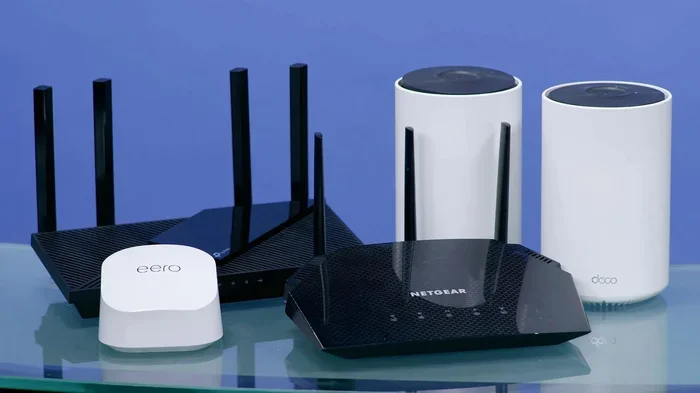
A long range wifi extender is a device that picks up your existing router signal and rebroadcasts it to areas with weak or no coverage. Think of it as a helper that reaches the places your main router cannot. These devices are also called wifi repeaters or wifi signal boosters, but they all serve a similar purpose.
Most extenders connect wirelessly to your router and create a new access point. This new access point extends your internet coverage to far-off rooms, backyards, and even detached garages. For homes with thick walls, multiple floors, or unusual layouts, this can be a real game changer. Instead of suffering through slow connections in certain rooms, you get a reliable signal everywhere.
How Do They Differ From Regular Extenders?
Standard wifi extenders usually work well in small to medium homes. They cover about 1,000 to 2,000 square feet. Long range wifi extenders, on the other hand, are designed to reach much farther. Some models claim coverage up to 6,000 square feet or more. They often feature stronger antennas and more powerful amplifiers to push the signal through obstacles.
However, longer range does not always mean better performance. The further the extender sits from the router, the weaker the signal it receives. And a weak received signal means a weaker rebroadcasted signal. This is why placement is so critical for getting the best results from any wireless range extender.
How Do Long Range WiFi Extenders Work?
Understanding how these devices work helps you set them up for the best results. The basic process is simple and straightforward once you see the big picture.
First, your router sends out a wireless signal in all directions. The long range wifi extender picks up that signal from a distance. Then it amplifies the signal and sends it out again to the areas that need it most. This creates a second network node that expands your home network coverage without needing new wiring.
Most extenders use a dual band connection. This means they communicate with your router on one frequency band and with your devices on another. The two most common bands are 2.4 GHz and 5 GHz. The 2.4 GHz band travels farther but is slower. The 5 GHz band is faster but has a shorter range. Many extenders let you switch between bands depending on what you need.
The Role of Signal Strength
Your extender can only rebroadcast what it receives. If the signal from your router is already weak when it reaches the extender, the extended signal will also be weak. This is why experts recommend placing the extender halfway between your router and the dead zone. That way, it gets a strong enough signal to work with and deliver decent speeds to the far end of your home.
Many modern extenders come with a signal strength indicator. This helps you find the sweet spot for placement. You simply walk around your home with your phone and look for the area where the indicator shows a good connection. That is where you set up the device for the best signal strength and coverage.
Ethernet Backhaul: A Better Option
Some long range wifi extenders support wired connections through ethernet backhaul. This means you can connect the extender to your router using an ethernet cable. The cable carries the data, and the extender simply rebroadcasts the wifi signal. This method eliminates the speed loss that happens with wireless backhaul.
If your home has ethernet cables running through the walls, this is the best setup you can get. You get full speed on the extended network without any wireless signal degradation. It is like having a second router placed exactly where you need it. This approach preserves your bandwidth and keeps latency low for gaming and video calls.
When Do Long Range WiFi Extenders Work Best?
Not every home needs a long range wifi extender. These devices shine in specific situations where the router alone cannot cover the entire space. Understanding when they work best helps you decide if they are the right choice for your home and budget.
Large Floor Plans
Homes with open floor plans that stretch across 3,000 square feet or more often struggle with wifi coverage. The router sits in one room, and the signal weakens as it travels down the hallway or across the great room. A long range wifi extender placed in the middle of the home can bridge that gap effectively.
For example, if your router is in the living room on the first floor and your bedroom is at the far end of the house, an extender in the hallway can carry the signal to your room. You will get a much stronger connection for streaming, browsing, and video calls. The wireless connectivity in that far room goes from frustrating to perfectly usable.
Multi-Story Homes
Multi-story homes are notorious for dead zones. The signal has to travel up through the ceiling, which absorbs a lot of the wireless energy. A long range wifi extender on the second floor can pick up the signal from the router below and push it through the upper level.
This works especially well when the router is in the basement or on the ground floor. The extender acts as a relay station, passing the signal up and out to the upper rooms. Many homeowners report a dramatic improvement in wireless connectivity after adding an extender to the second floor. Even old routers can perform much better with a smart extender placement.
Homes with Thick Walls or Obstacles
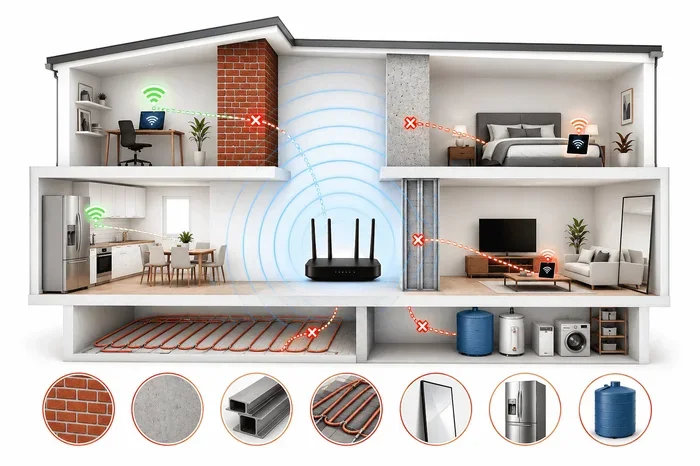
Brick, concrete, and stone walls are enemies of wifi signals. They block and absorb the wireless energy, creating internet dead spots in rooms behind them. A long range wifi extender can help by placing a new signal source on the other side of the wall.
For instance, if your home office is in a room with thick exterior walls, the router signal may barely reach it. An extender placed in an adjacent room can send a fresh signal into the office. This restores your broadband speed and makes video conferencing much smoother. The same principle applies to rooms behind large appliances, fish tanks, or heavy furniture.
Outdoor Coverage
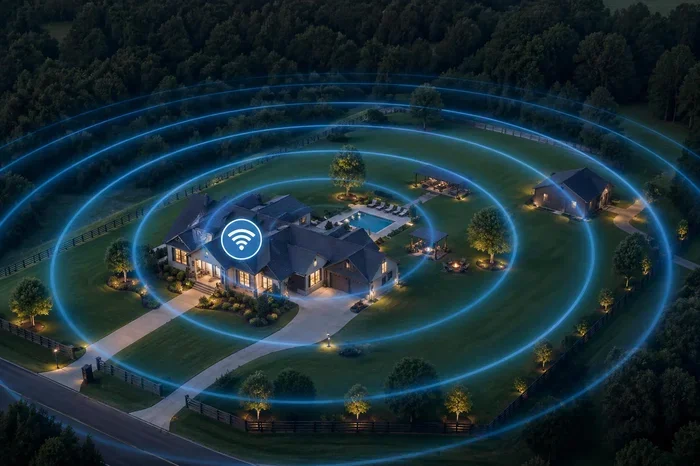
Some homeowners need wifi coverage in their backyard, patio, or garage. Standard routers usually cannot reach these areas. A long range wifi extender placed near a window or exterior wall can push the signal outside. This lets you enjoy outdoor entertainment, work on your patio, or monitor smart home devices in the garage without worrying about losing your connection.
Common Problems with Long Range WiFi Extenders
While these devices can be very helpful, they are not perfect. Knowing the common problems helps you set realistic expectations and avoid frustration when setting up your home network.
Speed Reduction
The biggest complaint about wifi extenders is speed loss. When a device rebroadcasts a signal, it uses the same radio to both receive and send data. This cuts the available bandwidth in half. In real-world terms, you might see a 30 to 50 percent drop in wifi speed compared to being close to the router.
For basic tasks like email and web browsing, this speed loss is barely noticeable. But for heavy activities like 4K streaming or online gaming, it can be a real problem. This is why many experts recommend using the extender for lighter tasks and keeping the router connection for demanding activities. Understanding this trade-off helps you use your network more wisely.
Latency and Lag
Because the signal has to travel from the router to the extender and then to your device, there is added latency. This extra delay is called latency, and it can cause lag during online gaming or video calls. The further the extender is from the router, the higher the latency tends to be.
If you are a serious gamer or someone who takes video calls for work, this lag can be annoying. You might notice delays in your voice or a slight lag in your movements during fast-paced games. In these cases, a wired connection or a mesh system might be a better fit for your needs.
Network Confusion
Some extenders create a separate network name from your router. This means your phone or laptop might not automatically switch between the two networks as you move around the house. You could end up stuck on a weak router signal when the extender signal is actually stronger right next to you.
Many modern extenders now use the same network name and password as the router. This seamless roaming makes the experience much smoother. But even with this feature, the handoff is not always perfect. You might notice a brief pause when switching between the two access points. Look for extenders that support seamless roaming for the best experience.
Interference Issues
Wireless signals can get disrupted by other electronics in your home. Microwaves, baby monitors, cordless phones, and even neighboring wifi networks can all cause signal interference. This is especially common on the 2.4 GHz band, which is more crowded and prone to congestion.
To reduce interference, try placing the extender away from other electronics. Switching to the 5 GHz band can also help, since it is less crowded. Some extenders let you choose the channel manually, which can reduce interference from nearby networks. Keeping your extender firmware updated also helps maintain a clean and stable connection.
Long Range WiFi Extenders vs. Mesh Networks
If you are shopping for solutions to cover a large home, you have probably seen mesh wifi systems too. Both options aim to solve the same problem, but they work very differently. Understanding the differences helps you pick the right solution for your home.
How Mesh Systems Work
A mesh network uses multiple nodes that work together as a single unified network. Unlike a traditional extender, mesh nodes communicate with each other intelligently. They route data through the fastest path and hand off devices seamlessly as you move around the house. This creates a smooth, consistent experience throughout your entire home.
Mesh systems are designed from the ground up for whole-home coverage. They come with multiple units that you place around the home, and they all share the same network name and password. This makes roaming effortless and the experience much more consistent. You never have to think about which network your phone is connected to.
Comparison Table
| Feature | Long Range WiFi Extender | Mesh WiFi System |
|---|---|---|
| Price Range | $30 to $150 | $100 to $500+ |
| Setup Difficulty | Easy | Easy to Moderate |
| Speed Loss | Moderate to High | Low to Moderate |
| Seamless Roaming | Limited | Excellent |
| Best For | Small to medium coverage gaps | Whole-home coverage |
| Expandability | Limited | High |
| Performance Consistency | Varies by placement | Consistent across the home |
Which One Should You Choose?
If you only have one or two rooms with weak signal, a long range wifi extender is a cost-effective solution. It is simple to set up and works well for targeted coverage. You plug it in, connect it to your router, and you are good to go. Most extenders cost under $100, making them an affordable way to improve your wifi coverage.
If you need reliable coverage throughout a large home, a mesh system is the better long-term investment. It costs more upfront, but the performance and consistency are hard to beat. Mesh systems also handle more devices without breaking a sweat, which matters in today’s connected homes with smart TVs, phones, tablets, and IoT devices all competing for bandwidth.
How to Choose the Right Long Range WiFi Extender
Not all extenders are created equal. With so many options on the market, picking the right one can feel overwhelming. Here are the key factors to consider before you make a purchase.
Check the Coverage Area
Manufacturers often list the coverage area on the box, but these numbers are usually based on ideal conditions. In a real home with walls and furniture, the actual coverage will be smaller. As a general rule, look for an extender rated for at least 1.5 times your home’s square footage.
For example, if your home is 3,000 square feet, look for an extender that claims 4,500 square feet of coverage. This gives you a buffer for walls, furniture, and other obstacles that weaken the signal. Reading real user reviews gives you a more honest picture of how much coverage you can actually expect.
Look for Dual Band or Tri Band
Dual band extenders use both 2.4 GHz and 5 GHz frequencies. This gives you flexibility to connect devices on the band that works best for each situation. Tri band extenders add a second 5 GHz band, which reduces congestion and maintains better speeds when multiple devices are connected at the same time.
For most large homes, a dual band extender is sufficient. But if you have many devices and need consistent high speeds, a tri band model is worth the extra cost. The additional band means less competition for airtime and better performance for everyone connected to your home network.
Consider the Backhaul Method
As mentioned earlier, wired ethernet backhaul delivers the best performance. If your home supports it, choose an extender with an ethernet port for backhaul. This gives you the strongest possible extended signal without speed loss. It is the closest you can get to a wired connection with the convenience of wireless access.
If wired backhaul is not an option, look for extenders that use dedicated wireless backhaul. These models use a separate radio for communicating with the router, which preserves more of your bandwidth. This is a good middle ground between wireless-only extenders and wired setups, and it helps maintain better broadband speed across the extended network.
Read Reviews and Check Compatibility
Before buying any long range wifi extender, read real user reviews. Look for feedback on setup ease, speed performance, and reliability. Pay attention to reviews from people with homes similar to yours in size and layout. Their experience will be much more relevant to your situation.
Also check that the extender is compatible with your router. Most extenders work with any standard router, but some mesh extenders only work with their own brand’s router. Checking compatibility ahead of time saves you from returns and frustration. Look for extenders that support the latest wifi standards, such as WiFi 6, for the best future-proof performance.
Quick Tips for Setup
Getting the most out of your long range wifi extender comes down to a few simple setup tips:
- Place the extender halfway between your router and the weak coverage area.
- Keep the extender in an open space, not inside a cabinet or closet.
- Use the signal strength indicator app or web interface to find the best spot.
- Update the extender firmware regularly for the best performance and security.
- Restart the extender once a month to keep it running smoothly.
- Use the 5 GHz band for devices that need speed and the 2.4 GHz band for devices that need range.
Common Mistakes to Avoid
Here are some setup mistakes that can hurt your performance and waste your money:
- Placing the extender too far from the router: If the extender cannot get a strong signal from the router, it cannot extend that signal effectively to the far reaches of your home.
- Putting the extender in a corner or basement: Walls and floors absorb wifi signals. Open, central locations work best for maintaining strong signal strength on both sides of the extender.
- Ignoring firmware updates: Outdated firmware can cause slow speeds, connection drops, and security vulnerabilities. Always keep your extender updated through the manufacturer’s app or web interface.
- Expecting miracles in extreme dead zones: If the router signal does not reach the extender’s location at all, no extender will help. You need at least a usable signal at the extender’s location for it to work.
Do Long Range WiFi Extenders Really Work?
The honest answer is yes, they do work. Thousands of homeowners have successfully used long range wifi extenders to eliminate dead zones and improve their internet experience. The key is managing your expectations and setting up the device correctly for your specific home layout.
A long range wifi extender is not magic. It cannot create a signal where none exists. But it can take a weak signal and push it further, giving you usable coverage in areas that would otherwise be unreachable. For many homes, this is exactly what is needed to make the entire living space comfortable and connected.
If you have a large home with coverage gaps, an extender is a practical and affordable solution. It is much cheaper than running ethernet cables through walls or replacing your entire router with a mesh system. For the right situation, a long range wifi extender delivers real, noticeable improvements in wireless connectivity and internet coverage. You will notice the difference the moment you stream a movie or join a video call from a previously problematic room.
The best approach is to test your current setup first. Walk around your home with your phone and note where the signal drops. Then place the extender strategically to fill those gaps. With the right placement and a quality device, you can turn weak spots into strong, reliable connections throughout your entire home.
Final Thoughts
Long range wifi extenders are a proven technology that works well for the right use case. They are not perfect, and they do have limitations, but for many large homes, they are the simplest and most affordable way to boost coverage. Take the time to choose the right model, set it up in the best location, and you will enjoy a stronger, more reliable wireless network all around your home.
Remember that no single solution fits every home. What works perfectly for a 4,000-square-foot two-story house might not be ideal for a 1,500-square-foot ranch with thick brick walls. Evaluate your specific needs, consider your budget, and choose the solution that fits your situation best. A well-placed long range wifi extender can transform your internet experience and make every room in your home a great place to connect.
Frequently Asked Questions
Can a long range wifi extender slow down my internet?
Yes, most extenders reduce speed by 30 to 50 percent because they use the same radio to receive and rebroadcast the signal. This speed loss is most noticeable during heavy activities like 4K streaming or online gaming. For lighter tasks like browsing and email, the slowdown is usually barely noticeable.
Where should I place my long range wifi extender?
Place the extender halfway between your router and the area with weak coverage. It needs to receive a strong signal from the router in order to rebroadcast effectively. Avoid placing it in corners, closets, or behind furniture, as these locations block the signal and reduce performance.
Is a mesh network better than a wifi extender?
Mesh networks generally offer better performance and seamless roaming than traditional extenders. They are ideal for whole-home coverage in large homes. However, they cost more upfront. If you only have one or two rooms with weak signal, a long range wifi extender is a more affordable solution that still delivers good results.
Do long range wifi extenders work with any router?
Most extenders work with any standard router that uses wifi. However, some mesh extenders only work with their own brand’s router. Always check compatibility before purchasing. Look for extenders that support the latest wifi standards, such as WiFi 5 or WiFi 6, for the best performance.
Can I use multiple wifi extenders in my home?
Yes, you can use multiple extenders, but it is not always recommended. Each extender adds latency and can reduce overall network performance. If you need coverage in more than two or three weak areas, a mesh system is usually a better choice. It manages multiple nodes more efficiently and provides a more consistent experience throughout your home.
Will a long range wifi extender work outdoors?
Yes, an extender placed near a window or exterior wall can push the wifi signal outside. This works well for patios, backyards, and garages. However, outdoor conditions like weather and distance can affect performance. For reliable outdoor coverage, consider an outdoor-rated extender or access point designed for exterior use.