Do You Just Need A Wifi Router For Wifi And What To Know
Yes, a wifi router is the core device you need for wireless internet, but it often works alongside a modem and other equipment. Understanding what a router does, how to set it up, and when you might need extras like a wifi booster or mesh system will save you time and money. This guide covers everything from basic setup to advanced tips for better wireless network performance.
Do you just need a wifi router for wifi? The short answer is yes. But the full answer is a lot more interesting than that. A wifi router is the heart of any wireless home network. It takes your internet signal and broadcasts it so your phones, laptops, tablets, and smart home devices can all go online without wires. But there is much more to know about how routers work, what else you might need, and how to get the best performance from your setup.
Whether you are setting up a brand new home network or trying to fix a slow or spotty connection, understanding your wifi router is the first step. This guide breaks everything down in plain language. You will learn what a router actually does, how it differs from a modem, and what you can do to get stronger coverage and faster speeds throughout your home.
Let us start with the basics and work our way up to more advanced tips. By the end, you will know exactly what you need and how to get the most out of your wireless setup.
Key Takeaways
- A wifi router alone creates a wireless network: It broadcasts your internet signal so devices can connect without cables.
- You still need a modem for most setups: The router and modem serve different but equally important roles in your home network.
- Router placement matters a lot: A poorly placed router leads to weak signal and dead zones throughout your home.
- You may need extras for larger homes: Wifi extenders or mesh systems help cover more square footage.
- Dual-band routers offer better performance: Choosing the right frequency band reduces interference and speeds up your connection.
- Setup is simple but optimization takes effort: Basic setup takes minutes, but tweaking settings like channel selection boosts your internet speed significantly.
📑 Table of Contents
What Is A Wifi Router And How Does It Work
A wifi router is a device that creates a wireless local area network, or WLAN. Think of it as the traffic director for your home internet. It receives data from your modem through a cable and then sends that data out over the air using radio waves. Your devices pick up those waves and connect to the internet wirelessly.
Here is a simple way to think about it. Your modem brings the internet into your home from your internet service provider, or ISP. The router then takes that internet and shares it with all your devices. Without a router, you would need to plug every single device directly into the modem with an ethernet cable. That is where the router saves the day.
The Role Of Radio Frequencies
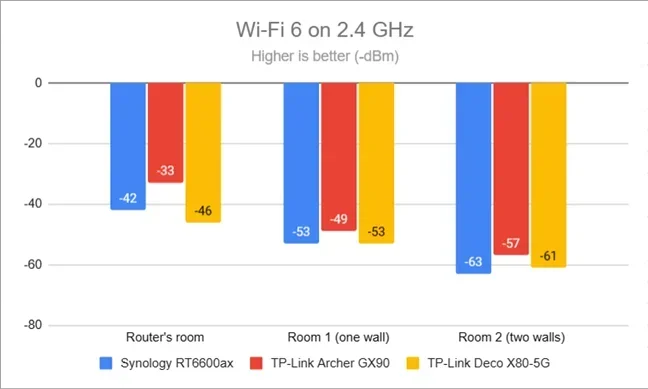
Most modern routers use two radio frequency bands. These are called 2.4 GHz and 5 GHz. The 2.4 GHz band travels farther but is slower. It also deals with more interference from things like microwaves and Bluetooth devices. The 5 GHz band is faster but has a shorter range. It works best when you are close to the router.
Many people wonder whether they should force their device to use a specific band. For example, if you have interference issues, forcing your phone to use the 2.4 GHz band can sometimes help stabilize your connection. This is especially true in apartments or densely populated areas where many networks overlap.
What Makes A Router “Wifi Capable”
Not all routers are created equal. A basic wifi router handles the essentials. It broadcasts a wireless signal, assigns IP addresses to your devices, and lets them communicate with each other and the internet. But more expensive routers come with extra features. These include better range, faster speeds, support for more devices at once, and advanced security settings.
When shopping for a router, look for terms like “dual band,” “tri-band,” “WiFi 5,” or “WiFi 6.” These labels tell you what generation of wireless technology the router supports. WiFi 6 is the newest standard and offers noticeably better performance, especially in homes with many connected devices.
Do You Really Just Need A Wifi Router For Wifi
In most cases, yes. A wifi router is the only device you strictly need to create a wireless network. But “need” and “optimal” are two very different things. Whether you just need a basic router depends on your home size, the number of devices you use, and what you do online.
If you live in a small apartment and use the internet for light browsing and email, a single basic router might be all you need. But if you have a large house, multiple people streaming at the same time, or a home office that demands reliable speeds, you might need more than just a router.
When A Single Router Is Enough
A single router works well in these situations:
- You live in a small or medium-sized apartment or home.
- You have fewer than 10 devices connected at the same time.
- Your main activities are browsing, email, and light streaming.
- Your router is placed in a central location in your home.
- You do not experience frequent dead zones or signal drops.
If all of these apply to you, a standard wireless router will serve you just fine. You do not need to spend extra money on additional equipment. Just make sure your router is from a reputable brand and supports at least WiFi 5 standards.
When You Need More Than A Router
There are clear signs that your setup needs an upgrade. If you notice weak signals in certain rooms, frequent disconnections, or slow speeds when multiple people are online, your router alone is not cutting it. In these cases, you might want to consider a few additional solutions.
One popular option is a wifi extender. This device boosts your existing signal and pushes it further into your home. Another option is a mesh network system, which uses multiple units placed around your home to create seamless coverage. Some people also look into buying a dedicated wifi booster to improve their signal strength without replacing their entire router.
For those dealing with larger spaces, connecting a mesh router to an existing router can also solve coverage issues. If you are exploring this route, check out our guide on connecting a mesh router to an existing router for detailed steps.
Router Vs Modem: What Is The Difference
One of the most common points of confusion is the difference between a router and a modem. Many people use these terms interchangeably, but they are two very different devices. Understanding the distinction helps you troubleshoot problems and make better purchasing decisions.
A modem connects your home to the internet. It talks to your internet service provider and brings the signal into your house. A router then takes that signal and distributes it to your devices, both wired and wireless.
Can You Use A Router Without A Modem
Technically, yes. If you are setting up a local network where devices share files or a printer without needing internet access, a router alone is enough. But for any kind of internet browsing, streaming, or online gaming, you need both a modem and a router. The modem brings the internet in, and the router spreads it around.
Some ISPs provide a combo device that works as both a modem and a router. These are convenient and save space. But they often come with trade-offs. Combo devices tend to have weaker wifi performance and fewer customization options compared to separate, standalone equipment.
Do You Need To Buy Your Own Modem
You can usually rent a modem from your ISP, but buying your own often saves money in the long run. It also gives you more control over your network. Just make sure the modem you buy is compatible with your ISP. You can usually find a list of approved models on your provider’s website.
Keep in mind that having a separate modem and router gives you more flexibility. If one device fails or becomes outdated, you only need to replace that one device. With a combo unit, a single failure takes down both your internet and your wireless network.
How To Set Up Your Wifi Router Properly
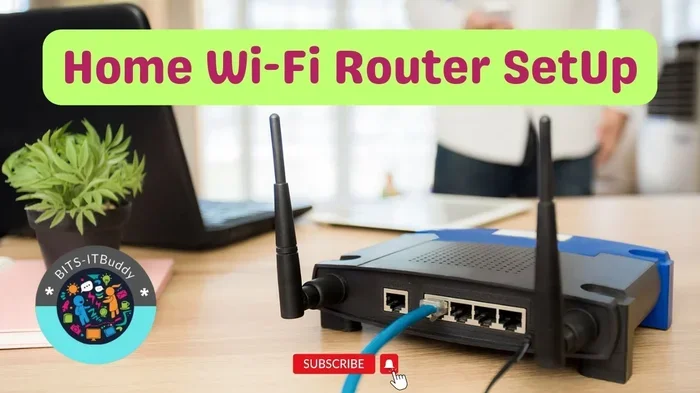
Setting up a wifi router is easier than most people think. You do not need to be a tech expert. With a few basic steps, you can have a working wireless network in less than 30 minutes. The key is following the right process and avoiding common setup mistakes.
Step By Step Setup Guide
- Place your router in a central location. The center of your home is ideal. Walls, floors, and large furniture can block the signal, so keep the router out in the open.
- Connect the router to your modem. Use an ethernet cable to link the modem’s output port to the router’s WAN or internet port.
- Power on both devices. Plug in the modem first and wait for it to fully start up. Then plug in the router and wait for its lights to stabilize.
- Connect to the router’s default network. Look for the network name and password on a sticker on the bottom or back of the router.
- Access the router’s admin panel. Open a web browser and type in the router’s IP address, usually something like 192.168.1.1 or 192.168.0.1.
- Configure your settings. Change the default network name and password, update the firmware, and choose the best wifi channel for your area.
Quick Tips For Better Setup
- Always change the default admin password. This is one of the most overlooked security steps.
- Update your router’s firmware regularly. Updates fix bugs and improve performance.
- Name your network something unique but avoid personal information.
- Use WPA3 encryption if your router supports it. It is the most secure option available today.
- If you experience slow speeds, try switching between the 2.4 GHz and 5 GHz bands.
Common Setup Mistakes To Avoid
One of the biggest mistakes is hiding the router in a closet or behind a TV. This blocks the signal and weakens your coverage. Another common error is leaving the default network name and password unchanged. This makes your network an easy target for unauthorized users. Finally, many people skip firmware updates, which means they miss out on important security patches and performance improvements.
Common Wifi Router Problems And How To Fix Them
Even the best routers can have issues. Slow speeds, dropped connections, and devices that refuse to connect are all too common. The good news is that most of these problems have simple solutions. You do not need to call a technician or buy expensive new equipment right away.
Slow Internet Speeds
Slow speeds are often caused by interference or outdated firmware. Start by restarting your router. This clears its memory and refreshes the connection. If that does not work, check which wifi channel your router is using. In crowded areas like apartment buildings, many routers use the same channel, which causes congestion. Switching to a less crowded channel can make a big difference.
Weak Signal In Certain Rooms
Weak signals usually come down to placement and distance. If your router is in one corner of the house, the opposite corner will get a weak signal. Moving the router to a more central spot often solves this problem. If moving the router is not an option, a wifi extender or wifi extension device can help bridge the gap.
Devices That Keep Disconnecting
If a specific device keeps dropping off the network, the problem might be with that device rather than the router. Check for outdated network drivers or settings on the device itself. Also, make sure the device is not set to power-saving mode, which can sometimes disable the wifi adapter to save battery.
Can Not Connect At All
If a device simply will not connect, try forgetting the network and reconnecting. Also check if the router has reached its maximum device limit. Most consumer routers support between 20 and 50 devices, but performance drops when that limit is approached.
When You Need More Than Just A Router
Sometimes a single router is not enough. Large homes, thick walls, and heavy internet usage all create challenges that a basic router cannot handle alone. Knowing when to invest in additional equipment saves you frustration and helps you get the most out of your internet plan.
Signs You Need A Wifi Extender Or Mesh System
- You have dead zones where the signal does not reach at all.
- You have tried repositioning your router but still get weak signals in some areas.
- Your home is larger than 2,000 square feet.
- Multiple family members stream, game, or work from home simultaneously.
- Your current router is more than five years old and does not support modern wifi standards.
Mesh systems are the most popular solution for larger homes. They use multiple units placed around the house to create one seamless network. Unlike traditional extenders, mesh systems do not create separate network names. Your devices switch automatically between units as you move through your home.
Can A Router Be Mounted On A Wall
Yes, many routers can be wall-mounted. In fact, wall mounting is often the best way to improve coverage. It elevates the router, reduces signal blockage from furniture, and spreads the signal more evenly. However, not all routers come with wall-mounting hardware, so check before you buy. For more details, see our guide on whether a projector can be mounted on a wall, which covers similar mounting principles for electronic devices.
Choosing The Right Equipment For Your Needs
When choosing additional equipment, consider your actual needs. A small apartment might only need a single strong router. A medium-sized home might benefit from a quality extender. Large homes with many occupants usually do best with a mesh system. Do not overspend on equipment you do not need, but also do not cheap out if your usage demands better performance.
For those who travel or need portable internet, you might also wonder about mobile wifi options. If you are planning a trip to Japan, for example, you can look into whether you can buy your own portable wifi device for the trip. This is a completely different setup from a home router, but the underlying wireless technology works on similar principles.
Final Thoughts On Your Wifi Setup
So, do you just need a wifi router for wifi? The answer is yes, but with important context. A router is the essential device that creates your wireless network. It takes your internet connection and broadcasts it so all your devices can connect without wires. But depending on your home size, device count, and usage habits, you might also need a modem, an extender, or a mesh system to get the best results.
The key takeaway is that your setup should match your needs. A small apartment does not require a high-end mesh system. But a large family home with heavy internet usage will benefit from one. Start with the basics, monitor your performance, and upgrade only when you see clear signs that your current equipment is holding you back.
Take the time to set up your router correctly. Place it in a central, open location. Change the default passwords. Keep the firmware updated. These simple steps make a huge difference in your daily internet experience. A well-configured router gives you faster speeds, stronger signals, and a more secure network. And that is something everyone can appreciate.
Remember, your home network is only as good as the equipment and setup behind it. Invest a little time in understanding how it all works, and you will enjoy a much better online experience every single day.
Frequently Asked Questions
Can I Use A Wifi Router Without A Modem?
Yes, you can use a wifi router without a modem if you only need a local network for sharing files or printers. But for internet access, you need both a modem and a router. The modem brings the internet signal into your home, and the router distributes it to your devices wirelessly.
How Many Devices Can A Typical Wifi Router Handle?
Most consumer routers support between 20 and 50 devices at the same time. However, performance starts to drop as you approach the upper limit. If you have many smart home devices, streaming boxes, and phones all connected, consider a router designed for heavy multi-device usage or a mesh system.
Does Router Placement Really Affect Wifi Performance?
Absolutely. Router placement is one of the biggest factors in wifi performance. A router placed in a central, open location will provide much better coverage than one hidden in a corner or behind furniture. Walls, metal objects, and even large appliances can weaken the signal significantly.
What Is The Difference Between A Wifi Router And A Wifi Extender?
A wifi router creates the wireless network and distributes internet to your devices. A wifi extender takes an existing signal from the router and boosts it to reach farther areas. Extenders do not replace routers. They work alongside them to improve coverage in larger homes.
Should I Buy A Separate Modem And Router Or A Combo Unit?
Separate modem and router setups offer better performance, more customization, and easier troubleshooting. Combo units are convenient and save space but often have weaker wifi capabilities. If you want the best performance and control, go with separate devices from reputable brands.
How Often Should I Update My Router Firmware?
You should check for firmware updates at least once a month. Many modern routers have automatic update features, but it is still a good idea to check manually. Firmware updates fix security vulnerabilities, improve stability, and sometimes add new features that boost performance.