Does iPhone Have Multipoint Bluetooth Connectivity
Does iPhone have multipoint Bluetooth? The answer is not a simple yes or no. Most iPhones do not natively support true multipoint Bluetooth, but there are workarounds. This guide explains everything about iPhone Bluetooth connectivity and how to connect multiple devices.
Have you ever wondered if your iPhone can connect to two Bluetooth devices at the same time? Maybe you want to listen to music on your wireless headphones while taking a call through your car speaker. The idea of multipoint Bluetooth sounds great, but does iPhone actually support it? Let us dive deep into this topic and find out everything you need to know.
The world of wireless connectivity has changed a lot in recent years. We now expect our phones to talk to multiple devices without any hassle. But when it comes to Apple and iPhone Bluetooth, things are not always as simple as they seem. This article breaks it all down for you in plain English.
Key Takeaways
- Multipoint Bluetooth allows a device to connect to two sources at once.
- iPhones do not natively support full multipoint Bluetooth pairing.
- You can use workarounds like Bluetooth adapters to achieve dual connections.
- Bluetooth 5.0 and newer offer better range and stability for wireless audio.
- Certain third-party apps and accessories help bridge the multipoint gap on iPhones.
- Wireless earbuds and headphones from brands like Bose and Sony lead in multipoint tech.
- Keeping your iPhone updated ensures the best Bluetooth connectivity experience.
📑 Table of Contents
- What Is Multipoint Bluetooth and Why Does It Matter?
- Does iPhone Support Multipoint Bluetooth Natively?
- Workarounds to Achieve Multipoint Bluetooth on iPhone
- Which Bluetooth Devices Work Best With iPhone?
- How to Connect Multiple Bluetooth Devices to iPhone
- Common Bluetooth Problems on iPhone and How to Fix Them
- Expert Insights on iPhone Bluetooth and Multipoint Tech
- Is Multipoint Bluetooth Worth Waiting For on iPhone?
What Is Multipoint Bluetooth and Why Does It Matter?
Multipoint Bluetooth is a technology that lets a single Bluetooth device connect to two or more source devices at the same time. Think about it like this. You are listening to a podcast on your laptop. Your phone rings. With multipoint Bluetooth, your wireless headphones can switch to your phone call automatically. When the call ends, they go back to the laptop. Pretty cool, right?
This feature matters a lot for people who juggle multiple devices every day. If you work on a computer and carry a phone, you do not want to disconnect and reconnect your Bluetooth headphones every time. It saves time and makes life smoother. Not all devices support this though, and that is where things get tricky.
How Multipoint Bluetooth Works Technically
Multipoint Bluetooth uses a special Bluetooth protocol that allows a headphone or speaker to maintain two active connections. The device switches between sources based on audio priority. When a call comes in, the phone connection takes priority. When the call ends, the headphones go back to the media source.
This is different from regular Bluetooth pairing, where you can only connect to one device at a time. Bluetooth 5.0 and newer versions handle this better. They offer stronger signals and faster switching between devices. But your iPhone needs to work with your headphones for this to function properly.
Does iPhone Support Multipoint Bluetooth Natively?
Here is the honest answer. Most iPhones do not support true multipoint Bluetooth out of the box. Apple has not built this feature deeply into iOS. Your iPhone can only connect to one Bluetooth audio source at a time for media playback. This might feel limiting, but there are reasons behind Apple choices.
Apple focuses on a smooth and stable experience. By keeping Bluetooth connectivity simple, they reduce connection drops and audio glitches. But for power users, this can be frustrating. You might need to rely on third-party solutions or specific accessories that help bridge this gap.
Which iPhone Models Are Affected?
All iPhone models running modern iOS versions share this limitation. Whether you have an iPhone 15 Pro Max or an older iPhone 12, the native Bluetooth pairing behavior is the same. You can only stream audio to one device at a time.
Some people think newer iPhones fixed this, but they have not. Apple has not added native multipoint support to any iPhone model yet. The focus has been on improving wireless connection range and audio quality instead. So if you are hoping for a native fix in a future iOS update, keep an eye on Apple announcements.
Workarounds to Achieve Multipoint Bluetooth on iPhone
Just because iPhones do not support multipoint natively does not mean you are stuck. There are several ways to get around this limitation. Let us look at the most practical options.
Use a Bluetooth Transmitter or Adapter
A Bluetooth transmitter can act as a bridge between your iPhone and another device. You connect the transmitter to your TV or stereo. Then your iPhone connects to the transmitter for audio. Meanwhile, your headphones can connect to the TV directly.
This is not true multipoint, but it gets close. You can listen to TV audio through your headphones while your phone handles notifications and calls. Some transmitters even let you turn your stereo into Bluetooth with ease. This is a great option for home entertainment setups.
Try Bluetooth-Enabled Accessories That Support Multipoint
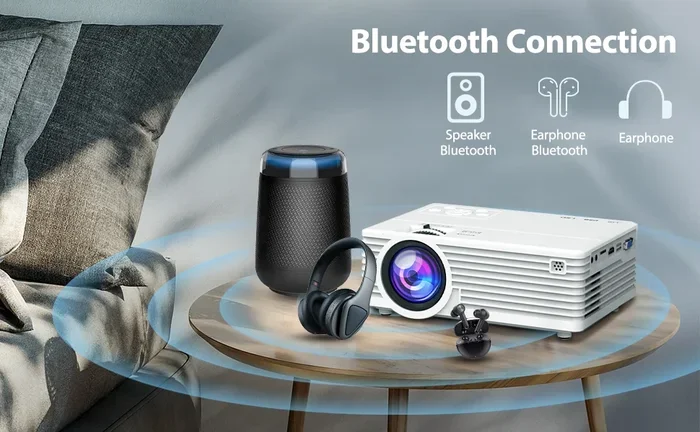
Some wireless headphones and earbuds come with built-in multipoint support. Even though your iPhone cannot use both connections at once, the headphones handle the switching for you. Brands like Sony, Bose, and Jabra offer headphones with this feature.
For example, you can make your old Bose speakers Bluetooth with a simple adapter. Then you can connect your phone to the speakers and your laptop to the headphones. The headphones handle the switching when a call comes in. It is not perfect, but it works well for many people.
Use Third-Party Apps for Device Switching
A few apps on the App Store claim to help with device switching on iPhone. These apps automate the process of disconnecting from one Bluetooth device and connecting to another. They are not true multipoint solutions, but they save you the manual hassle.
Be careful with these apps though. Some may drain your battery or cause connection issues. Stick to well-reviewed apps from trusted developers. Always check reviews before installing anything new on your phone.
Which Bluetooth Devices Work Best With iPhone?
Not all wireless devices play nice with iPhones. Some work perfectly, while others cause frustration. Here is a look at the best Bluetooth device categories for iPhone users.
Wireless Earbuds and Headphones
Wireless earbuds are the most popular Bluetooth accessory for iPhone users. AirPods from Apple work seamlessly, but they do not support multipoint either. If you want multipoint functionality, look at brands like Sony, Jabra, and Samsung.
Many people ask, do other earbuds work well with iPhone? The answer is yes, most modern earbuds use the same Bluetooth standards. They connect to iPhone without issues. Just keep in mind that multipoint features may not work the same way on iPhone as they do on Android.
Bluetooth Speakers
Bluetooth speakers are great for sharing music or podcasts with friends. They also work well as a hands-free speaker for phone calls. Most Bluetooth speakers connect to iPhone without any problems.
If you want to use a speaker for music and headphones for private listening, you will need to switch between them manually on your iPhone. This is the trade-off for not having native multipoint support. But the connection quality is usually excellent.
Car Bluetooth Systems
Using Bluetooth in your car is one of the most common use cases for iPhone users. You can make calls, use GPS, and stream music all through your car speakers. Many modern cars support Bluetooth hands-free calling and audio streaming.
If you have an older car, you might wonder if you can upgrade. The good news is that you can make your car radio Bluetooth capable with a simple adapter. This opens up a lot of possibilities for hands-free driving and music streaming.
Printers and Other Peripherals
Bluetooth is not just for audio. You can also connect printers, keyboards, and other peripherals to your iPhone. Connecting a Brother printer via Bluetooth is a great example of using wireless connectivity beyond audio. iPhone supports Bluetooth for many accessory types, not just headphones and speakers.
How to Connect Multiple Bluetooth Devices to iPhone
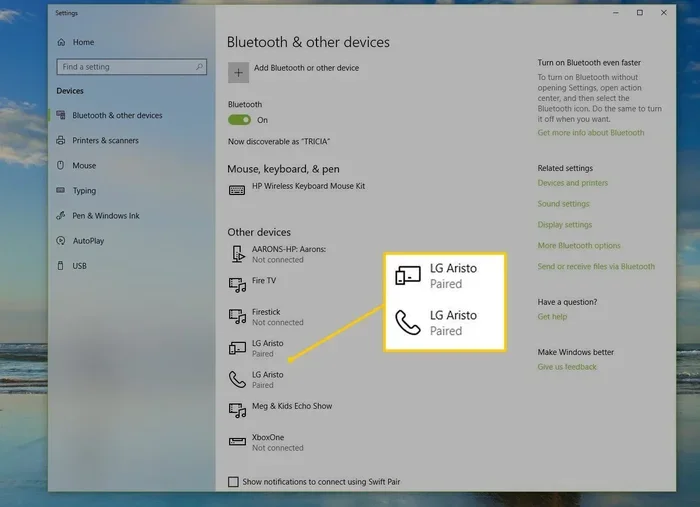
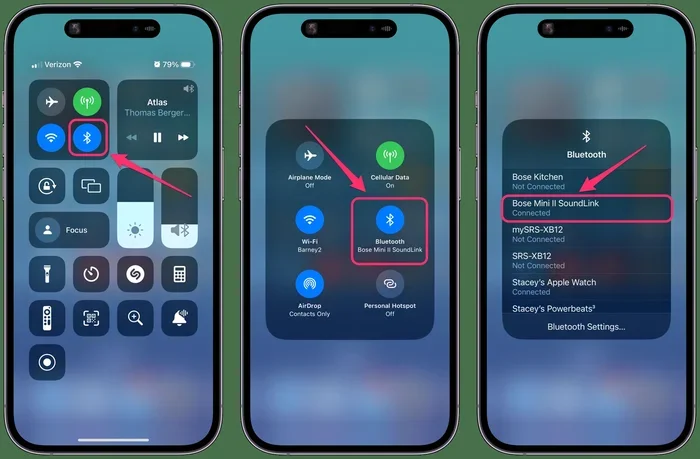
Even though iPhone does not support multipoint, you can still manage multiple Bluetooth devices. Here is how to do it step by step.
- Open Settings on your iPhone.
- Tap Bluetooth to turn it on.
- Put your first device in pairing mode.
- Tap the device name when it appears on your screen.
- Wait for the connection to complete. You will see a checkmark next to the device name.
- Repeat the process for your second device.
Now here is the important part. Your iPhone will only stream audio to one device at a time. You need to go into Bluetooth settings and manually switch the output device. This takes a few extra seconds, but it gets the job done.
Tips for Smoother Bluetooth Management
- Keep your iPhone updated to the latest iOS version for the best Bluetooth performance.
- Turn off Bluetooth on devices you are not using to save battery.
- Restart your iPhone if you notice connection issues.
- Forget old devices you no longer use to keep your Bluetooth list clean.
- Place devices closer to your iPhone for stronger signal strength.
Common Bluetooth Problems on iPhone and How to Fix Them
Bluetooth issues on iPhone can be annoying. But most of them have simple fixes. Let us look at the most common problems and how to solve them.
Connection Drops Frequently
If your Bluetooth connection keeps dropping, the first thing to check is distance. Stay within 30 feet of your Bluetooth device. Walls and other obstacles can weaken the signal. Also, make sure your iPhone and the other device are not too far apart.
Another common cause is interference. Wi-Fi routers, microwaves, and other wireless devices can disrupt Bluetooth signals. Try moving away from these devices and see if the connection improves.
Audio Quality Is Poor
Low audio quality on Bluetooth is often caused by outdated software. Update your iPhone and your Bluetooth device to the latest firmware. Bluetooth 5.0 and newer offer much better audio quality than older versions.
You should also check if your headphones support high-quality audio codecs like AAC or LDAC. iPhone supports AAC natively, which delivers great sound. If your headphones only support older codecs, the audio quality may suffer.
Device Will Not Pair
If a Bluetooth device will not pair with your iPhone, try these steps. First, turn Bluetooth off and on again. Second, restart both devices. Third, forget the device in your Bluetooth settings and try pairing fresh.
If none of these work, reset your iPhone network settings. This clears all Bluetooth pairings and Wi-Fi connections. You will need to reconnect everything, but it often fixes stubborn pairing issues.
Expert Insights on iPhone Bluetooth and Multipoint Tech
Technology experts have mixed opinions about Apple approach to multipoint Bluetooth. Some believe Apple intentionally keeps it simple to avoid connection conflicts. Others think the company will add native support in future iPhone models.
What we do know is that the demand for multipoint is growing. More and more people use wireless headphones for work and entertainment. They want seamless switching between laptop, phone, and tablet. Until Apple addresses this directly, users will need to rely on the workarounds we discussed above.
One thing experts agree on is that Bluetooth technology keeps improving. Each new version brings better range, faster speeds, and lower power consumption. Bluetooth 5.3 is the latest standard, and it offers significant improvements over older versions. Future iPhones will likely support even more advanced Bluetooth features.
If you are curious about how Bluetooth works on other Apple devices, you might wonder does Bluetooth work on Apple Watch without iPhone. The answer is yes, in certain scenarios. Apple Watch can connect to Wi-Fi and Bluetooth independently for some features. This shows that Apple is slowly expanding wireless capabilities across its ecosystem.
Is Multipoint Bluetooth Worth Waiting For on iPhone?
The short answer is yes. Multipoint Bluetooth is a game-changer for people who use multiple devices daily. It saves time and reduces the hassle of constant reconnecting. Apple has a history of adding requested features in major iOS updates. There is a good chance we will see native multipoint support in the future.
Until then, the workarounds we covered in this article will help you get close to the multipoint experience. Use Bluetooth adapters, choose headphones with built-in multipoint, and keep your devices updated. These small steps make a big difference in your daily wireless experience.
The Bluetooth ecosystem is evolving fast. New headphones, speakers, and accessories come out every year with better features. Stay informed and choose devices that fit your workflow. Whether you want to talk on the phone with Bluetooth headphones or stream music to multiple rooms, the right setup makes all the difference.
Remember that iPhone Bluetooth connectivity is not just about audio. You can connect keyboards, fitness trackers, and even car systems. The possibilities are wide open. Just be mindful of the one-device limitation for audio streaming, and plan your setup accordingly.
Finally, if you are shopping for new Bluetooth gear, look for devices that explicitly support multipoint. Even if your iPhone cannot use both connections at once, the headphones handle the switching locally. This gives you a near-multipoint experience without needing a native iPhone feature. It is a smart investment for anyone who lives across multiple devices.
Keep exploring, keep experimenting, and enjoy the wireless freedom that modern Bluetooth technology offers. Your iPhone is a powerful tool, and with the right setup, you can make it work exactly how you want it to.