Do You Need Wifi For Wifi Camera
Do you need wifi for a wifi camera? The short answer is yes, but there are important exceptions and workarounds you should know about. A wireless security camera typically relies on a wifi connection to send footage to the cloud or your phone. However, some cameras offer local storage or can work with a cellular connection instead. Understanding how wireless connectivity affects your camera’s performance helps you make the right choice for your home or business security needs.
Let’s talk about something a lot of people overlook when setting up a home security system. If you have been shopping for a wireless security camera, you have probably seen the words “wifi camera” everywhere. But here is the real question: do you need wifi for a wifi camera? It sounds like a silly question, but the answer is more nuanced than you might think.
Most people assume that a wifi camera simply needs a wifi network to work. And in most cases, that is true. But what happens when your wifi goes down? What if you want to place a camera somewhere far from your router? What if you do not have wifi at all in a certain area of your property? These are the questions that really matter when you are trying to protect your home or business.
In this guide, we will walk through everything you need to know about wireless connectivity for security cameras. We will cover how wifi cameras work, when wifi is absolutely necessary, what happens without it, and what alternatives you can explore. By the end, you will have a clear picture of what kind of camera setup makes sense for your situation.
Key Takeaways
- Wifi is essential for most wifi cameras: Without a wifi connection, most wireless cameras cannot transmit footage to your phone or the cloud.
- Some cameras offer offline recording: Certain models store footage locally on an SD card even when the wifi drops.
- Cellular cameras are a wifi-free alternative: You can use a security camera that runs on a SIM card and mobile data instead of wifi.
- Wifi signal strength matters a lot: A weak signal leads to lag, dropped footage, and poor video quality.
- Ethernet can replace wifi in some setups: Many wireless cameras also support wired connections for a more stable experience.
- Smart home integration depends on wifi: Features like motion alerts, two-way audio, and cloud storage all need a working wifi network.
- You can extend your wifi range: Tools like wifi extenders and mesh systems help cameras stay connected in distant areas of your home.
📑 Table of Contents
- What Is A Wifi Camera And How Does It Work?
- Do You Actually Need Wifi For A Wifi Camera?
- How Wifi Signal Strength Affects Camera Performance
- Alternatives When You Do Not Have Wifi
- Setting Up Your Wifi Camera For Best Results
- Common Mistakes People Make With Wifi Cameras
- Expert Insights On Wifi Camera Connectivity
- Conclusion
What Is A Wifi Camera And How Does It Work?
A wifi camera is a security camera that connects to your wireless network to send and receive data. Unlike traditional wired cameras that need a physical cable to transmit footage, a wifi camera uses your home’s wireless network to communicate with your phone, computer, or cloud storage service.
Here is how it works in simple terms. Your camera connects to your wifi router using the 2.4 GHz or 5 GHz frequency band. Once connected, it can stream live video, send motion alerts, and upload recorded footage to the cloud. You access all of this through a mobile app or web portal from anywhere with an internet connection.
How Wireless Connectivity Powers Your Camera
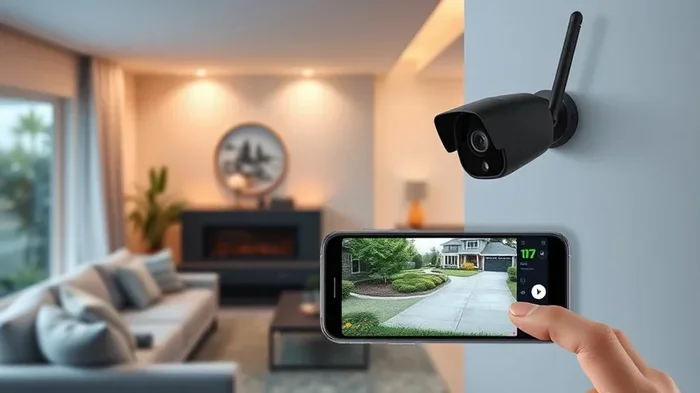
The wireless connectivity between your camera and router is the backbone of the whole system. When you move your phone and check your camera’s live feed from across town, that video is traveling from the camera to your router, then to the internet, then back to your phone through the cloud.
Most wireless security cameras use your home’s existing internet plan to stay connected. They do not need a separate data plan or SIM card. This is one reason they are so popular. You just plug them in (or charge them if they are battery powered), connect them to your network through the app, and you are done.
But here is the catch. If your internet connection goes down, your camera loses its ability to send footage to the cloud or your phone. Some cameras can still record to a local SD card during an outage, but you lose the remote access and real-time alerts that make wifi cameras so useful.
Do You Actually Need Wifi For A Wifi Camera?
This is where things get interesting. The short answer is yes, most wifi cameras need an active wifi connection to function as intended. But “need” can mean different things depending on what you want your camera to do.
Let us break this down into three scenarios. In the first scenario, you want full functionality. That means live streaming, cloud storage, motion alerts, and two-way audio. For this, you absolutely need a stable wifi connection. Without it, your camera becomes a lot less smart.
In the second scenario, you just want basic recording. Some wireless cameras can record to a local SD card without wifi. The camera will still capture video, but you cannot view it remotely or get instant alerts. Think of it like a digital video recorder that happens to use wireless technology to connect to your network when it is available.
In the third scenario, you have no wifi at all. In that case, a standard wifi camera will not help you. You would need to look at alternatives like cellular cameras or wired systems that use Ethernet instead of wireless technology.
When Wifi Is Absolutely Essential
There are certain features that simply do not work without wifi. If any of these matter to you, then a strong wifi connection is non-negotiable:
- Live video streaming to your phone or computer from anywhere
- Cloud storage for recorded footage and video history
- Real-time motion alerts that notify you instantly
- Two-way audio so you can speak through the camera
- Smart home integration with systems like Alexa or Google Home
- Remote viewing when you are not on the same local network
If you want any of these features, you need wifi. Period. There is no way around it for a standard wifi camera.
How Wifi Signal Strength Affects Camera Performance
Not all wifi connections are created equal. A strong, stable signal makes your camera work beautifully. A weak signal causes all kinds of headaches. Understanding how wifi signal strength impacts your camera helps you avoid frustration and get the best results.
The Role Of Your Router And Network Band
Your wifi router is the heart of your camera’s connection. If your router is old or placed far from your camera, you will experience issues. The camera might drop offline, the video quality might suffer, or there could be delays in the live feed.
Most wireless security cameras work on the 2.4 GHz band. This band has a longer range but slower speeds. Some newer cameras also support the 5 GHz band, which is faster but has a shorter range. If you want better performance, you can force your phone to use 2.4 GHz wifi or adjust your router settings to prioritize the camera’s connection.
One thing many people do not realize is that too many devices on the same network can slow things down. If you have a smart TV, phone, laptop, tablet, and several cameras all competing for bandwidth, your camera’s video stream may suffer. Network bandwidth is a real concern when you have multiple wireless devices.
What Happens When The Signal Is Weak
A weak wifi signal leads to several problems with your camera:
- Video footage that lags or freezes
- Delayed motion alerts that arrive too late
- Footage that fails to upload to the cloud
- Frequent disconnections that cause gaps in recording
- Poor video resolution even when the camera is online
If you are dealing with a weak signal, consider moving your router closer to the camera or using a wifi extender to boost the range. A mesh wifi system can also help by spreading a strong signal throughout your home.
Alternatives When You Do Not Have Wifi
What if you are in a situation where wifi is not available or reliable? Maybe you are setting up a camera at a remote cabin, a construction site, or a garage that is too far from your router. In these cases, you have a few options that do not rely on a traditional wifi network.
Cellular Security Cameras
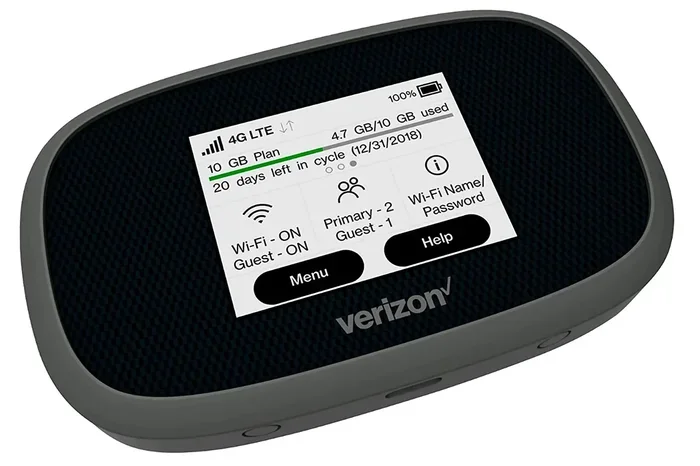
Cellular cameras use a SIM card and mobile data instead of wifi. They work anywhere there is cell phone coverage. You can think of them as a phone that happens to be a camera. You buy a data plan, insert the SIM card, and the camera connects to the internet through the cellular network.
These cameras are great for locations where you cannot get a wifi signal. They do come with a monthly cost for the data plan, but they offer a lot of flexibility. If you have ever wondered about setting up a camera somewhere without internet access, a cellular model might be your best bet.
Wired Cameras With Ethernet
Some cameras that are marketed as “wireless” also support a wired Ethernet connection. This means you can plug the camera directly into your router with an Ethernet cable. The camera still captures and stores footage wirelessly when the cable is connected, but it gets a much more stable and faster connection.
This is a great option if you want the convenience of a wireless camera but need the reliability of a wired connection. You get the best of both worlds.
Local Storage Without Internet
Some wireless cameras can record to a local SD card or a base station without needing an active internet connection. The camera captures footage and stores it on site. You can later remove the SD card or connect to the base station to review the recordings.
This setup does not give you remote access or live streaming. But it does give you a recording system that works even when the internet is completely down. For basic surveillance purposes, this can be enough.
Setting Up Your Wifi Camera For Best Results
Now that you understand the role wifi plays in your camera’s performance, let us talk about how to set things up the right way. A good setup makes a huge difference in reliability and video quality.
Step One: Choose The Right Location
Place your camera within a reasonable distance of your router. Walls, floors, and large metal objects can weaken the signal. If you can, keep the camera in the same room as your router or within a clear line of sight.
If the camera must be far from the router, consider using a wifi extender or a mesh network system. These devices boost your signal and help the camera maintain a strong connection.
Step Two: Secure Your Network
Your camera is connected to your home network, which means it is as secure as your network. Use a strong password for your wifi and keep your router firmware up to date. You should also change the default password on your camera to something unique.
Some people wonder if others can access their camera through the network. While the chances are low if you have a secure setup, it is always better to be safe. A strong password and updated firmware go a long way.
Step Three: Test Your Setup
After setting up your camera, test it thoroughly. Check the live feed from your phone, walk around the property to see if the motion detection works, and make sure alerts come through promptly. This simple step can save you a lot of trouble later.
Common Mistakes People Make With Wifi Cameras
Setting up a wireless security camera seems simple, but many people make mistakes that cause problems later. Here are some of the most common ones to avoid.
- Placing the camera too far from the router: This leads to weak signals and poor performance. Keep the camera close enough for a strong connection.
- Ignoring the 2.4 GHz vs 5 GHz issue: Most cameras only work on 2.4 GHz. If your router splits the bands, make sure the camera connects to the right one.
- Not checking your internet speed: A slow internet plan can cause lag and poor video quality. Make sure your plan can handle the extra load.
- Skipping firmware updates: Manufacturers release updates that fix bugs and improve security. Always keep your camera’s software up to date.
- Relying only on cloud storage: If your wifi goes down, cloud storage stops working too. Use a local SD card as a backup when possible.
Avoiding these mistakes helps you get the most out of your wireless camera system. It also saves you from the headache of troubleshooting problems that were never necessary in the first place.
Expert Insights On Wifi Camera Connectivity
Security professionals often recommend thinking about your camera setup the same way you think about your home network. A strong, secure network makes all the difference. If you are serious about home security, consider investing in a quality router and a mesh system to cover your entire property.
One thing experts frequently mention is the importance of a dedicated network for security devices. Some advanced routers allow you to create a separate network just for your cameras. This keeps your security traffic isolated and reduces the risk of interference from other devices.
Also, keep in mind that wifi technology keeps improving. Newer cameras support the latest wifi standards, which means faster speeds, better range, and lower power consumption. If you are buying a camera today, look for one that supports the newest wifi standards for the best long-term performance.
Conclusion
So, do you need wifi for a wifi camera? Yes, in most cases you do. Wifi is what makes these cameras smart, connected, and accessible from anywhere. Without it, you lose most of the features that make a wifi camera worth buying.
But that does not mean you are stuck if wifi is not available everywhere. Cellular cameras, wired options, and local storage give you alternatives when a traditional wifi connection is not practical. The key is to understand your needs and choose the right setup for your situation.
Take the time to plan your camera placement, secure your network, and test everything before you rely on the system for real security. A little effort upfront saves you a lot of trouble down the road. With the right setup, your wireless security camera will give you peace of mind and reliable protection for years to come.
Remember, the best camera is the one that works reliably in your specific environment. Whether that means investing in a stronger router, adding a wifi extender, or exploring cellular options, the goal is the same: a camera system that keeps your home and family safe no matter what.
Frequently Asked Questions
Can a wifi camera work without an internet connection?
Some wifi cameras can record to a local SD card without internet, but you lose remote access, live streaming, and real-time alerts. The camera still captures footage, but you cannot view it from your phone or receive instant notifications.
What happens if my wifi goes down while the camera is recording?
If your wifi goes down, the camera loses its connection to the cloud and your phone. Cameras with local SD card storage will continue recording to the card. However, any footage stored on the cloud during the outage will not update until the wifi comes back.
Can I use a security camera without wifi at all?
Yes, you have options. Cellular cameras use a SIM card and mobile data instead of wifi. Wired cameras use Ethernet for a direct connection. Some wireless cameras also support local storage without any internet connection at all.
How far can a wifi camera be from the router?
This depends on your router’s power and any obstacles in the way. In open spaces, a good router can reach 150 feet or more indoors. Walls, furniture, and other objects reduce that distance. If your camera is too far, a wifi extender or mesh system can help bridge the gap.
Do all wifi cameras use the 2.4 GHz band?
Most wifi cameras use the 2.4 GHz band because it has a longer range. Some newer models also support 5 GHz, which is faster but has a shorter range. Check your camera’s specs to see which bands it supports.
Is a wifi camera safe from hacking?
No device is 100% safe, but you can reduce the risk. Use a strong, unique password for your wifi and camera. Keep the firmware updated. Some cameras also offer two-factor authentication for an extra layer of protection. A secure network goes a long way in keeping your camera safe.