Does Verizon Offer Portable Wi Fi Plans and Hotspots
Does Verizon offer portable Wi Fi? Yes, Verizon provides several portable hotspot plans and devices, including the popular Verizon Jetpack lineup. You can get wireless internet on the go with 5G speeds, flexible data options, and nationwide coverage. Verizon portable Wi Fi is a great choice for travelers, remote workers, and anyone who needs reliable internet away from home.
Do you need internet access while you are on the road, at a coffee shop, or in a remote cabin? Does Verizon offer portable Wi Fi? The short answer is yes. Verizon is one of the largest wireless carriers in the United States, and they provide a range of portable Wi Fi solutions for people who need connectivity everywhere they go.
Whether you are a frequent traveler, a remote worker, or someone who just wants backup internet at home, Verizon has options that can fit your lifestyle. In this guide, we will walk through everything you need to know about Verizon portable Wi Fi plans, devices, pricing, and coverage. You will learn how these hotspots work, what plans are available, and whether they are worth your money.
Portable Wi Fi has become a necessity for many people. Smartphones can only do so much when you need to connect a laptop, a tablet, or multiple devices at once. That is where a dedicated hotspot device comes in handy. And Verizon has been a leader in this space for years, offering reliable hardware and strong network performance.
Key Takeaways
- Verizon offers portable Wi Fi: Multiple hotspot plans and devices are available for purchase or lease.
- 5G speeds are included: Verizon’s 5G network powers many of its portable hotspot options.
- Flexible data plans: You can choose from unlimited, tiered, and pay-as-you-go data options.
- Devices range from budget to premium: Verizon offers hotspot devices at various price points to fit different needs.
- Coverage is extensive: Verizon’s network reaches most of the United States, making it ideal for travel.
- You can buy your own device: If you prefer, you can buy your own portable Wi Fi device and pair it with a Verizon data plan.
- Setup is simple: Most Verizon hotspots are plug-and-play and easy to configure.
📑 Table of Contents
- What Is a Portable Wi Fi Hotspot?
- Does Verizon Offer Portable Wi Fi Plans?
- Verizon Portable Hotspot Devices
- Verizon 5G Portable Wi Fi: What You Need to Know
- How to Set Up Your Verizon Portable Hotspot
- Pros and Cons of Verizon Portable Wi Fi
- Verizon Portable Wi Fi vs. Other Options
- Common Mistakes to Avoid With Portable Hotspots
- Is Verizon Portable Wi Fi Worth It?
What Is a Portable Wi Fi Hotspot?
A portable Wi Fi hotspot is a small device that creates a personal Wi Fi network using cellular data. It connects to a carrier’s network, just like your phone does, and then broadcasts that connection as a Wi Fi signal. Any device nearby can connect to it, giving you internet access without needing a traditional home router.
These devices are also called mobile hotspots, MiFi devices, or portable routers. They are compact, battery-powered, and easy to carry in your pocket or bag. Most hotspots can connect 5 to 15 devices at once, depending on the model.
So how does this relate to Does Verizon offer portable Wi Fi? Verizon sells its own branded hotspot devices and also allows you to bring your own compatible device. You simply add a data plan, and you are good to go. This makes it very easy to set up a mobile internet connection wherever there is cellular coverage.
One important thing to note is that a portable hotspot is different from tethering your phone. While phone tethering works, it drains your battery quickly and can slow down your phone’s performance. A dedicated hotspot device handles the job more efficiently and often delivers better speeds.
Does Verizon Offer Portable Wi Fi Plans?
Yes, Verizon offers several portable Wi Fi plans. These plans come with monthly data allowances that you can use to connect your hotspot device. Let us break down the main options available.
Unlimited Hotspot Data Plans
Verizon offers unlimited data plans that include hotspot data. These plans are ideal for heavy users who need constant connectivity. The unlimited plans typically include 15 GB to 50 GB of hotspot data per month, depending on the specific plan you choose.
Once you use up your hotspot data, Verizon may slow down your speeds or charge overage fees, depending on the plan terms. It is important to read the fine print and understand the data limits before you commit to a plan.
Some popular Verizon unlimited plans that include hotspot data are the Verizon Play More, Do More, and Get More plans. Each plan offers different amounts of hotspot data, streaming benefits, and other perks.
Tiered Data Plans
If you do not need unlimited data, Verizon also offers tiered plans. These plans give you a set amount of data each month, such as 5 GB, 10 GB, or 15 GB. They are a good choice for light users who only need internet occasionally.
Tiered plans can save you money if you do not use a lot of data. However, you need to monitor your usage carefully to avoid running out of data before the end of the month.
Pay-As-You-Go and Prepaid Options
Verizon also has prepaid options that let you pay for data as you go. These are great for people who only need portable Wi Fi during certain months or for specific trips. You can buy data passes and activate them whenever you need them.
Pay-as-you-go plans give you flexibility without a long-term contract. This is a nice option if you are not sure how much data you will need or if you only use portable Wi Fi seasonally.
Verizon Portable Hotspot Devices
Verizon sells several hotspot devices that work with their network. These devices are designed to be portable, reliable, and easy to use. Let us look at some of the most popular options.
Verizon Jetpack Devices
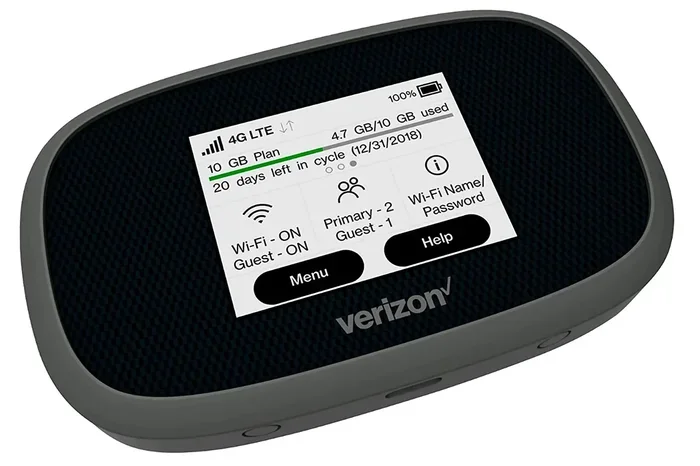
The Verizon Jetpack is probably the most well-known portable hotspot brand. Jetpack devices are compact, powerful, and designed specifically for on-the-go internet access. They come in different models, each with unique features.
Some Jetpack models support 5G connectivity, which means you can get very fast speeds in areas with 5G coverage. Other models are more basic and work on 4G LTE networks. The right model for you depends on your needs, budget, and the areas where you plan to use it.
Jetpack devices typically have a built-in battery that lasts several hours on a single charge. They also have a small screen or LED indicators that show your signal strength, data usage, and connection status.
Bringing Your Own Device
You do not have to buy a Verizon-branded hotspot. You can bring your own compatible device and use it with a Verizon data plan. This is a great option if you already have a hotspot device you like or if you prefer to shop around for the best hardware.
Before you bring your own device, make sure it is compatible with Verizon’s network. Check the device specifications for supported bands and frequencies. You can also visit Verizon’s website or contact their customer service to confirm compatibility.
If you are considering this route, you might want to check out whether you can buy your own portable Wi Fi device and pair it with Verizon service. This gives you more control over the hardware you use.
Comparing Hotspot Devices
Here is a quick comparison of what to look for when choosing a Verizon hotspot device:
- Network support: Does the device support 5G, 4G LTE, or both?
- Battery life: How long does the device last on a single charge?
- Device capacity: How many devices can connect at once?
- Size and portability: Is it small enough to carry in your pocket?
- Price: Does the device fit your budget?
- Extra features: Does it have a touchscreen, USB tethering, or expandable storage?
Verizon 5G Portable Wi Fi: What You Need to Know
Verizon has been rolling out 5G coverage across the country, and their portable Wi Fi devices are taking advantage of this. 5G hotspot speeds can be significantly faster than 4G LTE, making them ideal for video calls, streaming, and large file downloads.
Not all areas have 5G coverage yet, but Verizon’s 5G network is expanding rapidly. If you live in or frequently visit a major city or suburban area, you will likely have access to 5G speeds on your portable hotspot.
Here are some benefits of using a Verizon 5G portable hotspot:
- Faster speeds: 5G can deliver download speeds of 100 Mbps or more in good conditions.
- Lower latency: Video calls and online gaming feel smoother on 5G.
- Better capacity: 5G handles multiple connected devices more efficiently.
- Future-proofing: Investing in a 5G hotspot means you are ready for the next generation of wireless technology.
Keep in mind that 5G hotspot data is still part of your data plan. Using 5G can drain your data allowance faster because of the higher speeds and better performance. Make sure your plan includes enough hotspot data to match your usage habits.
How to Set Up Your Verizon Portable Hotspot
Setting up a Verizon portable hotspot is straightforward. Most devices come ready to use right out of the box. Here is a simple step-by-step guide.
Step 1: Charge Your Device
Before you use your hotspot for the first time, fully charge the battery. This ensures you have enough power to get through the setup process and your first few hours of use.
Step 2: Power On and Connect
Turn on the device and wait for it to connect to the Verizon network. You will see a signal indicator light up when the connection is established. Most devices also have a screen that shows your network name and signal strength.
Step 3: Connect Your Devices
On your phone, laptop, or tablet, open the Wi Fi settings and look for the network name of your hotspot. Enter the password that came with the device, and you are connected. You can now browse the web, stream videos, or work online.
Step 4: Monitor Your Data Usage
It is important to keep an eye on your data usage, especially if you are on a limited data plan. Most Verizon hotspot devices have a way to check data usage directly on the device or through the Verizon app on your phone.
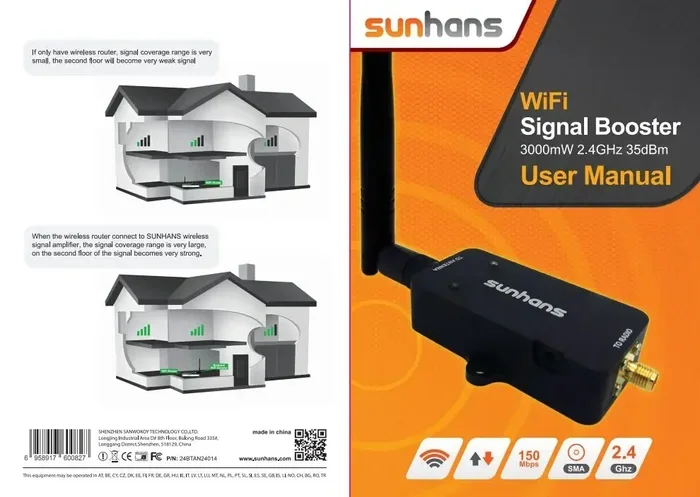
If you are concerned about signal strength in certain areas, you might want to explore options like a Wi Fi booster to enhance your connection. While boosters work differently than hotspots, they can help improve coverage in weak signal areas.
Quick Tips for Best Performance
- Place your hotspot in a central location for the best signal spread.
- Keep the device charged above 20% to avoid unexpected shutdowns.
- Update your device firmware regularly for the best performance and security.
- Turn off the hotspot when you are not using it to save battery and data.
- Use a strong, unique password to protect your hotspot from unauthorized users.
Pros and Cons of Verizon Portable Wi Fi
Like any product, Verizon portable Wi Fi has its strengths and weaknesses. Let us take a balanced look at what you can expect.
Pros
- Reliable network: Verizon has one of the largest and most reliable networks in the US.
- 5G access: Many plans and devices include access to Verizon’s 5G network.
- Flexible plans: You can choose from unlimited, tiered, and prepaid options.
- Wide device selection: Verizon offers multiple hotspot devices at different price points.
- Nationwide coverage: Verizon covers most of the country, including rural areas.
- Easy setup: Most devices are plug-and-play and require no technical expertise.
Cons
- Higher costs: Verizon plans can be more expensive than some competitors.
- Data limits on hotspot: Even unlimited plans often cap hotspot data.
- Device costs: Some hotspot devices can be pricey upfront.
- Contract requirements: Some plans require a contract or credit check.
- Coverage gaps: Some remote areas may not have strong Verizon signal.
Overall, Verizon portable Wi Fi is a solid choice for people who need reliable mobile internet. The higher cost is often offset by the quality of the network and the consistency of the service. If you are comparing carriers, you might also want to look at what options other providers offer for portable connectivity away from home to make an informed decision.
Verizon Portable Wi Fi vs. Other Options
Verizon is not the only option for portable Wi Fi. Let us compare Verizon with a couple of other popular choices so you can make the best decision.
Verizon vs. AT&T Portable Wi Fi: AT&T also offers portable hotspot plans and devices. Both carriers have strong networks, but Verizon tends to have slightly better coverage in rural areas. AT&T may offer lower prices in some cases. If you are trying to decide between the two, it is worth comparing coverage maps and plan pricing for your specific area.
Verizon vs. Xfinity Mobile: Xfinity Mobile uses the Verizon network for coverage, so you get the same reliability. However, Xfinity Mobile often has more affordable plans, especially if you are already an Xfinity internet customer. You can also connect to Xfinity Wi Fi away from home in some cases, which adds extra value.
Verizon vs. Third-Party Hotspot Providers: Companies like Karma and GlocalMe offer portable Wi Fi devices with pay-as-you-go data. These can be cheaper for occasional use but may not offer the same speeds or reliability as Verizon’s network. For frequent or heavy use, Verizon is usually the better choice.
When choosing between these options, consider your data needs, budget, travel habits, and the areas where you need coverage most.
Common Mistakes to Avoid With Portable Hotspots
Using a portable hotspot is not complicated, but there are some common mistakes that can cause problems. Here are a few to watch out for.
- Ignoring data limits: Not tracking your data usage can lead to overage charges or throttled speeds.
- Using the hotspot in areas with no signal: This drains the battery quickly and gives you no internet.
- Leaving the hotspot on all the time: This wastes battery and data. Turn it off when not in use.
- Not securing your hotspot: Using a weak or default password leaves your connection open to others.
- Choosing the wrong plan: Picking a plan with too little or too much data for your needs can cost you money.
Avoiding these mistakes will help you get the most out of your Verizon portable Wi Fi experience. Take a few minutes to understand your plan, your device, and your usage patterns before you hit the road.
Is Verizon Portable Wi Fi Worth It?
After looking at all the options, plans, and devices, the big question remains: is Verizon portable Wi Fi worth it? The answer depends on your needs and situation.
If you travel frequently, work remotely, or live in an area with unreliable home internet, Verizon portable Wi Fi is an excellent investment. The network coverage is strong, the devices are reliable, and the plans offer good flexibility.
On the other hand, if you only need internet occasionally, a prepaid plan or a third-party provider might save you money. It is all about matching the right solution to your lifestyle.
One thing is certain: Does Verizon offer portable Wi Fi? Absolutely. And their options are among the best in the industry. Whether you choose a Jetpack device, bring your own hotspot, or pick a prepaid plan, Verizon has you covered.
Take some time to compare the plans and devices we discussed in this article. Think about where you will use the hotspot most, how much data you will need, and what your budget allows. With the right setup, you can stay connected no matter where life takes you.
Portable Wi Fi gives you freedom and flexibility that a home internet connection simply cannot match. And with Verizon’s strong network and growing 5G coverage, you can trust that your connection will be fast and reliable when you need it most.
Frequently Asked Questions
Can I use a Verizon portable hotspot while traveling internationally?
Verizon offers some international roaming options on certain plans, but not all plans include global coverage. Before you travel abroad, check with Verizon to confirm that your plan supports international use. You may need to add an international data add-on or switch to a different plan temporarily.
How many devices can connect to a Verizon portable hotspot at once?
Most Verizon hotspot devices can connect between 5 and 15 devices simultaneously. The exact number depends on the model of your hotspot. Keep in mind that connecting too many devices can slow down your speeds and use up your data faster.
Do I need a separate plan for a Verizon portable hotspot?
Yes, you need a data plan that includes hotspot usage. You can add a hotspot data add-on to an existing Verizon plan or sign up for a standalone hotspot plan. Check the plan details to make sure hotspot data is included.
Can I use my phone as a hotspot instead of buying a Verizon portable device?
You can use your phone as a hotspot, but a dedicated hotspot device is more efficient. Phone tethering drains your battery quickly and can overheat your device. A standalone hotspot handles the job better and often delivers faster, more stable speeds.
What is the difference between 4G LTE and 5G Verizon hotspots?
5G hotspots offer faster speeds and lower latency than 4G LTE hotspots. 5G is ideal for streaming, video calls, and large downloads. However, 5G coverage is not available everywhere yet. If you are in an area with 5G, a 5G hotspot will give you a noticeable speed boost over a 4G model.
Can I cancel my Verizon portable Wi Fi plan at any time?
It depends on your plan. Some Verizon plans are month-to-month and allow cancellation at any time. Others may require a contract or have early termination fees. Always review the terms of your plan before you sign up to avoid unexpected charges.
=== CONCLUSION ===
Does Verizon offer portable Wi Fi? Yes, and they offer it in a big way. From flexible data plans to reliable hotspot devices, Verizon gives you everything you need to stay connected on the go. Whether you pick a Jetpack device, bring your own hotspot, or choose a prepaid plan, you will have access to one of the strongest networks in the country.
Portable Wi Fi is no longer a luxury, it is a necessity for many people. Whether you work remotely, travel often, or just need backup internet, a Verizon portable hotspot can deliver the connectivity you need. With 5G speeds, extensive coverage, and a range of device and plan options, Verizon makes it easy to find a solution that fits your life.
Take action today. Explore Verizon’s portable Wi Fi plans, compare the devices, and find the perfect setup for your needs. Staying connected has never been easier or more reliable.