Does A Wi Fi Thermostat Need To Be Hardwired At All
A Wi-Fi thermostat does not always need to be hardwired. Many smart thermostats can run on batteries or use a C-wire adapter, giving you flexible installation options. Whether you rent or own, this guide covers every scenario so you can set up wireless temperature control with confidence.
You just bought a Wi-Fi thermostat and you are excited to start saving energy. But then you notice the installation guide mentions wiring. And you start to wonder — do you really need to hardwire this thing? The short answer is no. But the full picture is a lot more interesting than a simple yes or no.
Whether you are a homeowner looking to upgrade your smart home setup or a renter who wants better control over your heating and cooling, understanding your options makes all the difference. Let us walk through everything you need to know about Wi-Fi thermostat wiring, power sources, and installation.
Key Takeaways
- Not all Wi-Fi thermostats require hardwiring: battery-powered and C-wire adapter options exist for flexible installation.
- Hardwired setups offer steady power: they eliminate battery swaps and provide reliable connectivity for your smart thermostat.
- Renters can benefit too: plug-in and battery-powered Wi-Fi enabled thermostat models work without permanent changes to your HVAC system.
- Check your current wiring first: knowing what wires you have saves time, money, and frustration during thermostat installation.
- Wi-Fi range matters: a weak signal can cause connectivity issues, so consider a Wi-Fi booster if your thermostat is far from your router.
- Most modern systems are compatible: but always verify support for your specific HVAC system before purchasing.
📑 Table of Contents
- What Is a Wi-Fi Thermostat and How Does It Work?
- Does a Wi-Fi Thermostat Need to Be Hardwired?
- How to Know If Your System Supports a Wi-Fi Thermostat
- Setting Up Your Wi-Fi Thermostat: Step by Step
- Wi-Fi Connectivity and Range Considerations
- Pros and Cons of Hardwired vs. Battery-Powered Wi-Fi Thermostats
- Common Mistakes to Avoid When Installing a Wi-Fi Thermostat
- Expert Insights on Wi-Fi Thermostat Power Options
- Final Thoughts
What Is a Wi-Fi Thermostat and How Does It Work?
A Wi-Fi thermostat is a smart device that connects to your home wireless network. It lets you control the temperature from your phone, tablet, or computer — even when you are away from home. You can adjust settings, set schedules, and monitor energy usage right from an app.
These devices go by many names. People call them smart thermostats, wireless thermostats, or Wi-Fi enabled thermostat units. They all do essentially the same thing. They use your home network to communicate with a central app or platform.
Most Wi-Fi thermostats work with your existing HVAC system. They replace your old manual thermostat and take over temperature control. Some connect to your furnace, some to a heat pump, and others work with central air systems. The key difference is how they get their power.
Does a Wi-Fi Thermostat Need to Be Hardwired?
This is the big question, and the answer depends on the model you choose. Not every Wi-Fi thermostat needs a hardwired connection to your electrical system. Let us break down the two main power options.
Option 1: Hardwired Installation
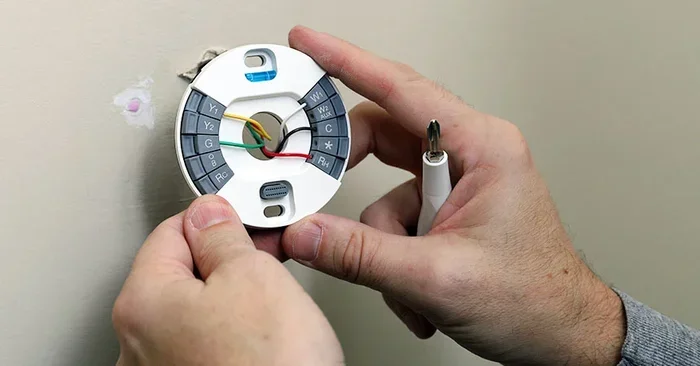
Hardwiring means connecting the thermostat directly to your HVAC system using physical wires. This is the most common setup for central heating and cooling systems. The wires carry both power and signals between the thermostat and your heating or cooling equipment.
Most traditional thermostat wiring setups include a few basic wires. You might see a red wire for 24V power, a white wire for heating, a yellow wire for cooling, and a green wire for the fan. Some systems also have a blue or C-wire, which provides continuous power.
Hardwired smart thermostats have some clear advantages:
- No battery changes needed. The thermostat draws power directly from your HVAC system.
- More reliable connectivity. Because the device never runs out of power, your Wi-Fi connection stays active.
- Works with all features. Some advanced features, like screen displays and remote sensors, need constant power.
However, hardwiring does require some basic electrical knowledge. If your system does not have a C-wire, you might need to install one or use a power-extending kit. This is where many people get stuck.
Option 2: Battery-Powered or Plug-In Thermostats
Not every Wi-Fi thermostat needs wires at all. Battery-powered models let you skip the wiring entirely. You simply mount the thermostat on your wall, insert batteries, and connect it to your wireless network.
These battery-operated smart thermostats are perfect for certain situations:
- Rental properties. You do not want to mess with the existing wiring.
- Older homes. Some older HVAC systems do not have the wiring needed for a hardwired smart thermostat.
- Boiler or baseboard heating. These systems often lack a standard wiring setup.
Keep in mind that battery-powered models need regular maintenance. You will need to swap out batteries every few months or so. Some models use rechargeable batteries or USB charging to reduce this hassle.
Plug-in thermostats are another option. These units plug directly into a standard wall outlet. They work well for electric heaters and portable units. They are not ideal for central HVAC systems, but they serve a specific purpose.
How to Know If Your System Supports a Wi-Fi Thermostat
Before you buy any Wi-Fi thermostat, you should check whether your current system is compatible. Not every heating and cooling setup works with every smart thermostat. Here is how to find out.
Check Your Current Wiring
The easiest way is to look at your existing thermostat. Remove the faceplate carefully and look at the wires. If you see several wires connected to terminals, your system likely supports a hardwired smart thermostat. If you see only one or two wires, or no wires at all, a battery-powered model might be your best bet.
Take a photo of your wiring before you remove anything. This will help you or a professional figure out what you are working with. Label each wire if possible.
Check Your HVAC System Type
Different systems have different wiring needs. A standard forced-air system with both heating and cooling usually has the most wiring options. Heat pump systems, radiant heating, and boiler systems may require specific thermostat models.
Most major smart thermostat brands list compatible systems on their packaging or website. Always double-check before you make a purchase.
Setting Up Your Wi-Fi Thermostat: Step by Step
Once you have chosen the right Wi-Fi enabled thermostat, the next step is installation. Here is a general overview of what to expect.
For Hardwired Installation
- Turn off your HVAC system. Switch off the power at the breaker to stay safe.
- Remove your old thermostat. Take off the faceplate and note which wire goes where.
- Connect the new thermostat. Match each wire to the correct terminal on your new device.
- Mount the new thermostat. Secure the base plate to the wall and attach the display.
- Turn the power back on. Test your HVAC system and the thermostat.
- Connect to Wi-Fi. Follow the app instructions to link the thermostat to your wireless network.
For Battery-Powered Installation
- Choose a good location. Place the thermostat on an interior wall away from direct sunlight and drafts.
- Insert batteries. Follow the manufacturer’s instructions for battery orientation.
- Mount the thermostat. Most battery models stick or screw onto the wall easily.
- Connect to Wi-Fi. Open the app and follow the setup prompts.
If you are not comfortable with any of these steps, hire a professional. A quick thermostat installation by an HVAC technician costs very little and gives you peace of mind.
Wi-Fi Connectivity and Range Considerations
Your Wi-Fi thermostat is only as good as its connection. If the signal is weak or drops frequently, you will miss out on remote control and smart features. Here are some things to keep in mind.
Most smart thermostats connect to the 2.4GHz band of your wireless network. They do not support 5GHz. This is important if your router uses both bands. If you are having trouble connecting, you might want to check whether your phone is on the right frequency band. You can force your phone to use 2.4GHz Wi-Fi to troubleshoot connectivity issues with your thermostat.
If your thermostat is far from your router, the signal might be too weak. This is common in larger homes or homes with thick walls. In these cases, a Wi-Fi booster can help extend your wireless coverage to the thermostat’s location. You can also consider a mesh router setup for whole-home coverage.
Humidity and physical obstacles can also affect your wireless signal. If your thermostat is in a damp area like a basement, moisture might interfere with the connection. Keeping the router and thermostat in open spaces helps maintain a strong signal.
Pros and Cons of Hardwired vs. Battery-Powered Wi-Fi Thermostats
Every option has its strengths and weaknesses. Here is a quick comparison to help you decide.
| Feature | Hardwired | Battery-Powered |
|---|---|---|
| Power Source | HVAC system wiring | Batteries or USB |
| Installation Complexity | Moderate to high | Very easy |
| Maintenance | None | Battery replacements |
| Wi-Fi Reliability | Very stable | Good, but depends on batteries |
| Best For | Homeowners with standard wiring | Renters and older homes |
| Upfront Cost | Moderate | Lower |
| Advanced Features | Full feature access | Most features available |
Both options work well for most people. Your choice should depend on your wiring situation, your comfort level with DIY projects, and your living situation. Renters should strongly consider battery-powered models since they do not require any permanent changes to the property.
Common Mistakes to Avoid When Installing a Wi-Fi Thermostat
Even with a simple setup, mistakes can happen. Here are some pitfalls to watch out for.
- Skipping the C-wire check. If your system does not have a C-wire and you try to hardwire a thermostat that needs one, you will run into power issues. Always verify your wiring before buying.
- Ignoring Wi-Fi range. Placing your thermostat too far from the router leads to dropped connections. Test your signal strength in the thermostat location first.
- Using the wrong thermostat for your system. Not all Wi-Fi thermostats work with all HVAC systems. Check compatibility lists carefully.
- Forgetting to turn off the power. Working on wiring without shutting off the breaker is dangerous. Always disconnect power before touching any wires.
- Not updating the firmware. After installation, check for firmware updates in the app. Updates fix bugs and improve Wi-Fi connectivity.
Avoiding these mistakes will save you time and frustration. It also helps your thermostat run smoothly for years to come.
Expert Insights on Wi-Fi Thermostat Power Options
Industry experts agree that the days of needing complex wiring for a smart thermostat are fading. Modern Wi-Fi enabled thermostat technology offers more flexibility than ever. Battery-powered models have improved dramatically in recent years, with some lasting over a year on a single charge.
HVAC professionals also point out that even if your system does not have a C-wire, many smart thermostats come with power-extending kits. These small adapters use your existing wires to draw the power needed for Wi-Fi connectivity. This means you can enjoy all the benefits of a hardwired setup without adding new wires.
The trend in the smart home industry is clearly moving toward easier installation. Manufacturers understand that most people want a simple setup experience. This is why battery options and plug-in models continue to grow in popularity.
Final Thoughts
So, does a Wi-Fi thermostat need to be hardwired? The answer is that it depends on your situation, your system, and your preferences. You have options. You can go the traditional hardwired route for a permanent, low-maintenance setup. Or you can choose a battery-powered model for easy, no-wire installation.
Both approaches give you the smart features you want. Both let you control your home temperature from anywhere using your phone. And both can help you save energy and money over time.
Take a close look at your current wiring and your living situation. Pick the option that fits your needs best. And remember, if you ever get stuck, a professional installer can handle the job quickly and safely. The most important thing is that you start enjoying the comfort and convenience of a smart thermostat in your home.
With the right Wi-Fi thermostat and a solid setup, you are one step closer to a smarter, more efficient home. Enjoy the control, the savings, and the peace of mind that comes with modern temperature management.
Frequently Asked Questions
Can I install a Wi-Fi thermostat myself?
Yes, most Wi-Fi thermostats come with detailed installation guides. If you are comfortable with basic wiring and turning off your breaker, you can likely do it yourself. For battery-powered models, the process is even simpler and usually takes less than 15 minutes.
What happens if my Wi-Fi thermostat loses connection?
If your Wi-Fi thermostat loses its connection, it will continue running your HVAC system using its last settings. You can reconnect by checking your wireless network and moving closer to your router if needed. A Wi-Fi booster can help maintain a steady connection.
Do all smart thermostats need a C-wire?
Not all of them. Some smart thermostats include a power-extending kit that works without a C-wire. Battery-powered models do not need a C-wire at all. Always check the product specifications before you buy.
Can I use a Wi-Fi thermostat with a boiler or radiant heating system?
Yes, but you need to choose a model compatible with your system. Many manufacturers offer Wi-Fi enabled thermostat options specifically designed for boilers, radiant floor heating, and other non-standard setups. Check compatibility before purchasing.
How much can I save with a Wi-Fi thermostat?
Most users save between 10% and 25% on their heating and cooling bills. The exact savings depend on your habits, your HVAC system efficiency, and how much you use the scheduling and remote features. Over time, these savings can offset the cost of the thermostat.
Is it better to use a battery or hardwired thermostat for Wi-Fi connectivity?
Hardwired thermostats tend to have more stable Wi-Fi connectivity because they never lose power. Battery-powered models work well too, but you need to keep the batteries charged. For the most reliable remote access and smart features, a hardwired setup is generally preferred.