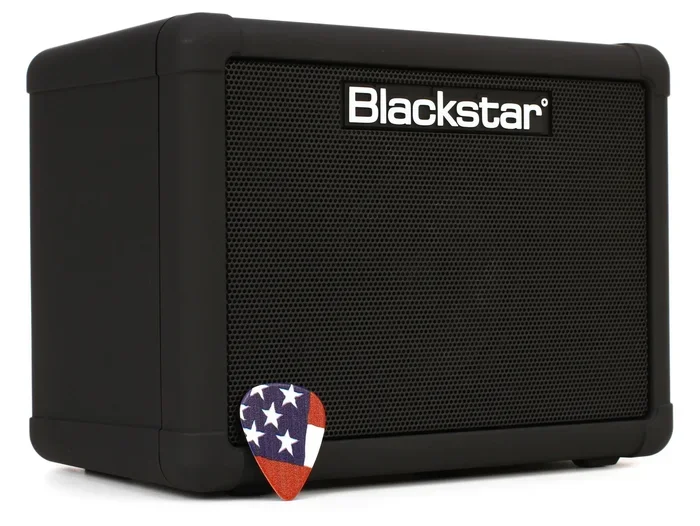
Does The Blackstar Fly 3 Have Bluetooth Connectivity
The Blackstar Fly 3 does not have built-in Bluetooth connectivity. It is a simple, compact practice amp designed for guitarists who want a no-fuss setup. However, you can still enjoy wireless audio by adding a Bluetooth adapter or transmitter to the amp’s aux input.
The Blackstar Fly 3 is one of the most popular small guitar amps on the market. It is compact, lightweight, and affordable. But one question keeps coming up from musicians and buyers alike: does the Blackstar Fly 3 have Bluetooth? The short answer is no. But there is more to the story. In this article, we will explore everything about the Blackstar Fly 3, its connectivity options, and how you can still enjoy wireless audio with this handy little amp.
If you are a guitarist looking for a practice amp, the Fly 3 is a strong contender. It has a clean sound, built-in effects, and a simple design. But the lack of Bluetooth connectivity might be a dealbreaker for some. Let us dive deep into what the Fly 3 offers and how you can work around its limitations.
Key Takeaways
- No Built-in Bluetooth: The Blackstar Fly 3 does not include Bluetooth connectivity out of the box.
- Alternative Connections Available: The amp features an aux input and headphone output for wired audio.
- Easy Workaround: A Bluetooth adapter or transmitter can add wireless capability to the Fly 3.
- Great for Practice: Despite lacking Bluetooth, the Fly 3 is an excellent portable practice amp.
- Affordable Option: Bluetooth adapters are inexpensive and easy to set up.
- Know Your Options: Compare the Fly 3 with other amps that offer built-in Bluetooth.
📑 Table of Contents
What Is the Blackstar Fly 3?
The Blackstar Fly 3 is a portable guitar amplifier designed for practice and small performances. It is part of Blackstar’s Fly series, which is known for its compact size and decent sound quality. The amp weighs less than a kilogram, making it easy to carry around. You can practice at home, take it to jam sessions, or even use it for small gigs.
The Fly 3 comes in different versions too. There is the standard Fly 3 for electric guitars, the Fly 3 Acoustic for acoustic guitars, and the Fly 3 Bass for bass players. Each version is tailored to its specific instrument. They all share the same core design and connectivity options though.
Key Features of the Fly 3
- 3 Watts of Power: Enough volume for practice sessions and small rooms.
- Built-in Effects: Includes reverb, delay, and other effects for shaping your tone.
- Headphone Output: Lets you practice silently without disturbing others.
- Aux Input: Allows you to connect external audio sources like your phone or MP3 player.
- USB Port: Useful for firmware updates and connecting to a computer.
- Compact Design: Small enough to fit in a gig bag or backpack.
These features make the Fly 3 a great choice for beginners and experienced players alike. But the connectivity options are somewhat limited. There is no wireless audio streaming built into the amp. This is where the Bluetooth question becomes important.
Does the Blackstar Fly 3 Have Bluetooth?
To answer this directly: the Blackstar Fly 3 does not have Bluetooth connectivity. There is no wireless pairing option, no Bluetooth module, and no way to connect your phone or other devices wirelessly to the amp. This is a deliberate design choice by Blackstar. The Fly 3 is meant to be a simple, straightforward practice amp. Adding Bluetooth would increase the cost and complexity.
Some guitar players might see this as a downside. After all, wireless audio streaming is convenient. You can play music from your phone through your amp without any cables. But the Fly 3 keeps things basic. It focuses on delivering good guitar tone rather than offering smart features.
Why No Bluetooth?
There are a few reasons why Blackstar chose not to include Bluetooth in the Fly 3. First, the amp is designed to be ultra-simple. It targets beginners who may not need advanced features. Second, adding Bluetooth would increase the manufacturing cost. The Fly 3 is already an affordable amp, and keeping the price low is a priority. Third, the 3-watt design limits the amp’s use case. It is a practice amp, not a performance amp, so wireless streaming is less critical.
That said, the lack of Bluetooth does not make the Fly 3 a bad choice. It is still an excellent amp for its price range. The sound quality is solid, and the built-in effects add a lot of value. But if wireless audio is important to you, you will need to look at other options or find a workaround.
How to Add Bluetooth to the Blackstar Fly 3
Even though the Fly 3 does not have built-in Bluetooth, you can still add wireless capability. There are simple and affordable solutions that let you stream audio from your phone or tablet to the amp. Here are the best methods.
Method 1: Use a Bluetooth Adapter
A Bluetooth adapter is the easiest way to add wireless connectivity to your Fly 3. These small devices plug into the amp’s aux input and receive audio signals from your phone via Bluetooth. The setup is straightforward. You pair your phone with the adapter, and the audio streams through the amp’s speaker.
Look for a Bluetooth adapter that supports the AUX 3.5mm input. Most adapters on the market work with this standard. They are small, portable, and inexpensive. Some popular options include generic Bluetooth receivers that cost around $10 to $20.
Here is how to set it up:
- Plug the Bluetooth adapter into the Fly 3’s aux input.
- Turn on the adapter and put it in pairing mode.
- Go to your phone’s Bluetooth settings and find the adapter.
- Pair the devices and start playing music.
This method works well for jamming along with backing tracks or listening to music through your amp. The sound quality is decent, and the latency is usually low enough for practice purposes.
Method 2: Use a Bluetooth Transmitter
Another option is a Bluetooth transmitter. This device works a bit differently from an adapter. A transmitter sends audio from your device to a Bluetooth receiver. However, for the Fly 3, a transmitter is less useful because the amp does not have a Bluetooth receiver built in. You would still need an adapter on the amp side.
That said, if you plan to use your Fly 3 with Bluetooth headphones, a transmitter can be helpful. You can connect the transmitter to the Fly 3’s headphone output and pair it with wireless headphones. This lets you practice silently without any cables.
Method 3: Use a Bluetooth Speaker Instead
If your main goal is wireless audio, consider using a Bluetooth speaker alongside the Fly 3. You can connect your phone to the speaker wirelessly and use the Fly 3 for your guitar tone. This setup gives you the best of both worlds. You get the amp’s guitar sound and the speaker’s wireless convenience.
Some players also use a Bluetooth adapter for their stereo setup at home. The Fly 3’s aux input can connect to a stereo system, and a Bluetooth adapter on the stereo side lets you stream wirelessly. This is a great option for home practice where you want better sound quality.
Fly 3 Connectivity Options Explained
The Fly 3 has several connectivity options, even if Bluetooth is not one of them. Understanding these options helps you get the most out of your amp. Let us break down each connection type.
Aux Input
The aux input on the Fly 3 is a standard 3.5mm jack. It accepts audio from any device with a headphone output. This includes phones, tablets, laptops, and MP3 players. The aux input is the primary way to play music through the amp. It is also the connection point for Bluetooth adapters and transmitters.
The audio quality through the aux input is good for a practice amp. It is not studio-grade, but it is perfectly fine for jamming along with your favorite songs. The volume of the aux input is separate from the guitar input, so you can balance the two easily.
Headphone Output
The headphone output lets you practice in complete silence. This is great for late-night practice sessions or when you do not want to disturb others. You can plug in any standard headphones or earphones. The sound quality through headphones is clear and detailed.
If you want to go wireless with headphones, you can use a Bluetooth transmitter connected to the headphone output. This lets you listen without any cables. Just keep in mind that the Fly 3 itself still does not have Bluetooth.
USB Port
The USB port on the Fly 3 serves a specific purpose. It is mainly used for firmware updates and connecting to a computer. You can also use it to record your guitar directly into a DAW (Digital Audio Workstation) on your computer. The USB connection is not designed for audio streaming or wireless connectivity.
Comparison: Fly 3 Connectivity vs. Bluetooth-Enabled Amps
| Feature | Blackstar Fly 3 | Bluetooth-Enabled Amps |
|---|---|---|
| Built-in Bluetooth | No | Yes |
| Aux Input | Yes (3.5mm) | Yes (3.5mm) |
| Headphone Output | Yes | Yes |
| USB Connection | Yes | Some models |
| Wireless Audio Streaming | No (without adapter) | Yes |
| Price Range | $50-$80 | $80-$200+ |
| Portability | Excellent | Varies |
As you can see, the Fly 3 holds its own in terms of basic connectivity. The only major difference is the lack of built-in wireless audio streaming. But with a cheap adapter, you can close that gap.
Pros and Cons of the Blackstar Fly 3
Every amp has its strengths and weaknesses. The Fly 3 is no exception. Here is a balanced look at what it offers.
Pros
- Affordable Price: The Fly 3 is one of the cheapest practice amps available.
- Compact and Portable: It is small and light, making it easy to carry anywhere.
- Good Sound Quality: The tone is clear and the effects add versatility.
- Simple to Use: No complicated settings or menus to navigate.
- Multiple Connectivity Options: Aux input, headphone output, and USB port are all included.
- Durable Build: The Fly 3 is well-built and can handle regular use.
Cons
- No Built-in Bluetooth: Wireless audio streaming is not supported natively.
- Low Power: 3 watts is not enough for larger venues or band practice.
- Limited Effects: The effects are decent but not as advanced as higher-end amps.
- No Battery Option: The Fly 3 requires a power outlet to operate.
- Basic Connectivity: No wireless features at all, which feels outdated in 2024.
The pros outweigh the cons for most practice guitarists. The Fly 3 delivers great value for its price. The lack of Bluetooth is a minor drawback that can be easily fixed with an adapter.
Alternatives: Amps with Built-in Bluetooth
If the lack of Bluetooth is a dealbreaker for you, there are other amps to consider. Several practice amps on the market offer built-in Bluetooth connectivity. These amps let you stream audio wirelessly without any extra accessories.
Blackstar Fly 3 Bluetooth Alternatives
Blackstar itself offers amps with more advanced connectivity. The Blackstar ID:Core series includes Bluetooth in some models. These amps are slightly more expensive but offer wireless audio streaming and other smart features. The ID:Core Fly 10, for example, has Bluetooth and more power than the Fly 3.
Other Brands with Bluetooth Amps
Several other brands offer Bluetooth-enabled practice amps. The Boss Cube Street EX has Bluetooth and can run on batteries. The Marshall MS-2 has a built-in Bluetooth receiver in some versions. The Fender Frontman 20G also includes Bluetooth in certain models. Each of these amps offers wireless audio streaming as a standard feature.
When choosing an alternative, consider your budget and needs. If you want the simplest setup possible, a Bluetooth-enabled amp saves you the hassle of buying and managing an adapter. But if you already own a Fly 3 or prefer its sound, adding a Bluetooth adapter is the way to go.
Expert Tips for Using the Fly 3
Here are some practical tips to help you get the most out of your Blackstar Fly 3.
Tip 1: Use a Quality Bluetooth Adapter
Not all Bluetooth adapters are created equal. Cheap adapters may have high latency or poor sound quality. Look for adapters that support aptX or AAC codecs for better audio performance. A good adapter makes a noticeable difference in sound quality.
Tip 2: Keep Your Amp Clean
The aux input on the Fly 3 can collect dust over time. Clean it regularly with compressed air or a soft brush. A dirty aux input can cause crackling sounds or intermittent connections.
Tip 3: Use the Headphone Output for Late-Night Practice
The headphone output on the Fly 3 is excellent for silent practice. If you live in an apartment or share walls with neighbors, this feature is a lifesaver. Pair it with a Bluetooth transmitter for a completely wireless setup.
Tip 4: Experiment with the Aux Input Volume
The aux input volume is separate from the guitar volume. Take time to balance the two. This lets you play along with music at a comfortable level without one overpowering the other.
Tip 5: Update Your Firmware
Blackstar occasionally releases firmware updates for the Fly 3. These updates can improve performance and add new features. Use the USB port to check for updates and keep your amp running at its best.
Common Mistakes to Avoid
Here are some common mistakes that Fly 3 users make. Avoid these to get the best experience.
- Expecting Bluetooth: Do not buy the Fly 3 expecting wireless audio streaming. It does not have that feature.
- Using a Cheap Adapter: A low-quality Bluetooth adapter can degrade your sound quality. Invest in a decent one.
- Overloading the Amp: The Fly 3 is a 3-watt amp. Do not expect it to fill a large room with sound.
- Ignoring the Aux Input: Many users overlook the aux input. It is a great way to play along with backing tracks and songs.
- Not Using Headphones: The headphone output is one of the best features of the Fly 3. Use it for quiet practice sessions.
Conclusion
The Blackstar Fly 3 is a great practice amp, but it does not have Bluetooth connectivity. This is a fact that every potential buyer should know before making a purchase. The amp is simple, affordable, and delivers solid sound quality. It is perfect for beginners and casual players who want a no-nonsense practice amp.
If wireless audio is important to you, do not worry. You can add Bluetooth to the Fly 3 with a simple adapter or transmitter. These accessories are affordable and easy to use. They open up new possibilities for playing along with music and practicing silently.
Overall, the Fly 3 remains a strong choice in the portable amp category. Its lack of Bluetooth is a minor limitation that can be easily overcome. Whether you are a beginner or an experienced player, the Blackstar Fly 3 offers great value and reliable performance. Just be sure to explore your options for adding wireless connectivity if that matters to your setup.
The world of guitar amplifiers has evolved, and Bluetooth is becoming a standard feature. But the Fly 3 proves that you do not need smart features to make great music. Sometimes, simplicity is the best feature of all.
Frequently Asked Questions
Can I connect my phone wirelessly to the Blackstar Fly 3?
No, the Blackstar Fly 3 does not have built-in Bluetooth. You cannot connect your phone wirelessly to the amp directly. However, you can use a Bluetooth adapter plugged into the aux input to achieve wireless audio streaming.
Does the Blackstar Fly 3 support wireless audio streaming?
The Fly 3 does not support wireless audio streaming natively. It relies on wired connections like the aux input and headphone output. To add wireless capability, you need a Bluetooth adapter or transmitter.
What is the best Bluetooth adapter for the Blackstar Fly 3?
Look for a Bluetooth adapter that supports a 3.5mm AUX input and offers low latency. Adapters that support aptX or AAC codecs deliver better sound quality. Popular choices include generic Bluetooth receivers available for $10 to $20 online.
Can I use Bluetooth headphones with the Blackstar Fly 3?
Yes, you can use Bluetooth headphones with the Fly 3 by connecting a Bluetooth transmitter to the headphone output. This lets you practice silently without any cables. The transmitter pairs with your headphones wirelessly.
Is the Blackstar Fly 3 worth buying if I want Bluetooth?
If Bluetooth is a must-have feature, the Fly 3 may not be the best choice. Consider amps with built-in Bluetooth like the Blackstar ID:Core series. However, if you already own a Fly 3, a Bluetooth adapter is an inexpensive and easy solution.
Are there any Blackstar amps that have Bluetooth?
Yes, Blackstar offers amps with built-in Bluetooth in its ID:Core series. Models like the ID:Core Fly 10 include Bluetooth connectivity. These amps are slightly more expensive than the Fly 3 but offer wireless audio streaming and other smart features.