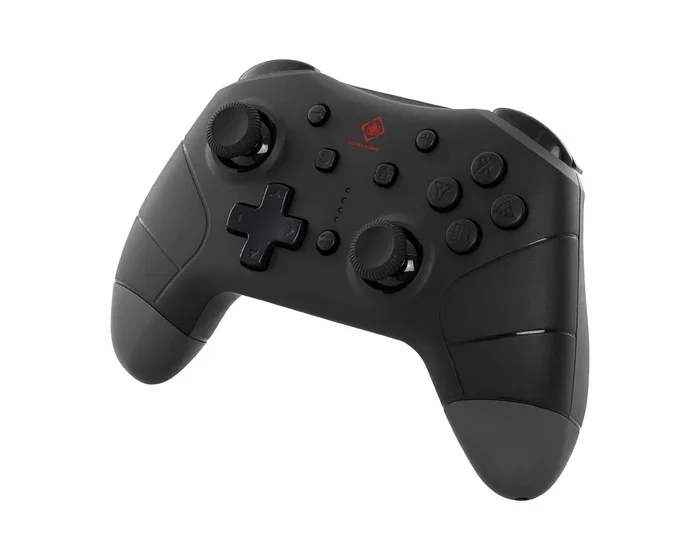
Does The Nintendo Switch Come With Bluetooth Built In
The Nintendo Switch does have Bluetooth built in, but with some important limitations. The console uses Bluetooth 4.1 and supports wireless audio devices, though it doesn’t allow standard Bluetooth headphones to connect directly without extra steps. You can still enjoy wireless audio through compatible adapters, Bluetooth speakers, and specific wireless headphones designed for the Switch.
This is a comprehensive guide about Does The Nintendo Switch Come With Bluetooth.
Key Takeaways
- The Switch has Bluetooth 4.1 built in: It supports wireless connections for controllers and audio devices.
- Direct Bluetooth headphone pairing is limited: The Switch blocks most standard Bluetooth headphones from connecting natively.
- You can use a Bluetooth adapter: A USB Bluetooth adapter in the dock unlocks wireless audio options.
- Pro Controller and Joy-Cons connect wirelessly: These use Bluetooth to pair with the console seamlessly.
- Third-party wireless headsets work best: Many gaming headsets designed for the Switch offer the best Bluetooth experience.
- Bluetooth range matters: Keep your Switch within 30 feet of your Bluetooth device for the best connection.
[FEATURED_IMAGE_PLACEHOLDER]
Does The Nintendo Switch Come With Bluetooth Built In?
The short answer is yes. The Nintendo Switch does come with Bluetooth built in. But the full story is a bit more complicated than a simple yes or no. If you have been wondering whether you can go completely wireless with your Switch, you are in the right place.
Nintendo designed the Switch to be a versatile gaming machine. You can play it at home on your TV, docked on a table, or carry it around as a handheld. With that versatility comes the need for wireless connectivity. Bluetooth plays a big role in making that happen. The console includes a Bluetooth 4.1 wireless radio that handles connections for controllers, audio devices, and more.
Here is what makes the Switch’s Bluetooth situation unique. Unlike a smartphone or a PC, the Switch does not let you connect just any Bluetooth device freely. Nintendo places restrictions on what can pair directly. This is especially true for wireless headphones. The company wants you to use its own wireless accessories or approved third-party options. But do not worry. There are still plenty of ways to get wireless audio working on your Switch.
Whether you want to use wireless headphones, a Bluetooth speaker, or a wireless controller, the Switch can handle it. You just need to know the right method. This guide will walk you through everything you need to know about Bluetooth connectivity on the Nintendo Switch.
What Bluetooth Version Does The Nintendo Switch Use?
The Nintendo Switch uses Bluetooth 4.1. This is an older version compared to the latest Bluetooth 5.0 and 5.3 standards found on modern smartphones and laptops. But Bluetooth 4.1 is still perfectly functional for most wireless accessories. Here is what you need to know about this version.
Bluetooth 4.1 offers a reliable connection with a range of about 30 feet. That means you can move around your room while playing without losing the signal. The version also supports low energy consumption, which helps preserve your Switch’s battery life during wireless play.
However, Bluetooth 4.1 does have some limitations. It does not support the latest audio codecs like aptX or LDAC. These codecs deliver higher quality sound on newer devices. The Switch’s Bluetooth audio is limited to standard SBC audio, which is good but not the best available. If you are an audiophile looking for top-tier wireless sound, you might notice a small difference in audio quality compared to a direct wired connection.
Bluetooth 4.1 vs. Newer Bluetooth Versions
Most modern devices now use Bluetooth 5.0 or higher. These newer versions offer faster data transfer, longer range, and better audio quality. The Switch’s Bluetooth 4.1 still works well for gaming, though. The difference in real-world use is minimal for most players. You will barely notice the gap during gameplay. The connection stays stable, and the audio remains clear.
How To Connect Bluetooth Devices To Your Nintendo Switch
Connecting Bluetooth devices to your Switch depends on what type of device you are using. The process is not always the same. Let me walk you through the different methods.
Connecting Wireless Controllers
The easiest Bluetooth connection on the Switch is with controllers. The Pro Controller and Joy-Con pairs wirelessly using Bluetooth. Here is how to do it:
- Turn on your Pro Controller or Joy-Con.
- On your Switch, go to System Settings.
- Select Controllers and Sensors.
- Choose Change Grip/Order.
- Press the Sync button on your controller.
- The controller should appear on your screen. Select it to pair.
This process works every time. The Switch recognizes the controller instantly. Once paired, the controller stays connected until you turn it off or move out of range.
Connecting Wireless Headphones
This is where things get tricky. The Switch does not allow standard Bluetooth headphones to connect directly through its Bluetooth settings. Nintendo blocks this on purpose. So if you try to pair regular wireless headphones like you would with your phone, it will not work.
But you still have options. You can use a Bluetooth adapter plugged into the Switch dock. This adapter bypasses the console’s restrictions and lets you connect any Bluetooth headphones. Another option is to use headphones that connect through the Switch’s 3.5mm headphone jack. Some wireless headsets come with a USB dongle that plugs directly into the dock.
If you want to use AirPods or other Apple headphones with your Switch, you will need a Bluetooth adapter. Check out our guide on pairing AirPods to your Switch for a detailed walkthrough.
Using Bluetooth Speakers With the Switch
You can also connect a Bluetooth speaker to your Switch using a USB Bluetooth adapter. This works great for sharing game audio with a group of friends. Just plug the adapter into the dock, pair your speaker, and you are good to go. Keep in mind that the audio quality depends on your speaker and the adapter you use.
Best Bluetooth Accessories For The Nintendo Switch
Not all Bluetooth accessories work the same way with the Switch. Some are plug-and-play, while others need extra setup. Here are the best options for wireless gaming on your Switch.
Wireless Controllers
The official Nintendo Pro Controller is the best Bluetooth controller for the Switch. It connects seamlessly and offers a classic console feel. The Joy-Con controllers also connect wirelessly and work great for handheld mode. Third-party controllers from brands like 8BitDo and PowerA also work well over Bluetooth.
If you have used Bluetooth headphones with a PS4, you know that console Bluetooth can be finicky. The Switch is similar. It works best with first-party and approved accessories. Third-party devices sometimes need extra steps to pair correctly.
Wireless Headsets and Headphones
For the best wireless audio experience on the Switch, consider these options:
- Nintendo Switch Wireless Headset: This is the official wireless headset from Nintendo. It connects through the USB dongle and offers great sound quality.
- Gaming headsets with USB dongles: Brands like Turtle Beach and SteelSeries offer headsets that work well with the Switch.
- Bluetooth adapter + any wireless headphones: This is the most flexible option. You can use any Bluetooth headphones with a compatible adapter.
- Wired headphones with a 3.5mm jack: The simplest option. Just plug them into the Switch dock or the Joy-Con.
Bluetooth Adapters
A Bluetooth adapter is a small USB device that adds Bluetooth capability to your Switch dock. This is the most reliable way to connect standard Bluetooth headphones and speakers. Look for adapters that support Bluetooth 4.0 or higher for the best compatibility. Some adapters also support Bluetooth 5.0, which can improve range and audio quality slightly.
If you are looking for a budget-friendly option, check out our article on using a Bluetooth adapter on your TV for tips that also apply to the Switch dock setup.
Bluetooth Limitations On The Nintendo Switch
It is important to understand what the Switch’s Bluetooth cannot do. Knowing these limitations helps you set realistic expectations and avoid frustration.
No Direct Bluetooth Headphone Support
The biggest limitation is that the Switch does not support direct Bluetooth headphone connections. You cannot go to your Bluetooth settings and pair any pair of wireless headphones like you would on your phone. This is a deliberate design choice by Nintendo. The company wants to keep the gaming experience consistent and avoid audio lag issues that can come with generic Bluetooth connections.
Limited Audio Codecs
The Switch only supports the standard SBC audio codec over Bluetooth. This is the most basic Bluetooth audio codec. It does not support advanced codecs like aptX, aptX HD, or LDAC. These codecs deliver better sound quality on other devices. The result is that wireless audio on the Switch sounds good but not amazing. For most casual gamers, the difference is barely noticeable.
No Bluetooth File Transfer
The Switch’s Bluetooth cannot transfer files between devices. You cannot send music, photos, or documents wirelessly using Bluetooth. The Bluetooth radio is only used for controller input and audio output. If you need to transfer files, you will need to use a USB cable or SD card.
Limited Number of Simultaneous Connections
The Switch can only maintain a few active Bluetooth connections at once. You can connect up to 8 Joy-Con or Pro Controllers at a time. But for audio devices, you are typically limited to one Bluetooth connection at a time. This means you cannot connect both a wireless headset and a wireless speaker simultaneously without an adapter that supports multiple profiles.
Tips For Better Bluetooth Performance On The Nintendo Switch
Getting the most out of your Switch’s Bluetooth connection is easy with a few simple tips. These tricks help reduce lag, improve audio quality, and keep your connection stable.
- Keep your Switch close to the Bluetooth device. Stay within 30 feet for the best signal. Walls and other obstacles can weaken the connection.
- Use the dock for wireless audio. Plug your Bluetooth adapter directly into the dock. This provides a more stable connection than using the handheld mode.
- Turn off other wireless devices nearby. Wi-Fi routers and other Bluetooth devices can cause interference. Moving them away helps keep your connection clean.
- Update your Switch firmware. Nintendo regularly releases updates that improve Bluetooth performance. Keep your console up to date.
- Use a dedicated Bluetooth adapter. A quality USB Bluetooth adapter gives you better range and stability than relying on the built-in Bluetooth alone.
- Avoid using Bluetooth in crowded areas. Places with lots of wireless signals, like gaming conventions or busy offices, can cause connection drops.
Quick Tips For Bluetooth Success
- Always pair your device in a quiet wireless environment.
- Restart your Switch if Bluetooth connections drop unexpectedly.
- Check that your Bluetooth accessory is fully charged before pairing.
- Keep your Switch software updated for the best Bluetooth compatibility.
- Use the official Nintendo accessories whenever possible for the smoothest experience.
Can You Use Bluetooth With The Switch In Both Docked And Handheld Mode?
Yes, you can use Bluetooth in both modes, but the experience differs. In docked mode, you have access to the USB ports on the dock. This makes it easy to plug in a Bluetooth adapter for wireless headphones or speakers. The connection tends to be more stable in docked mode because the adapter sits close to the console’s Bluetooth radio.
In handheld mode, you do not have access to the USB ports unless you use a USB hub attached to the Switch. This means using a Bluetooth adapter in handheld mode requires extra hardware. Some players prefer handheld mode for its portability, so this can be a limitation. The good news is that the Switch’s built-in Bluetooth still works for wireless controllers in handheld mode. You just cannot use a Bluetooth adapter for audio without additional accessories.
For the best of both worlds, consider getting a USB-C Bluetooth adapter that works with the Switch’s USB-C port. This lets you enjoy wireless audio in both docked and handheld modes without extra hassle.
How Does The Switch Bluetooth Compare To Other Gaming Consoles?
Let us compare the Switch’s Bluetooth capabilities with other popular gaming consoles. This helps you understand where the Switch stands in terms of wireless connectivity.
| Console | Bluetooth Version | Direct Headphone Support | Controller Bluetooth |
|---|---|---|---|
| Nintendo Switch | 4.1 | No (requires adapter) | Yes (Joy-Con, Pro Controller) |
| PlayStation 4 | 4.0 | Limited (with specific headsets) | Yes (DualShock 4) |
| PlayStation 5 | 5.1 | Yes (PULSE 3D headset) | Yes (DualSense) |
| Xbox One | 4.0 | No (uses proprietary wireless) | Yes (Xbox Wireless) |
As you can see, the Switch is not alone in its Bluetooth limitations. The PS4 also struggles with direct Bluetooth headphone connections. The Xbox One uses its own proprietary wireless system instead of standard Bluetooth. The PS5 has improved its Bluetooth support with version 5.1, but still has some restrictions. The Switch holds its own fairly well, especially considering its portable nature.
Switch owners who also game on other consoles know that Bluetooth limitations are common across the industry. If you have used Bluetooth headphones with a PS4, you will find the Switch experience similar. Both require workarounds for wireless audio. The Switch’s advantage is its portability, which makes Bluetooth adapters more convenient to carry around.
Final Thoughts
The Nintendo Switch does come with Bluetooth built in, and it works well for wireless controllers and accessories. The console uses Bluetooth 4.1, which is reliable and stable for gaming. However, the Switch does have limitations when it comes to direct wireless audio. You cannot connect standard Bluetooth headphones without a workaround.
The good news is that solutions exist. A USB Bluetooth adapter unlocks full wireless audio freedom. Many third-party gaming headsets work seamlessly with the Switch out of the box. And Nintendo’s own wireless accessories offer the best plug-and-play experience.
If you want the simplest wireless audio solution, go with a headset that includes its own USB dongle. If you want flexibility, invest in a quality Bluetooth adapter. Either way, you can enjoy wireless gaming audio on your Switch without any hassle.
The Switch is a fantastic console that handles wireless connectivity well. Its Bluetooth may not be the most advanced, but it gets the job done. With the right accessories and a little patience, you can go fully wireless and enjoy your favorite games without any tangled cables holding you back.
Frequently Asked Questions
Can I Connect Any Bluetooth Headphones Directly To The Nintendo Switch?
No, the Switch does not allow direct Bluetooth headphone connections. Nintendo blocks standard Bluetooth audio devices from pairing through the console’s settings. You will need a USB Bluetooth adapter or a headset with a compatible USB dongle to get wireless audio working on the Switch.
What Bluetooth Version Does The Nintendo Switch Use?
The Nintendo Switch uses Bluetooth 4.1. This version is reliable for gaming accessories and controllers. It offers a range of about 30 feet and supports low energy consumption. However, it does not support the latest audio codecs found in newer Bluetooth versions.
Can I Use A Bluetooth Speaker With My Nintendo Switch?
Yes, you can use a Bluetooth speaker with the Switch. You will need a USB Bluetooth adapter plugged into the Switch dock. Once paired, your speaker will output game audio wirelessly. This is a great option for sharing sound with friends during multiplayer sessions.
Do Joy-Con Controllers Use Bluetooth To Connect?
Yes, both Joy-Con controllers connect to the Switch using Bluetooth. They pair wirelessly through the console’s Bluetooth radio. The connection is stable and responsive, making them great for handheld and tabletop mode gaming.
Is Bluetooth Audio On The Switch As Good As Wired Audio?
Bluetooth audio on the Switch is good but not quite as good as wired audio. The Switch only supports the SBC audio codec, which is standard but not the highest quality. You may notice a slight difference in audio fidelity compared to a wired connection. For most gamers, the difference is minimal and not noticeable during gameplay.
Can I Use My AirPods With The Nintendo Switch?
You can use AirPods with the Switch, but not through direct Bluetooth pairing. Apple AirPods use a proprietary connection method that the Switch does not support natively. You will need a Bluetooth adapter plugged into the Switch dock to connect AirPods wirelessly. Alternatively, you can use AirPods with a wired connection through the 3.5mm headphone jack using an Apple Lightning to 3.5mm adapter.
Frequently Asked Questions
What is Does The Nintendo Switch Come With Bluetooth?
Does The Nintendo Switch Come With Bluetooth is an important topic with many practical applications.