Find Out How Big A 100 Projector Screen Actually Is
A 100 projector screen measures approximately 87 inches wide by 49 inches tall in a 16:9 aspect ratio, making it a popular choice for home theaters. Understanding the exact 100 inch screen dimensions helps you plan the perfect viewing setup. Whether you are upgrading your movie nights or building a dedicated cinema room, knowing the size ensures a stunning visual experience.
Key Takeaways
- 100-inch screens deliver a cinematic experience: A 100 projector screen creates an immersive viewing area that transforms any room into a home theater.
- Dimensions vary by aspect ratio: A 16:9 screen measures about 87 x 49 inches, while a 2.35:1 screen stretches wider to about 87 x 37 inches.
- Room size matters: You need at least 10 to 15 feet of viewing distance for the best experience with a 100-inch screen.
- Projector placement is critical: The right throw distance and mounting position ensure the image fills the entire screen perfectly.
- Screen material affects image quality: Different screen materials impact brightness, contrast, and color accuracy on your 100-inch projection.
📑 Table of Contents
- How Big Is A 100 Projector Screen? The Full Breakdown
- Why Size Matters for Your Projector Setup
- Types of 100-Inch Projector Screens
- How to Choose the Right Room for a 100-Inch Screen
- Common Mistakes People Make with 100-Inch Screens
- 100-Inch Screen vs. Other Sizes: Quick Comparison
- Can a Projector Replace Your TV Entirely?
- Final Thoughts
How Big Is A 100 Projector Screen? The Full Breakdown
A 100 projector screen is one of the most popular sizes for home theaters and casual movie nights. But “100 inches” only tells part of the story. The actual size depends on the aspect ratio, the screen type, and how you set it up in your room. Let us break down everything you need to know about 100 inch screen dimensions so you can make the right choice for your space.
When most people hear “100 inch screen,” they picture a massive display that fills a whole wall. And they are not wrong. A 100 projector screen is big enough to make you feel like you are sitting in a real cinema. But the exact width, height, and area depend on the format you choose. Let us look at the numbers in detail.
Standard 16:9 Dimensions
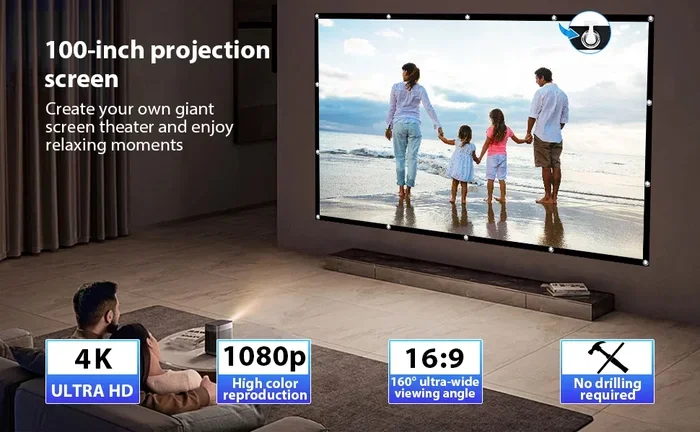
The most common aspect ratio for modern projectors and TVs is 16:9. For a 100 inch diagonal screen in this ratio, the width comes out to about 87 inches and the height is roughly 49 inches. That means the total screen area is around 4,263 square inches, or about 29.6 square feet.
To put that in perspective, a 100-inch 16:9 screen is wider than most standard couches. It is big enough to fill your entire field of vision when you sit at the right distance. This is why so many people choose this size for their home theater screen setups.
Widescreen 2.35:1 (Cinema) Dimensions
If you are a movie buff who loves the widescreen cinema look, a 2.35:1 aspect ratio changes the picture. A 100 inch projector screen in this format measures about 87 inches wide but only 37 inches tall. The screen stays the same diagonal measurement but becomes much wider and shorter.
This format gives you that true Hollywood cinematic feel. It is perfect for watching movies filmed in ultrawide format. The trade-off is that you sacrifice some vertical height, so you might not get the full picture if you watch a lot of TV shows shot in 16:9.
4:3 (Traditional) Dimensions
Older projectors and some business presentations use a 4:3 aspect ratio. A 100-inch screen in this format measures about 80 inches wide and 60 inches tall. It is more square-shaped compared to the wide formats. This was the standard for older TVs and projectors, and some people still prefer it for certain types of content.
Why Size Matters for Your Projector Setup
The size of your projector screen directly impacts your viewing experience. A screen that is too small can feel underwhelming, while one that is too large can distort the image if your projector cannot handle it. Choosing the right size means balancing several factors.
When you go with a 100 projector screen, you are choosing a size that works well for most medium to large rooms. It strikes a great balance between immersion and practicality. You get a big, detailed image without needing an extremely powerful projector or a massive room.
Viewing Distance Guidelines
The distance between your screen and your seating area is crucial. For a 100-inch screen, the recommended viewing distance is typically between 10 and 15 feet. This range comes from the Society of Motion Picture and Television Engineers (SMPTE) guidelines, which suggest sitting at a distance that is about 1.5 to 2 times the screen diagonal.
Here is a quick look at what different distances feel like with a 100 inch screen:
- 8 feet: You will feel completely immersed. The screen fills your vision. Great for movies but can feel intense for long viewing sessions.
- 12 feet: This is the sweet spot for most people. You get a comfortable, cinematic experience without eye strain.
- 15 feet: You can see the full picture easily. This works well for larger rooms where people sit farther back.
- 20+ feet: The image may start to feel small. You would benefit from going even bigger or moving closer.
Projector Brightness and Resolution
A bigger screen means the projector has to work harder to keep the image bright and sharp. For a 100-inch screen, you generally want a projector that puts out at least 2,000 to 3,000 lumens. If your room has a lot of ambient light, aim for even higher brightness.
Resolution matters just as much. A 100 projector screen will show every pixel if your projector is not sharp enough. For the best results, use a projector with at least 1080p resolution. If your budget allows, a 4K projector on a 100-inch screen creates an incredibly detailed and lifelike picture.
Types of 100-Inch Projector Screens
Not all 100 inch screen options are the same. Different screen types suit different rooms, budgets, and preferences. Let us explore the most popular choices.
Fixed Frame Screens
A fixed frame screen is mounted permanently to the wall or a frame. It stays taut and flat at all times, which gives you the best image quality. These screens do not roll up or move, so the projection surface remains perfectly smooth.
Pros: Excellent image quality, no wrinkles, and a sleek, theater-like look. Cons: They are permanent and take up wall space. You cannot easily move or store them.
Retractable Screens
A retractable screen rolls up into a ceiling-mounted or wall-mounted casing when not in use. This is a great option if you want a 100 projector screen but do not want to dedicate an entire wall to it.
Pros: Space-saving, versatile, and easy to use. You can hide the screen when you need the wall for other purposes. Cons: The image quality is slightly lower than a fixed frame because the screen material may have slight wrinkles or curvature.
Portable and Inflatable Screens
If you want flexibility, a portable or inflatable screen might be the way to go. These screens are lightweight and easy to set up anywhere. They are popular for backyard movie nights, camping trips, or temporary setups.
Pros: Highly portable, affordable, and easy to set up. Cons: The image quality is usually lower, and the screen may not be perfectly flat, which can affect sharpness on a 100-inch projection.
Ambient Light Rejecting (ALR) Screens
ALR screens are designed to reject ambient light from windows, ceiling lights, and other sources while reflecting the projector light directly to the viewer. This makes them ideal for rooms that are not completely dark.
If you plan to watch movies during the day or in a bright room, an ALR screen paired with your 100-inch setup can make a huge difference in contrast and color accuracy.
How to Choose the Right Room for a 100-Inch Screen
Not every room can accommodate a 100 projector screen properly. Before you buy, consider these room factors carefully.
Room Size and Layout
The room needs to be long enough to accommodate the proper viewing distance. A room that is at least 12 to 15 feet deep works well for a 100-inch screen. The width of the room also matters because the screen is about 87 inches wide in a 16:9 format.
Think about how the screen will fit into your existing furniture layout. You do not want the screen blocking windows, doors, or furniture. Measure your wall space first and make sure a 100-inch screen will fit comfortably without feeling cramped.
Light Control
Light is the enemy of a great projection image. The darker your room, the better your 100 inch screen will look. If you have large windows, consider blackout curtains or blinds. You can also paint your walls with a dark, matte finish to reduce light reflection.
Some people use a black cloth for projector setups to improve contrast and reduce light spill. This is a budget-friendly trick that can significantly improve your viewing experience. The darker the environment, the more vibrant and detailed your 100-inch image will appear.
Ceiling Height and Mounting Options
A 100-inch screen is about 49 inches tall in a 16:9 format. Make sure your ceiling is high enough to mount the screen without it feeling too close to the top of the room. The center of the screen should ideally be at eye level when you are seated.
If you are wondering whether you can mount the projector off to the side rather than directly in front, the answer is yes. You can mount your projector off center with the right lens shift or keystone correction. This gives you more flexibility in how you arrange your room.
Common Mistakes People Make with 100-Inch Screens
Setting up a 100 projector screen is exciting, but there are some common pitfalls to avoid. These mistakes can ruin your viewing experience even with the best equipment.
Underestimating Throw Distance
Every projector has a specific throw ratio that determines how far it needs to be from the screen to produce a 100-inch image. If you place the projector too close or too far, the image will be blurry, too small, or too large. Always check your projector’s throw distance specifications before mounting it.
Ignoring Screen Gain
Screen gain measures how much light the screen reflects back to the viewer. A high-gain screen makes the image brighter but narrows the viewing angle. A low-gain screen provides a wider viewing angle but a dimmer image. For a 100-inch setup in a dedicated room, a gain of 1.0 to 1.3 usually works well.
Using the Wrong Cables or Connections
Your projector and screen are only as good as the connection between them. Using low-quality cables can result in signal loss, reduced resolution, or flickering. Make sure you use high-speed HDMI cables that support the resolution your projector outputs. If your projector only has certain ports, you might need an adapter like a HDMI to USB converter to connect your source device properly.
Forgetting About Projector Maintenance
Projector lamps degrade over time, and a dim lamp will make your 100-inch image look washed out. If you have an older projector, consider replacing the lamp or upgrading to an LED projector. Some people ask, “Can I replace projector lamp with LED?” The answer is often yes, depending on your model, and it can dramatically improve brightness and lifespan.
100-Inch Screen vs. Other Sizes: Quick Comparison
Wondering how a 100-inch screen compares to other popular sizes? Here is a quick comparison to help you decide:
- 80-inch screen: Width about 70 inches, height about 40 inches. Good for smaller rooms but less immersive.
- 100-inch screen: Width about 87 inches, height about 49 inches. The sweet spot for most home theaters.
- 120-inch screen: Width about 104 inches, height about 58 inches. Truly cinematic but requires a large room and powerful projector.
The 100-inch size hits a perfect balance. It is big enough to feel cinematic but not so big that you need a massive room or an extremely expensive projector. For most people, a 100 projector screen is the ideal choice.
Can a Projector Replace Your TV Entirely?
Many people wonder whether a projector and a 100-inch screen can fully replace a television. The short answer is yes, for most people. A 100-inch projected image is significantly larger than even the biggest TVs on the market. It creates a viewing experience that a standard TV simply cannot match.
That said, a projector works best for movie watching and evening use. If you need a screen that is always on for news, gaming during the day, or background TV, a TV might still be more practical. You can also use a projector alongside your TV for different purposes. If you are considering this switch, you might find it helpful to explore whether you can use a projector instead of a TV for your specific needs.
Modern projectors are also much more versatile than older models. Many support smart features, built-in streaming apps, and wireless connectivity. You can even connect your phone or laptop directly to the projector. The flexibility of a 100 projector screen setup gives you options that a fixed TV simply does not offer.
Final Thoughts
A 100 projector screen is a fantastic investment for anyone who loves movies, sports, or gaming at home. With dimensions of about 87 inches wide by 49 inches tall in a standard 16:9 format, it delivers a truly cinematic experience that transforms any room into a personal theater.
The key to getting the most out of your 100-inch setup is proper planning. Choose the right room size, control ambient light, select the appropriate screen type, and pair it with a projector that matches your screen size and room conditions. Avoid common setup mistakes, and you will enjoy a stunning viewing experience for years to come.
Whether you are building a dedicated home theater or just want to upgrade your weekend movie nights, a 100-inch screen delivers big on entertainment. Take the time to plan your setup, pick the right equipment, and enjoy the show.
Frequently Asked Questions
How far should I sit from a 100 projector screen?
The ideal viewing distance for a 100-inch screen is between 10 and 15 feet. Sitting too close can cause eye strain, while sitting too far reduces the immersive experience. The sweet spot is usually around 12 feet for most people.
What size projector do I need for a 100-inch screen?
You need a projector with at least 2,000 to 3,000 lumens for a 100-inch screen in a dimly lit room. If your room has ambient light, aim for 3,000 lumens or more. Resolution should be at least 1080p for a sharp and detailed image.
Can I use a 100-inch screen outdoors?
Yes, you can use a 100-inch screen outdoors, but you will need a portable or inflatable screen and a bright projector. Outdoor setups work best at night or in shaded areas where ambient light is minimal. A screen with good gain helps reflect more light to your viewers.
Is a 100-inch screen too big for a small room?
A 100-inch screen can feel overwhelming in a small room if the viewing distance is less than 8 feet. For rooms under 10 feet deep, consider a smaller screen size like 80 inches. Measure your room carefully before committing to a 100-inch setup.
What is the best screen material for a 100-inch projector screen?
The best material depends on your room conditions. For dark rooms, a matte white screen with a gain of 1.0 works well. For rooms with some ambient light, an ambient light rejecting (ALR) screen provides better contrast and color accuracy.
Do I need a special wall to mount a 100-inch fixed frame screen?
You need a sturdy, flat wall surface that can support the weight of the screen. Most fixed frame screens come with mounting hardware. Make sure the wall can handle the load and that the screen is level for the best image quality.
=== CONCLUSION ===
A 100 projector screen is a big, beautiful addition to any home entertainment setup. With a width of about 87 inches and a height of 49 inches in a standard 16:9 format, it delivers a truly cinematic experience that rivals commercial theaters. By understanding the dimensions, choosing the right screen type, and setting up your projector at the correct distance, you can create a viewing experience that is truly memorable.
Take the time to plan your room layout, control your lighting, and invest in quality equipment. A well-set-up 100-inch screen will give you years of enjoyment and bring your favorite movies, shows, and games to life in stunning detail.