How Do Bluetooth Car Adapters Work And Why You Need One
A Bluetooth car adapter lets you stream music and make calls wirelessly through your car stereo. It connects to your phone and sends audio to your speakers without any cables. You can turn your old car radio into a smart, connected system in minutes. These small devices are easy to install, affordable, and work with almost any vehicle.
Have you ever wished you could play your favorite playlists through your car speakers without fumbling with cables? Maybe your car stereo is old and doesn’t have Bluetooth built in. Or perhaps you just want a cleaner, wire-free driving experience. Either way, a Bluetooth car adapter solves these problems fast.
These small, affordable devices are changing how we listen to music and make calls in the car. They bridge the gap between your smartphone and your car’s audio system. You don’t need to be a tech expert to set one up. In fact, most people get theirs working in under five minutes.
This guide covers everything you need to know. We’ll explain how Bluetooth car adapters work, why you need one, and how to pick the right one for your vehicle. Let’s dive in.
Key Takeaways
- Easy Wireless Connection: Bluetooth car adapters pair with your phone instantly, so you can stream music and take calls without wires.
- Works With Any Car: Whether you have an old or new vehicle, a Bluetooth car adapter can make your stereo wireless.
- Hands-Free Safety: You can answer calls and use voice commands while keeping your hands on the wheel and eyes on the road.
- Simple Setup: Most adapters plug into your aux port or cigarette lighter and connect in under two minutes.
- Affordable Upgrade: Bluetooth car adapters cost much less than replacing your entire car stereo system.
- Better Audio Quality: Modern adapters support clear, high-quality sound that rivals direct phone connections.
- Multiple Device Support: Many adapters let you switch between phones or devices seamlessly.
📑 Table of Contents
What Is a Bluetooth Car Adapter?
A Bluetooth car adapter is a small device that connects your phone to your car’s audio system wirelessly. It uses Bluetooth technology to send audio from your phone to your car speakers. Think of it as a translator between your phone and your stereo.
Most adapters plug directly into your car’s auxiliary input or cigarette lighter. Some connect through your FM radio frequency. Once paired, your phone streams audio to the adapter, and the adapter sends that sound to your car speakers. It’s that simple.
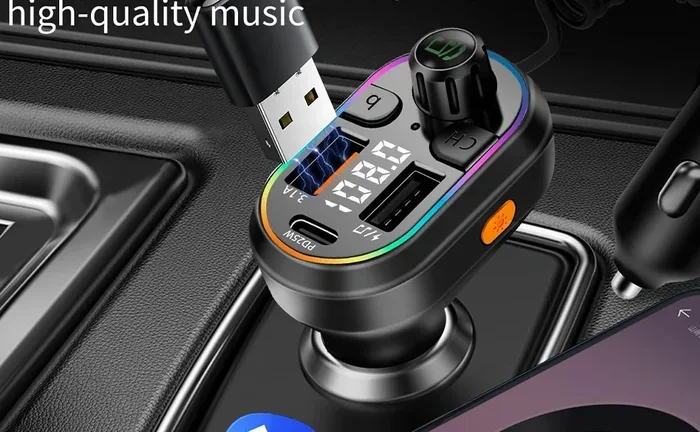
These devices come in different shapes and sizes. Some are tiny and discreet. Others have extra features like built-in microphones for calls or USB charging ports. But they all do the same core job: making your car audio wireless.
Why Do People Use Bluetooth Car Adapters?
People use Bluetooth car adapters for a few key reasons. First, many older cars don’t have Bluetooth built in. A Bluetooth car adapter adds that capability without expensive upgrades. Second, wireless connections are just more convenient. No more hunting for the right cable or dealing with tangled cords.
Third, safety matters. Hands-free calling through a Bluetooth car adapter keeps your eyes on the road. You can answer calls with a button press or voice command. Fourth, the audio quality on modern adapters is surprisingly good. You get clear sound without any noticeable delay or lag.
How Do Bluetooth Car Adapters Work?
Understanding how Bluetooth car adapters work helps you use them better. The technology behind them is simpler than you might think. Let’s break it down step by step.
The Bluetooth Connection Process
When you turn on a Bluetooth car adapter, it enters pairing mode. This means it’s ready to connect to a nearby device. Your phone scans for available Bluetooth devices and finds the adapter. You select it, and if needed, you enter a PIN code.
Once paired, the adapter and your phone create a secure wireless link. This link uses radio waves to transmit data. The adapter receives audio data from your phone and converts it into an analog signal. That signal then flows into your car’s audio system through the aux cable or FM frequency.
The whole process happens in milliseconds. You won’t notice any delay when streaming music or taking calls. It feels like the audio is coming directly from your phone.
What Happens Inside the Adapter
Inside a Bluetooth car adapter, there are a few key components. The Bluetooth chip handles wireless communication. It receives the audio data from your phone and decodes it. The amplifier boosts the signal so it’s strong enough for your car speakers.
Some adapters also have a built-in DAC, which stands for digital-to-analog converter. This converts digital audio from your phone into analog sound waves your car speakers can play. Better adapters have higher-quality DACs, which means clearer, richer sound.
The power supply is another important part. Most adapters draw power from your car’s cigarette lighter or USB port. This keeps them running as long as your car is on. A few models run on built-in batteries, which gives you more flexibility in where you place them.
Bluetooth Versions and What They Mean
Not all Bluetooth adapters are the same. They use different versions of the Bluetooth protocol. Bluetooth 4.0 was common in older models. It works fine for basic audio streaming but has a shorter range. Bluetooth 5.0 is the current standard in most quality adapters.
Bluetooth 5.0 offers a longer range, up to about 30 feet. It also uses less power and provides a more stable connection. If you’re shopping for a new adapter, look for one with Bluetooth 5.0 or higher. You’ll get better performance and fewer connection drops.
Benefits of Using a Bluetooth Car Adapter
There are many reasons to add a Bluetooth car adapter to your vehicle. Let’s look at the biggest benefits.
Wireless Music Streaming
The most obvious benefit is wireless music streaming. You can play Spotify, Apple Music, or any app on your phone through your car speakers. No cables needed. You just select the adapter as your audio output and start playing.
This works with any music app on your phone. Whether you like podcasts, audiobooks, or radio stations, it all streams wirelessly. You can also control playback from your phone. Skip tracks, adjust volume, or pause without touching your car stereo.
Hands-Free Calling
Safety is a big deal when driving. A Bluetooth car adapter lets you take calls hands-free. The adapter’s built-in microphone picks up your voice. Your caller hears you clearly through the car speakers.
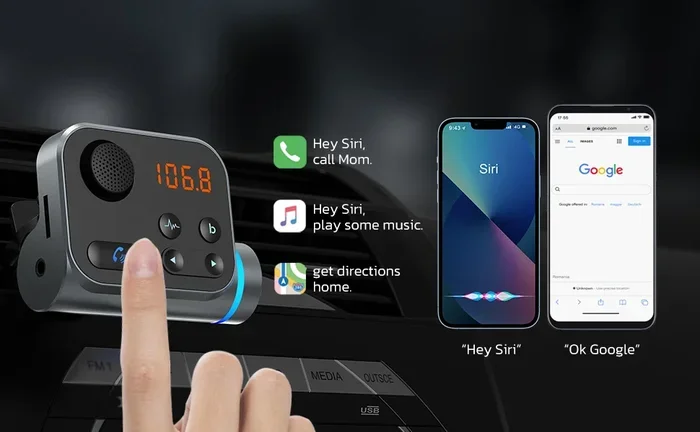
Most adapters have a dedicated button for answering and ending calls. Some support voice assistants like Siri or Google Assistant. This means you can make calls or send messages using just your voice. It’s safer and more convenient than holding your phone.
Works With Almost Any Car
One of the best things about Bluetooth car adapters is their versatility. They work with almost any vehicle. If your car has an aux input, you can use one. If it doesn’t, some adapters connect through your FM radio. This means even very old cars can get wireless audio.
You don’t need to replace your car stereo. A Bluetooth car adapter is a much cheaper solution. It also works great in rental cars or vehicles you don’t own. Just plug it in, pair your phone, and you’re good to go.
Easy to Move Between Vehicles
Unlike built-in Bluetooth systems, a Bluetooth car adapter is portable. You can unplug it and move it to another car. This is perfect if you have multiple vehicles or share a car with someone. You just plug it in the new car and pair your phone again.
Some people keep one in their daily driver and another in a backup car. It’s a small investment that works across all your vehicles.
Charging While You Stream
Many Bluetooth car adapters include USB charging ports. This means you can charge your phone while you stream music or take calls. You don’t have to worry about your phone battery dying on long drives.
Some adapters have fast-charging USB ports. Others have multiple ports so you can charge more than one device at a time. This adds a lot of value for the price.
Types of Bluetooth Car Adapters Available
Not all Bluetooth car adapters are the same. They come in different types, each with its own strengths. Let’s look at the main options.
Aux-Input Bluetooth Adapters
Aux-input adapters plug directly into your car’s 3.5mm aux port. They send audio straight to your car stereo. These adapters are simple and reliable. They don’t compress audio quality as much as FM-based options.
Most aux-input adapters also have a built-in microphone for calls. They usually charge through the car’s cigarette lighter or USB port. These are the most popular type because of their ease of use and solid sound quality.
FM Transmitter Adapters
FM transmitter adapters broadcast your phone’s audio over an empty FM frequency. Your car radio picks up this signal and plays it through the speakers. This type works even if your car doesn’t have an aux input.
The sound quality is slightly lower than aux-input adapters. FM signals can sometimes pick up interference from other radio stations. But FM transmitter adapters are very versatile. They work in almost any car, even those with no aux or USB ports.
Bluetooth Car Kits with Built-In Amplifiers
Some adapters come with built-in amplifiers. These boost the audio signal for louder, clearer sound. They’re great if your car speakers are weak or if you like listening at higher volumes.
These kits often include more advanced features. You might get volume controls, track skipping buttons, or even remote controls. They cost a bit more but offer a premium experience.
USB Bluetooth Adapters for Car Stereos
Some newer car stereos have USB ports that support Bluetooth. A USB Bluetooth adapter connects directly to the stereo’s USB port. It provides a digital connection, which means the best possible audio quality.
These adapters are compact and often invisible once installed. They’re a great option if your car stereo supports USB input but lacks built-in Bluetooth.
How to Choose the Right Bluetooth Car Adapter
Picking the right adapter can feel overwhelming with so many options. Here’s what to look for.
Check Your Car’s Inputs
First, check what inputs your car stereo has. Does it have an aux port? A USB port? If it has aux, an aux-input adapter is your best bet. If it has no aux but you can use the FM radio, an FM transmitter adapter works great.
If you’re unsure, check your car’s manual or look behind the stereo for available ports. Knowing your inputs helps you choose the right type of adapter.
Look for Bluetooth 5.0
Always choose an adapter with Bluetooth 5.0 or higher. It offers better range, faster connections, and less audio dropout. Older Bluetooth versions like 3.0 or 4.0 still work, but they’re not as reliable.
Bluetooth 5.0 also uses less battery power on your phone. This means your phone battery lasts longer during drives.
Consider Audio Quality
Audio quality varies between adapters. Look for ones that support aptX or AAC codecs. These codecs deliver better sound than standard Bluetooth audio. If you’re an audiophile or just care about good sound, this matters.
For most people, a standard Bluetooth adapter sounds perfectly fine. But if you notice a big difference in quality, upgrading to a codec-supported adapter makes a real impact.
Think About Extra Features
Do you need hands-free calling? Look for adapters with built-in microphones. Do you want to charge your phone while driving? Pick an adapter with USB ports. Do you travel with multiple passengers? Consider an adapter with multi-device pairing.
Some adapters also support voice assistants. This lets you use Siri, Google Assistant, or Alexa while driving. These extra features add convenience but may cost a bit more.
Read Reviews and Check Brand Reputation
Before buying, read user reviews. Look for adapters with high ratings and positive feedback about sound quality and reliability. Stick with reputable brands. A cheap adapter from an unknown brand might save money upfront but cause frustration later.
Setting Up Your Bluetooth Car Adapter
Setting up a Bluetooth car adapter is quick and easy. Here’s a step-by-step guide.
Step 1: Plug in the Adapter
First, plug the adapter into your car’s power source. Most adapters use the cigarette lighter socket. Some use a USB port. Make sure the adapter is powered on.
If your adapter has an aux cable, plug the other end into your car’s aux input. For FM transmitter adapters, you don’t need an aux cable. Just set the adapter to broadcast on an empty FM frequency.
Step 2: Put the Adapter in Pairing Mode
Press and hold the adapter’s Bluetooth button. The LED light will usually start flashing. This means it’s in pairing mode and ready to connect.
If you’re not sure how to do this, check the adapter’s manual. Most adapters have a simple one-button pairing process.
Step 3: Pair Your Phone
On your phone, go to Settings and turn on Bluetooth. Your phone will scan for nearby devices. Find your adapter’s name in the list and tap it.
Some adapters require you to enter a PIN code. The default is usually 0000 or 1234. Check the manual if needed. Once paired, your phone will connect automatically in the future.
Step 4: Test the Connection
Play some music on your phone. You should hear it through your car speakers. Try adjusting the volume from both your phone and your car stereo.
Make a test call to check the microphone. Make sure the other person can hear you clearly. If the sound quality isn’t great, try moving the adapter closer to your phone or switching to a different FM frequency.
Quick Tips for Best Performance
- Keep your adapter’s firmware updated if the manufacturer offers updates.
- Place the adapter in a central location in your car for a stronger signal.
- Avoid placing your phone too far from the adapter.
- Turn off Bluetooth on other devices to prevent connection conflicts.
- Restart the adapter if you experience connection drops.
Common Problems and How to Fix Them
Bluetooth car adapters are reliable, but you might run into issues occasionally. Here are the most common problems and their solutions.
Adapter Won’t Pair with Your Phone
This usually happens when the adapter is still connected to a previous device. Turn off Bluetooth on other phones or devices nearby. Then reset the adapter by turning it off and on again. Try pairing from scratch.
Sometimes clearing your phone’s Bluetooth cache helps too. On iPhone, you can forget the device and pair again. On Android, go to Bluetooth settings and remove the adapter, then re-pair.
Poor Audio Quality or Static
Static or poor sound often comes from interference. If you’re using an FM transmitter adapter, try a different frequency. Move away from areas with strong radio signals.
For aux-input adapters, check the cable connections. A loose cable causes crackling or intermittent sound. Also, make sure your phone isn’t too far from the adapter.
Connection Drops Frequently
Frequent drops usually mean the Bluetooth signal is weak. Move your phone closer to the adapter. Avoid placing your phone in a bag or pocket far from the adapter.
If you’re using a Bluetooth 4.0 adapter, upgrading to Bluetooth 5.0 can help. Newer versions have stronger, more stable connections.
Adapter Won’t Turn On
Check the power source first. Try a different cigarette lighter socket. Make sure the cable is firmly plugged in. If the adapter has a built-in battery, charge it fully before use.
If none of these work, the adapter might be defective. Contact the manufacturer for a replacement, especially if it’s still under warranty.
Can I Use a Bluetooth Car Adapter with Any Phone?
Yes, Bluetooth car adapters work with virtually all smartphones. They’re compatible with both iPhone and Android devices. The Bluetooth protocol is universal, so any phone with Bluetooth can connect. You don’t need a special phone to use a Bluetooth car adapter.
Do Bluetooth Car Adapters Drain Car Battery?
Bluetooth car adapters use very little power. They draw a small amount of electricity from your car’s electrical system. In normal use, they won’t drain your battery. However, if you leave the adapter plugged in with your car off for days, it might slowly drain the battery. It’s best to unplug it when not using the car for extended periods.
Can I Connect Multiple Devices to One Adapter?
Some Bluetooth car adapters support multi-device pairing. This lets you connect two or more phones to the same adapter. You can switch between devices easily. Not all adapters have this feature, so check the specs before buying if this matters to you.
Is It Legal to Use a Bluetooth Car Adapter While Driving?
Yes, using a Bluetooth car adapter for hands-free calls is legal in most places. Many states and countries require hands-free devices for phone use while driving. A Bluetooth car adapter helps you comply with these laws. However, always check your local regulations to be sure.
Can I Use a Bluetooth Car Adapter to Stream Music from Apps Like Spotify?
Absolutely. Bluetooth car adapters stream any audio from your phone, including Spotify, Apple Music, podcasts, and YouTube. Just make sure the app is playing audio through your phone’s Bluetooth output. You can control playback from the app or from your car stereo controls.
How Far Can My Phone Be from the Adapter?
With Bluetooth 5.0, your phone can be up to 30 feet away from the adapter without losing connection. Bluetooth 4.0 has a shorter range of about 10 to 20 feet. Keep your phone in a pocket or mount within range for the best experience.
Conclusion
A Bluetooth car adapter is one of the best upgrades you can make to your car. It brings wireless audio streaming, hands-free calling, and modern convenience to any vehicle. The setup is fast, the cost is low, and the benefits are huge.
Whether you drive an old sedan or a new SUV, a Bluetooth car adapter makes sense. It eliminates cables, improves safety, and lets you enjoy your favorite music wirelessly. You can even turn your car radio into Bluetooth capability without replacing the entire stereo system.
If you’re still on the fence, think about how much time you spend in your car. Every drive becomes more enjoyable with wireless audio. Pick the right adapter, follow the setup steps, and you’ll wonder how you ever drove without one.
The technology is simple, reliable, and affordable. There’s really no reason not to try one. Your car, your phone, and your ears will thank you.