Do All Laptops Have a Lock Slot And Why You Need To Know
Not all laptops have a lock slot, and understanding this can save you from a major security headache. The Kensington lock slot is a standard feature on most full-sized laptops, but many slim and ultrabook models skip it entirely. Knowing whether your device has one and how to add protection is essential for laptop security.
Have you ever looked at your laptop and wondered if it has a lock slot? Maybe you are at a coffee shop, and you see someone cable-locking their computer to a desk. Or perhaps you just bought a sleek new ultrabook and noticed there is no slot on the side. The question is simple but the answer is more complicated than you might think. Do all laptops have a lock slot? The short answer is no. But the full story is much more interesting, and it matters more than most people realize.
Laptop security is not just a concern for businesses. Students, remote workers, and travelers all face the risk of theft every day. A laptop lock slot is one of the easiest ways to keep your device safe. Yet many modern laptops are designed so thin and light that manufacturers cut this feature to save space and weight. This guide will walk you through everything you need to know about lock slots, which laptops have them, and what you can do if yours does not.
Key Takeaways
- Not every laptop includes a lock slot: Many ultrabooks and Chromebooks leave it out to save space.
- The Kensington lock slot is the industry standard: Most Windows and gaming laptops still include it.
- Missing lock slots are a real security risk: Laptops without slots are easier targets for theft.
- Adapters and alternative solutions exist: You can add security to any laptop with the right accessories.
- Check your laptop model before buying a lock: Compatibility varies widely across brands and sizes.
- Business and enterprise laptops almost always have lock slots: They are built with security in mind.
📑 Table of Contents
- What Is a Laptop Lock Slot?
- Do All Laptops Have a Lock Slot?
- Why Do Some Laptops Skip the Lock Slot?
- How to Tell If Your Laptop Has a Lock Slot
- What to Do If Your Laptop Does Not Have a Lock Slot
- Best Laptops With Built-In Lock Slots
- Common Mistakes People Make With Laptop Locks
- Expert Insights on Laptop Security
- Key Takeaways
- Conclusion
What Is a Laptop Lock Slot?
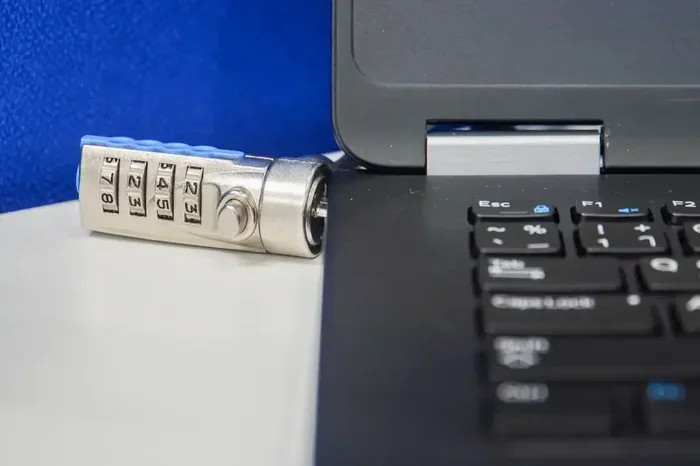
A laptop lock slot is a small, reinforced hole built into the chassis of a laptop. It is also called a Kensington lock slot or a security slot. You insert a Kensington lock into this hole, and the lock cable attaches to a fixed object like a desk or a wall. This makes it very hard for someone to walk off with your laptop.
The Kensington lock slot has been around for decades. It was originally designed for desktop monitors and kiosks. But laptop manufacturers quickly adopted it as a standard security feature. Most people refer to it simply as a “Kensington slot” or “Kensington lock hole.” The mechanism itself is straightforward. A metal anchor inserts into the slot, and a security cable threads through it. You then lock the cable with a key or combination lock.
How Does the Lock Slot Work?
The lock slot is usually made of metal or reinforced plastic. It is designed to withstand pulling force. When you attach a laptop security cable, the anchor pin fits snugly into the slot. Some slots are reinforced with metal brackets inside the laptop frame for extra strength. The laptop lock mechanism relies on the tight fit between the pin and the slot. If someone tries to yank the cable, the reinforced design holds firm.
Not all lock slots are the same. Some are deeper, some are wider, and some are reinforced with metal. The quality of the slot depends on the laptop brand and model. Premium business laptops tend to have the strongest slots. Budget laptops sometimes use thinner plastic that can crack under pressure.
Do All Laptops Have a Lock Slot?
The honest answer is no. Do all laptops have a lock slot? Absolutely not. While many laptops do include a security slot, a growing number of models leave it out. This is especially true for lightweight ultrabooks and certain Chromebooks. The trend toward thinner and lighter laptops has led many manufacturers to drop features that add even a few millimeters of thickness or a few ounces of weight.
Laptops That Typically Have Lock Slots
Most full-sized laptops and gaming laptops include a Kensington lock slot. Here are the categories where you will almost always find one:
- Business laptops: Models from Dell Latitude, HP EliteBook, and Lenovo ThinkPad almost always have lock slots. These are built for enterprise environments where laptop security is a top priority.
- Gaming laptops: Brands like ASUS ROG, MSI, and Acer Predator include lock slots. Gamers often carry expensive equipment to tournaments and LAN events.
- Workstations: High-performance mobile workstations from Lenovo and Dell typically have reinforced security slots.
- Older laptop models: Most laptops made before 2015 include a lock slot as a standard feature.
Laptops That Often Lack Lock Slots
On the other side of the spectrum, several types of laptops frequently skip the lock slot:
- Ultrabooks: Models like the Dell XPS 13, MacBook Air, and HP Spectre prioritize thinness over security features.
- Chromebooks: Many budget Chromebooks, especially the lighter models, do not include a lock slot.
- 2-in-1 convertibles: Hybrid laptops that fold into tablets often omit the slot to keep the design clean.
- MacBooks: Apple has never included a Kensington lock slot in any MacBook model. This is a well-known gap in their security design.
Why Do Some Laptops Skip the Lock Slot?
Manufacturers make design choices based on what their target users value most. For many consumers, portability is king. Every gram of weight and every millimeter of thickness matters when you are carrying a laptop all day. Removing the lock slot saves space and reduces manufacturing complexity.
There are a few reasons why laptop makers leave out this feature:
- Thin design priorities: Ultrabook designers focus on making laptops as thin and light as possible. A lock slot adds structural complexity.
- Target audience: Some laptops are aimed at home users who keep their devices on desks and rarely travel.
- Cost savings: Adding a reinforced slot increases production costs. Budget laptops skip it to keep prices low.
- Alternative security: Some manufacturers believe software-based security is enough, though this is debatable.
While these reasons make sense from a design perspective, they do not help the user who needs physical security. If you work in a shared office, attend conferences, or study in crowded libraries, a missing lock slot is a real problem.
How to Tell If Your Laptop Has a Lock Slot
Finding a laptop lock slot is usually straightforward. Most slots are located on the left or right side of the laptop chassis. Look for a small, oval-shaped hole. It is often near the hinge area or toward the back of the laptop. Some laptops have a small icon next to the slot that looks like a padlock.
Here is how you can check:
- Check the sides of your laptop: Run your fingers along the edges. The slot feels like a small, recessed hole.
- Look at the laptop manual: The product specifications will list a Kensington lock slot if it is included.
- Search online: Type your laptop model number into a search engine along with the words “lock slot” or “security slot.”
- Check the manufacturer website: Look at the technical specifications page for your specific model.
If you cannot find a slot, your laptop probably does not have one. This is common with many of the sleek, modern laptops on the market today. But do not worry. There are solutions for every situation.
What to Do If Your Laptop Does Not Have a Lock Slot
Finding out your laptop lacks a security slot can be frustrating. But you are not helpless. There are several practical solutions to protect your device even without a built-in lock slot.
Use a Security Slot Adapter
A security slot adapter is a small metal plate that you attach to your laptop. It creates a new lock point where one did not exist before. These adapters use adhesive or screws to stay in place. They are a popular choice for MacBook users and ultrabook owners who want to add laptop security without modifying the device permanently.
When choosing an adapter, make sure it is compatible with your laptop size. Some adapters are designed for specific models, while others are universal. The laptop lock compatibility of adapters varies, so check the product description carefully.
Use a Laptop Lock That Wraps Around the Screen
Some laptop security cables do not need a lock slot at all. These cables wrap around the laptop screen and attach to a fixed object. They use rubber pads to grip the laptop without scratching it. While they are not as secure as a slot-based lock, they do provide a basic level of laptop anti-theft protection.
Use a Laptop Lock Bag or Case
Another option is a lockable laptop bag. These bags have a built-in cable pass-through. You thread a lock through the bag and anchor it to a fixed point. This approach works well for travelers and students who need portable computer security on the go.
Use Software-Based Security
While not a physical solution, software security tools add an important layer of protection. Use strong passwords, enable laptop theft prevention features like Find My Device, and set up remote wipe capabilities. These steps do not stop someone from taking your laptop, but they do protect your data if theft occurs.
Best Laptops With Built-In Lock Slots
If a lock slot laptop is important to you, here are some top picks across different categories:
- Lenovo ThinkPad X1 Carbon: A business favorite with a reinforced Kensington lock slot and excellent build quality.
- Dell Latitude 5540: A reliable business laptop with strong laptop security features.
- HP EliteBook 840 G9: Premium build and a durable lock slot designed for enterprise use.
- ASUS ROG Zephyrus G14: A gaming laptop with a lock slot, perfect for securing expensive gear at events.
Common Mistakes People Make With Laptop Locks
Even when people have a laptop lock slot, they sometimes make mistakes that reduce the effectiveness of their security. Here are a few to avoid:
- Using a cheap lock: A flimsy security cable can be cut easily. Invest in a quality Kensington lock with a hardened steel cable.
- Leaving the laptop unattended: Even the best lock does not help if you step away and leave your laptop unlocked and visible.
- Ignoring the slot quality: Some lock slots are poorly reinforced. A strong pull can pop a weak slot out of the chassis.
- Not checking compatibility: Not all locks fit all slots. Always verify laptop lock compatibility before purchasing.
Expert Insights on Laptop Security
Laptop security experts agree that physical locks remain one of the most effective anti-theft tools available. Software solutions help protect data, but they do nothing to prevent the physical loss of the device itself. A Kensington lock slot provides a tangible, reliable layer of defense that every laptop user should consider.
Security professionals recommend using a lock slot whenever possible, especially in public spaces. Cafes, airports, libraries, and co-working spaces are all high-risk environments. A simple cable lock can deter opportunistic thieves who are looking for easy targets. The laptop anti-theft benefit of a lock slot cannot be overstated.
For businesses, the recommendation is even stronger. Companies should mandate laptop security protocols that include physical locks for all mobile devices. The cost of a lock is tiny compared to the cost of replacing a stolen laptop and the data breach that might follow.
Key Takeaways
- Not every laptop includes a lock slot: Many ultrabooks and Chromebooks leave it out to save space.
- The Kensington lock slot is the industry standard: Most Windows and gaming laptops still include it.
- Missing lock slots are a real security risk: Laptops without slots are easier targets for theft.
- Adapters and alternative solutions exist: You can add security to any laptop with the right accessories.
- Check your laptop model before buying a lock: Compatibility varies widely across brands and sizes.
- Business and enterprise laptops almost always have lock slots: They are built with security in mind.
Conclusion
The question do all laptops have a lock slot does not have a one-size-fits-all answer. The truth is that many modern laptops do include a Kensington lock slot, but a significant number do not. Ultrabooks, MacBooks, and lightweight Chromebooks are the most common offenders. If laptop security matters to you, it is essential to check your specific model before assuming it has a slot.
The good news is that solutions exist for every situation. Whether your laptop has a built-in slot or not, you can add protection with adapters, security cables, or lockable bags. Taking a few minutes to secure your device can save you from the stress and expense of a stolen laptop. Do not wait until it is too late. Check your laptop today and make sure your laptop lock slot and security setup are in place.
FAQs
Can I add a lock slot to any laptop?
Yes, you can use a security slot adapter to add a lock point to most laptops. These adapters stick or screw onto the chassis and work with standard Kensington locks. They are widely available and affordable.
Why do MacBooks not have a lock slot?
Apple has never included a Kensington lock slot in any MacBook model. The company prioritizes thin design and minimalism over physical security features. However, third-party adapters can solve this problem.
Are laptop lock slots universal?
Most lock slots follow the Kensington standard, which means locks from different brands are generally compatible. However, slot size and depth can vary, so always check compatibility before buying.
How secure is a laptop lock slot?
A lock slot provides good physical security against opportunistic theft. However, a determined thief with the right tools can still remove a lock. For best results, use a high-quality lock and never leave your laptop unattended in public.
Do gaming laptops have lock slots?
Most gaming laptops include a Kensington lock slot. Brands like ASUS, MSI, and Acer typically include this feature because gaming laptops are expensive and often used in shared or public spaces.
What is the best laptop lock for a security slot?
The Kensington NanoSaver and Kensington ClickSafe are among the most popular choices. They are reliable, compact, and work with virtually any laptop lock slot that follows the standard design.