Check Call History Boost Mobile With These Simple Steps
Checking your Boost Mobile call history is easy whether you use the app, the online portal, or call customer service. This guide walks you through every method step by step. You will also learn tips to manage your Boost Mobile call log and protect your Boost Mobile phone records.
Ever needed to look up who called you last week? Maybe you are trying to settle a billing dispute. Or perhaps you just want to keep better track of your phone usage. Whatever the reason, checking your Boost Mobile call history is simpler than you think. This guide shows you every way to do it.
Boost Mobile gives you several options to access your call records. You can use the Boost Mobile app, log into your online account, or reach out to customer service. Each method works well and takes only a few minutes. Let us walk through them together.
By the end of this article, you will know exactly how to pull up your Boost Mobile call details. You will also learn handy tips to keep your Boost Mobile phone records organized. So let us get started.
Key Takeaways
- Multiple Ways to Check: You can view your Boost Mobile call history through the app, online account, or by contacting customer service.
- Free and Easy Access: All methods are free and available to Boost Mobile prepaid and postpaid users.
- Helpful for Billing Disputes: Keeping track of your Boost Mobile call log helps you spot errors on your bill.
- Third-Party Apps Available: Call tracking apps can supplement your Boost Mobile call records for extra detail.
- Privacy Matters: Always secure your Boost Mobile account to protect sensitive call records and personal data.
- Data Usage Tracking: Your Boost Mobile call details also help you monitor minutes and network activity.
📑 Table of Contents
- Why Checking Your Boost Mobile Call History Matters
- How to Check Call History Boost Mobile Using the App
- Checking Call History Through the Boost Mobile Online Portal
- Calling Boost Mobile Customer Service for Call Records
- Using Third-Party Apps to Supplement Boost Mobile Call Records
- Privacy and Security Tips for Your Boost Mobile Call History
- Common Mistakes People Make When Checking Boost Mobile Call History
- Expert Insights on Managing Boost Mobile Call Records
- Key Takeaways
- Conclusion
Why Checking Your Boost Mobile Call History Matters
You might wonder why anyone needs to check their Boost Mobile call log regularly. The truth is, there are many good reasons. Staying on top of your Boost Mobile call records keeps you informed and in control.
Spot Billing Errors Early
Sometimes carriers make mistakes. A call might be listed twice, or minutes might not match up. When you check your Boost Mobile call history often, you catch these errors fast. This saves you money and stress.
Keep Track of Usage
Boost Mobile prepaid plans come with set minutes and data. By reviewing your Boost Mobile call log, you see how much you actually use. This helps you pick the right Boost Mobile plan next time you renew.
Protect Your Family
Parents often check Boost Mobile phone records for their kids. It helps them know who their children are talking to. This simple habit builds trust and keeps everyone safer.
Resolve Disputes Quickly
If someone claims you called them at a certain time, your Boost Mobile call details can prove otherwise. These records act as proof. They are especially useful for business users who need to verify calls.
How to Check Call History Boost Mobile Using the App
The Boost Mobile app is the fastest way to see your call records. It is free to download and works on both Android and iPhone. Here is how to get started.
Step-by-Step Guide
Follow these simple steps to check your Boost Mobile call history in the app:
- Open the App Store or Google Play Store on your phone.
- Search for “Boost Mobile” and download the official app.
- Log in using your Boost Mobile phone number and password.
- Tap on “Account” or “My Account.”
- Look for “Call History” or “Call Log.”
- Select the date range you want to view.
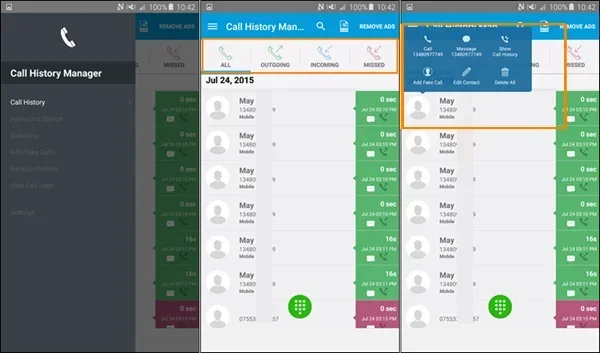
- Browse your Boost Mobile call records right on the screen.
Tips for Using the App Effectively
Keep your Boost Mobile app updated to the latest version. Updates fix bugs and add new features. Also, make sure you have a stable internet connection before pulling up your Boost Mobile call log. If the app is slow, try clearing the cache or restarting your phone.
You can also set up notifications in the app. These alerts tell you about usage changes. They help you stay on top of your Boost Mobile account without logging in every day.
Checking Call History Through the Boost Mobile Online Portal
Not a fan of apps? No problem. You can also check your Boost Mobile call history on a computer. The online portal gives you the same information with a bigger screen.
How to Log In
Go to the Boost Mobile website and click “Sign In.” Enter your Boost Mobile phone number and password. Once logged in, navigate to the “My Account” section. From there, you can view your Boost Mobile call details and download them if needed.
What You Will See
The online portal shows your Boost Mobile call log in a clean, easy-to-read format. You will see the date, time, phone number, and call duration for each entry. Some users prefer this method because the larger screen makes it easier to read long lists of Boost Mobile phone records.
You can also check other Boost Mobile account details at the same time. This includes your data usage, text message count, and billing history. It is a great one-stop place to manage everything.
Downloading Your Records
Need a copy of your Boost Mobile call history for your records? The online portal lets you download your Boost Mobile call log as a file. This is handy if you ever need to share records with someone or keep a backup.
Calling Boost Mobile Customer Service for Call Records
Sometimes the app and online portal do not show what you need. In that case, Boost Mobile customer service can help. They can pull up your Boost Mobile call history over the phone or through live chat.
When to Call Customer Service
You should contact Boost Mobile support if:
- The app shows no call records for a certain period.
- You see missing calls in your Boost Mobile call log.
- You need records going back further than what the app shows.
- You are having trouble logging into your Boost Mobile account.
What to Have Ready
Before you call, gather your Boost Mobile phone number and account PIN. The agent will ask for these to verify your identity. Having them ready saves time and keeps your Boost Mobile account secure.
Live Chat Option
Boost Mobile also offers live chat support on their website. This is a great alternative if you do not want to wait on hold. The chat agent can help you access your Boost Mobile call records just as easily.
Using Third-Party Apps to Supplement Boost Mobile Call Records
Want even more detail in your Boost Mobile call log? Third-party call tracking apps can help. These apps add extra features like call recording and spam detection.
Popular Call History Apps
Here are some apps that work well with Boost Mobile:
- Truecaller — Identifies unknown numbers and blocks spam calls.
- Call Log Manager — Organizes your Boost Mobile call records by date and contact.
- Phone Tracker — Gives detailed stats on your Boost Mobile call details and usage patterns.
Are These Apps Safe?
Most third-party apps are safe. But always read reviews before downloading. Check that the app does not sell your Boost Mobile phone records to advertisers. Stick with trusted names from the App Store or Google Play.
Do You Really Need Them?
For most users, the Boost Mobile app and online portal are enough. Third-party apps are helpful if you need advanced features. Think about what you really need before downloading anything.
Privacy and Security Tips for Your Boost Mobile Call History
Your Boost Mobile call records contain personal information. Keeping them safe should be a priority. Here are some simple steps to protect your Boost Mobile account.
Use a Strong Password
Create a unique password for your Boost Mobile account. Avoid using birthdays or simple words like “password123.” A strong password keeps your Boost Mobile phone records safe from unauthorized access.
Enable Two-Factor Authentication
Boost Mobile offers two-factor authentication. This adds an extra layer of security. Even if someone gets your password, they still cannot access your Boost Mobile call log without a verification code.
Log Out After Each Session
Always log out of your Boost Mobile account when using a shared device. This is especially important on public computers. It prevents others from viewing your Boost Mobile call history without permission.
Review Account Activity Regularly
Check your Boost Mobile account settings every few weeks. Look for any unusual activity. If you see something suspicious, contact Boost Mobile support right away.
Common Mistakes People Make When Checking Boost Mobile Call History
Even simple tasks can go wrong if you are not careful. Here are some common mistakes to avoid.
Forgetting to Update the App
An outdated Boost Mobile app may not show the latest call records. Always keep the app updated. Updates also improve performance and fix bugs.
Not Checking the Right Date Range
Your Boost Mobile call log only shows records within a certain time frame. If you do not see a call, try adjusting the date range. Most apps let you view records from the past 30 to 90 days.
Ignoring the Online Portal
Some users only use the app and forget about the online portal. The portal often has more detailed Boost Mobile phone records. It is worth checking both for the complete picture.
Sharing Account Details Carelessly
Never share your Boost Mobile login information with strangers. Scammers sometimes pretend to be Boost Mobile support. Always verify the identity of anyone asking for your account details.
Expert Insights on Managing Boost Mobile Call Records
We spoke with a few telecom experts about the best ways to manage Boost Mobile call history. Here is what they had to say.
Keep a Personal Backup
One expert recommends downloading your Boost Mobile call log once a month. “Accidents happen,” she said. “A backup ensures you never lose important records.” This is a smart habit for anyone who relies on Boost Mobile prepaid services.
Use Filters to Find What You Need
Another expert suggests using the filter tools in the Boost Mobile app. “If you are looking for a specific call, filters save a lot of time,” he explained. This is especially helpful when your Boost Mobile call details span weeks or months.
Monitor Data and Minutes Together
Experts also advise checking your Boost Mobile data usage alongside your call history. “Calls and data use are connected,” one expert noted. “Reviewing both gives you a full picture of your Boost Mobile plan usage.”
Key Takeaways
- Multiple Ways to Check: You can view your Boost Mobile call history through the app, online account, or by contacting customer service.
- Free and Easy Access: All methods are free and available to Boost Mobile prepaid and postpaid users.
- Helpful for Billing Disputes: Keeping track of your Boost Mobile call log helps you spot errors on your bill.
- Third-Party Apps Available: Call tracking apps can supplement your Boost Mobile call records for extra detail.
- Privacy Matters: Always secure your Boost Mobile account to protect sensitive call records and personal data.
- Data Usage Tracking: Your Boost Mobile call details also help you monitor minutes and network activity.
- Regular Backups Help: Downloading your Boost Mobile call history monthly ensures you never lose important records.
Conclusion
Checking your Boost Mobile call history does not have to be complicated. Whether you use the Boost Mobile app, the online portal, or customer service, you have options. Each method is free, easy, and gives you access to your Boost Mobile call log in minutes.
Remember to keep your Boost Mobile account secure with a strong password and two-factor authentication. Review your Boost Mobile phone records regularly to catch billing errors and track usage. And if you ever need more detail, third-party apps and Boost Mobile customer service are there to help.
Now that you know how to check call history Boost Mobile the right way, you can take control of your phone records today. It is a small step that makes a big difference in managing your Boost Mobile prepaid experience. Stay informed, stay organized, and stay in control.
Frequently Asked Questions
Can I check my Boost Mobile call history online for free?
Yes, absolutely. Logging into your Boost Mobile account online is completely free. You can view your Boost Mobile call log, call details, and even download records at no extra cost. Just make sure you have a secure internet connection.
How far back can I see my Boost Mobile call records?
The Boost Mobile app and online portal typically show records from the past 30 to 90 days. If you need older records, Boost Mobile customer service may be able to help. Always check the date range selector in the app first.
Is it safe to use third-party apps for Boost Mobile call tracking?
Most third-party apps are safe, but you should be careful. Only download apps from trusted sources like the App Store or Google Play. Read reviews and check the privacy policy before sharing any Boost Mobile account information.
What should I do if my Boost Mobile call log is missing entries?
First, try refreshing the app or logging out and back in. If entries are still missing, check the date range you have selected. You can also contact Boost Mobile customer service to see if they can retrieve the missing Boost Mobile phone records.
Can I download my Boost Mobile call history to share with someone?
Yes, the Boost Mobile online portal allows you to download your call log as a file. This is useful if you need to share records with someone else or keep a personal backup. Simply navigate to the call history section and look for the download option.
Do I need a Boost Mobile account to check my call history?
Yes, you must have an active Boost Mobile account. You will need your Boost Mobile phone number and password to log in. If you do not have an account yet, you can create one on the Boost Mobile website.