Does A Bluetooth Receiver Need Power To Work Properly
Yes, a Bluetooth receiver needs power to work properly. Most Bluetooth receivers draw power from a USB port, battery, or wall adapter. Without a power source, the receiver cannot connect to your devices or stream audio wirelessly. Understanding how Bluetooth receivers get power helps you set up your wireless audio system the right way and avoid frustrating connection problems.
You just bought a Bluetooth receiver and you are excited to make your old speaker or stereo wireless. But then a question hits you. Does a Bluetooth receiver need power? The short answer is yes. Every Bluetooth receiver needs some form of power to work. Without energy, it is just a small plastic box with no magic inside.
But the full story is more interesting than that. There are different ways a Bluetooth receiver gets its power. Some plug into a USB port. Others use batteries. And some clever designs pull power right from the audio source itself. Each method has its pros and cons. In this article, we will walk you through everything you need to know about Bluetooth receiver power. You will learn how they work, what powers them, and how to pick the right one for your setup.
Whether you want to make your car stereo wireless, add Bluetooth to your home speaker, or stream audio from your laptop, this guide covers it all. Let us dive in and break down the world of Bluetooth receiver power in simple terms.
Key Takeaways
- Bluetooth receivers always need power: They cannot function without an energy source, whether from USB, batteries, or an external adapter.
- USB power is the most common option: Most receivers plug directly into a TV, computer, or USB wall charger for steady power.
- Battery-powered receivers offer portability: Portable Bluetooth receivers run on built-in batteries, making them great for travel and on-the-go use.
- Power matters for performance: A weak or unstable power source can cause audio dropouts, short range, and poor sound quality.
- Some receivers work without extra power: Certain models draw power directly from the audio source, but they may have limitations.
- Check compatibility before buying: Make sure your Bluetooth receiver matches your device’s power output and audio input options.
📑 Table of Contents
- What Is A Bluetooth Receiver And Why Does It Need Power?
- How Bluetooth Receivers Get Their Power
- Does A Bluetooth Receiver Need Power Even When Not Connected?
- Can You Use A Bluetooth Receiver Without Any Power Source?
- Best Practices For Powering Your Bluetooth Receiver
- Bluetooth Receiver Power Compared To Bluetooth Transmitters
- Common Bluetooth Receiver Power Problems And How To Fix Them
- Final Thoughts On Bluetooth Receiver Power
What Is A Bluetooth Receiver And Why Does It Need Power?
A Bluetooth receiver is a small device that catches wireless audio signals from your phone, tablet, or computer. It then turns those signals into sound you can hear through speakers or headphones. Think of it as a bridge between your device and your audio gear.
But here is the thing. That bridge needs energy to work. Bluetooth technology uses radio waves to send audio data. Processing those waves and converting them into sound takes work. And work needs power. Without power, the receiver sits there doing nothing. It cannot pair with your phone. It cannot stream music. It cannot do anything at all.
The amount of power a receiver needs is usually very small. Most receivers use between 0.5 and 2 watts. That is less than a night light. But even that tiny amount of energy must come from somewhere. This is why every Bluetooth receiver has a power source, whether it is a USB cable, a battery, or a direct connection to your audio device.
How Bluetooth Receivers Use Energy
When a Bluetooth receiver is on, it is always doing several things at once. It listens for incoming Bluetooth signals. It pairs with your device. It decodes the audio data. And it sends that data out through an audio cable or speaker. All of these tasks use energy. The more tasks it handles, the more power it needs.
For example, if you are streaming high-quality audio, the receiver works harder. It has to process more data. This means it uses slightly more power. But for everyday music listening, the power draw is very low. A good Bluetooth receiver can run for hours on very little energy.
How Bluetooth Receivers Get Their Power
There are several ways a Bluetooth receiver gets the power it needs. Let us look at each one so you can decide what works best for your setup.
USB Power
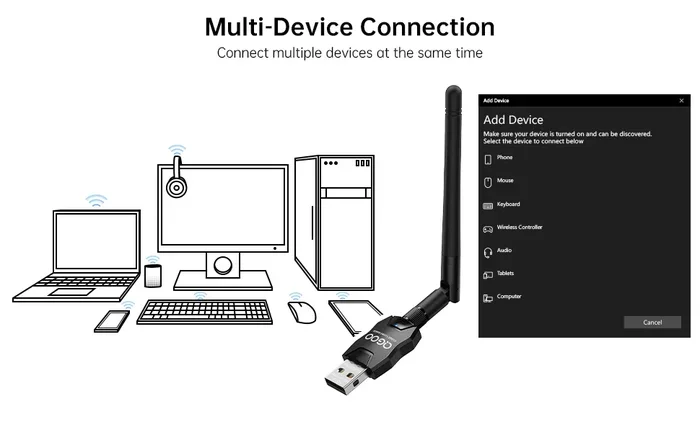
USB power is the most common way to power a Bluetooth receiver. You plug the receiver into a USB port on your TV, computer, game console, or USB wall charger. The USB port supplies the electricity the receiver needs to run.
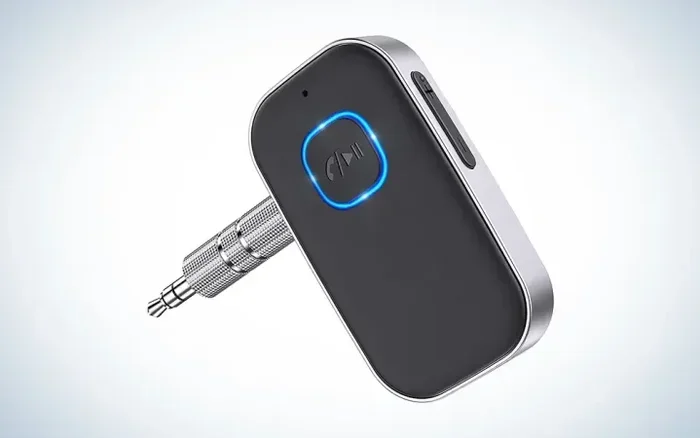
Most Bluetooth receivers use a standard USB Type-A or USB Type-C connection. This makes them easy to use with almost any device. You do not need any special cables or adapters. Just plug it in and go.
One big advantage of USB power is that it is steady. Your device provides a constant flow of electricity. This means the receiver stays powered on as long as the source device is on. There are no batteries to recharge or replace.
But there is a small downside. If your TV or computer turns off, the Bluetooth receiver turns off too. You cannot use it when the source device is off. Also, some devices have limited USB power output. If the USB port does not provide enough power, the receiver might not work well or might disconnect often.
Battery Power
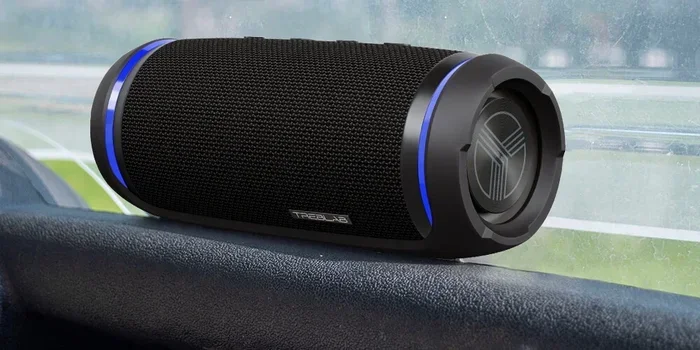
Battery-powered Bluetooth receivers are great for people who want portability. These receivers have a built-in rechargeable battery. You charge them with a USB cable, and then they work anywhere.
Battery-powered receivers are perfect for travel. You can take them to hotel rooms, outdoor parties, or friend’s houses. You do not need a USB port nearby. Just charge the battery before you go, and you are good to connect.
The battery life varies from model to model. Some receivers last 4 to 6 hours on a single charge. Others can go 10 hours or more. If you need long battery life, look for a receiver with a large battery capacity. Also, check if the receiver has a battery indicator. This helps you know when it is time to recharge.
The trade-off with battery power is that you need to keep the battery charged. If you forget to charge it, you cannot use the receiver. It adds a small bit of maintenance to your routine. But for many people, the freedom of portability is worth it.
Power From The Audio Source
Some Bluetooth receivers are designed to pull power directly from the audio source. These are called “passive” or “bus-powered” receivers. They get their electricity through the same cable that carries audio to your speaker or amplifier.
This design is clever because it means you do not need a second cable for power. The audio cable does double duty. It carries both the audio signal and the electricity. This makes the setup very simple and clean.
However, there are limits. Because the receiver draws power from the audio source, it might not get enough energy for the best performance. The audio quality might be slightly lower. And the Bluetooth range might be shorter. If you want the best results, a receiver with its own power source is usually better.
Does A Bluetooth Receiver Need Power Even When Not Connected?
This is a common question. The answer is yes. Even when a Bluetooth receiver is not connected to any device, it still needs power if you want it to be ready to pair. A receiver that is completely off or has no power cannot search for new devices or accept connections.
Some receivers have a standby mode. In standby, they use very little power. They can still be found by your phone or tablet when you want to connect. Other receivers fully shut down when not in use. They use zero power but need to be turned back on before you can pair them.
If you want your receiver to always be ready, keep it powered on in standby mode. This uses very little electricity and saves you time when you want to start streaming. If you want to save power, turn the receiver off when you are done using it.
Standby Mode vs. Fully Off
Standby mode is like a light switch in the “on” position but with the dimmer turned way down. The receiver is awake but using very little energy. It can still detect Bluetooth signals and connect quickly.
When the receiver is fully off, it is like the light switch is in the “off” position. It uses no power at all. But you have to press a button or plug it in again to wake it up. This adds a step every time you want to use it.
Most people prefer standby mode for convenience. It is a small trade-off for the ease of use. Just keep in mind that even in standby, the receiver is still drawing a tiny bit of power.
Can You Use A Bluetooth Receiver Without Any Power Source?
The short answer is no. You cannot use a Bluetooth receiver without any power source at all. Bluetooth technology requires electricity to transmit and receive data. Without power, the receiver is dead in the water.
There is no way to make a Bluetooth receiver work purely on its own. It does not generate its own power. It does not harvest energy from the air. It needs a power source, whether that is USB, a battery, or power drawn from the audio source.
If someone tells you a Bluetooth receiver can work without power, they are wrong. It might work if it gets power through the audio cable from your speaker or stereo. But that is still power from somewhere. There is no such thing as a magic Bluetooth receiver that runs on nothing.
What Happens When Power Is Lost During Use
If your Bluetooth receiver loses power while you are using it, the audio stops. You might hear a brief silence or a pop in the speakers. Then the connection drops. Your phone or tablet will show that the Bluetooth device is no longer connected.
This can happen if a USB cable comes loose. It can happen if a battery dies. And it can happen if the power source is not strong enough. To avoid this, make sure your power connection is secure. Use a good quality USB cable. And if you are using a battery, keep it charged.
If you are using a receiver that pulls power from the audio source, make sure that source is turned on and working. If the speaker or stereo is off, the receiver loses power too. This is an easy mistake to make, so always check your power chain first when troubleshooting.
Best Practices For Powering Your Bluetooth Receiver
Now that you know how Bluetooth receivers get power, let us look at some best practices. These tips will help you get the best performance from your receiver and avoid common problems.
Use A Quality USB Cable
A cheap USB cable can cause power problems. It might not deliver enough electricity to the receiver. This can lead to dropouts, static, or the receiver turning off unexpectedly. Always use a good quality, short USB cable for best results.
Longer cables can lose power along the way. If you need a longer cable, look for one that is thicker and has better shielding. This helps keep the power flowing steadily to your receiver.
Check Your USB Port Power Output
Not all USB ports are created equal. A TV USB port might only provide 0.5 amps. A wall charger might provide 2 amps or more. The more power the port provides, the better the receiver will work.
If your receiver keeps disconnecting or acting weird, try plugging it into a different USB port. A wall charger is often the best choice because it provides steady, reliable power. If you are using a computer, try a USB port on the back of the tower instead of a front panel port.
Keep Your Receiver Cool
Bluetooth receivers can get warm when they are working hard. This is normal. But if they get too hot, it can affect performance. Heat can also drain batteries faster. Keep your receiver in a well-ventilated spot. Do not bury it under papers or cushions.
If your receiver feels very hot to the touch, unplug it for a few minutes and let it cool down. This can help extend its lifespan and keep it working properly.
Charge Battery-Powered Receivers Regularly
If your receiver uses a battery, do not let it run all the way down. Recharge it when it gets to about 20 percent. This helps the battery last longer over time. Lithium batteries, which most Bluetooth receivers use, do not like to be fully drained.
Store your battery-powered receiver with at least a 50 percent charge if you are not using it for a while. This keeps the battery healthy and ready to go when you need it.
Match The Receiver To Your Device
Make sure your Bluetooth receiver is compatible with your device. Check the power requirements before you buy. Some receivers need more power than others. If you plug a power-hungry receiver into a weak USB port, it might not work well.
Also check the audio output. Does your receiver use a 3.5mm jack, RCA cables, or optical output? Make sure it matches your speaker or stereo. A Bluetooth receiver that matches your setup will give you the best results with the least frustration.
Bluetooth Receiver Power Compared To Bluetooth Transmitters
It helps to understand the difference between a Bluetooth receiver and a Bluetooth transmitter. They are two sides of the same coin, but they work differently when it comes to power.
A Bluetooth receiver takes wireless signals and turns them into audio you can hear. A Bluetooth transmitter takes audio from a device and sends it out wirelessly. Both need power to work. But transmitters often need more power because they are sending data, not just receiving it.
If you are trying to add Bluetooth to a device that does not have it, you need a receiver. If you want to send audio from a device to Bluetooth headphones or speakers, you need a transmitter. Both devices need a reliable power source to work their best.
For example, if you want to make your car stereo wireless, you might use a Bluetooth transmitter that plugs into your car’s audio output. And if you want to add Bluetooth to your old home stereo, you would use a Bluetooth receiver that plugs into the stereo’s input. Both need power, but the setup is different.
Common Bluetooth Receiver Power Problems And How To Fix Them
Even with the best Bluetooth receiver, you might run into power-related problems. Here are the most common issues and how to solve them.
Receiver Keeps Disconnecting
If your Bluetooth receiver keeps disconnecting, the first thing to check is the power source. A weak USB port or a dying battery can cause this. Try a different USB port or a wall charger. If the receiver is battery-powered, charge it fully and try again.
Also check for interference. Other wireless devices can sometimes cause the receiver to lose its connection. Moving the receiver closer to your phone or tablet can help.
No Sound Even Though It Is Connected
If the receiver connects but you hear no sound, check the power first. A receiver that is not getting enough power might connect but not process audio properly. Try a different power source or a shorter USB cable.
Also make sure your audio source is turned up. And check that the correct audio output is selected on your device. Sometimes the problem is not the receiver at all but a simple settings issue.
Short Bluetooth Range
If your Bluetooth receiver has a short range, power might be the culprit. A receiver that is not getting enough power might have a weaker Bluetooth signal. Try a different power source or move the receiver closer to your device.
Walls, furniture, and other electronics can also reduce range. But if you have tried everything and the range is still short, the power supply might be the issue.
Final Thoughts On Bluetooth Receiver Power
The answer to the question “Does a Bluetooth receiver need power?” is a clear yes. Every Bluetooth receiver needs power to work. Whether it comes from a USB port, a battery, or the audio source itself, power is essential.
Understanding how your receiver gets power helps you set it up the right way. It helps you avoid frustration. And it helps you get the best possible wireless audio experience. A well-powered Bluetooth receiver gives you clean, reliable, and enjoyable sound every time.
So the next time you set up a new receiver, pay attention to the power source. Use a good cable. Choose the right power option for your needs. And keep your receiver charged or plugged in. With the right power setup, your Bluetooth receiver will serve you well for years to come.
Whether you are adding Bluetooth to your home stereo, your car radio, or your portable speaker, the power connection is the foundation of everything. Get that right, and the rest is easy. Happy listening.
If you are looking for ways to expand your Bluetooth setup, check out how you can use Alexa as a Bluetooth speaker for a whole-home audio experience. You can also learn more about adding Bluetooth to your TV by reading our guide on using a Bluetooth adapter on your TV. And for car audio upgrades, find out how to turn your car radio into Bluetooth for wireless streaming on the road.
Finally, if you are curious about using Bluetooth headphones with your TV, we have a guide on using any Bluetooth headphones with your TV that you will find helpful. These resources can help you build the perfect wireless audio setup for your home or car.
Frequently Asked Questions
Can a Bluetooth receiver work without being plugged in?
Yes, if it has a built-in battery. Battery-powered Bluetooth receivers let you use them without being plugged in. Just make sure the battery is charged before you use it. Once the battery dies, you will need to recharge it before the receiver works again.
How long does a Bluetooth receiver last on battery power?
This depends on the model and how you use it. Most battery-powered receivers last between 4 and 10 hours on a single charge. High-quality models with larger batteries can last even longer. To get the most out of your battery, turn off the receiver when you are not using it.
Can I use a phone charger to power my Bluetooth receiver?
Yes, most Bluetooth receivers can be powered by a standard phone charger with a USB cable. Just plug the USB end into the charger and the other end into the receiver. A wall charger provides steady power and is a great option for home use.
Why does my Bluetooth receiver keep turning off?
This is usually a power issue. Your USB port might not be providing enough power. Or the cable might be loose or damaged. Try using a different USB port, a shorter cable, or a wall charger. If the receiver is battery-powered, the battery might need replacing or recharging.
Do Bluetooth receivers use a lot of electricity?
No, Bluetooth receivers use very little electricity. Most use less than 2 watts of power. That is about the same as a small LED light bulb. You do not need to worry about your electricity bill going up because of a Bluetooth receiver.
Can I power a Bluetooth receiver from my TV’s USB port?
Yes, most TVs have USB ports that can power a Bluetooth receiver. However, some TV USB ports provide very low power. If your receiver keeps disconnecting, try a different port or use a USB wall charger instead. Check your TV manual to see how much power the USB port provides.