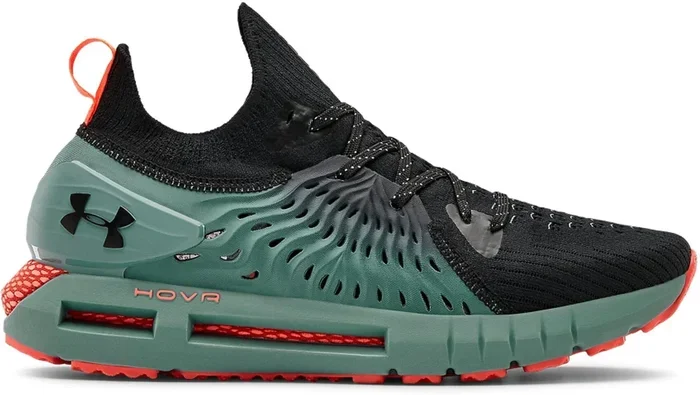
Does the Under Armour Hovr Phantom Have Bluetooth Support
The Under Armour Hovr Phantom does not have built-in Bluetooth hardware in the shoe itself. Instead, it relies on the Hovr app and smartphone sensors to track your runs and provide wireless audio feedback. You can still enjoy Bluetooth connectivity through your phone and wireless headphones while using the Hovr Phantom.
When you invest in a premium running shoe, you want to know every feature it offers. The Under Armour Hovr Phantom has earned a strong reputation among runners and fitness enthusiasts. But one question keeps coming up: does the Hovr Phantom have Bluetooth? The short answer is no, not directly in the shoe. But the full story is more interesting than you might think.
In this deep dive, we will walk you through everything you need to know about Bluetooth connectivity and the Hovr Phantom. You will learn how the shoe tracks your runs, how wireless audio works with it, and whether you need any extra gear. We will also compare it to other connected shoes on the market and give you practical tips for getting the most out of your Hovr Phantom setup.
Whether you are a casual jogger or a dedicated marathon trainer, this guide covers you. By the end, you will have a clear picture of what Bluetooth enabled shoes can and cannot do, and where the Hovr Phantom fits into that picture.
Key Takeaways
- The Hovr Phantom does not include Bluetooth: The shoe itself lacks Bluetooth hardware, relying instead on your phone for connectivity.
- The Hovr app handles tracking: All run data is captured through your smartphone’s sensors and processed via the app.
- Wireless audio works through your phone: You can pair Bluetooth headphones with your phone to listen to music or coaching cues during runs.
- Hovr technology focuses on cushioning: The shoe’s main innovation is its energy return system, not wireless features.
- Firmware updates happen via the app: If any updates are needed, they come through the Hovr app on your phone.
- The shoe works with both iOS and Android: You can use the Hovr app regardless of your phone type.
- No separate Bluetooth device is needed: Everything runs through your existing smartphone and wireless earbuds.
📑 Table of Contents
- Understanding the Under Armour Hovr Phantom
- Does Hovr Phantom Have Bluetooth? The Truth
- Bluetooth Connectivity and the Hovr Phantom Ecosystem
- How the Hovr Phantom Compares to Bluetooth-Enabled Shoes
- Setting Up Your Hovr Phantom for the Best Experience
- Common Mistakes People Make with the Hovr Phantom
- Expert Insights on Connected Running Shoes
- Final Verdict: Is the Hovr Phantom Right for You?
- Frequently Asked Questions
Understanding the Under Armour Hovr Phantom
The Hovr Phantom is part of Under Armour’s Hovr lineup. This series focuses on energy return and cushioning technology. The Phantom sits as a premium model that balances comfort with responsiveness. It uses a special foam midsole that absorbs impact and returns energy to your legs.
Under Armour designed the Hovr Phantom for runners who want a smooth ride. The shoe features a mesh upper for breathability, a responsive midsole, and a durable rubber outsole. It is built for daily training, long runs, and recovery runs alike. The shoe weighs around 10.6 ounces for men’s size 9, making it a mid-weight option that works well for various distances.
What Makes Hovr Technology Special
The Hovr foam is the standout feature here. Unlike traditional EVA foam, Hovr foam uses a unique cell structure that bounces back energy. This means less impact on your joints and more push-off power with each stride. Under Armour calls this the energy return system, and it is what sets Hovr shoes apart from standard running shoes.
The technology also includes a heel counter that locks your foot in place. This adds stability without adding bulk. Together, the foam and the heel design create a shoe that feels both cushioned and responsive. That is a rare combination in the running shoe world.
Does Hovr Phantom Have Bluetooth? The Truth
Here is the key question. The Hovr Phantom does not have built-in Bluetooth in the shoe itself. There is no Bluetooth chip, no wireless antenna, and no pairing mechanism inside the footwear. This might surprise some buyers who expect modern running shoes to come with wireless features.
Instead, the Hovr Phantom relies on your smartphone to handle all smart features. The shoe works in tandem with the Under Armour Hovr app. The app uses your phone’s GPS, accelerometer, and gyroscope to track your runs. All of the running analytics and fitness tracking happen through your phone, not the shoe.
This approach has both advantages and limitations. On the plus side, you do not need to charge the shoe. There are no batteries to worry about inside the footwear. On the downside, you always need your phone nearby during a run to capture data. If you leave your phone behind, the shoe still works perfectly for running, but you lose the tracking features.
How the Hovr App Connects to Your Runs
The Hovr app is the bridge between your shoe and your wireless connection. When you start a run, you open the app and press record. Your phone’s GPS tracks your route. The accelerometer measures your cadence, stride length, and impact. The app then feeds this data into a workout tracking system that gives you detailed post-run insights.
The app also provides real-time audio coaching. It can tell you your pace, distance, and heart rate if you pair it with a compatible watch or chest strap. All of this audio feedback plays through your phone’s speakers or, more commonly, through Bluetooth headphones connected to your phone.
Bluetooth Connectivity and the Hovr Phantom Ecosystem
While the Hovr Phantom itself does not have Bluetooth, the broader ecosystem depends heavily on Bluetooth connectivity. Your phone uses Bluetooth to connect to wireless earbuds, smartwatches, and heart rate monitors. This creates a seamless wireless connection that enhances your running experience.
Let us break down how each piece of the puzzle fits together. Understanding this setup helps you get the most out of your Hovr Phantom.
Pairing Bluetooth Headphones for Runs
Most runners pair their phone with Bluetooth headphones before heading out. This lets you listen to music, podcasts, or guided runs without dealing with wires. The Hovr Phantom works perfectly with any Bluetooth headphones your phone supports. Whether you use over-ear buds, in-ear monitors, or true wireless earbuds, the setup is the same.
Make sure your headphones are fully charged before a long run. Nothing kills a good workout faster than dying earbuds. Also, choose headphones with good sweat resistance. Running can produce a lot of moisture, and not all headphones handle that well.
Using Bluetooth with Smartwatches
Many runners also connect a smartwatch via Bluetooth to their phone. The watch tracks heart rate, steps, and other metrics in real time. The Hovr app can pull this data and combine it with your run metrics. This gives you a more complete picture of your performance.
If you use a Garmin, Apple Watch, or Fitbit, check that it pairs smoothly with the Hovr app. Some smartwatches connect directly to the app, while others require a phone intermediary. The setup process is straightforward, but it helps to test it before a race or long training run.
Bluetooth Range and Reliability
Bluetooth range typically extends about 30 feet from your phone. This means you can leave your phone on your hip or in an armband and still maintain a stable connection to your headphones. However, walls, trees, and other obstacles can weaken the signal.
For most running scenarios, standard Bluetooth range is more than enough. If you run in a very remote area or on a trail with heavy tree cover, you might notice occasional dropouts. Keeping your phone close to your body helps maintain a strong wireless connection.
How the Hovr Phantom Compares to Bluetooth-Enabled Shoes
Not all smart shoes are created equal. Some running shoes come with built-in Bluetooth and sensors right in the sole. The Hovr Phantom takes a different approach by offloading all smart features to your phone. Let us compare this to shoes that do include Bluetooth hardware directly.
| Feature | Hovr Phantom | Bluetooth-Enabled Smart Shoes |
|---|---|---|
| Built-in Bluetooth | No | Yes |
| Phone Required for Tracking | Yes | Sometimes |
| Battery in Shoe | No | Yes (needs charging) |
| Shoe Weight | Lightweight | Slightly heavier |
| Charging Needed | No | Yes |
| App Dependency | High | Moderate |
| Price Point | Mid to High | High |
The table above shows why the Hovr Phantom remains a popular choice. Runners love that they do not need to charge the shoe. They also appreciate the lighter weight that comes from not having a battery and Bluetooth chip inside the footwear. For many people, the trade-off of needing a phone is well worth it.
Who Should Choose the Hovr Phantom
The Hovr Phantom is ideal for runners who already carry a phone on every run. If you use an armband or running belt, the phone-based tracking adds very little inconvenience. It is also great for people who do not want to manage another device that needs charging.
On the other hand, if you prefer to leave your phone at home during runs, a shoe with built-in Bluetooth and sensors might be a better fit. These shoes store data internally and sync later. They give you more freedom from your phone, but they add weight and require regular charging.
Setting Up Your Hovr Phantom for the Best Experience
Getting the most out of your Hovr Phantom is simple. Follow these steps to set up your wireless connection and fitness tracking setup before your next run.
- Download the Hovr app. Search for the Under Armour Hovr app in the App Store or Google Play Store. Install it on your phone and create an account.
- Pair your Bluetooth headphones. Go to your phone’s Bluetooth settings and connect your preferred wireless earbuds or headphones. Make sure they are charged.
- Start a test run. Open the Hovr app, press record, and go for a short run. This helps you verify that GPS tracking, audio coaching, and Bluetooth audio all work smoothly.
- Review your data. After the run, check the app for pace, distance, cadence, and impact metrics. The Hovr app provides detailed breakdowns of each run.
- Adjust your settings. In the app settings, you can customize coaching cues, set goals, and choose which metrics to display during runs.
Quick Tips for Better Bluetooth Performance
- Keep your phone firmware and app updated. Updates often improve Bluetooth pairing stability.
- Turn off Bluetooth on devices you are not using. This reduces interference and keeps your connection strong.
- Restart your phone if you experience connection drops. This clears temporary glitches in the wireless connection.
- Store your Bluetooth headphones in a dry, cool place. Heat and moisture can damage the batteries and reduce performance.
- Use a running belt or armband to keep your phone close to your body. This improves Bluetooth signal strength during your run.
Common Mistakes People Make with the Hovr Phantom
Even though the Hovr Phantom is straightforward, some users run into avoidable issues. Here are the most common mistakes and how to fix them.
Forgetting to update the app. Under Armour releases updates that improve tracking accuracy and fix bugs. An outdated app can give you incorrect data or cause connection problems. Check for updates once a week.
Not charging Bluetooth headphones. This sounds obvious, but it happens more than you would think. A dead battery mid-run ruins the experience. Get in the habit of charging your headphones after every few uses.
Ignoring GPS permissions. The Hovr app needs access to your phone’s GPS to track your route. If you have denied location permissions, the app cannot map your run. Go to your phone settings and make sure the app has full location access.
Using low-quality Bluetooth headphones. Cheap earbuds often have poor sound quality and weak Bluetooth signals. Investing in a decent pair of wireless headphones makes a big difference in your running experience. Look for headphones with good sweat resistance and stable Bluetooth pairing.
When to Contact Support
If you have followed all the setup steps and still experience issues, it may be time to reach out to Under Armour support. Persistent Bluetooth connection problems could indicate a phone settings issue or a problem with the app. The support team can walk you through troubleshooting steps specific to your setup.
Expert Insights on Connected Running Shoes
The trend toward connected footwear has grown rapidly in recent years. More shoe brands are adding sensors, Bluetooth, and smart features to their running shoes. But the Hovr Phantom takes a simpler path that many experts actually prefer.
“The best smart shoe is the one that works reliably without adding complexity,” says a common sentiment among running coaches. The Hovr Phantom proves you do not need a computer inside your shoe to get great tracking data. Your phone already has everything needed to capture and analyze your runs.
This philosophy also means the shoe lasts longer. No battery to degrade, no Bluetooth chip to malfunction, no charging port to corrode. The Hovr Phantom is a pure running shoe that happens to work beautifully with smart technology. That combination appeals to a wide range of runners, from beginners to seasoned athletes.
The Future of Bluetooth in Running Shoes
It is worth noting that the running shoe industry is evolving. Future models from Under Armour and other brands may include Bluetooth enabled shoes with built-in sensors and direct wireless connections. For now, the Hovr Phantom’s phone-dependent approach remains one of the most practical solutions on the market.
If you are curious about other Bluetooth-connected devices, it helps to understand how Bluetooth technology works across different products. Many people also wonder about using Bluetooth headphones with various devices during workouts. The principles are similar whether you are connecting to a phone, a TV, or a car stereo. The Bluetooth range and pairing process follow the same basic rules across devices.
Final Verdict: Is the Hovr Phantom Right for You?
The Under Armour Hovr Phantom is an excellent running shoe that delivers on comfort, cushioning, and performance. While it does not have built-in Bluetooth, its phone-based smart features work reliably and provide valuable running analytics. The shoe is lightweight, durable, and comfortable for daily training.
If you are comfortable carrying your phone on runs and already use Bluetooth headphones for wireless audio, the Hovr Phantom fits seamlessly into your routine. The lack of Bluetooth in the shoe itself is not a drawback, it is simply a design choice that keeps the shoe light and maintenance-free.
For runners who want a smart shoe without the hassle of charging and managing extra hardware, the Hovr Phantom is a strong choice. It proves that you do not need every feature built into the shoe to have a connected, data-rich running experience.
So, does the Hovr Phantom have Bluetooth? Not in the shoe. But through your phone and wireless earbuds, you get all the connectivity you need. The result is a running shoe that feels great, tracks your progress, and keeps things simple.
Frequently Asked Questions
Can I use the Hovr Phantom without a smartphone?
Yes, you can run in the Hovr Phantom without a phone. The shoe works perfectly as a regular running shoe. However, you will lose access to the Hovr app’s tracking features, coaching cues, and run analytics. The shoe’s cushioning and energy return technology still work without a phone.
What Bluetooth headphones work best with the Hovr app?
Any Bluetooth headphones that connect to your phone will work with the Hovr app. Popular choices include Apple AirPods, Jabra Elite series, Sony WF series, and Bose SoundSport. Look for headphones with good sweat resistance and secure fit for running. The Hovr app does not require any specific headphone brand.
Does the Hovr Phantom need to be charged?
No, the Hovr Phantom does not need charging. There is no battery or electronic component inside the shoe. All smart features are handled by your phone and the Hovr app. This is one of the biggest advantages of the Phantom over shoes with built-in Bluetooth and sensors.
Can I track my runs if I leave my phone at home?
Without your phone, the Hovr Phantom cannot track your runs through the app. The shoe itself has no tracking hardware. If you want to log your runs, you need to bring your phone. Some runners use a GPS watch instead, which can store data and sync later, but this depends on the watch’s compatibility with the Hovr app.
How does the Hovr app use Bluetooth to track runs?
The Hovr app does not use Bluetooth to track your runs directly. Instead, it uses your phone’s built-in GPS and motion sensors. Bluetooth is used to connect wireless accessories like headphones and smartwatches. The app combines GPS data with accelerometer readings to provide detailed run metrics and coaching feedback.
Will future Hovr shoes include built-in Bluetooth?
Under Armour has not announced any plans for Hovr shoes with built-in Bluetooth. The company’s current strategy focuses on keeping shoes lightweight and maintenance-free by relying on phone-based smart features. The future of connected footwear may include more built-in Bluetooth, but for now, the Hovr Phantom remains a phone-dependent smart shoe.