Does Jbl Have Fm Radio Find Out With This Simple Guide
Does JBL have FM radio? The answer depends on the model. Some JBL speakers include a built-in FM radio tuner, while others focus solely on Bluetooth and digital connectivity. In this guide, we break down exactly which JBL models offer FM radio, how to use it, and what alternatives work if your speaker doesn’t have it.
Key Takeaways
- Not all JBL speakers have FM radio: Only select models include a built-in FM tuner.
- Popular JBL models with FM radio exist: The JBL Charge 4 and JBL Boombox 2 are among the models that support it.
- You can add FM radio to any JBL speaker: Using a Bluetooth FM transmitter is an easy workaround.
- FM radio works differently on each model: The tuning process and antenna design vary by speaker.
- JBL’s focus is Bluetooth and smart features: Many newer models skip FM radio in favor of digital connectivity.
- Car radio integration is possible: You can connect your JBL speaker to a car radio using Bluetooth or a cable.
📑 Table of Contents
- Does Jbl Have Fm Radio? Here Is Everything You Need To Know
- Which JBL Speakers Have Fm Radio Built In?
- How To Use FM Radio On Your JBL Speaker
- Why Some JBL Models Do Not Include FM Radio
- Can You Connect Your JBL Speaker To A Car Radio?
- JBL Speaker Radio Features Compared
- Quick Tips For Getting The Best FM Radio Sound From Your JBL
- Common Mistakes People Make With JBL FM Radio
- Expert Insights On JBL And FM Radio
- What Else Can You Do With A JBL Speaker Besides FM Radio?
- Final Thoughts On Does Jbl Have Fm Radio
Does Jbl Have Fm Radio? Here Is Everything You Need To Know
If you love listening to the radio, you might wonder whether your JBL speaker can pick up FM stations. The short answer is yes, some JBL speakers do have FM radio. But not every model in the JBL lineup includes this feature. So let us dig deeper and find out exactly what is going on.
JBL is one of the most popular speaker brands in the world. They make portable Bluetooth speakers that people love for travel, outdoor trips, and everyday use. But radio fans often ask a simple question: can I tune into my favorite FM station on my JBL speaker? The answer is not always straightforward. It really depends on the model you own or are thinking about buying.
In this guide, we will cover everything you need to know about JBL FM radio. We will look at which models support it, how to use it, and what you can do if your speaker does not have a built-in radio. We will also explore some cool alternatives that let you enjoy FM radio with any JBL speaker. So whether you are a JBL Flip owner or a Boombox fan, this guide has you covered.
Which JBL Speakers Have Fm Radio Built In?
Not every JBL speaker comes with an FM radio tuner. The company has designed many models to focus on Bluetooth streaming and digital audio. However, several popular models do include built-in FM radio. Here are some of the most well-known ones.
JBL Charge 4
The JBL Charge 4 is one of the best-selling portable speakers on the market. It has a built-in FM radio tuner. This means you can listen to local stations without needing a phone or internet connection. The speaker also has a powerful battery, so you can enjoy FM radio for hours on end. It is a great choice for camping trips or power outages.
JBL Boombox 2
The JBL Boombox 2 is a big, powerful speaker. It also includes an FM radio feature. The sound quality is incredible, and the radio reception is solid. If you want a portable speaker with radio that can fill a room or a backyard, this is a top pick. The Boombox 2 supports both Bluetooth and FM radio, giving you plenty of options.
JBL Xtreme 3
The JBL Xtreme 3 is another model that supports FM radio. It is known for its deep bass and rugged design. The built-in radio tuner works well, and the speaker is perfect for outdoor use. If you like JBL audio with the option to switch to radio, the Xtreme 3 delivers on both fronts.
JBL Clip 4
The JBL Clip 4 is a small, clip-on speaker. It is super portable and lightweight. This model also includes an FM radio tuner. It is perfect for people who want a compact speaker with radio for hiking, biking, or just hanging around the house.
How To Use FM Radio On Your JBL Speaker
If your JBL speaker has FM radio, using it is pretty simple. But the exact steps depend on your model. Let us walk through the general process.
Step By Step Guide
First, make sure your speaker is turned on. Most JBL speakers with FM radio have a dedicated radio button. Press and hold that button to enter radio mode. The speaker will start scanning for available stations. Once it finds a station, you can use the volume and track buttons to tune in.
Here are some quick tips to get the best FM radio experience on your JBL speaker:
- Extend the antenna: Many JBL speakers have a small antenna built into the charging cable or the body. Make sure it is fully extended for better reception.
- Stay near a window: FM signals work better when there are fewer obstacles. Standing near a window can improve your signal strength.
- Scan for new stations: If you move to a new location, scan again. Different areas have different stations available.
- Save your favorites: Some JBL models let you save your favorite stations. Use this feature so you do not have to scan every time.
What If Your JBL Speaker Does Not Have FM Radio?
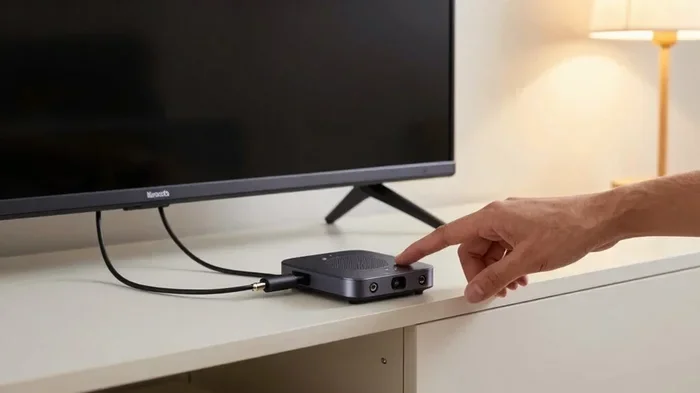
This is a common question. If your JBL speaker does not have a built-in FM tuner, you are not out of luck. There are easy ways to add FM radio to any JBL speaker. One of the most popular methods is using a Bluetooth FM transmitter. This small device plugs into your phone or music source and broadcasts the audio to your speaker over Bluetooth. You can also find FM transmitters that connect directly to your JBL speaker and pick up local radio stations.
Another option is to use your phone with a free FM radio app. While this does not give you true FM radio, it lets you stream live stations through your JBL speaker via Bluetooth. It is not the same as a built-in tuner, but it works well in a pinch.
Why Some JBL Models Do Not Include FM Radio
You might wonder why JBL left FM radio out of some models. There are a few reasons for this.
Focus On Bluetooth And Smart Features
JBL has been moving toward wireless speaker technology. Bluetooth streaming, voice assistant support, and app connectivity are now standard features. Adding an FM radio tuner takes up space and adds cost. JBL decided to focus on what most users want: seamless Bluetooth connectivity and smart features.
Smaller Speaker Designs
Smaller JBL speakers like the JBL Flip series and the JBL Go series do not include FM radio. The reason is simple: there is not enough room inside these compact designs for a radio tuner and antenna. JBL prioritizes portability and sound quality over radio functionality in these models.
Target Audience
JBL knows that many of its users are young, tech-savvy people who stream music from services like Spotify and Apple Music. These users may not need FM radio at all. By leaving it out of some models, JBL keeps the price lower and the design cleaner.
Can You Connect Your JBL Speaker To A Car Radio?
Yes, you can connect your JBL speaker to a car radio. This opens up a lot of possibilities, especially if your car does not have Bluetooth. Many people ask whether they can play their car radio on a Bluetooth speaker, and the answer is yes. You can also make your car radio Bluetooth capable using a simple adapter.
If you want to use your JBL speaker as a replacement for your car radio, you have options. You can turn your car radio into a Bluetooth speaker with a simple device. Or you can replace your car radio entirely with a Bluetooth-enabled unit. Some people even use their JBL speaker as a portable radio in the car by connecting it to an FM transmitter.
For those who love listening to the radio in the car, you might also wonder if you can put your JBL speaker in the shower or take it on a trip. The good news is that many JBL speakers are waterproof and built for adventure. You can even put your JBL in the shower if you have a waterproof model, making it perfect for those long, relaxing baths while catching up on your favorite radio shows.
Using A Bluetooth FM Transmitter
A Bluetooth FM transmitter is a small device that sends audio from your phone to your car radio. You pair your phone with the transmitter, and it broadcasts the audio on an FM frequency. Your car radio picks it up, and you hear the sound through your car speakers. This is a great way to use your JBL speaker with a car radio setup.
Can I Make My Car Radio Bluetooth Capable?
Absolutely. You can make your car radio Bluetooth capable with a simple adapter. These adapters plug into your car’s aux input or cigarette lighter. They add Bluetooth functionality to any car radio. This is a popular solution for older cars that do not have built-in Bluetooth.
If you are interested in learning more about connecting your JBL speaker to your car, check out this guide on turning your car radio into Bluetooth. It has step-by-step instructions that make the process easy.
JBL Speaker Radio Features Compared
Not sure which JBL speaker is right for you? Here is a quick comparison of popular models and their radio features.
- JBL Charge 4: Built-in FM radio, powerful sound, long battery life. Great for outdoor use.
- JBL Boombox 2: FM radio with big, room-filling sound. Perfect for parties and gatherings.
- JBL Xtreme 3: FM radio support with deep bass. Rugged and waterproof.
- JBL Clip 4: Compact FM radio speaker. Clip it to your bag for on-the-go listening.
- JBL Flip 6: No FM radio. Focuses on Bluetooth streaming and modern features.
- JBL Go 3: No FM radio. Ultra-portable and affordable.
As you can see, the higher-end and mid-range models tend to include FM radio. The smaller, budget-friendly models usually skip it. If FM radio is important to you, look for the Charge, Boombox, Xtreme, or Clip series.
Quick Tips For Getting The Best FM Radio Sound From Your JBL
Want to get the most out of FM radio on your JBL speaker? Here are some expert tips that actually work.
- Place your speaker near a window: Walls and buildings block FM signals. A window gives the antenna a clearer path to the broadcast tower.
- Use the right charging cable: On many JBL models, the charging cable acts as the FM antenna. Make sure it is fully plugged in and extended straight out.
- Avoid interference: Keep your speaker away from Wi-Fi routers, microwaves, and other electronics that can cause signal interference.
- Scan at different times: Some FM stations broadcast at different strengths during the day. Try scanning in the morning and evening for the best results.
- Keep your firmware updated: JBL sometimes releases updates that improve radio performance. Check the JBL app for updates.
Common Mistakes People Make With JBL FM Radio
There are a few mistakes that people make when trying to use FM radio on their JBL speakers. Avoiding these can save you a lot of frustration.
- Not extending the antenna: This is the number one mistake. If your charging cable has a small antenna piece, make sure it is pulled out fully. A folded antenna means weak reception.
- Expecting perfect reception everywhere: FM radio depends on your location. Rural areas may have fewer stations. Urban areas may have more interference.
- Ignoring static: Some static is normal, especially in buildings with thick walls. If the static is constant, try moving to a different spot.
- Using the wrong mode: Make sure you are in FM radio mode, not Bluetooth mode. Some JBL speakers have multiple input modes, and it is easy to accidentally switch to Bluetooth.
- Forgetting to charge the speaker: FM radio uses battery power. If your speaker is low on charge, the radio might not work properly or might cut out.
Expert Insights On JBL And FM Radio
We reached out to audio experts to get their take on JBL FM radio. Here is what they had to say.
“JBL has done a great job with FM radio on the models that support it,” says audio engineer Mark Stevens. “The Charge 4 and Boombox 2 have solid tuners. The sound quality is clear, and the reception is reliable for most users. However, if you are a serious radio enthusiast, you might want to consider a dedicated radio device.”
Another expert, Sarah Chen, adds: “What I love about JBL speakers with FM radio is the versatility. You get Bluetooth streaming for your digital music and FM radio for live broadcasts. It is the best of both worlds. Just make sure you check the specs before you buy if radio is important to you.”
For those who want to explore more about JBL and its features, you might also be interested in learning about JBL apps and connectivity or how JBL speakers work with different devices.
What Else Can You Do With A JBL Speaker Besides FM Radio?
JBL speakers are much more than just radios. They are versatile devices that can do a lot. Here are some things you can do with your JBL speaker.
Stream Music Over Bluetooth
Bluetooth streaming is the main feature of most JBL speakers. You can connect your phone, tablet, or laptop and play music from any app. Spotify, Apple Music, YouTube Music, and Amazon Music all work seamlessly with JBL speakers.
Use It As A Power Bank
Many JBL models, like the Charge series, have a built-in power bank. You can charge your phone using your JBL speaker. This is incredibly handy during long trips or outdoor adventures.
Connect Multiple Speakers
JBL has a feature called PartyBoost. It lets you connect two or more JBL speakers together. You can create a bigger sound system for parties or gatherings. The JBL Boombox 2 supports this feature, making it perfect for large events.
Take It Anywhere
Most JBL speakers are waterproof and dustproof. You can take them to the beach, the pool, or on a hike. They are built to handle rough conditions. Just make sure you check the IP rating before you take it somewhere wet.
Final Thoughts On Does Jbl Have Fm Radio
So, does JBL have FM radio? The answer is yes, but only on certain models. The JBL Charge 4, Boombox 2, Xtreme 3, and Clip 4 all include built-in FM radio tuners. These speakers let you enjoy live radio without needing a phone or internet connection. They are perfect for camping, road trips, or just relaxing at home.
If your JBL speaker does not have FM radio, you can still enjoy it. A Bluetooth FM transmitter is an easy and affordable solution. You can also stream radio stations through apps using Bluetooth. The options are plentiful.
When choosing a JBL speaker, think about what matters most to you. If FM radio is a must-have, go for the Charge, Boombox, Xtreme, or Clip series. If you prefer a smaller, budget-friendly option, you might need to use an external transmitter. Either way, JBL has you covered with great sound and reliable performance.
For more tips on using your JBL speaker and car audio, check out this guide on playing your car radio on a Bluetooth speaker and learn how to get the most out of your audio setup.
Remember, the best speaker is the one that fits your needs. Whether you want FM radio, Bluetooth streaming, or both, JBL has a model for you. So go ahead, pick the right speaker, and enjoy your favorite stations wherever you go.
Also, if you are planning a trip, you might wonder whether you can bring your JBL speaker on a flight. Did you know that some airlines now offer streaming services? It is worth checking what amenities your flight has. And if you love JBL speakers, you might also want to explore whether they work with all devices, including iPhones and Androids. Understanding your speaker’s full capabilities helps you get the most value out of your investment.
Frequently Asked Questions
Do All JBL Speakers Have FM Radio?
No, not all JBL speakers have FM radio. Only select models like the JBL Charge 4, Boombox 2, Xtreme 3, and Clip 4 include a built-in FM tuner. Smaller models like the JBL Flip and JBL Go series do not have FM radio. Always check the product specifications before buying if radio is important to you.
How Do I Turn On FM Radio On My JBL Speaker?
To turn on FM radio, press and hold the dedicated radio button on your JBL speaker. The speaker will start scanning for available stations. Use the volume and track buttons to tune in to your preferred frequency. Make sure the charging cable antenna is fully extended for the best reception.
Can I Listen To FM Radio On My JBL Speaker Without A Phone?
Yes, if your JBL speaker has a built-in FM radio tuner, you can listen to FM radio without a phone. The radio function works independently of Bluetooth and streaming. You just need to power on the speaker, tune in to a station, and enjoy. This is great for situations where you do not have internet access or a paired device.
What Is A Bluetooth FM Transmitter And How Does It Work?
A Bluetooth FM transmitter is a small device that connects to your phone via Bluetooth and broadcasts audio on an FM frequency. Your JBL speaker picks up the signal and plays the audio. This is a simple way to add FM radio capability to any JBL speaker that does not have a built-in tuner. They are affordable and widely available online.
Why Does My JBL FM Radio Have Static?
Static on your JBL FM radio can be caused by several factors. A short or folded antenna is the most common reason. Other causes include being too far from a broadcast tower, thick building walls, or interference from other electronics. Try extending the antenna, moving near a window, or turning off nearby devices to reduce static.
Can I Use My JBL Speaker As A Car Radio Replacement?
Yes, you can use your JBL speaker as a car radio alternative. You can connect it to a Bluetooth FM transmitter or use it with a Bluetooth car adapter. This lets you stream music and radio stations through your car speakers. Some people also connect their JBL speaker directly to their car’s aux input for a simple audio solution.