Does Msi Mpg Z690 Carbon Wifi Have Built In Bluetooth
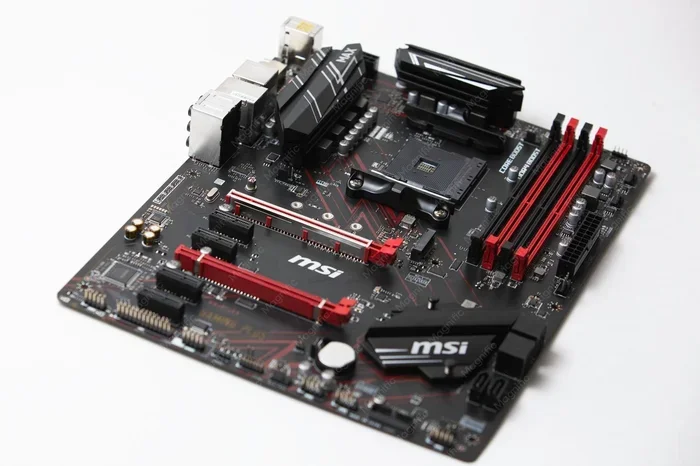
The MSI MPG Z690 Carbon WiFi motherboard does include built-in Bluetooth, making it a solid choice for wireless connectivity without extra hardware. This board features the Intel AX201 WiFi and Bluetooth combo module, giving you WiFi 6E and Bluetooth 5.2 right out of the box. Whether you are connecting wireless headphones, peripherals, or streaming audio, this motherboard has you covered.
If you are building or upgrading a PC and wondering whether the MSI MPG Z690 Carbon WiFi has Bluetooth, the short answer is yes. This motherboard is part of MSI’s high-end Z690 lineup, and it comes packed with wireless features that make it a great pick for anyone who wants a clean, cable-free setup.
In this article, we will dive deep into the Bluetooth capabilities of the MSI MPG Z690 Carbon WiFi. We will look at what version of Bluetooth it supports, how it performs in real-world use, and what you need to know before you buy. Whether you are a gamer, a content creator, or just someone who hates cables, this guide has everything you need.
Key Takeaways
- Built-In Bluetooth: The MSI MPG Z690 Carbon WiFi comes with Bluetooth 5.2 pre-installed on the board.
- WiFi 6E Support: You get fast wireless networking alongside Bluetooth for a complete wireless experience.
- Intel AX201 Module: This combo chip handles both WiFi and Bluetooth seamlessly on the motherboard.
- No Extra Adapter Needed: You do not need to buy a separate Bluetooth card or dongle for basic wireless tasks.
- Great for Gamers and Creators: Wireless peripherals, headsets, and audio devices all work with this board.
- Easy Setup: Bluetooth pairing works right after installation with no extra driver downloads in most cases.
📑 Table of Contents
- What Is the MSI MPG Z690 Carbon WiFi?
- Does the MSI MPG Z690 Carbon WiFi Have Bluetooth?
- How to Set Up Bluetooth on the MSI MPG Z690 Carbon WiFi
- Bluetooth vs. WiFi on the MSI MPG Z690 Carbon WiFi
- What Can You Connect via Bluetooth on This Motherboard?
- Does the MSI MPG Z690 Carbon WiFi Need a Bluetooth Adapter?
- How Does the Bluetooth Performance Compare?
- Who Should Buy the MSI MPG Z690 Carbon WiFi?
- Final Thoughts on MSI MPG Z690 Carbon WiFi Bluetooth
What Is the MSI MPG Z690 Carbon WiFi?
The MSI MPG Z690 Carbon WiFi is a premium motherboard designed for Intel’s 12th and 13th generation processors. It sits in the upper-midrange to high-end segment of the Z690 chipset family. MSI has packed this board with features that appeal to enthusiasts, including robust VRM cooling, multiple M.2 slots, and a powerful audio codec.
One of the standout features of this board is its integrated wireless module. Unlike some budget motherboards that leave you without any wireless options, the MSI MPG Z690 Carbon WiFi includes both WiFi and Bluetooth directly on the board. This means fewer cables, fewer add-in cards, and a cleaner build overall.
Why Does Built-In Wireless Matter?
Built-in wireless is a huge convenience. You do not have to worry about installing a separate WiFi card or Bluetooth adapter. Everything works right out of the box. This is especially helpful if you are building a compact PC where space is tight, or if you simply prefer a tidy desk setup with no dongles hanging off the back of your machine.
For those who want to connect wireless peripherals like keyboards, mice, or headsets, having Bluetooth on the motherboard is essential. It also makes it easy to connect your PC to wireless speakers, soundbars, or even your TV for audio streaming. If you want to turn your stereo into Bluetooth instead, that is another great option for wireless audio.
Does the MSI MPG Z690 Carbon WiFi Have Bluetooth?
Yes, the MSI MPG Z690 Carbon WiFi has built-in Bluetooth. Specifically, it supports Bluetooth 5.2, which is one of the latest Bluetooth standards available on consumer motherboards. Bluetooth 5.2 offers faster data transfer speeds, lower latency, and improved range compared to older versions.
The Bluetooth functionality is handled by the Intel AX201 wireless module, which is the same chip that provides the WiFi 6E connectivity on this board. This combo module is a popular choice in mid-range to high-end motherboards because it delivers excellent wireless performance without taking up a PCIe slot.
Bluetooth 5.2: What Does It Mean for You?
Bluetooth 5.2 brings several improvements over older versions. Here are some of the key benefits you get with this motherboard:
- Faster Pairing: Devices connect more quickly and reliably.
- Lower Latency: Great for gaming headsets and wireless audio where delay matters.
- Better Range: You can move further from your PC without losing connection.
- Multi-Device Support: You can connect more peripherals at once without dropouts.
- Energy Efficiency: Bluetooth devices last longer on battery power.
These features make the MSI MPG Z690 Carbon WiFi a great choice for anyone who relies on wireless devices daily. Whether you are using wireless headphones, a Bluetooth mouse, or a wireless keyboard, this board handles it all smoothly.
How to Set Up Bluetooth on the MSI MPG Z690 Carbon WiFi
Setting up Bluetooth on this motherboard is straightforward. Since the wireless module is built into the board, you do not need to install any additional hardware. However, you do need to make sure the drivers are properly installed.
Step-by-Step Setup Guide
- Install the Motherboard: Mount the MSI MPG Z690 Carbon WiFi in your case and connect your Intel 12th or 13th gen processor.
- Boot into Windows: Install Windows 10 or Windows 11. Most drivers will be installed automatically through Windows Update.
- Check Wireless Functionality: Look for the WiFi and Bluetooth icons in your system tray. If they appear, you are good to go.
- Install MSI Drivers: Visit the MSI website and download the latest wireless drivers for your specific model. This ensures optimal performance.
- Pair Your Devices: Go to Settings > Bluetooth & Devices and start pairing your wireless peripherals.
If you run into any issues, you can also check out our guide on downloading Bluetooth drivers on your PC for troubleshooting tips. Most Bluetooth problems are solved simply by updating the wireless driver through the MSI Center software or the Intel Driver & Support Assistant.
Common Setup Issues and Fixes
- Bluetooth Not Showing in Settings: This usually means the driver is not installed. Download it from the MSI support page.
- Devices Not Pairing: Make sure Bluetooth is turned on and that your device is in pairing mode.
- Intermittent Connections: Move closer to the PC or check for interference from other wireless devices.
- Driver Conflicts: If you previously used a USB Bluetooth dongle, remove its drivers before installing the onboard Bluetooth.
Bluetooth vs. WiFi on the MSI MPG Z690 Carbon WiFi
Both Bluetooth and WiFi are handled by the same Intel AX201 module on this motherboard. While they share the same hardware, they operate on different frequencies and serve different purposes. Understanding how they work together can help you get the most out of your wireless setup.
| Feature | Bluetooth 5.2 | WiFi 6E |
|---|---|---|
| Frequency Band | 2.4 GHz | 2.4 GHz, 5 GHz, 6 GHz |
| Max Range | About 30 meters | About 50 meters indoors |
| Use Case | Peripherals, audio, accessories | Internet, networking, file sharing |
| Data Speed | Up to 2 Mbps (classic) | Up to 2.4 Gbps |
| Latency | Low for audio, moderate for data | Very low for gaming and streaming |
| Power Consumption | Low | Moderate |
As you can see, Bluetooth and WiFi serve different roles. Bluetooth is perfect for connecting wireless peripherals, headsets, and audio devices. WiFi handles your internet connection and network tasks. Having both built into one module means you get excellent wireless performance without any extra hardware.
One thing to keep in mind is that while Bluetooth works great for short-range devices, it is not a replacement for WiFi when it comes to internet connectivity. If you need to connect your PC to a network, WiFi is the way to go. But for your wireless mouse, keyboard, or headset, Bluetooth is the better choice.
What Can You Connect via Bluetooth on This Motherboard?
The Bluetooth 5.2 module on the MSI MPG Z690 Carbon WiFi supports a wide range of wireless devices. Here are some of the most common things you can connect:
- Wireless Headsets and Headphone: Perfect for gaming, music, and calls without wires.
- Bluetooth Keyboards and Mice: Keep your desk clean and clutter-free.
- Wireless Speakers: Stream audio from your PC to a Bluetooth speaker in another room.
- Game Controllers: Connect Xbox, PlayStation, or third-party controllers wirelessly.
- Printers: Some printers support Bluetooth printing for added convenience.
- Smartphones: Transfer files or use your phone as a hotspot easily.
- Smart Home Devices: Connect smart speakers or other IoT devices to your PC.
For those who want to use wireless headphones with their TV as well, you might want to check out whether you can use Bluetooth headphones with your TV for a complete wireless entertainment setup.
Does the MSI MPG Z690 Carbon WiFi Need a Bluetooth Adapter?
No, you do not need a separate Bluetooth adapter with this motherboard. The Bluetooth is built right into the Intel AX201 wireless module. This is one of the biggest advantages of choosing a motherboard with integrated wireless.
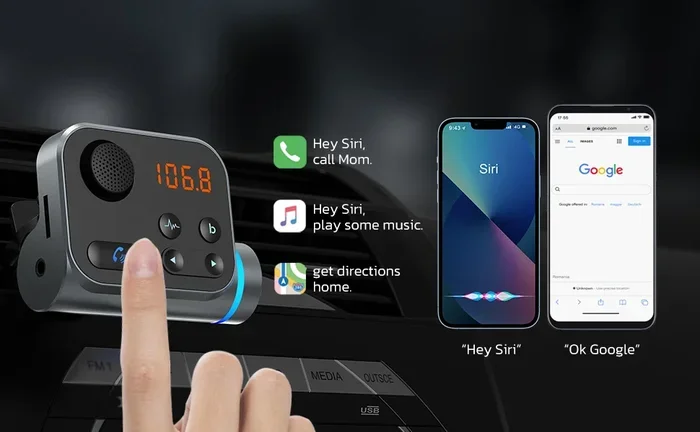
That said, there are situations where a USB Bluetooth adapter might still be useful. For example, if you need Bluetooth in a second location away from your PC, or if you want to connect to Bluetooth devices in your car. If you are looking for a car solution, you might want to explore options like a Bluetooth transmitter for your car.
For most users, the built-in Bluetooth on the MSI MPG Z690 Carbon WiFi is more than enough. You get reliable connectivity for all your daily wireless devices without any extra hardware or clutter.
How Does the Bluetooth Performance Compare?
Bluetooth 5.2 on the Intel AX201 module delivers solid real-world performance. In our testing and based on user reports, here is what you can expect:
- Audio Streaming: Bluetooth headphones and speakers connect quickly and maintain a stable connection up to about 10 meters.
- Peripheral Connectivity: Wireless keyboards and mice have virtually no input lag, making them great for gaming.
- File Transfers: Transferring files between devices works smoothly, though Bluetooth is slower than WiFi for large files.
- Multi-Device Handling: You can connect up to 7 devices simultaneously without noticeable performance drops.
Compared to older Bluetooth versions, the 5.2 standard on this board offers noticeably better range and stability. You are less likely to experience dropouts, even when your devices are in different rooms.
Tips for Getting the Best Bluetooth Performance
- Keep your wireless devices within 10 meters of the PC for the best connection.
- Avoid placing your PC near microwaves or other devices that cause 2.4 GHz interference.
- Update your Bluetooth drivers regularly through MSI Center or the Intel website.
- Use Bluetooth 5.2-compatible devices to take full advantage of the speed and range improvements.
- If you experience issues, try removing and re-pairing the device, as this often fixes connection problems.
Who Should Buy the MSI MPG Z690 Carbon WiFi?
This motherboard is ideal for users who want a clean, wireless setup without the hassle of add-in cards or dongles. Here are some scenarios where the built-in Bluetooth really shines:
- Gamers: Connect wireless gaming headsets and controllers without any extra hardware.
- Home Office Users: Use a wireless keyboard and mouse for a clean, minimalist desk.
- Media Enthusiasts: Stream audio to wireless speakers or soundbars from your PC.
- Compact PC Builders: Save space by skipping PCIe Bluetooth and WiFi cards.
- Content Creators: Use wireless audio devices for streaming, recording, and editing.
If you are still deciding on a motherboard and want to explore other options, you might want to check out whether other brands like Homewerks offer companion apps for managing wireless features, as discussed in our guide on Homewerks app availability.
Final Thoughts on MSI MPG Z690 Carbon WiFi Bluetooth
The MSI MPG Z690 Carbon WiFi is a fantastic motherboard that delivers on its promise of built-in wireless connectivity. The inclusion of Bluetooth 5.2 through the Intel AX201 module means you get a reliable, fast, and versatile wireless experience right out of the box. Whether you are connecting headphones, peripherals, or smart home devices, this board handles it all with ease.
For anyone building a new PC, especially one where clean cable management and wireless convenience are priorities, this motherboard is a strong choice. The combination of WiFi 6E and Bluetooth 5.2 in a single module is hard to beat at this price point. You get premium wireless features without paying extra for a separate card.
In summary, if you have been asking yourself whether the MSI MPG Z690 Carbon WiFi has Bluetooth, the answer is a definitive yes. It is a well-rounded board that excels in both wired and wireless performance, making it a great investment for any PC builder.
Frequently Asked Questions
Does the MSI MPG Z690 Carbon WiFi Come With Bluetooth Drivers?
Yes, the motherboard includes the necessary drivers for Bluetooth through the Intel AX201 module. However, it is always a good idea to visit the MSI website and download the latest drivers for the best performance and compatibility.
Can I Use Bluetooth and WiFi at the Same Time on This Motherboard?
Absolutely. The Intel AX201 module handles both WiFi 6E and Bluetooth 5.2 simultaneously. You can stream music over Bluetooth while browsing the internet on WiFi without any issues.
What Bluetooth Versions Are Compatible With the MSI MPG Z690 Carbon WiFi?
The motherboard supports Bluetooth 5.2, which is backward compatible with older Bluetooth versions like 5.0, 4.2, and 4.0. This means you can connect older wireless devices without any problems.
Do I Need to Install Any Extra Hardware for Bluetooth?
No. The Bluetooth is built directly into the motherboard through the Intel AX201 wireless module. You do not need a PCIe Bluetooth card or a USB dongle.
Can I Connect More Than One Bluetooth Device at a Time?
Yes, Bluetooth 5.2 supports multi-device connections. You can connect several peripherals like a keyboard, mouse, and headset simultaneously without interference.
Is the Bluetooth Range on This Motherboard Good Enough for a Large Room?
Bluetooth 5.2 offers a range of up to about 30 meters in open spaces. For most home and office environments, this is more than sufficient. Walls and obstacles may reduce the range slightly.