Does Schlage Camelot Work With Ring Smart Doorbell
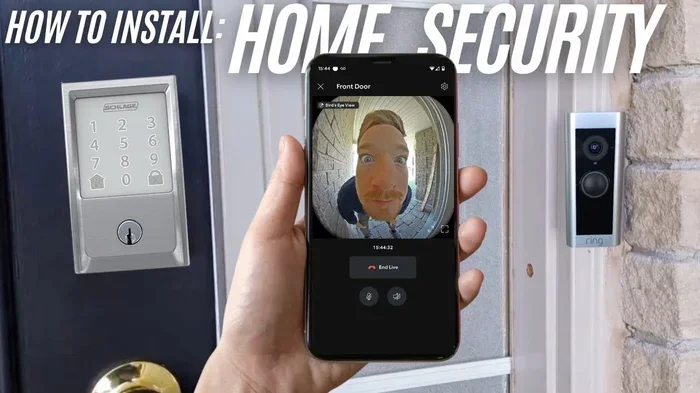
The Schlage Camelot smart lock can work with Ring smart doorbells through smart home integrations and shared ecosystems. Both devices connect to Wi-Fi and support Bluetooth, making them compatible for a unified home security setup. You can pair them using the Ring app or a smart hub like Alexa to create automated routines and enhance your overall home security system.
If you are building a smart home, you want everything to work together seamlessly. One of the most common questions homeowners ask is whether the Schlage Camelot smart lock can pair with a Ring smart doorbell. The short answer is yes. But the full story has some important details that can make or break your setup.
The Schlage Camelot is a popular keypad deadbolt known for its sleek design and reliable keyless entry. Ring doorbells are equally well known for their video monitoring and motion detection features. When you combine them, you get a powerful home security setup. But compatibility depends on how you connect them. This guide walks you through everything you need to know.
Whether you already own both devices or are planning to buy them, understanding how they work together saves time and frustration. Let us dive into the details of Schlage Camelot and Ring smart doorbell compatibility.
Key Takeaways
- Schlage Camelot and Ring are compatible: You can integrate them using smart home platforms like Alexa or the Ring app.
- Bluetooth and Wi-Fi connectivity: Both devices use wireless protocols that allow them to communicate within the same network.
- Automated routines are possible: You can set up actions like auto-unlocking when the doorbell rings.
- No extra hardware is needed: A standard Wi-Fi network and a compatible smartphone are all you need to get started.
- Setup is straightforward: Both devices offer guided pairing processes that take minutes to complete.
- Home security improves: Using them together gives you better control over who enters your home.
📑 Table of Contents
- Understanding the Schlage Camelot Smart Lock
- How Ring Smart Doorbells Work
- Does Schlage Camelot Work With Ring Smart Doorbell
- Setting Up Schlage Camelot With Ring
- Benefits of Using Schlage Camelot With Ring
- Common Problems and How to Fix Them
- Expert Insights on Smart Home Compatibility
- Frequently Asked Questions
- Conclusion
Understanding the Schlage Camelot Smart Lock
The Schlage Camelot is a touchscreen deadbolt that lets you lock and unlock your door without a physical key. It uses a backlit keypad where you enter a unique code. You can also use a traditional key as a backup. This makes it one of the most versatile smart locks on the market.
Key Features of the Schlage Camelot
- Touchscreen keypad: No buttons to wear out. The touchscreen is responsive and easy to use.
- Keyless entry: Enter a user code to lock or unlock the door from the outside.
- Auto-lock function: The lock automatically engages after a set time, usually 30 seconds.
- Multiple user codes: You can create up to 19 unique codes for family members, guests, or service providers.
- Battery powered: It runs on four AA batteries, which last up to two years under normal use.
- Traditional key backup: A standard key slot ensures you are never completely locked out.
The Schlage Camelot does not have built-in Wi-Fi. This is an important detail. It connects to your home network through a bridge or hub. Without that connection, it cannot communicate directly with your Ring doorbell. But do not worry. There are simple ways to bridge this gap.
For more on smart lock compatibility with other devices, check out does Ihome only work with iPhones to understand how smart locks interact with phone ecosystems.
How Ring Smart Doorbells Work
Ring smart doorbells are wireless video doorbells that let you see and speak with visitors from your phone. They use Wi-Fi to connect to your home network and send alerts when motion is detected or someone presses the doorbell button.
What Makes Ring Doorbells Popular
- Video monitoring: HD or 1080p cameras give you a clear view of your front door.
- Two-way audio: Talk to visitors through the Ring app even when you are not home.
- Motion detection: Customizable motion zones send instant alerts to your phone.
- Night vision: Infrared LEDs let you see visitors in the dark.
- Cloud storage: Video recordings are saved to the cloud for review later.
Ring doorbells connect directly to your Wi-Fi network. They do not need a separate bridge. This makes them easy to set up and use. But it also means they rely heavily on a strong and stable Wi-Fi connection. If your Wi-Fi signal is weak near the front door, you may experience connectivity issues.
For more on Bluetooth device connectivity between smart home products, see does Bluetooth work on Apple Watch without iPhone to learn how wireless devices maintain connections.
Does Schlage Camelot Work With Ring Smart Doorbell
This is the big question. The Schlage Camelot and Ring smart doorbell are both smart home devices, but they use different communication methods. The Camelot uses Bluetooth and a bridge, while Ring uses Wi-Fi directly. So how do they work together?
The answer lies in smart home hubs and platforms. When both devices connect to the same ecosystem, they can communicate and trigger actions based on each other. Here is how it works in practice.
Using Alexa as the Bridge
The easiest way to connect Schlage Camelot and Ring is through Amazon Alexa. Both devices are Alexa-compatible. You link each device to your Alexa account, and then you can create routines that connect them.
For example, you can set a routine where when your Ring doorbell detects motion, Alexa sends a notification to your phone. You can also create a routine where saying “Alexa, I’m home” unlocks the Schlage Camelot and turns on your porch light. These routines make your home smarter and more convenient.
Using the Ring App for Notifications
While the Ring app does not directly control the Schlage Camelot, it can still play a role. When someone rings your doorbell or triggers motion detection, the Ring app sends a push notification. You can then use your phone to unlock the Camelot through the Schlage Home app or via Alexa voice command.
This is not fully automated, but it is a practical workaround. It gives you real-time awareness of who is at your door and the ability to grant entry remotely.
Setting Up Automated Routines
Automated routines are where the real magic happens. Here is a step-by-step example of a routine you can create:
- Open the Alexa app on your phone.
- Go to Routines and tap the plus icon to create a new one.
- Set the trigger: Choose “When Ring detects motion at front door.”
- Add actions: Add “Unlock Schlage Camelot” and “Send notification to phone.”
- Save the routine and test it with a visitor.
This setup means that when someone approaches your door, the Camelot can unlock automatically. Of course, you should only enable this feature if you feel comfortable with it. Security and convenience need to be balanced.
For more insights on smart home device compatibility, check out do other earbuds work well with iPhone to learn how different devices handle cross-brand integration.
Setting Up Schlage Camelot With Ring
Setting up the connection between your Schlage Camelot and Ring doorbell is not difficult. It does require some patience and attention to detail. Here is a clear roadmap to follow.
Step 1: Install and Connect Each Device Separately
Before linking them together, make sure each device is fully set up on its own.
- Install the Schlage Camelot: Follow the included instructions to mount the lock on your door. Insert four AA batteries and create your master code using the touchscreen.
- Set up the Schlage Home app: Download the Schlage Home app, create an account, and pair the Camelot lock via Bluetooth.
- Install the Ring doorbell: Mount the Ring device near your front door. Connect it to your Wi-Fi network using the Ring app.
- Create a Ring account: Sign in and complete the initial setup, including motion zones and notification preferences.
Step 2: Link Both Devices to Alexa
Once each device is working independently, it is time to link them to Amazon Alexa.
- Open the Alexa app and go to Devices.
- Tap the plus icon and select “Add Device.”
- Choose Schlage and follow the prompts to link your Schlage Home account.
- Repeat the process for Ring. Select “Ring” from the list of supported skills.
- Enable the Ring skill by signing into your Ring account within Alexa.
Step 3: Create Your First Routine
Now that both devices are linked to Alexa, you can start creating routines. Go to the Routines section in the Alexa app and follow the steps outlined earlier. Test each routine thoroughly to make sure everything works as expected.
Quick Tips for a Smooth Setup
- Keep your Wi-Fi signal strong: Place your router close to the front door or use a Wi-Fi extender.
- Use the latest firmware: Update both the Schlage Camelot and Ring doorbell to the latest software versions.
- Name your devices clearly: Use descriptive names like “Front Door Lock” and “Front Door Camera” to avoid confusion.
- Test before relying on automation: Always manually test routines before trusting them with your home security.
For more on connecting wireless devices to your home network, see can wireless Wi-Fi work anywhere to understand Wi-Fi range and signal strength for smart home devices.
Benefits of Using Schlage Camelot With Ring
Pairing these two devices offers several real-world benefits that enhance your daily life and home security.
Enhanced Security
When your Schlage Camelot and Ring doorbell work together, you get layered security. The Ring doorbell lets you see who is approaching. The Camelot lock lets you control who gets in. Together, they create a complete front-door security system.
You can see a visitor on your Ring video feed, speak to them through two-way audio, and unlock the door for them — all from your phone. This is especially useful when you are expecting a delivery or letting in a guest while you are busy.
Convenience and Automation
Automated routines remove the need for manual actions. Imagine pulling into your driveway. Your Ring doorbell detects your car. Your phone sends you a notification. You tap the notification and unlock the front door. All of this happens in seconds.
This level of convenience is what makes smart home devices so appealing. You no longer need to fumble with keys or remember to lock the door. The system handles it for you.
Remote Access and Control
One of the biggest advantages of using both devices together is remote access. You can check your doorbell camera and unlock your door from anywhere in the world. As long as you have an internet connection, your smart home is at your fingertips.
This is valuable for homeowners who travel frequently or have caregivers coming to the house. You can grant temporary access and monitor activity without being physically present.
Peace of Mind
Knowing that your front door is monitored and controlled by smart devices gives you peace of mind. You can check your lock status from bed. You can see who rang your doorbell while you were in the shower. These small conveniences add up to a much more secure and comfortable home.
Common Problems and How to Fix Them
Even with the best setup, you may run into occasional issues. Here are the most common problems and their solutions.
Devices Not Connecting to Alexa
If your Schlage Camelot or Ring doorbell does not appear in the Alexa app, try these steps:
- Check your Wi-Fi connection: Make sure your phone is on the same network as your devices.
- Restart both devices: Unplug the Ring doorbell and remove the batteries from the Camelot. Wait 30 seconds and reconnect.
- Re-link the accounts: In the Alexa app, go to Skills and disable the Schlage and Ring skills. Then re-enable them and sign in again.
Routines Not Triggering Properly
If your automated routines fail to work, check the following:
- Verify device names: Make sure the routine references the correct device names.
- Check for firmware updates: Outdated software can cause compatibility issues.
- Test devices individually: Make sure each device works on its own before troubleshooting the routine.
Weak Wi-Fi Signal at the Front Door
A weak Wi-Fi signal can cause your Ring doorbell to disconnect or your Camelot bridge to lose connection. To fix this:
- Move your router closer to the front door if possible.
- Use a Wi-Fi mesh system to extend coverage throughout your home.
- Add a Wi-Fi extender near the front door for a stronger signal.
Battery Drain on the Schlage Camelot
If your Camelot batteries are draining faster than expected, consider these factors:
- Frequent Bluetooth connections from multiple devices can drain the battery faster.
- Cold weather reduces battery life significantly. Consider lithium batteries for better performance in winter.
- Auto-lock frequency can also impact battery usage if set to a very short interval.
Expert Insights on Smart Home Compatibility
Smart home experts agree that the best setups are built on a single ecosystem. When all your devices speak the same language through a platform like Alexa or Google Home, compatibility issues drop dramatically. The Schlage Camelot and Ring doorbell pair well because both are deeply integrated into the Alexa ecosystem.
Experts also recommend starting small. Do not try to connect every device at once. Set up your Schlage Camelot and Ring doorbell first. Make sure they work reliably. Then add more devices gradually. This approach helps you identify problems early and keeps your smart home running smoothly.
For more on how smart locks interact with other smart devices, check out can I make my TV Bluetooth with an adapter to learn about Bluetooth bridging and device integration.
Frequently Asked Questions
Can I control the Schlage Camelot lock directly from the Ring app?
No, the Ring app does not directly control the Schlage Camelot lock. You need to use the Schlage Home app or Alexa to control the lock. However, you can link both devices through Alexa to create routines that connect them indirectly.
Do I need a subscription to use both devices together?
The Schlage Camelot does not require a subscription. The Ring doorbell offers basic features for free, but Ring Protect plans provide video recording and extended storage. You do not need a paid subscription to connect the two devices, but a Ring plan enhances the video features.
Is the Schlage Camelot compatible with Ring Alarm?
Yes, the Schlage Camelot can integrate with Ring Alarm through Alexa. When Ring Alarm is triggered, you can set up routines that lock or unlock the Camelot. This creates a more comprehensive home security system that responds automatically to events.
Can I use the Schlage Camelot without a bridge or hub?
The Schlage Camelot does not have built-in Wi-Fi, so it needs a bridge to connect to your smart home network. The lock uses Bluetooth to communicate with the bridge, and the bridge connects to your Wi-Fi router. Without the bridge, the lock works locally with keypad codes and a physical key only.
How secure is the connection between Schlage Camelot and Ring doorbell?
Both devices use encrypted connections to protect your data. The Schlage Camelot uses AES encryption for its Bluetooth and keypad communications. Ring uses TLS encryption for its video and audio streams. When connected through Alexa, the data is handled securely within the Amazon ecosystem.
Can I add more smart devices to this setup later?
Absolutely. The Alexa ecosystem supports hundreds of smart home devices. You can add smart lights, smart plugs, cameras, and sensors to your existing setup. The Schlage Camelot and Ring doorbell serve as a great foundation that you can build on over time.
Conclusion
The Schlage Camelot and Ring smart doorbell are a powerful combination for any smart home. They may use different communication methods, but through Alexa and smart routines, they work together beautifully. The setup process is straightforward, and the benefits in security and convenience are significant.
Does Schlage Camelot work with Ring smart doorbell? Yes, it does. With the right setup, you get a front-door security system that lets you see, speak with, and grant access to visitors from anywhere. The key is to connect both devices through a shared platform like Alexa and build routines that make your home smarter.
Take the time to set up each device properly. Create routines that match your daily habits. Test everything before relying on automation. Once your Schlage Camelot and Ring doorbell are working together, you will wonder how you ever managed without them. Your front door becomes smarter, safer, and more convenient — and that is exactly what a smart home should be.