Can A Mic Be Connected Directly To A Bluetooth Speaker
Yes, you can connect a mic directly to a Bluetooth speaker in certain situations. This setup works when your speaker has a built-in mic input or supports audio return features. However, most standard Bluetooth speakers are designed only for audio output, which means a direct connection is not always possible without extra gear.
Can a mic be connected directly to a Bluetooth speaker? This is a question many people ask when they want a simple, wireless setup for karaoke, presentations, or live gigs. The short answer is: it depends on your speaker and your needs. Some Bluetooth speakers come with built-in mic inputs that make this easy. Others are output-only devices that need extra gear to work with a microphone. In this guide, we will walk you through everything you need to know about connecting a mic to a Bluetooth speaker. You will learn what works, what does not, and the best ways to get great sound every time.
Whether you are setting up a backyard party, a small business presentation, or a home karaoke night, understanding how audio connections work saves you time and money. Bluetooth technology has changed the way we listen to music and share sound. But it was not originally designed for two-way audio communication. That means connecting a microphone to a Bluetooth speaker involves some technical limitations. Let us break down those limitations and explore the solutions that actually work.
Key Takeaways
- Not all Bluetooth speakers support mic input: Most speakers are output-only devices designed for playing audio, not receiving it.
- Workarounds exist: You can use an aux cable, a mixer, or a Bluetooth adapter to bridge the gap between a mic and speaker.
- Sound quality varies: Direct connections may introduce latency or reduce audio fidelity compared to wired setups.
- Wireless options are available: Wireless microphones and Bluetooth transmitters offer more flexibility for your setup.
- Check your speaker specs: Always review the input and output options on your Bluetooth speaker before buying any equipment.
- Latency is a real concern: Bluetooth technology adds a slight delay that can affect live performances or real-time audio use.
📑 Table of Contents
How Bluetooth Speakers Work With Audio
Before we dive into mic connections, it helps to understand how Bluetooth speakers handle audio. Most Bluetooth speakers are built for one primary job: receiving audio signals and playing them out through their built-in drivers. This is called audio output. When you pair your phone with a speaker, the phone sends audio data over a Bluetooth wireless connection. The speaker receives that data and converts it into sound waves you can hear.
The Output-Only Design
The vast majority of portable Bluetooth speakers are output-only devices. This means they can only receive and play audio. They do not have the hardware to accept an incoming audio signal from a microphone. Think of it like a TV that can only display pictures but cannot record them. The speaker listens, but it cannot be listened to in return. This design keeps speakers simple, affordable, and portable.
Bluetooth technology itself uses specific profiles for different types of audio. The most common profile is A2DP, which stands for Advanced Audio Distribution Profile. This profile handles high-quality audio streaming from a source device to a speaker. Another profile, HFP (Hands-Free Profile), is used for voice calls and handles microphone input. However, HFP is designed for phone calls, not for connecting an external microphone to a speaker. So even if your speaker supports HFP, it is not the same as having a dedicated mic input.
When Speakers Do Have Mic Inputs
Some Bluetooth speakers are designed with more versatility in mind. These speakers often include a 3.5mm aux input, a USB port, or even a dedicated mic jack. Portable karaoke speakers and PA-style Bluetooth speakers are the most likely to have these features. If your speaker has an input port labeled “MIC” or “AUX IN,” then you have a real pathway to connect a microphone directly.
Here are some common speaker types that support mic input:
- Karaoke Bluetooth speakers: These are built for singing and usually include multiple mic inputs.
- Portable PA systems with Bluetooth: These larger speakers often have XLR or 1/4-inch mic jacks.
- Reverb and effects speakers: Some models include mic inputs for live vocal processing.
- Smart speakers with built-in assistants: Devices like Amazon Echo or Google Nest have built-in mics but are not designed to accept external mic input.
Can You Connect A Mic Directly To A Bluetooth Speaker?
Now let us answer the big question. Can you connect a mic directly to a Bluetooth speaker? The answer depends entirely on the type of speaker you own. If your speaker has a mic input port, then yes, you can connect a mic directly. If it does not, then you will need a workaround or additional equipment.
Direct Connection Methods
When your Bluetooth speaker supports mic input, the connection process is straightforward. Here are the most common direct methods:
- Using a 3.5mm aux cable: If your speaker has an aux input and your mic has a 3.5mm output, simply plug the cable from the mic into the speaker. This is the easiest and most affordable method.
- Using an XLR or 1/4-inch cable: Professional microphones often use XLR connectors. Some speakers have corresponding mic jacks that accept these cables directly.
- Using a USB connection: A few Bluetooth speakers support USB audio input. You can connect a USB microphone directly to the speaker for a digital audio link.
The Wireless Route
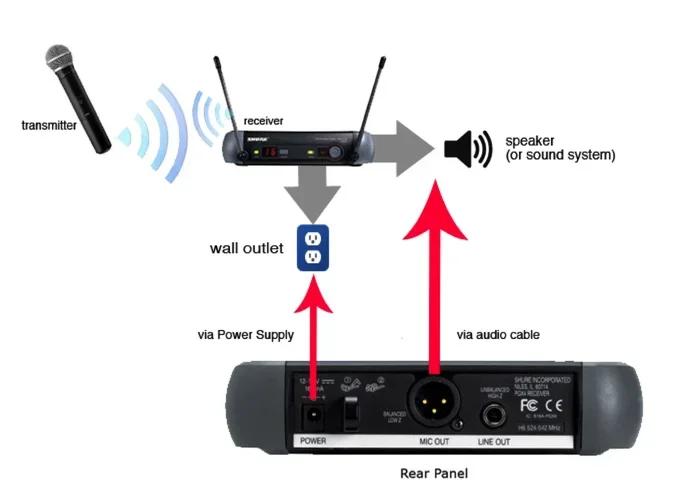
What if you want a fully wireless setup? You can pair a wireless microphone with a Bluetooth speaker, but there is a catch. Both devices need to connect to the same Bluetooth channel, and most speakers can only act as a Bluetooth sink (receiver), not a source. This means the speaker cannot send audio back to the microphone or another device. For a fully wireless mic-to-speaker setup, you typically need a Bluetooth transmitter paired with a receiver system.
Common Challenges With Direct Connections
Even when a direct connection is possible, you may face some challenges. Bluetooth latency, or audio delay, is the biggest issue. Bluetooth adds a small delay between when audio is sent and when it is received. This delay is usually tiny, but it matters for live singing or speaking. You may notice the sound comes out a fraction of a second after you speak or sing. This can be distracting and make it hard to stay in rhythm.
Another challenge is sound quality. Bluetooth compresses audio data to transmit it wirelessly. This compression can reduce the clarity and richness of your voice. For casual use, this is not a big deal. For professional performances, it can be noticeable. Wired connections always deliver better audio quality than wireless ones.
Best Ways To Connect A Mic To A Bluetooth Speaker
If a direct connection is not possible or does not give you the results you want, there are several workarounds. Each method has its pros and cons, so let us explore the best options.
Method 1: Use an Aux Cable
This is the simplest and most affordable method. If your Bluetooth speaker has an aux input, you can run a cable from your microphone’s output directly into the speaker. You will need the right cable adapter for your mic type. For example, if you have a dynamic mic with an XLR output, you need an XLR-to-3.5mm adapter cable. This method bypasses Bluetooth entirely for the mic-to-speaker link, which means zero latency and better sound quality.
Quick Tip: Keep your aux cable as short as possible to reduce signal loss and interference. A cable longer than 15 feet can degrade audio quality.
Method 2: Use a Bluetooth Transmitter and Receiver
For a fully wireless setup, you can use a Bluetooth transmitter paired with a receiver. The transmitter plugs into your microphone or mixer and sends audio to the Bluetooth speaker. The receiver is built into the speaker or connected via aux input. This method gives you wireless freedom but adds a small amount of latency.
Here is how it works in practice:
- Plug the Bluetooth transmitter into your mic or audio output.
- Pair the transmitter with your Bluetooth speaker.
- The speaker receives the audio signal wirelessly and plays it out.
This setup works well for karaoke nights, small gigs, and casual use. It is not ideal for professional audio where timing and quality are critical.
Method 3: Use a Small Mixer
A small audio mixer is the most versatile solution. You can connect your microphone to the mixer and then connect the mixer to your Bluetooth speaker via aux cable or Bluetooth. The mixer lets you control volume, add effects, and balance multiple audio sources. This is the go-to setup for live performers and event hosts.
Mixers come in different sizes. A compact portable mixer with Bluetooth output can replace your speaker’s built-in Bluetooth and give you much more control over your sound. Some popular options include small tabletop mixers with USB and Bluetooth capabilities.
Method 4: Use a Speaker With Built-In Mic Channels
The easiest solution is to buy a Bluetooth speaker designed for mic input. Many portable karaoke speakers and compact PA systems include one or more mic channels. These speakers handle both the mic input and the Bluetooth audio output seamlessly. If you plan to use a mic with your speaker regularly, this is the best long-term investment.
Comparing Connection Methods
Not sure which method is right for you? Here is a quick comparison of the most common ways to connect a mic to a Bluetooth speaker.
| Method | Wired or Wireless | Latency | Sound Quality | Ease of Setup | Cost |
|---|---|---|---|---|---|
| Aux Cable Direct | Wired | None | Excellent | Very Easy | Low |
| Bluetooth Transmitter | Wireless | Low to Medium | Good | Easy | Medium |
| Audio Mixer | Wired or Wireless | None (wired) | Excellent | Moderate | Medium to High |
| Speaker With Mic Input | Wired | None | Excellent | Very Easy | Medium to High |
| USB Connection | Wired | None | Excellent | Easy | Medium |
As you can see, wired methods always deliver better sound quality and zero latency. Wireless methods offer more freedom but come with trade-offs. Your choice depends on your specific use case and budget.
Tips For Better Sound Quality
No matter which connection method you choose, these tips will help you get the best possible sound from your mic and Bluetooth speaker setup.
Keep Your Bluetooth Signal Strong
Bluetooth works best when the devices are within 30 feet of each other with no major obstacles. Walls, furniture, and even your body can weaken the Bluetooth signal. Keep your phone or audio source close to the speaker for a stronger, more stable connection. If you notice dropouts or static, moving closer to the speaker often solves the problem.
Use the Right Mic Type
Not all microphones work equally well with Bluetooth speakers. Dynamic microphones are less sensitive and better for loud environments. Condenser microphones are more sensitive and capture more detail, but they can pick up background noise. For most Bluetooth speaker setups, a dynamic mic is the safer choice. It handles volume well and reduces unwanted noise.
Manage Your Volume Levels
One of the most common mistakes is setting the mic volume too high. This causes distortion and feedback. Start with the mic volume low and slowly increase it until the sound is clear. If you hear a ringing or whistling sound, that is feedback. Move the mic away from the speaker or lower the volume to fix it.
Charge Your Devices Fully
Bluetooth speakers and wireless microphones run on batteries. Low battery levels can cause audio dropouts, reduced range, and poor sound quality. Always charge your devices fully before an event. Keep a backup charger or power bank on hand for longer sessions.
Common Mistakes To Avoid
Setting up a mic with a Bluetooth speaker is not complicated, but people make mistakes that cause frustration. Here are the most common ones and how to avoid them.
- Assuming all speakers support mic input: Most do not. Always check the specs before you buy or try to connect anything.
- Ignoring Bluetooth latency: If you are singing or speaking live, even a small delay can throw you off. Use wired connections when timing matters.
- Using cheap cables: A bad cable can cause static, crackling, and signal loss. Invest in quality cables and adapters.
- Pairing too many devices: Bluetooth speakers can only stay connected to a limited number of devices at once. Disconnect unused devices to keep your connection stable.
- Placing the mic too close to the speaker: This causes feedback and distortion. Keep at least a few feet of distance between the mic and the speaker.
- Forgetting to turn off the speaker’s built-in mic: Some speakers have built-in microphones for calls. If your speaker has one, turn it off when using an external mic to avoid confusion.
Expert Insights On Bluetooth Audio Setup
Audio professionals often recommend a simple rule: use wired connections whenever possible for critical audio tasks. Bluetooth is convenient, but it is not perfect. The technology has improved a lot over the years, and newer Bluetooth versions like 5.0 and 5.3 offer better range, lower latency, and higher audio quality. But even with these improvements, a wired connection will always win when it comes to reliability and sound fidelity.
For casual use like karaoke at home or a small gathering, Bluetooth is perfectly fine. Most people will not notice the small delay or slight compression. The convenience of going wireless outweighs the minor audio trade-offs. But for live performances, professional events, or anything where sound quality and timing are critical, a wired setup with a mixer is the way to go.
Expert Tip: If you want the best of both worlds, use a Bluetooth speaker with a wired aux input and connect your mic through that input. This gives you the Bluetooth convenience for your music source while keeping your mic signal crisp and delay-free.
Key Takeaways
- Direct connection depends on your speaker: Only speakers with mic input ports can accept a mic directly without extra gear.
- Aux cables are the simplest workaround: A 3.5mm or XLR cable from mic to speaker gives you the best sound with zero latency.
- Bluetooth transmitters enable wireless setups: They add convenience but introduce a small amount of audio delay.
- A small mixer offers the most control: It lets you manage multiple audio sources and improve overall sound quality.
- Wired connections beat wireless for quality: Always choose wired when sound fidelity and timing are important.
- Check your speaker specs first: Knowing what inputs your speaker supports saves time and prevents frustration.
- Avoid common setup mistakes: Keep mic volume low, use quality cables, and maintain a strong Bluetooth signal for the best experience.
Conclusion
So, can a mic be connected directly to a Bluetooth speaker? The answer is yes, but with some important caveats. If your speaker has a mic input, you can connect a mic directly using a cable. If it does not, you have several workarounds that get the job done. Each method has its strengths and weaknesses, and the right choice depends on your specific needs and setup.
For most casual users, an aux cable connection or a Bluetooth transmitter setup works great. For more serious audio needs, an audio mixer or a purpose-built karaoke speaker delivers the best results. The key is understanding what your equipment can do and choosing the right method for your situation. With the right setup, you can enjoy wireless music playback and crystal-clear vocal sound from a single Bluetooth speaker. Experiment with different methods, find what works best for you, and enjoy the freedom of a versatile audio setup.
Remember, technology is always improving. Newer Bluetooth speakers are becoming more versatile, and wireless microphones are getting better every year. Stay curious, keep learning, and do not be afraid to try new setups. The best audio experience is the one that works for you and brings you joy every time you hit play or step up to the mic.
Frequently Asked Questions
Can any Bluetooth speaker work with a microphone?
No, not all Bluetooth speakers can work with a microphone. Most Bluetooth speakers are output-only devices designed to play audio, not receive it. You need a speaker that has a dedicated mic input port, such as an aux input or a mic jack, to connect a microphone directly. Always check your speaker’s specifications before attempting a connection.
What is the best way to connect a mic to a Bluetooth speaker?
The best way depends on your setup. For the highest sound quality and zero latency, use an aux cable or XLR cable to connect the mic directly to the speaker’s input. For a wireless option, use a Bluetooth transmitter paired with your speaker. If you need more control, a small audio mixer connected to the speaker gives you the best flexibility and sound quality.
Does Bluetooth cause audio delay when connecting a mic?
Yes, Bluetooth adds a small amount of latency to audio signals. This delay is usually between 50 and 200 milliseconds. For casual listening, this is not noticeable. But for live singing or speaking, the delay can be distracting. Wired connections eliminate this problem entirely, making them the preferred choice for real-time audio use.
Can I use a wireless microphone with a Bluetooth speaker?
You can, but both devices need to be set up correctly. A wireless microphone typically has its own receiver, and you can connect that receiver to the Bluetooth speaker via an aux cable. You cannot directly pair a wireless microphone with a Bluetooth speaker over Bluetooth because most speakers do not support mic input over the Bluetooth protocol.
Do karaoke Bluetooth speakers support mic connections?
Yes, most karaoke Bluetooth speakers are specifically designed with mic inputs. They often include one or more mic jacks, echo and reverb effects, and volume controls for vocals. These speakers are the easiest option if you want to sing or speak into a mic while playing music through Bluetooth.
Why is my mic not working when connected to a Bluetooth speaker?
There are several possible reasons. Your speaker may not have a mic input port. The cable or adapter you are using may be faulty or incompatible. The mic volume on the speaker may be turned down or muted. Try a different cable, check the speaker settings, and confirm that your speaker supports external mic input before troubleshooting further.