Can Bluetooth Be Amplified for Stronger Wireless Audio
Can Bluetooth be amplified? Yes, you can boost Bluetooth signal strength, range, and audio quality using amplifiers, boosters, and smart placement techniques. Bluetooth amplification works by enhancing the wireless signal between your device and speaker, giving you louder, clearer, and more reliable sound. Whether you want to fix a weak connection or improve your wireless audio experience, this guide covers everything you need to know.
You are sitting in your living room, trying to enjoy your favorite playlist. But the music keeps cutting out. The sound fades every time you walk to the kitchen. It is frustrating, right?
Can Bluetooth be amplified? This is a question many people ask when their wireless audio lets them down. The short answer is yes. You can boost Bluetooth signal strength, improve range, and get louder, clearer sound. But how exactly does this work? And what can you do right now to fix weak Bluetooth connections?
In this guide, we will break down everything about Bluetooth amplification. We will cover how Bluetooth works, why signal gets weak, and the best ways to boost your wireless audio. You will learn about amplifiers, boosters, placement tips, and common mistakes. By the end, you will know exactly how to get the strongest possible Bluetooth connection in your home or office.
Key Takeaways
- Bluetooth can be amplified: You can boost signal strength and range using amplifiers, boosters, and smart placement.
- Bluetooth amplifiers work: Dedicated devices can extend range and improve audio quality significantly.
- Placement matters: Where you put your Bluetooth device affects signal strength more than you think.
- Bluetooth 5.0 helps: Newer versions offer better range and stronger connections without extra hardware.
- Common mistakes hurt signal: Walls, distance, and interference weaken Bluetooth more than most people realize.
- DIY boosters exist: You can improve Bluetooth performance without buying expensive equipment.
📑 Table of Contents
- What Is Bluetooth and How Does It Work?
- Can Bluetooth Be Amplified? Understanding the Basics
- Ways to Amplify Bluetooth Signal and Improve Range
- Bluetooth Amplifiers and Boosters: What Works?
- Can You Build a DIY Bluetooth Amplifier?
- Common Mistakes That Weaken Bluetooth Signal
- Expert Tips for the Best Bluetooth Audio Experience
- Key Takeaways
- Conclusion
What Is Bluetooth and How Does It Work?
Before we talk about amplification, let us understand the basics. Bluetooth is a wireless technology that sends audio between devices without cables. It uses radio waves to transfer data over short distances.
When you connect your phone to a speaker, your phone sends audio data through the air. The speaker receives that data and turns it into sound. Simple, right? But many things can interfere with this process.
Bluetooth range depends on several factors. Most devices work well within 30 feet. But walls, furniture, and other electronics can reduce that range. The version of Bluetooth your device uses also matters a lot. Bluetooth 5.0 offers much better range than older versions. It can reach up to 800 feet in open space.
Here are the key Bluetooth versions and their ranges:
- Bluetooth 4.0: About 30 feet range
- Bluetooth 4.2: About 30 to 50 feet range
- Bluetooth 5.0: Up to 800 feet in open space
- Bluetooth 5.3: Improved stability and range over 5.0
The better your Bluetooth connectivity, the better your audio experience. Understanding this is the first step toward improving your wireless sound.
Can Bluetooth Be Amplified? Understanding the Basics
Now let us answer the big question. Can Bluetooth be amplified? Yes, but it works differently than you might think. Bluetooth itself is a low-power signal. It was not designed to carry massive amounts of data over long distances. But you can amplify the signal and improve the audio output in several ways.
There are two types of amplification when it comes to Bluetooth:
- Signal amplification: Boosting the wireless connection between devices
- Audio amplification: Making the sound louder and richer once the signal arrives
Both matter. A strong signal means fewer dropouts and better wireless audio quality. And audio amplification means your speakers produce more volume and better bass. Let us look at both in detail.
Signal Amplification vs. Audio Amplification
People often confuse these two concepts. Signal amplification improves the Bluetooth range and connection stability. Audio amplification makes the sound louder and clearer. You need both for the best experience.
Think of it like a water pipe. Signal amplification is like widening the pipe so more water flows through. Audio amplification is like increasing the water pressure so it comes out stronger. You need both for a great shower.
Why Bluetooth Signals Get Weak
Before you fix a problem, you need to understand what causes it. Several things weaken Bluetooth signals every day:
- Physical barriers: Walls, doors, and floors block Bluetooth waves
- Distance: The further you are from the source, the weaker the signal
- Interference: Wi-Fi routers, microwaves, and other electronics cause interference
- Old hardware: Older Bluetooth versions have weaker signals
- Low battery: Low battery on your device reduces signal strength
Once you know what weakens your signal, you can take steps to fix it. And that is where amplification comes in.
Ways to Amplify Bluetooth Signal and Improve Range
There are many practical ways to boost your Bluetooth signal. Some are free. Some require a small investment. Here are the most effective methods.
1. Optimize Device Placement
This is the simplest and cheapest fix. Where you place your Bluetooth device matters a lot. Try these tips:
- Keep your phone and speaker in the same room
- Place speakers in open spaces, not behind furniture
- Keep devices away from Wi-Fi routers and microwaves
- Elevate speakers to waist or chest height
- Reduce the number of walls between devices
Good placement can improve your Bluetooth audio range by 30 to 50 percent. You do not need any extra equipment.
2. Update Your Device Software
Old software can hurt your Bluetooth performance. Manufacturers release updates that improve Bluetooth connectivity and fix bugs. Always keep your phone, tablet, and speaker software up to date.
Go to your device settings and check for updates regularly. This one simple step can make a big difference.
3. Remove Connected Devices
Bluetooth devices share signals. If too many devices are connected to the same network, they compete for bandwidth. Disconnect devices you are not using. This frees up signal strength for your active connection.
Turn off Bluetooth on devices you are not actively using. This reduces interference and improves your wireless streaming quality.
4. Use a Bluetooth Range Extender
A range extender is a device that boosts your Bluetooth signal. It sits between your source device and your speaker. The extender receives the weak signal and retransmits it at full strength.
Bluetooth range extenders are affordable and easy to use. They work great for large homes or offices where your speaker is far from your phone.
Bluetooth Amplifiers and Boosters: What Works?
If simple fixes are not enough, you can use dedicated hardware to amplify your Bluetooth signal. Let us look at the best options.
Bluetooth Amplifiers
A Bluetooth amplifier is a device that boosts the audio signal from your Bluetooth connection. It sits between your phone and your speaker. The amplifier receives the wireless signal, boosts it, and sends stronger audio to your speaker.
Here is how a Bluetooth amplifier works:
- Your phone sends audio via Bluetooth to the amplifier
- The amplifier boosts the signal strength
- The amplified signal goes to your speaker
- Your speaker produces louder, clearer sound
Bluetooth amplifiers are great for improving audio amplification in large rooms. They also help if your speaker has weak built-in amplification.
Bluetooth Signal Boosters
A signal booster focuses on improving the wireless connection itself. It does not necessarily make sound louder. But it does make the connection more stable and reliable.
Bluetooth signal boosters are ideal when your main problem is dropouts and disconnections. They strengthen the link between your devices so the audio stays consistent.
Bluetooth Transmitters with Amplification
Some devices combine a Bluetooth transmitter with built-in amplification. These are versatile tools that can boost both signal and audio quality. They work with speakers, headphones, car audio systems, and more.
Look for transmitters that support Bluetooth 5.0 or higher. They offer better range and stronger connections than older versions.
Comparison: Bluetooth Amplifiers vs. Boosters vs. Extenders
Not sure which device you need? Here is a quick comparison:
| Device Type | Boosts Signal | Boosts Audio | Best For |
|---|---|---|---|
| Bluetooth Amplifier | Yes | Yes | Louder, clearer sound |
| Bluetooth Signal Booster | Yes | No | Stable connections |
| Bluetooth Range Extender | Yes | No | Longer range |
| Bluetooth Transmitter | Yes | Sometimes | Versatile setups |
Choose based on your main problem. If your sound is weak, get an amplifier. If your connection drops, get a booster. If you need more distance, get an extender.
Can You Build a DIY Bluetooth Amplifier?
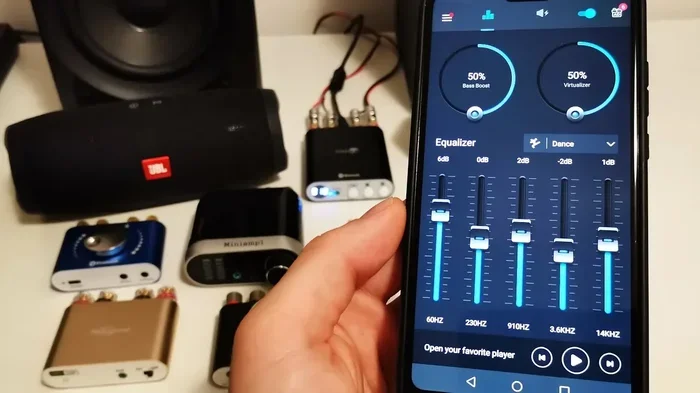
Yes, you can. Some people build their own Bluetooth amplifiers using simple components. This is a fun project if you like electronics.
Here are the basic things you need:
- A Bluetooth receiver module
- An audio amplifier board
- A power supply
- Speakers or speaker wire
You connect the Bluetooth receiver to the amplifier board. Then you connect the amplifier to your speakers. The result is a custom Bluetooth amplifier that you built yourself.
Quick Tip: This is a great weekend project. It costs much less than buying a pre-built amplifier. And you learn a lot about how Bluetooth audio works.
However, DIY projects require some technical knowledge. If you are not comfortable with electronics, stick to store-bought solutions.
Common Mistakes That Weaken Bluetooth Signal
Many people make mistakes that hurt their Bluetooth performance without even knowing it. Here are the most common ones.
Placing Devices Near Interference Sources
Wi-Fi routers, microwaves, and cordless phones all operate on similar frequencies. When they are near your Bluetooth devices, they cause interference. Keep your Bluetooth devices away from these sources.
Using Outdated Bluetooth Versions
Older Bluetooth versions have weaker signals and shorter range. If your phone or speaker only supports Bluetooth 3.0 or older, consider upgrading. Bluetooth 5.0 and newer versions offer much better performance.
Ignoring Firmware Updates
Just like software updates, firmware updates improve Bluetooth performance. Check your speaker and phone for firmware updates regularly.
Overloading the Connection
Bluetooth has limits. If you try to connect too many devices at once, the signal weakens. Keep your active connections to a minimum for the best results.
Placing Speakers in Corners
Corners and walls trap Bluetooth signals. Placing your speaker in the middle of a room gives the best signal spread. Open spaces let the signal travel freely.
Expert Tips for the Best Bluetooth Audio Experience
We asked audio experts for their top tips on improving Bluetooth sound. Here is what they recommend.
Tip 1: Use the 2.4 GHz Band Wisely
Most Bluetooth devices use the 2.4 GHz frequency band. This band is crowded with many devices. If possible, use devices that support dual-band or 5 GHz Bluetooth. These experience less interference.
Tip 2: Keep Devices Cool
Heat affects Bluetooth performance. Overheating devices weaken their signal strength. Keep your phone and speaker in cool, ventilated areas.
Tip 3: Reset Devices Regularly
Sometimes the simplest fix is a reset. Turn off Bluetooth, wait 30 seconds, and turn it back on. This clears connection issues and refreshes your signal.
Tip 4: Pair Devices in Close Proximity
Always pair your devices when they are close together. This ensures a strong initial connection. Once paired, you can move further apart without losing signal.
Tip 5: Invest in Quality Hardware
Cheap Bluetooth devices often have weak antennas and poor amplifiers. Investing in quality hardware pays off in better range, louder sound, and fewer dropouts.
Key Takeaways
- Bluetooth can be amplified: You can boost signal strength and range using amplifiers, boosters, and smart placement.
- Bluetooth amplifiers work: Dedicated devices can extend range and improve audio quality significantly.
- Placement matters: Where you put your Bluetooth device affects signal strength more than you think.
- Bluetooth 5.0 helps: Newer versions offer better range and stronger connections without extra hardware.
- Common mistakes hurt signal: Walls, distance, and interference weaken Bluetooth more than most people realize.
- DIY boosters exist: You can improve Bluetooth performance without buying expensive equipment.
Conclusion
Can Bluetooth be amplified? Absolutely. You have many options to boost your Bluetooth signal and improve your wireless audio. From simple placement tips to dedicated amplifiers and boosters, there is a solution for every budget and every problem.
Start with the free fixes. Optimize your placement, update your software, and reduce interference. If those do not work, consider a Bluetooth amplifier or range extender. These devices make a real difference in signal strength and audio quality.
Remember, Bluetooth amplification is not about magic. It is about understanding how the signal works and removing obstacles that weaken it. With the right approach, you can enjoy louder, clearer, and more reliable wireless audio in any room.
Try these tips today. Your ears will thank you. Stronger Bluetooth audio is just a few changes away.
Frequently Asked Questions
Can you amplify Bluetooth signal without buying extra devices?
Yes, you can. Simple steps like optimizing device placement, removing interference sources, and updating software can boost your Bluetooth signal for free. These methods improve Bluetooth range without any extra cost.
What is the best Bluetooth amplifier for home use?
The best amplifier depends on your needs. For most homes, a Bluetooth 5.0 amplifier with built-in range extension works well. Look for models with positive reviews and solid build quality. Popular brands include Avantree, TaoTronics, and 1Mii.
Does a Bluetooth amplifier reduce audio quality?
A good amplifier improves audio quality. It boosts the signal without losing clarity. However, cheap or poorly designed amplifiers can distort sound. Always choose reputable brands with good reviews for the best results.
How far can Bluetooth reach with an amplifier?
Standard Bluetooth reaches about 30 feet. With a quality amplifier or extender, you can push that to 100 feet or more. Bluetooth 5.0 devices with amplifiers can reach up to 200 feet in open spaces.
Can I use a Bluetooth amplifier with any speaker?
Most Bluetooth amplifiers work with any speaker that has an auxiliary input or RCA input. Check your speaker’s inputs before buying an amplifier. Some amplifiers also work wirelessly with Bluetooth-enabled speakers.
Is Bluetooth amplification legal?
Yes, Bluetooth amplification is completely legal. There are no regulations against boosting Bluetooth signals for personal use. Just make sure any amplifier you buy meets safety and quality standards.