Can I Plug A Microphone Directly Into Speakers At Home
Yes, you can plug a microphone directly into speakers, but the results vary wildly based on your gear. A direct connection bypasses a mixer or audio interface, which can save time and money. However, it often leads to low volume, distortion, or feedback if you do it wrong. This guide shows you exactly when a direct plug works, what cables you need, and how to avoid common pitfalls. Can I Plug A Microphone Directly Into Speakers safely? The answer is yes—with the right setup.
Key Takeaways
- Direct connection works best with active speakers and dynamic microphones: Powered speakers have built-in amps that can handle a mic signal, while passive speakers usually need an external amplifier.
- You must match the signal levels: Microphones output a very weak mic-level signal; speakers expect a much stronger line-level or speaker-level signal. Without proper gain, the sound will be faint or distorted.
- The right cable matters a lot: An XLR-to-1/4-inch cable or a 3.5mm aux cord can work, but you must check the input type on your speaker. Using the wrong cable can damage equipment.
- Feedback and noise are real risks: Plugging a mic directly into a speaker creates a high chance of feedback loops, especially at higher volumes or in small rooms.
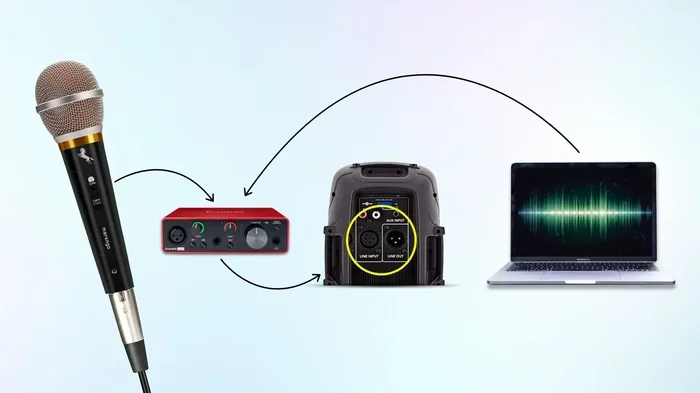
- An audio interface or mixer solves most problems: If you want clean, reliable sound, a simple interface provides the gain and impedance matching that a direct plug lacks.
- Quick fixes exist for emergencies: You can use a DI box or a preamp to make a direct connection work, even with condenser mics that need phantom power.
- Always test at low volume first: Before cranking up, check for hum, distortion, and feedback to protect your hearing and your speakers.
📑 Table of Contents
- Can I Plug A Microphone Directly Into Speakers?
- Understanding Speaker Types: Passive vs. Active
- The Right Cable and Connections
- Common Problems and How to Fix Them
- When Does a Direct Connection Make Sense?
- Pro Tips for Better Sound with a Direct Plug
- Direct Connection vs. Using an Audio Interface
- Common Mistakes to Avoid
- Final Thoughts: Is a Direct Plug Worth It?
Can I Plug A Microphone Directly Into Speakers?
Many people ask, Can I Plug A Microphone Directly Into Speakers at home or on stage. The answer is a definite yes, but the real question is whether you should. A direct plug means you skip the mixer, audio interface, or preamp and run the mic cable straight into the speaker input. This approach can work in a pinch, but it comes with trade-offs. You might get away with it for a quick karaoke night or a small podcast, but for serious audio, the risks are high.
When you connect a mic directly, you are asking a speaker to amplify a signal that was never designed for it. Microphones produce a tiny electrical signal called mic level. Speakers, on the other hand, expect a much stronger signal, often called line level or speaker level. Bridging that gap without proper equipment can lead to quiet audio, crackling, or even blown speakers. Understanding this basic mismatch is the first step to making a direct connection work safely.
In this article, we will break down exactly how a direct plug works, which speaker types can handle it, and the common mistakes that ruin the experience. You will learn about cable choices, gain staging, and feedback control. By the end, you will know if a direct connection is a clever shortcut or a recipe for disaster.
Why Do People Try a Direct Connection?
There are several reasons someone might want to skip the extra gear. Maybe you are setting up a spontaneous jam session and do not have a mixer. Perhaps you are at a party and want to plug a karaoke mic straight into the powered speaker. In home studios, beginners often wonder if they can save money by avoiding an audio interface. Whatever the reason, the desire is simple: fewer cables, less setup time, and a quicker path to sound.
Direct connections can also be useful in emergencies. If your mixer breaks or you forgot your interface, a direct plug can keep a show running. It is not ideal, but it can work if you understand the limitations. The key is to know what you are dealing with before you hit the cable.
Understanding Speaker Types: Passive vs. Active
Not all speakers are created equal. The type of speaker you own is the biggest factor in whether a direct microphone connection will succeed. Speakers fall into two main categories: passive and active. Each one handles a mic signal very differently.
Active Speakers (Powered Speakers)
Active speakers have a built-in amplifier. They plug directly into a wall outlet and do not need a separate power amp. Common examples include computer speakers, portable Bluetooth PA systems, and studio monitor speakers with a power switch. Because the amplifier is inside the speaker cabinet, the input expects a line-level signal, not a raw mic signal.
When you plug a dynamic microphone directly into an active speaker, you are feeding a very weak signal into a circuit designed for a stronger one. The result is often very low volume, even with the speaker gain turned all the way up. You might hear a faint sound, but it will lack punch and clarity. Some active speakers with a mic input jack (often labeled with a microphone icon) are more forgiving, but they still have limited gain. The built-in preamp in these speakers is usually basic and not designed for professional microphones.
Passive Speakers (Unpowered Speakers)
Passive speakers have no amplifier inside. They require an external power amplifier or a powered mixer to drive them. You will often see these in live sound setups, guitar amps, or older home stereo systems. The speaker cabinet only contains drivers and a crossover network.
Plugging a microphone directly into a passive speaker is almost always a bad idea. The speaker has no way to amplify the tiny mic signal. You will hear nothing or a barely audible whisper. Worse, some passive speakers have speaker-level inputs that expect a high-voltage signal from an amplifier. Sending a mic-level signal into a speaker-level input can damage the internal crossover or the voice coils. Always check the input label on the back of the speaker before making any connection.
The Right Cable and Connections
Choosing the correct cable is crucial for a direct plug. The wrong cable can cause signal loss, interference, or even break your equipment. Most microphones use an XLR connector, which is the round three-pin plug you see on stage mics. Speakers typically use 1/4-inch TS (tip-sleeve) jacks or RCA inputs, and some have a 3.5mm aux input.
To connect a microphone directly to a speaker, you need a cable that bridges these two worlds. An XLR-to-1/4-inch TS cable is the most common choice. It plugs into the mic and into the speaker’s line or instrument input. If your speaker only has a 3.5mm aux jack, you can use an XLR-to-3.5mm adapter or a cable with an XLR on one end and a 3.5mm plug on the other. Make sure the cable is shielded to reduce hum and noise.
Never use an XLR-to-XLR cable to connect a mic to a speaker. That is designed for mic-to-mixer or mixer-to-monitor connections, not for speaker inputs. The impedance mismatch can cause severe signal loss or damage the speaker’s input circuitry. Always check the speaker’s input panel and match the cable type to the jack.
Quick Tip: Check the Input Label
Look for labels like “Mic In,” “Line In,” “Instrument In,” or “Speaker In.” A mic input expects a mic-level signal and has a preamp. A line input expects a stronger signal and does not boost it much. A speaker input expects the raw output from an amplifier. Plugging a mic into a speaker input is a recipe for poor sound and potential damage.
Common Problems and How to Fix Them
Even with the right cable, a direct connection can cause several issues. Understanding these problems helps you troubleshoot quickly and avoid frustration.
Low Volume and Weak Signal
The most common complaint is that the sound is too quiet. A microphone outputs a signal that is millions of times weaker than what a speaker needs. Without a preamp to boost it, the speaker’s volume knob will not help much. You might turn it up to maximum and still get a faint, hissy sound.
The fix is to add gain somewhere in the chain. A simple inline preamp or a DI (direct injection) box can boost the mic signal to line level. Some audio interfaces have a built-in preamp that can be used as a separate box. If you do not have one, try using a dynamic microphone with higher sensitivity, like the Shure SM58, which gives a stronger signal than a condenser mic.
Distortion and Clipping
If you turn the speaker gain too high to compensate for the weak mic signal, you risk distortion. The speaker’s amplifier will clip the signal, creating a harsh, crunchy sound. This is not only unpleasant but can also damage the speaker cones over time.
To avoid distortion, keep the speaker volume low and find a clean gain stage. A DI box with a pad switch can attenuate the signal if it is too hot, but in a direct mic-to-speaker setup, you usually need more gain, not less. Use the speaker’s tone controls to reduce harshness. If distortion persists, the microphone itself might be too sensitive for the direct connection.
Feedback Loops
Feedback is that awful screeching sound that happens when the mic picks up its own signal from the speaker. A direct connection makes feedback more likely because the mic and speaker are in the same signal path with no isolation. The sound goes from the mic to the speaker, and the speaker’s sound goes right back into the mic.
To reduce feedback, keep the microphone close to your mouth and away from the speaker. Use a dynamic microphone with a tight polar pattern, such as a cardioid mic, which rejects sound from the rear. Lower the overall volume and avoid pointing the mic directly at the speaker grille. In a room with hard surfaces, feedback can be a persistent problem, so a direct connection is rarely the best choice for live performances.
No Sound or Hum
If you get no sound at all, check that the cable is fully inserted into both the mic and the speaker jack. A loose connection is a common culprit. If you hear a low hum or buzz, it is likely a ground loop issue. This happens when the mic and speaker are on different electrical circuits or when the cable shield is not properly grounded.
Try plugging both the mic and the speaker into the same power strip to share a common ground. Use a high-quality, shielded XLR cable. If the hum persists, a DI box can break the ground loop while still passing the audio signal. Some DI boxes also provide a ground lift switch, which is a handy fix for noisy direct connections.
When Does a Direct Connection Make Sense?
A direct plug is not always a bad idea. There are specific situations where it can work well or at least be acceptable. Knowing these scenarios helps you decide when to take the shortcut and when to reach for the mixer.
Karaoke at Home
Many consumer karaoke machines and powered party speakers have dedicated mic inputs with built-in echo and basic EQ. These are designed to accept a microphone signal directly. In this case, plugging a mic straight into the speaker is exactly what the manufacturer intended. The speaker’s internal electronics handle the gain and processing, so you get a decent sound without extra gear. This is the safest and most common use case for a direct connection.
Quick Podcast or Voiceover Check
If you are recording a quick voice memo or testing a microphone, you can plug it directly into a powered speaker with a line input and listen in real time. The sound quality will not be studio-grade, but it is good enough to check if the mic is working and to hear your voice. This is a great troubleshooting step before you set up your full audio interface.
Emergency Live Gig
When you are playing a small gig and your mixer fails, a direct connection can save the show. Plug the vocal mic into a powered PA speaker and keep the volume low to manage feedback. The sound will be thin and lack control, but the audience will still hear you. Always have a backup plan and a basic understanding of your gear before you rely on a direct plug in a live situation.
Pro Tips for Better Sound with a Direct Plug
If you must use a direct connection, follow these tips to get the best possible sound and avoid damage.
- Use a dynamic microphone whenever possible: Dynamic mics like the Shure SM58 are less sensitive and more forgiving with direct connections. They handle high sound pressure levels and do not require phantom power, which simplifies the setup.
- Keep the cable short: A longer cable picks up more noise and loses signal strength. Keep the XLR cable under 10 feet (about 3 meters) for the cleanest signal.
- Turn down the speaker gain before plugging in: Always start with the speaker volume at zero or very low. Plug in the mic, then slowly raise the volume while speaking into it. This prevents sudden pops or feedback bursts that can hurt your ears or damage the speaker.
- Use a DI box for condenser microphones: Condenser mics need phantom power, which a speaker input usually cannot provide. A DI box supplies the phantom power and converts the signal to a line-level output that the speaker can handle safely.
- Experiment with speaker placement: Place the speaker behind you and the mic in front of you. This reduces the chance of the mic picking up the speaker’s output and creating feedback.
- Add a simple preamp if needed: A small, battery-powered preamp can sit between the mic and the speaker, boosting the signal to a usable level. This is a cheap and effective way to improve a direct connection.
Expert Insight: The Role of Impedance Matching
Professional audio engineers talk a lot about impedance matching, and it matters here. A microphone has a low-impedance output, usually between 50 and 200 ohms. A speaker input, especially a speaker-level input, has a very low impedance as well, designed to handle high current from an amplifier. When you connect a low-impedance mic directly to a low-impedance speaker input, the signal suffers from a mismatch that reduces the voltage transfer. The result is weak, dull audio. An audio interface or mixer acts as a bridging device, matching the impedances so the signal transfers efficiently. A direct plug skips this bridge, which is why the sound is often subpar.
Direct Connection vs. Using an Audio Interface
To really understand the trade-offs, it helps to compare a direct plug with the standard approach of using an audio interface or mixer. The table below highlights the key differences.
| Feature | Direct Connection | Audio Interface or Mixer |
|---|---|---|
| Setup Time | Very fast (plug and play) | Slower (cables, drivers, gain staging) |
| Cost | No extra gear needed | Requires an interface or mixer ($100+) |
| Sound Quality | Low to moderate; prone to noise and distortion | Clean, clear, with proper gain and EQ |
| Gain Control | Limited or none | Independent gain knobs for each channel |
| Feedback Risk | High | Low (mixer can isolate and process the signal) |
| Phantom Power | Not available (unless the speaker provides it) | Available for condenser microphones |
| Best For | Quick checks, karaoke, emergencies | Recording, live sound, podcasts, music production |
The comparison shows that a direct connection is a shortcut, not a replacement for proper gear. If you care about sound quality, an audio interface is the way to go. But if you just need to get voice through a speaker right now, the direct plug can work.
Common Mistakes to Avoid
Even experienced people make mistakes when plugging a microphone directly into speakers. Here are the most common errors and how to avoid them.
- Using a speaker-level input for a mic signal: This can cause distortion and potentially damage the speaker’s internal crossover. Always use a line input or a dedicated mic input if the speaker has one.
- Ignoring phantom power needs: If you use a condenser microphone, it needs 48V phantom power to operate. Most passive speakers and even some active speakers do not provide this. The mic will be dead quiet or not work at all. Use a DI box with phantom power or a mixer instead.
- Turning up the gain too high: Because the mic signal is weak, the temptation is to crank the speaker gain. This leads to clipping, distortion, and blown speakers. Keep the gain moderate and speak close to the mic.
- Using an unbalanced cable for long runs: An XLR cable is balanced and rejects noise over long distances. A 1/4-inch TS cable is unbalanced and picks up interference easily. Keep unbalanced cables short, or use a balanced connection whenever possible.
- Forgetting to check the speaker’s power rating: If the speaker is not powered (passive), it cannot amplify a mic signal at all. Plugging a mic into a passive speaker will give you nothing but silence and frustration.
Final Thoughts: Is a Direct Plug Worth It?
So, can you plug a microphone directly into speakers? Yes, you can. But should you? For a quick karaoke session, a simple voice check, or an emergency live setup, a direct connection can be a handy workaround. It is easy, fast, and requires no extra equipment. Just remember that you are trading sound quality and reliability for convenience.
If you want clean, professional audio, invest in a basic audio interface or a small mixer. They are not expensive, and they solve almost all the problems we discussed. A direct plug is a tool for specific situations, not a daily driver. Use it wisely, keep the volume low, and always protect your speakers and your ears.
Now that you know the ins and outs of a direct microphone connection, you can set up your home audio system with confidence. Experiment with different mics and speakers, but always start at low volume and listen carefully. The more you understand your gear, the better your sound will be, no matter how you connect it.
Frequently Asked Questions
Can I plug a condenser microphone directly into powered speakers?
It is possible but not recommended. Condenser microphones need phantom power to operate, and most powered speakers do not supply it. Without phantom power, the mic will not produce sound. If your speaker has a mic input with 48V phantom power, it can work, but the sound quality may still be limited. A better approach is to use a DI box or an audio interface that provides phantom power.
Will plugging a microphone into a speaker damage the speaker?
It depends on the speaker type and the connection. Plugging a mic into a speaker-level input on a passive speaker can damage the internal crossover because the mic signal is too weak and not designed for that circuit. An active speaker with a line input is safer, but you risk blowing the speaker if you turn the gain too high and cause clipping. Always use the correct input and keep the volume low.
What kind of cable do I need for a direct mic-to-speaker connection?
You typically need an XLR-to-1/4-inch TS cable if the speaker has a 1/4-inch input. If the speaker has a 3.5mm aux input, use an XLR-to-3.5mm cable or adapter. Make sure the cable is shielded to reduce noise. Never use an XLR-to-XLR cable to connect a mic to a speaker, as that is for mic-to-mixer connections.
Why is my microphone so quiet when plugged directly into a speaker?
Microphones output a very weak signal called mic level, while speakers expect a much stronger line-level or speaker-level signal. Without a preamp to boost the gain, the speaker cannot make the sound loud enough. The solution is to add an inline preamp or a DI box, or to use a speaker that has a dedicated mic input with a built-in preamp.
Can I use a direct connection for live karaoke?
Yes, many karaoke machines and powered party speakers have dedicated mic inputs designed for direct connection. These inputs include basic amplification and echo effects, so a direct plug works perfectly in this scenario. Just keep the volume moderate to avoid feedback and enjoy the night.
How can I reduce feedback when plugging a mic directly into a speaker?
Feedback happens when the mic picks up sound from the speaker and re-amplifies it. To reduce it, keep the microphone close to your mouth and point it away from the speaker. Use a dynamic cardioid microphone, which rejects sound from the rear. Lower the overall volume and avoid placing the mic near the speaker grille. In a room with hard surfaces, a direct connection is especially prone to feedback, so use it only when necessary.