Are Usb Mics Ok For Podcasting And Music Recording
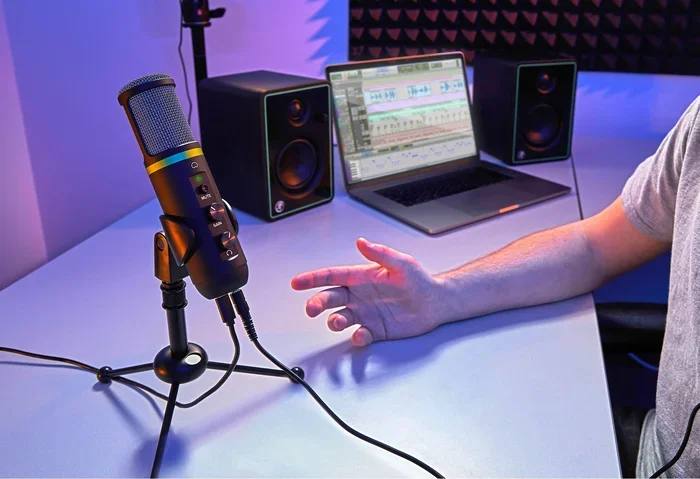
USB microphones have become a go-to choice for podcasters and musicians who want simple, reliable recording without extra gear. They offer plug-and-play convenience, decent sound quality, and affordability that makes them perfect for beginners and pros alike. This guide covers everything you need to know about whether USB mics are truly ok for your podcasting and music recording needs.
Are USB mics ok for podcasting and music recording? The short answer is yes, absolutely. But like any tool, they come with strengths and limitations that you should understand before buying. Whether you are a beginner podcaster setting up your first home studio or a musician looking for a simple way to capture ideas, USB microphones have changed the game in a big way.
In the past, recording quality audio meant investing in expensive audio interfaces, XLR cables, and standalone preamps. Today, a USB microphone lets you skip all of that and plug directly into your laptop or desktop computer. The result is a recording experience that is faster, simpler, and more accessible than ever before.
This article will walk you through everything you need to know. We will cover how USB mics work, their advantages and disadvantages, the best models available, and practical tips for getting the best sound. By the end, you will have a clear answer to whether a USB mic is the right choice for your podcasting or music recording goals.
Key Takeaways
- USB mics are convenient: They connect directly to your computer with no extra equipment needed.
- Sound quality has improved: Modern USB mics rival many traditional studio setups for casual and mid-level recording.
- They are budget-friendly: You can get a solid USB mic for under $100 without sacrificing much quality.
- Limitations exist for professional use: Advanced musicians and studios may still need XLR setups with audio interfaces.
- Your recording environment matters: Even the best USB mic won’t sound good in a noisy, untreated room.
- They work for telehealth too: USB mics are increasingly used in medical settings for clear audio communication.
📑 Table of Contents
- What Is A USB Microphone And How Does It Work
- Are Usb Mics Ok For Podcasting
- Are Usb Mics Ok For Music Recording
- Pros And Cons Of USB Microphones
- USB Mics Vs XLR Mics: Which Should You Choose
- Common Mistakes People Make With USB Mics
- Best USB Mics For Podcasting And Music Recording In 2024
- Expert Insights On USB Mic Quality
- Conclusion: Are Usb Mics Ok
What Is A USB Microphone And How Does It Work
A USB microphone is a mic that connects to your computer or laptop using a standard USB cable. Inside the mic, there is a built-in audio converter called an analog-to-digital converter, or ADC. This converts your voice or instrument sound into digital data that your computer can record directly.
Traditional microphones, like XLR microphones, send an analog signal that needs an external audio interface or mixer to convert it. USB mics handle this conversion internally. That means fewer cables, fewer devices, and less setup time. For many people, this simplicity is exactly what they need.
The Basics Of Plug And Play Recording
One of the biggest selling points of a USB mic is the plug-and-play experience. You plug the mic into your computer, select it as your input device, and you are ready to record. There is no driver installation on most modern systems, and no complicated configuration required.
This ease of use makes USB mics ideal for people who are just getting started with podcasting or music production. You do not need to understand concepts like gain staging or phantom power right out of the box. The mic handles the technical side so you can focus on creating content.
Are Usb Mics Ok For Podcasting
Podcasting is one of the fastest-growing content creation fields, and USB mics have become the standard for many successful shows. The question is not really whether USB mics are ok for podcasting, but rather which USB mic is best for your specific podcasting needs.
Most popular podcast shows, including many that air on major networks, use USB microphones for their recording. The convenience factor alone makes them a top choice. You can record a full episode from your laptop at a coffee shop, a hotel room, or your home office without hauling around heavy equipment.
Sound Quality For Voice Recording
Modern USB mics deliver excellent sound quality for spoken word content. Many models feature a cardioid pickup pattern, which means they capture sound primarily from the front and reject noise from the sides and back. This is perfect for podcasting because it minimizes background sounds like fans, traffic, or room echoes.
The sound quality of a USB mic for podcasting depends on several factors. The microphone capsule, the built-in preamp, and the digital conversion all play a role. Higher-end USB mics use better components that produce cleaner audio with less self-noise. But even budget-friendly options sound surprisingly good for voice recording.
Multiple Podcaster Setups
If you record a podcast with multiple hosts, you have a few options. Some USB mics come with mixers built in, like the Zoom PodTrak P4, which lets you connect several microphones and adjust levels independently. Other podcasters use a USB hub to connect multiple USB mics to one computer.
Keep in mind that most computers only recognize one USB audio device at a time as the default input. You may need software like Audacity or Riverside.fm to manage multiple USB mics on the same track. This is a small limitation, but it is manageable with the right setup.
Are Usb Mics Ok For Music Recording
Music recording is a different beast than podcasting. Instruments, vocals, and acoustic sounds demand a wider frequency response and higher audio resolution. So the question becomes: are USB mics ok for music recording, or do you need professional-grade gear?
The answer depends on what kind of music you are recording and what level of quality you expect. For demo recordings, home studio projects, and singer-songwriter setups, USB mics work wonderfully. For commercial releases and professional studio work, there are some limitations to consider.
Recording Vocals With A USB Mic
Recording vocals with a USB mic is one of the most common uses for these devices. Many condenser microphones are available in USB versions, and they capture vocal detail beautifully. The built-in preamp and converter handle the job well enough for most home recording situations.
To get the best vocal recordings, place your USB mic about six to eight inches from your mouth. Use a pop filter to reduce plosive sounds like “p” and “b” that can cause harsh bursts in your recording. A mic stand or shock mount also helps reduce vibrations and handling noise.
Recording Instruments
USB mics can also be used to record instruments like acoustic guitars, pianos, and drums. However, they have some limitations when it comes to loud sound sources. Most USB mics have a fixed sensitivity level that can clip or distort when exposed to very loud sounds.
For quiet to moderate instruments, a USB mic works great. For loud instruments like electric guitar amps or drum kits, you may run into issues with volume handling. In these cases, an XLR mic paired with an audio interface gives you more control over input levels.
Sample Rate And Bit Depth Considerations
When recording music, two technical specs matter a lot: sample rate and bit depth. Sample rate determines how many times per second the audio is captured, and bit depth determines the dynamic range of the recording.
Most USB mics support a sample rate of 44.1 kHz or 48 kHz and a bit depth of 16-bit or 24-bit. For podcasting, 44.1 kHz and 16-bit is more than enough. For music recording, 48 kHz and 24-bit gives you more headroom and a cleaner recording. Check these specs before buying a USB mic for music use.
Pros And Cons Of USB Microphones
Every recording tool has trade-offs. Understanding the pros and cons of USB mics helps you make an informed decision. Let us break down the key advantages and disadvantages.
Advantages Of USB Mics
- Simplicity: Plug in and start recording immediately. No extra gear or technical knowledge required.
- Affordability: Quality USB mics are available for $50 to $200, making them accessible to everyone.
- Portability: Most USB mics are lightweight and easy to carry. You can record anywhere with just a laptop.
- No audio interface needed: This saves money and desk space, especially for beginners.
- Low latency: Direct USB connection means minimal delay between speaking and hearing playback.
- Wide compatibility: USB mics work with Windows, Mac, Chromebooks, and even some tablets and smartphones.
Disadvantages Of USB Mics
- Limited upgrade path: You cannot swap out the preamp or converter on a USB mic like you can with an XLR setup.
- One mic per computer: Most systems only recognize one USB audio device at a time without extra software.
- Less control: You have fewer options for adjusting gain, EQ, and compression compared to a full audio interface setup.
- Build quality varies: Some budget USB mics use cheaper components that produce more self-noise or lower fidelity.
- Not ideal for live performance: USB mics are designed for studio or home use, not live stage setups.
Quick Tips For Getting The Best Sound From Your USB Mic
- Record in a quiet room with soft surfaces like blankets or foam panels to reduce echo.
- Keep the mic at mouth level and use a boom arm or stand for stability.
- Speak consistently at the same distance from the mic for even volume levels.
- Use a pop filter or windscreen to reduce harsh consonant sounds.
- Check your sample rate and bit depth settings in your recording software before you start.
- Monitor your audio with studio monitors or headphones to catch issues in real time.
USB Mics Vs XLR Mics: Which Should You Choose
Choosing between a USB mic and an XLR mic is one of the most common decisions new podcasters and musicians face. Both options have their place, and the right choice depends on your goals, budget, and how serious you are about audio quality.
USB mics are all-in-one devices that connect directly to your computer. XLR mics require an external audio interface or mixer to work. This fundamental difference shapes the entire recording experience.
| Feature | USB Mic | XLR Mic |
|---|---|---|
| Setup | Plug and play | Requires audio interface |
| Cost | Lower upfront cost | Higher total cost with interface |
| Sound Quality | Good to excellent | Professional grade |
| Upgrade Options | Limited | Highly flexible |
| Portability | Very portable | Less portable (more gear) |
| Best For | Beginners, podcasters, home studios | Professional studios, live sound |
If you are just starting out or mainly recording voice content, a USB mic is the clear winner. If you plan to build a professional studio or need maximum flexibility, an XLR setup is the better long-term investment. Many experienced creators start with a USB mic and eventually transition to XLR as their needs grow.
Common Mistakes People Make With USB Mics
Even though USB mics are simple to use, many people make avoidable mistakes that hurt their recording quality. Being aware of these pitfalls helps you get the best results from your gear.
Recording In A Noisy Room
The most common mistake is recording in an untreated room with lots of background noise. A USB mic picks up everything, including air conditioning hum, computer fan noise, and outside sounds. Before you record, turn off unnecessary appliances, close windows, and choose a quiet space.
Interestingly, computers play a role in many environments where USB mics are used. For instance, in medical settings, computers are used in medicine for telehealth consultations, and clear audio from a USB mic can make a big difference in patient communication. The same principles of quiet recording apply whether you are a podcaster or a medical professional.
Ignoring Mic Placement
Where you place your mic has a huge impact on sound quality. Putting the mic too far away causes a thin, echoey sound. Placing it too close creates a boomy, muddy tone. Aim for about six to eight inches from your mouth, slightly off-axis to reduce plosives.
Skipping Software Updates
Some USB mics come with companion software that controls gain, EQ, and effects. Keeping this software updated ensures the best performance and compatibility with your operating system. Outdated drivers can cause audio glitches, latency issues, or even prevent the mic from being recognized.
Not Checking Your Computer’s USB Port
Not all USB ports are created equal. USB 2.0 ports may introduce more latency or noise compared to USB 3.0 ports. For the best results, plug your USB mic directly into your computer rather than through a hub. Also, make sure your connection is secure to avoid audio dropouts.
Overlooking The Motherboard Connection
When you plug a USB mic into your computer, the connection goes through the motherboard. The quality of the motherboard’s USB controller can affect your audio performance. If you experience static or dropouts, it may be related to how the 5 components that are found on the motherboard handle data transfer. Using a dedicated USB sound card or a higher-quality motherboard can help resolve these issues.
Best USB Mics For Podcasting And Music Recording In 2024
The market for USB microphones has exploded in recent years. There are now excellent options at nearly every price point. Here are some of the best choices for podcasters and musicians in 2024.
Budget-Friendly Options Under $100
- Fifine K669B: A great entry-level condenser mic with surprisingly warm sound. Perfect for beginners who want to test the waters without spending much.
- Samson Q2U: A versatile dynamic mic that works as both USB and XLR. This gives you room to grow as your skills improve.
- AUDIO-TECHNICA AT2020USB-XP: A step up in quality with a cardioid pattern and low self-noise. Ideal for voiceover and podcasting.
Mid-Range Options $100 To $200
- Blue Yeti: One of the most popular USB mics on the market. It offers multiple pickup patterns and a rich, full-bodied sound.
- Rode NT-USB Mini: Compact, clean, and versatile. Great for both podcasting and music recording with excellent build quality.
- Elgato Wave:3: Features built-in clipguard and a software mixer that makes recording effortless for beginners.
Premium Options Over $200
- Shure MV7: A hybrid USB/XLR mic that delivers broadcast-quality sound. It is a favorite among professional podcasters.
- Rode NT-USB+: The latest from Rode with a built-in touchscreen mixer and studio-grade sound quality.
- Audio-Technica AT2020USB+: A professional condenser USB mic with exceptional clarity and low noise floor.
When choosing a mic, consider your primary use case. If you mainly podcast, a dynamic or large-diaphragm condenser USB mic works well. If you record music, look for a mic with a wider frequency response and 24-bit support for maximum detail.
Expert Insights On USB Mic Quality
Audio engineers and professional podcasters generally agree that USB mics have reached a level of quality that is more than sufficient for most use cases. The built-in converters in modern USB mics are remarkably good, especially in the mid-to-high price ranges.
However, professionals also note that USB mics limit your ability to customize the signal chain. With an XLR setup, you can choose your preamp, your converter, your compressor, and your EQ chain independently. A USB mic bundles all of that into one fixed configuration. For many creators, this trade-off is more than acceptable.
One thing experts emphasize is the importance of the recording environment. No microphone, USB or XLR, can fix a bad room. Investing in basic acoustic treatment like foam panels, blankets, or a reflection filter will do more for your sound quality than upgrading to an expensive mic.
For those who work in specialized fields like healthcare, USB mics have become a practical tool. Clear audio is essential for remote consultations, and USB mics provide that reliability. As computers are used in medicine more frequently for patient communication, the role of quality USB microphones continues to grow.
Conclusion: Are Usb Mics Ok
So, are USB mics ok for podcasting and music recording? The answer is a resounding yes. USB microphones offer an unbeatable combination of simplicity, affordability, and solid sound quality that makes them perfect for a wide range of creators.
Whether you are starting your first podcast, recording demos at home, or setting up a telehealth communication station, a USB mic gets the job done. They eliminate the complexity of external audio interfaces and let you focus on what really matters: creating great content.
That said, if you are a professional musician or plan to scale your production to a commercial level, you may eventually want to invest in an XLR setup with a dedicated audio interface. But for the vast majority of podcasters, content creators, and home musicians, a USB microphone is more than ok. It is a smart, practical choice that delivers real results.
Start with a solid USB mic, focus on your recording environment, and keep learning. The best gear in the world is only as good as the person using it. With the right USB mic and a little practice, you can produce audio that sounds professional and connects with your audience.
Frequently Asked Questions
Can I use a USB mic for live streaming?
Yes, USB mics work great for live streaming on platforms like Twitch and YouTube. They connect directly to your computer and require no extra setup. Just make sure your streaming software recognizes the mic as your input device.
Do USB mics need special drivers?
Most modern USB mics are plug-and-play and do not require special drivers. However, some models come with companion software that offers additional controls like EQ and gain adjustment. Always check the manufacturer’s website for the latest drivers if you experience any issues.
Can I use a USB mic with a tablet or smartphone?
Yes, many USB mics work with tablets and smartphones that support USB OTG (On-The-Go). You may need an adapter, such as a USB-C to USB-A cable or a Lightning to USB adapter. Check your device’s compatibility before purchasing.
Is a USB mic good enough for professional music production?
For home studios and demo recordings, USB mics are more than sufficient. However, for commercial releases and professional studio work, many engineers prefer XLR setups for their greater flexibility and upgrade options. The answer depends on your specific needs and goals.
How long do USB mics last?
A quality USB mic can last for many years with proper care. Keep it in a protective case when not in use, avoid dropping it, and clean the capsule regularly. The electronic components may eventually degrade, but the mechanical parts often last a very long time.
Can I record a full band with USB mics?
Recording a full band with USB mics alone is challenging because most computers only recognize one USB audio device at a time. For multi-track recording, you would need either multiple USB audio interfaces or software that can manage multiple USB devices simultaneously.