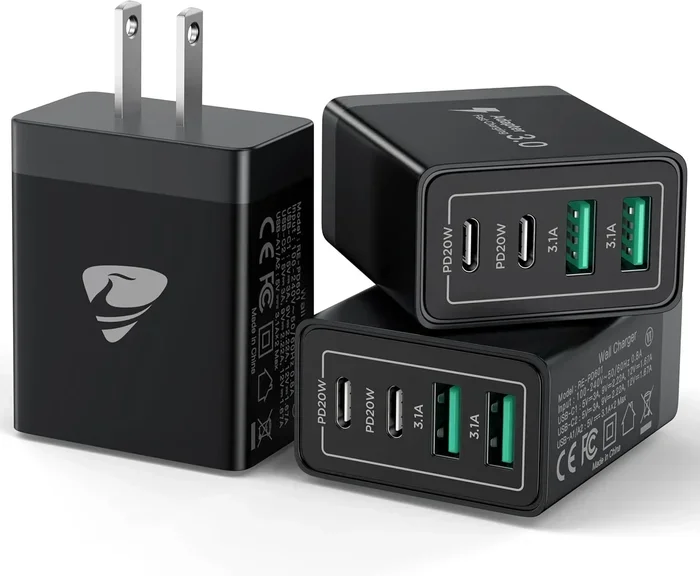
Can I Charge My Iphone With Usb C Charger Right Now
Yes, you can charge your iPhone with a USB C charger, and it is one of the easiest upgrades you can make. Starting with the iPhone 15 lineup, Apple made the switch to USB-C charging for good. If you own an older iPhone, a USB-C to Lightning cable makes it work too. This guide covers everything you need to know about charging your iPhone with USB-C safely and efficiently.
Key Takeaways
- USB-C works with newer iPhones: iPhone 15 and 16 models use USB-C natively for charging and data transfer.
- Older iPhones need a special cable: You can use a USB-C to Lightning cable with iPhone 14 and earlier models.
- Fast charging is possible: A USB-C Power Delivery adapter delivers faster charging speeds than the old Lightning setup.
- One charger fits all devices: USB-C lets you use the same charger for your iPhone, iPad, and laptop.
- Avoid cheap knockoff cables: Cheap USB-C cables can damage your battery or charge slowly.
- MagSafe still works with USB-C: Wireless charging remains compatible with USB-C iPhones.
- Check your adapter wattage: A 20W or higher adapter gives the best results for fast charging.
📑 Table of Contents
Can You Charge an iPhone With a USB-C Charger Right Now?
The short answer is yes. You can charge your iPhone with a USB-C charger, and you probably already have one lying around. Whether you just bought the latest iPhone or you are still using an older model, USB-C charging is here to stay.
Apple made the big switch to USB-C starting with the iPhone 15 in 2023. This change came after years of using the Lightning connector. Now, iPhones use the same USB-C port that you find on Android phones, MacBooks, and iPads.
If you are wondering whether your current setup works, the answer is almost certainly yes. You just need the right cable or adapter. This article walks you through every detail so you can charge with confidence.
USB-C charging is not just a trend. It is faster, more versatile, and more universal than the old Lightning cable. Let us break down exactly how it works and what you need to know.
Why the Switch to USB-C Matters
Apple used the Lightning port for over a decade. But the industry moved toward USB-C as the standard. The European Union pushed for this change to reduce e-waste and make chargers more interchangeable.
For you as a consumer, this means fewer cables to juggle. You can use one USB-C charger for your phone, tablet, and laptop. It also means better charging speeds and improved data transfer rates compared to Lightning.
Which iPhones Support USB-C Charging?
Not every iPhone uses USB-C yet. Apple introduced the port gradually. Here is a quick breakdown of which models support USB-C charging natively.
iPhone Models That Use USB-C Natively
- iPhone 15 (2023)
- iPhone 15 Plus (2023)
- iPhone 15 Pro (2023)
- iPhone 15 Pro Max (2023)
- iPhone 16 (2024)
- iPhone 16 Plus (2024)
- iPhone 16 Pro (2024)
- iPhone 16 Pro Max (2024)
All of these phones come with a USB-C port built in. You can plug any USB-C cable directly into them and start charging right away. No adapters needed.
Older iPhones That Need an Adapter
If you own an iPhone 14 or any model before it, your phone still uses the Lightning connector. But you can still use a USB-C charger with these older models. You just need a USB-C to Lightning cable.
Apple sells this cable officially, and many third-party brands make great ones too. Just make sure the cable is MFi certified, which means Apple has approved it for safe use.
| iPhone Model | Port Type | Cable Needed |
|---|---|---|
| iPhone 15 and newer | USB-C | USB-C cable (included) |
| iPhone 14 and older | Lightning | USB-C to Lightning cable |
What You Need to Start Charging With USB-C
Getting started with USB-C iPhone charging is simple. You need just a few things, and most people already own them.
Step 1: Get the Right Cable
If you have a USB-C iPhone, you need a standard USB-C to USB-C cable. These cables come with newer iPhones in the box. If your iPhone has a Lightning port, you need a USB-C to Lightning cable.
Look for cables that are MFi certified. This certification guarantees the cable works safely with your iPhone. Cheap, uncertified cables can cause slow charging or even damage your battery over time.
Step 2: Pick a Power Adapter
You can plug your USB-C cable into any USB-C power adapter. For the best results, choose one that supports USB Power Delivery, also known as USB PD. This technology adjusts the power output to match what your iPhone needs.
Apple recommends a 20W adapter or higher for fast charging. A 20W USB-C charger can charge your iPhone from zero to 50 percent in about 30 minutes. Lower wattage adapters work too, but they charge more slowly.
Step 3: Plug and Charge
That is it. Plug the cable into your iPhone, connect the other end to the adapter, and plug the adapter into a wall outlet. Your phone starts charging immediately. You can also plug the cable directly into a laptop USB-C port or a portable power bank with USB-C output.
How USB-C Charging Compares to Lightning Charging
It is natural to wonder how USB-C charging stacks up against the old Lightning charging method. The differences are real and noticeable.
Charging Speed
USB-C with Power Delivery charges faster than Lightning. Apple’s own tests show that a 20W USB-C adapter can charge an iPhone much quicker than the old 5W Lightning adapter that came in older iPhone boxes.
Here is a simple comparison of charging speeds:
- USB-C with 20W adapter: 0 to 50 percent in about 30 minutes
- Lightning with 5W adapter: 0 to 50 percent in about 2 hours
- USB-C with 30W adapter: Even faster, though iPhones cap at around 20W-27W depending on the model
The speed difference is huge. If you have ever been frustrated waiting for your phone to charge, USB-C fast charging will feel like a game changer.
Versatility and Compatibility
One of the biggest advantages of USB-C is that it works across many devices. You can use the same charger and cable for your iPhone, iPad, MacBook, AirPods case, and more. This cuts down on cable clutter and saves money.
Lightning cables only work with Apple devices. USB-C cables work with almost everything. That universality is a big reason why the industry made the switch.
Data Transfer Speeds
With iPhone 15 Pro and newer models, USB-C supports Thunderbolt speeds. This means you can transfer files to a computer much faster than with Lightning. You can back up your phone, move photos, and sync data in a fraction of the time.
Even standard USB-C 3.0 transfer speeds are significantly faster than what Lightning offered. If you move lots of files between your phone and computer, this is a real benefit.
Durability
USB-C connectors are built to last longer than Lightning connectors. The design is more robust, with a stronger locking mechanism. You will likely find that your USB-C cables survive longer before needing replacement.
Common Mistakes When Charging iPhone With USB-C
Even though USB-C charging is simple, some people make mistakes that slow things down or hurt their battery. Here are the most common ones to avoid.
Using Cheap, Uncertified Cables
Not all USB-C cables are created equal. Cheap cables from unknown brands might not deliver the right amount of power. They can also cause overheating or slow charging. Always look for MFi certification or buy from trusted brands like Anker, Belkin, or Apple.
Ignoring Adapter Wattage
Plugging your iPhone into a 5W adapter over USB-C will charge it slowly, even though you are using a modern port. To get fast charging, you need at least a 20W USB-C adapter. Check the wattage on your adapter before you buy one.
Charging in Extreme Temperatures
Your iPhone charges best between 62 and 72 degrees Fahrenheit. If you try to charge in very hot or very cold conditions, the phone may slow down or stop charging to protect the battery. This applies to both USB-C and Lightning charging.
Using Damaged Cables
A frayed or bent USB-C cable is a safety risk. It can cause inconsistent charging, spark, or damage the charging port. Inspect your cables regularly and replace them if you see any wear.
Expert Tips for the Best USB-C Charging Experience
Want to get the most out of your USB-C iPhone charging? Here are some tips from people who know their stuff.
Enable Optimized Battery Charging
Your iPhone has a feature called Optimized Battery Charging that learns your daily routine. It slows down charging when your phone reaches 80 percent and finishes charging right before you wake up. This reduces battery wear over time. You can find this in Settings, under Battery, then Battery Health.
Invest in a GaN Charger
Gallium Nitride (GaN) chargers are smaller and more efficient than traditional adapters. A GaN USB-C charger delivers high wattage in a compact size. They are perfect for travel and everyday use. Brands like Anker and Belkin make excellent GaN options.
Use a Quality Power Bank
If you are often on the go, a USB-C power bank is a lifesaver. Look for one that supports USB Power Delivery and has at least 10,000 mAh of capacity. This will give you multiple full charges for your iPhone on a single charge of the bank.
Keep Your Software Updated
Apple regularly releases iOS updates that improve battery management and charging efficiency. Keeping your iPhone updated ensures you get the best performance from your USB-C charging setup. These updates often include bug fixes related to charging behavior.
Clean Your Charging Port
Dust and lint can build up in the USB-C port over time. This can cause a loose connection or slow charging. Gently clean the port with a dry, soft brush or compressed air. Never use metal objects, as they can damage the internal pins.
Conclusion
Charging your iPhone with a USB-C charger is simple, fast, and future-proof. Whether you have the latest iPhone 16 or an older model, the USB-C ecosystem has you covered. You get faster charging speeds, better compatibility, and one charger that works across all your devices.
Make sure you use the right cable and a quality adapter. Avoid cheap accessories and take care of your charging equipment. Follow the tips in this guide, and your iPhone battery will stay healthy and charged up.
The shift to USB-C was a smart move by Apple, and it benefits everyone. So go ahead, grab your USB-C charger, and start charging with confidence. Your iPhone was designed to work with it, and you will notice the difference right away.
Frequently Asked Questions
Can I use any USB-C charger to charge my iPhone?
Yes, you can use most USB-C chargers with your iPhone. However, for the best results and fastest charging speeds, choose a charger that supports USB Power Delivery with at least 20 watts. Using a very low-wattage charger will work, but it will charge your phone much more slowly.
Do I need a special cable to charge an iPhone 14 with USB-C?
Yes, if you have an iPhone 14 or any older model, you need a USB-C to Lightning cable. The iPhone 14 still uses the Lightning port, so a standard USB-C to USB-C cable will not work. Apple and many trusted brands sell these cables officially.
Is USB-C charging faster than Lightning charging?
Yes, USB-C charging is significantly faster, especially when paired with a 20-watt or higher power adapter. You can charge your iPhone from zero to 50 percent in about 30 minutes with USB-C, which is much quicker than the old Lightning method with a standard 5-watt adapter.
Will using a USB-C charger damage my iPhone battery?
No, using a proper USB-C charger will not damage your iPhone battery. Apple designs iPhones to handle USB-C Power Delivery safely. To keep your battery healthy, use certified cables and adapters, and consider enabling Optimized Battery Charging in your settings.
Can I charge my iPhone with a USB-C power bank?
Absolutely. A USB-C power bank with Power Delivery support is a great way to charge your iPhone on the go. Look for a power bank with at least 10,000 mAh capacity for multiple full charges. This works with both USB-C iPhones and older models when paired with the right cable.
Do all iPhone 15 models support the same USB-C charging speed?
Not exactly. The iPhone 15 and 15 Plus charge up to about 20 watts with USB-C. The iPhone 15 Pro and Pro Max can charge up to 27 watts because they support faster USB-C Power Delivery. So the Pro models get a slight charging speed advantage over the standard models.