Do Ethernet To Usb Adaptors Really Work For Everyone
Ethernet To USB Adaptors do work and can transform any laptop or desktop into a wired-connected device in minutes. These small adapters plug into a USB port and deliver reliable internet through an Ethernet cable. They are affordable, easy to set up, and ideal for users who need faster speeds than Wi-Fi can offer.
Have you ever bought a laptop and realized it has no Ethernet port? You are not alone. Many modern computers are going wireless-only. But sometimes Wi-Fi just is not enough. That is where Ethernet To USB Adaptors come into the picture. These small devices promise to bring back the wired connection you miss. But do they really work for everyone?
The short answer is yes. Ethernet To USB Adaptors work well for most people. They connect your computer to a router using a simple cable. This gives you a direct path to the internet. No more dropped signals. No more buffering during movie night. But the full story is a bit more detailed. Let us walk through everything you need to know.
In this guide, we will cover how these adapters work, who benefits most, and what speeds you can expect. We will also look at setup tips and common problems. By the end, you will know if an Ethernet To USB Adaptor is the right choice for you.
Key Takeaways
- Ethernet To USB Adaptors are reliable: They provide stable wired connections for desktops and laptops.
- They boost internet speed: Wired connections often outperform Wi-Fi for streaming and gaming.
- Setup is simple: Most adapters plug and play with no complex driver installation needed.
- Compatibility matters: Check your USB port type and operating system before purchasing.
- USB 3.0 adapters deliver the best speeds: Older USB 2.0 versions limit network performance.
- They solve connectivity problems: Great for rental properties or areas with weak Wi-Fi signals.
📑 Table of Contents
What Are Ethernet To USB Adaptors?
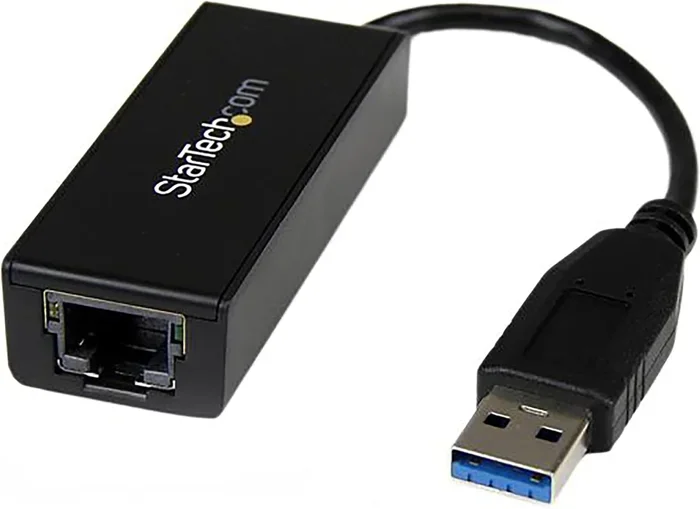
An Ethernet To USB Adaptor is a small device that bridges your computer and a wired internet connection. It has a USB plug on one end and an Ethernet port on the other. You plug the USB side into your laptop or desktop. Then you connect an Ethernet cable from the adaptor to your router or modem.
These adapters come in different shapes and sizes. Some are tiny thumb-sized dongles. Others are larger USB docks with extra ports. The most common types include:
- USB-A to Ethernet adapters: These fit into the standard rectangular USB ports found on older computers.
- USB-C to Ethernet adapters: These work with newer laptops and tablets that only have USB-C ports.
- USB 3.0 Ethernet adapters: These offer the fastest speeds and best performance for heavy internet use.
- USB 2.0 Ethernet adapters: These are budget-friendly but slower than USB 3.0 options.
Most Ethernet To USB Adaptors cost between $10 and $30. You can find them at any electronics store or online marketplace. They are one of the cheapest ways to add a wired connection to any device.
Why Do People Need Them?
Many newer laptops and ultrabooks have dropped Ethernet ports entirely. Apple removed them from MacBooks years ago. Some Windows laptops followed the same trend. If you live in a rental apartment or a dorm room, running a long Ethernet cable across the floor might not be practical. An adaptor solves this problem easily.
People also use USB to Ethernet adapters when their Wi-Fi signal is weak. Walls, distance, and interference can all slow down wireless speeds. A wired connection bypasses all of that. The signal goes straight from the router to your computer. This means fewer disconnections and more reliable performance.
How Do Ethernet To USB Adaptors Work?
The technology behind these adapters is simpler than it sounds. When you plug the adaptor into a USB port, your computer recognizes it as a network adapter. The operating system installs a driver, which is a small piece of software that tells your computer how to communicate with the device.
Once the driver is active, your computer can send and receive data through the Ethernet cable. The adaptor converts the USB signal into an Ethernet signal. This process happens in milliseconds. You barely notice any delay at all.
The Role of Drivers
Drivers are essential for any Ethernet To USB Adaptor to function. Most modern operating systems like Windows 10, Windows 11, and macOS already include drivers for popular adapters. This means you can just plug it in and go. No downloads needed.
However, some adapters require manual driver installation. This is more common with older or lesser-known brands. If your computer does not recognize the adaptor right away, check the manufacturer’s website. They usually have a download page with the latest driver updates.
Wired vs Wireless: A Quick Comparison
Many people wonder if a wired connection through a USB Ethernet dongle is really better than Wi-Fi. Here is a quick comparison:
- Speed: Wired connections are generally faster and more consistent than wireless. A USB 3.0 Ethernet adaptor can handle gigabit speeds easily.
- Stability: Wi-Fi signals fluctuate based on distance and obstacles. Ethernet cables provide a constant, uninterrupted connection.
- Latency: Wired connections have lower latency, which matters for online gaming and video calls.
- Security: A physical cable is harder to intercept than a wireless signal traveling through the air.
For most users, a wired connection through an Ethernet To USB Adaptor delivers a noticeably better experience than relying on Wi-Fi alone.
Who Benefits Most From Ethernet To USB Adaptors?
Not everyone needs a wired internet connection. But certain groups of people benefit greatly from using a USB to Ethernet adapter. Let us look at who gets the most value from these devices.
Home Office Workers
If you work from home, a stable internet connection is non-negotiable. Video conferences, file uploads, and cloud-based tools all demand reliable bandwidth. Wi-Fi can be unpredictable during important meetings. A network adapter plugged into your work laptop ensures you stay connected no matter what.
Many remote workers report fewer dropped calls and smoother screen sharing after switching to a wired setup. The small cost of an adaptor pays for itself quickly in lost productivity avoided.
Gamers
Online gaming requires low latency and steady speeds. Wi-Fi can introduce lag spikes that cost you a match or a ranking. An Ethernet To USB Adaptor gives gamers a direct line to their router. This reduces ping times and makes gameplay feel much more responsive.
Even casual gamers notice the difference. Games load faster, downloads complete quicker, and voice chat stays clear without interruptions.
Students in Dorm Rooms
Dorm rooms often have poor Wi-Fi coverage. Thick walls and distance from the router weaken the signal. A USB Ethernet dongle lets students plug directly into the wall jack in their room. This provides the fastest possible connection for studying, streaming lectures, and downloading large files.
Streaming Enthusiasts
Streaming high-quality video takes a lot of bandwidth. If you watch 4K content or stream your own gameplay, a wired connection handles the load better. An Ethernet To USB Adaptor ensures your stream stays smooth without buffering or pixelation.
Speed And Performance: What To Expect
The speed you get from an Ethernet To USB Adaptor depends on several factors. Not all adapters are created equal. Understanding these factors helps you set realistic expectations.
USB Port Version Matters
The USB port you use affects the maximum speed your adapter can reach. Here is a quick breakdown:
- USB 2.0: This older standard maxes out at about 480 Mbps. It is fine for basic browsing and email but struggles with heavy streaming or large downloads.
- USB 3.0: This standard supports up to 5 Gbps. Most USB 3.0 Ethernet adapters can handle gigabit internet speeds with ease.
- USB 3.1 and USB 3.2: These newer versions offer even higher bandwidth. They future-proof your setup for faster internet plans.
If your computer only has USB 2.0 ports, you will notice a bottleneck. The adaptor will work, but it cannot reach its full potential. For the best performance, always use a USB 3.0 Ethernet adapter or newer.
Ethernet Cable Quality
The cable you use also plays a role. A Cat5e cable supports speeds up to 1 Gbps. A Cat6 cable handles up to 10 Gbps over shorter distances. Using a high-quality Ethernet cable with your adaptor ensures you get the most out of your connection.
Real-World Speed Tests
In real-world testing, most Ethernet To USB Adaptors deliver speeds within 10% of a built-in Ethernet port. For everyday use, this difference is barely noticeable. You will get smooth streaming, fast downloads, and stable video calls.
Only in extreme scenarios, such as transferring files over a local network at full gigabit speed, might you see a slight gap. For 99% of users, a USB network adapter performs just as well as a native port.
Quick Tips for Maximum Speed
- Always use a USB 3.0 port when available.
- Keep your Ethernet cable short and free from damage.
- Update your adapter drivers regularly.
- Close background applications that use bandwidth during important tasks.
- Place your router close to your computer for the strongest signal path.
Compatibility And Setup Made Simple
One of the biggest advantages of Ethernet To USB Adaptors is how easy they are to set up. Most adapters follow a simple plug-and-play process. Let us walk through the steps.
Step-by-Step Setup
- Plug the adaptor into your USB port. Wait a few seconds for your computer to recognize it.
- Connect an Ethernet cable from the adaptor to your router or modem.
- Wait for the connection to establish. Your computer should automatically detect the wired network.
- Open your web browser and test the connection by visiting any website.
That is it. No software CDs, no complicated configurations. Most USB Ethernet dongles work right out of the box.
Operating System Compatibility
Before buying an adaptor, check its compatibility with your operating system. Most adapters support Windows 10, Windows 11, macOS, and even some Linux distributions. Here is a quick guide:
- Windows: Nearly all Ethernet To USB Adaptors work with Windows 10 and 11. Drivers are usually built into the operating system.
- macOS: Apple computers support most popular adapters, but you may need to download a driver from the manufacturer’s website.
- Chrome OS: Chromebooks generally support USB Ethernet adapters, but performance can vary by model.
- Linux: Many adapters work on Linux, but you may need to install additional drivers manually.
Checking Your USB Port Type
Before purchasing an adaptor, look at the USB ports on your computer. If you see a standard rectangular port, you need a USB-A adapter. If you see a smaller oval port, you need a USB-C adapter. Using the wrong type means you will need an additional cable or a different adaptor entirely.
Some adapters come with both USB-A and USB-C cables in the box. These are great for users who are not sure which port type they have. They offer flexibility and save you from buying the wrong product.
Common Problems And How To Fix Them
While Ethernet To USB Adaptors are reliable, you may run into occasional issues. Most problems have simple solutions. Here are the most common ones and how to fix them.
Adapter Not Recognized by Computer
If your computer does not detect the adaptor, try these steps:
- Unplug the adaptor and plug it into a different USB port.
- Restart your computer and let it re-detect the device.
- Check Device Manager on Windows to see if there is a driver error.
- Visit the manufacturer’s website and download the latest driver.
Slow Speeds
If your connection feels slow, the problem might not be the adaptor. Try these troubleshooting steps:
- Test your internet speed with and without the adaptor to compare.
- Switch from a USB 2.0 port to a USB 3.0 port.
- Replace your Ethernet cable with a newer Cat5e or Cat6 cable.
- Check if other devices on the same network are using heavy bandwidth.
Intermittent Disconnections
If your connection drops randomly, the adaptor might be loose in the USB port. Try using a USB hub with a power supply to provide a more stable connection. You can also try a different adaptor if the problem persists.
Driver Issues on macOS
Mac users sometimes face driver compatibility issues. Make sure your macOS is up to date. If the problem continues, check the manufacturer’s support page for macOS-specific drivers. Popular brands like TP-Link and Netgear offer good macOS support for their USB to Ethernet adapters.
Expert Insight: When to Replace Your Adaptor
Most Ethernet To USB Adaptors last several years with normal use. However, if you notice consistent problems even after troubleshooting, it may be time for a replacement. Look for adapters with good customer reviews and a solid warranty. Spending a little extra on a quality brand saves you frustration in the long run.
Final Thoughts
Ethernet To USB Adaptors are a simple, affordable solution for anyone who needs a wired internet connection. They work reliably for home office workers, gamers, students, and streaming enthusiasts alike. The setup is straightforward, and the performance is excellent for most use cases.
While they are not magic devices that fix every internet problem, they solve the specific issue of missing Ethernet ports on modern laptops and computers. As long as you choose the right adaptor for your USB port type and operating system, you will enjoy a stable, fast, and dependable connection.
If you have been struggling with weak Wi-Fi or dropped connections, an Ethernet To USB Adaptor is one of the easiest upgrades you can make. It costs less than a meal out and delivers better performance than most people expect. Give it a try, and you might never go back to wireless-only again.
Frequently Asked Questions
Do Ethernet To USB Adaptors Work With All Computers?
Most computers support Ethernet To USB Adaptors, regardless of brand or model. Windows, macOS, and Chrome OS all have built-in support for common adapters. Just make sure your USB port type matches the adaptor you buy.
Can I Use An Ethernet To USB Adaptor For Gaming?
Yes, you can. In fact, many gamers prefer wired connections over Wi-Fi. An Ethernet To USB Adaptor reduces lag and provides a more stable connection for online gaming. A USB 3.0 adapter is best for the lowest latency.
Will An Ethernet Adaptor Slow Down My Internet Speed?
Not significantly. A quality USB 3.0 Ethernet adapter delivers speeds very close to a built-in Ethernet port. The small speed difference is usually unnoticeable for everyday tasks like browsing, streaming, and video calls.
Do I Need To Install Drivers For My Adaptor?
Most modern adapters work without driver installation. Windows 10 and 11, as well as macOS, include drivers for popular network adapters. However, some brands may require a manual driver download from their website.
Can I Use A USB Hub With An Ethernet To USB Adaptor?
Yes, you can. Using a powered USB hub can provide a more stable connection. This is especially helpful if your computer has limited USB ports or if the adaptor feels loose in the port.
Are Expensive Ethernet Adaptors Worth The Money?
Not always. Many mid-range Ethernet To USB Adaptors priced between $15 and $25 offer excellent performance. You do not need to spend a premium price for reliable speeds. Focus on USB 3.0 support and good customer reviews instead.
=== CONCLUSION ===
Ethernet To USB Adaptors really do work for the vast majority of users. They are affordable, easy to set up, and deliver a stable wired connection when Wi-Fi falls short. Whether you are working from home, gaming online, or streaming your favorite shows, a USB to Ethernet adapter can make a noticeable difference in your internet experience.
The key is choosing the right adaptor for your setup. Check your USB port type, confirm operating system compatibility, and invest in a USB 3.0 model for the best speeds. With the right Ethernet To USB Adaptor in hand, you will enjoy faster, more reliable internet in no time.