Do Big Houses Need Multiple Routers for Better Coverage
Do big houses need multiple routers? The short answer is yes, if your home has more than one floor or rooms far from your main router. Large homes often suffer from weak wireless signals, internet dead zones, and poor network coverage that a single router simply cannot fix. Adding a second router or switching to a mesh network system can transform your home network and boost Wi-Fi speed in every room.
Have you ever walked from your living room to the bedroom and watched your Wi-Fi signal drop to nothing? You are not alone. Millions of people live in homes where a single router just cannot keep up. The walls are thick. The floors are many. And the wireless signal fades faster than you can say “buffering.”
If you have been asking yourself, do big houses need multiple routers, you have come to the right place. This guide breaks down everything you need to know about Wi-Fi coverage in large homes. We will look at why one router often falls short, when to add a second one, and how mesh networks can save the day. By the end, you will know exactly what your home needs.
The truth is, do big houses need multiple routers is not a simple yes or no question. It depends on your floor plan, the number of connected devices, and the type of walls in your home. But one thing is clear: if you have dead zones and slow Wi-Fi speed in certain rooms, something needs to change.
Key Takeaways
- Big houses often need more than one router to eliminate weak spots and dead zones.
- A mesh router system is the easiest and most reliable way to extend wireless coverage across large floor plans.
- Router placement matters a lot — even the best router fails if it is hidden in a closet or basement corner.
- Using two standard routers works but requires proper setup to avoid network conflicts and slow throughput.
- Wi-Fi 6 routers handle more connected devices and offer better signal strength for large homes.
- Common mistakes like placing routers near microwaves or metal objects can weaken your wireless signal significantly.
- A quick Wi-Fi speed test can tell you exactly whether your current setup is enough for your home.
📑 Table of Contents
Why Do Big Houses Have Wi-Fi Problems?
Before we dive into solutions, let us understand the problem. A wireless router sends out a signal that travels through the air. But walls, floors, furniture, and even appliances can block or weaken that signal. In a small apartment, the signal reaches every room easily. In a big house with multiple floors, the story is very different.
The Challenge of Large Floor Plans
Think of your home network like water flowing through a hose. A single router is like a small garden hose. It works fine for a small yard. But if you have a huge lawn, that little hose simply cannot reach everywhere. Big houses with long hallways, open floor plans, and many rooms stretch the wireless signal beyond its limits.
The average consumer router covers about 1,500 to 2,000 square feet under ideal conditions. But “ideal conditions” rarely exist in real homes. Furniture blocks signals. Mirrors reflect them. And thick concrete walls absorb them completely. This is why many homeowners with houses over 2,000 square feet experience internet dead zones regularly.
How Walls and Materials Block Signals
Not all walls are created equal when it comes to signal strength. Here is a quick look at how different materials affect your wireless signal:p>
- Drywall: Minimal signal loss. Your router can easily punch through.
- Wooden partitions: Slight signal reduction. Not a big deal in most cases.
- Brick walls: Noticeable signal loss. These can cut your range in half.
- Concrete blocks: Heavy signal loss. Very hard for wireless signals to pass through.
- Metal and mirrors: Extreme signal reflection or absorption. These are the worst offenders.
If your home has a mix of these materials across multiple floors, a single router will struggle. This is one of the main reasons do big houses need multiple routers becomes a real concern for homeowners.
Do Big Houses Need Multiple Routers?
The direct answer is: in most cases, yes. If your house is large, has multiple floors, or has rooms that are far from your main router, adding another router or a mesh system can make a huge difference. But how do you know for sure? Let us look at the signs.
When One Router Is Not Enough
There are clear signs that your home network needs help. If any of these sound familiar, you probably need more than one router:
- Your Wi-Fi speed drops significantly in rooms far from the router.
- You have rooms where the wireless signal shows zero bars.
- Streaming videos buffers constantly in certain parts of the house.
- Video calls drop or freeze in rooms on the second floor.
- Your connected devices number more than 15 to 20 throughout the home.
- You notice that your network coverage is great in the office but terrible in the garage.
If you checked off more than two of these, do big houses need multiple routers is probably the right question for you to ask. A single router is simply not designed to push a strong wireless signal through multiple thick walls and floors.
Signs Your Home Needs More Than One Router
Let us get specific. Here are the most common scenarios where adding a second router or a mesh system helps:
- Multi-story homes: Signals weaken as they travel vertically. The basement and upper floor often suffer the most.
- Homes over 2,500 square feet: Beyond this size, most single routers cannot maintain strong bandwidth in every room.
- Homes with thick or concrete walls: These materials block wireless signals far more than standard drywall.
- Homes with many smart devices: Smart TVs, cameras, thermostats, and speakers all compete for network coverage, slowing everything down.
- Home offices or studios: If you work from a room far from the router, you need a strong and stable connection.
In all of these situations, adding a second router or upgrading to a mesh router system can dramatically improve your experience. The goal is simple: every room in your house should have strong Wi-Fi coverage.
Mesh Networks vs. Multiple Routers
When you search for solutions, you will come across two main options: buying a second (or third) standard router, or investing in a mesh network system. Both work, but they are very different in how they operate and how easy they are to set up.
What Is a Mesh Network?
A mesh network is a system of multiple units (called nodes or satellites) that work together to create one seamless home network. Unlike traditional routers that create a single point of signal, mesh nodes spread the wireless signal evenly across your entire home. Each node talks to the others, creating a web of network coverage that follows you from room to room.
Popular mesh systems like Google Nest Wi-Fi, Eero, and Netgear Orbi have made this technology affordable and easy to use. You plug in one node near your modem, place additional nodes around the house, and the system configures itself. Most mesh systems also come with a single network name, so your phone and laptop switch between nodes automatically without dropping the connection.
Pros and Cons of Each Approach
Here is a side-by-side look at both options to help you decide. This table compares mesh systems with adding multiple standard routers:
| Feature | Mesh Network System | Multiple Standard Routers |
|---|---|---|
| Ease of setup | Very easy, app-guided | Moderate, requires manual config |
| Seamless roaming | Yes, single network name | No, separate network names |
| Cost | Higher upfront cost | Lower if you reuse old routers |
| Wi-Fi coverage | Excellent for large homes | Good, but gaps may remain |
| Management | One app controls all nodes | Must manage each router separately |
| Scalability | Easy, add more nodes | Limited by available ports and settings |
| Signal strength | Consistent across all nodes | Varies, depends on placement |
For most homeowners asking do big houses need multiple routers, a mesh system is the better long-term solution. It is simpler, more reliable, and delivers a smoother experience. However, if you already have extra routers lying around, setting them up as wired access points can be a budget-friendly option.
Expert Insight: When to Choose Which
According to networking experts, if your home is under 3,000 square feet and has mostly drywall and standard wooden partitions, a single high-quality dual-band router might still be enough. But for homes above 3,000 square feet, or those with concrete walls and multiple floors, a mesh router system is the recommended path.
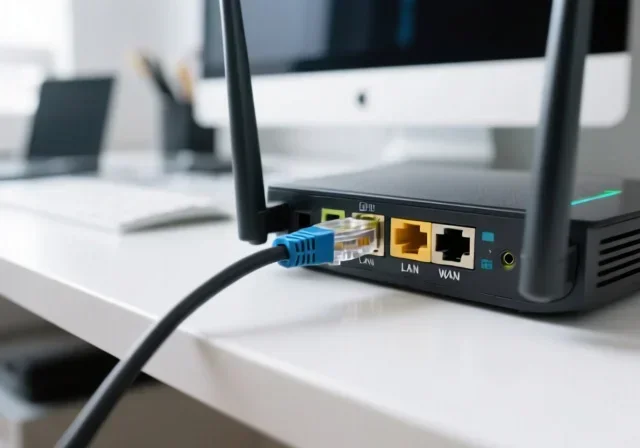
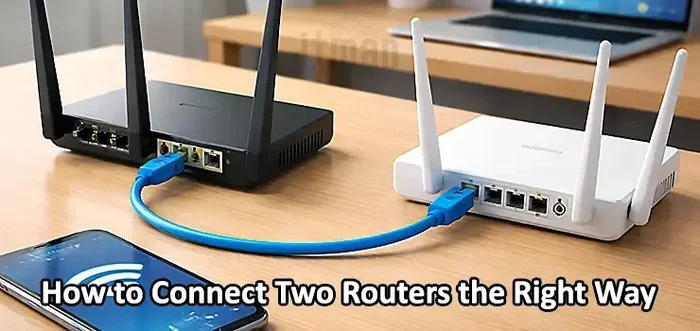
If you go the multiple-router route, you will need to set one router as the main unit and connect the second router via Ethernet cable. This is called “daisy-chaining” or using the second router as a wireless access point. It works, but it requires some basic networking knowledge. If this sounds complicated, a mesh system removes all the guesswork.
How to Set Up Multiple Routers in a Large Home
If you have decided to add a second router or set up a mesh system, the setup process matters just as much as the hardware. A poor setup can leave you with the same problems you started with.
Step-by-Step Setup Guide
Here is a simple approach to setting up multiple routers or a mesh system in a large home:
- Start with your main router: Place it in a central location on the main floor. Avoid closets, cabinets, and corners.
- Run an Ethernet cable from your modem to the main router if you have not already.
- Position the second router or mesh node halfway between the main router and the dead zone. Do not place it too far away.
- Connect the second router either wirelessly (for mesh systems) or via Ethernet cable (for standard routers).
- Run a Wi-Fi speed test in the previously weak area to confirm the signal has improved.
- Adjust placement if needed. Even moving a node or router a few feet can make a big difference.
Best Practices for Router Placement
Router placement is one of the most overlooked factors in network coverage. Here are some quick rules to follow:
- Keep routers elevated: Place them on shelves or tables, not on the floor. Signals travel downward better than upward.
- Stay away from thick walls: Do not tuck your router behind a large bookshelf or inside a cabinet.
- Avoid electronics that cause interference: Microwaves, baby monitors, and cordless phones can disrupt your wireless signal.
- Center your main router: The more central the location, the better the Wi-Fi range reaches in all directions.
- Keep routers away from metal objects: Metal shelves, filing cabinets, and appliances block wireless signals aggressively.
Following these placement tips ensures that every router and node in your home contributes to strong and consistent network coverage throughout the house.
Quick Tips for Maximizing Wi-Fi Coverage
Setting up multiple routers is only half the battle. Here are some quick tips that can squeeze more performance out of your home network:
Small Changes That Make a Big Difference
- Update your router firmware regularly. Manufacturers release updates that improve signal strength and fix bugs.
- Switch to the 5GHz band for devices that need high speed. The 2.4GHz band reaches farther but is slower.
- Reduce interference by changing your Wi-Fi channel. Most routers auto-select, but manual selection can help in dense neighborhoods.
- Use a Wi-Fi 6 router if possible. These routers handle more connected devices and deliver better throughput in crowded environments.
- Restart your router once a month. This clears the cache and refreshes the wireless signal.
- Consider a Wi-Fi extender for a single problem room. It is a cheaper alternative to buying a whole mesh system.
Quick Tips Summary
Here is a fast recap of the most impactful changes you can make today:
- Move your router to a central, elevated spot.
- Switch to Wi-Fi 6 for better device handling.
- Use a mesh system for homes over 2,500 square feet.
- Run an Ethernet backhaul for the strongest possible connection between nodes.
- Test your Wi-Fi speed in every room at least once a month.
These small steps add up fast. You do not need to overhaul your entire home network to see real improvements. Start with one or two of these tips and see how much your Wi-Fi coverage improves.
Common Mistakes to Avoid with Multiple Routers
Setting up more than one router sounds simple, but there are pitfalls that trip up many homeowners. Avoiding these mistakes saves you time, frustration, and money.
Pitfalls to Watch Out For
- Placing routers too far apart: If the second router is too far from the main router, it will struggle to receive a strong signal itself. Keep them close enough that the second router gets a solid connection.
- Using the same channel on both routers: This causes channel overlap and slows down your network coverage. Set them to different channels for best results.
- Ignoring the backhaul connection: If you are daisy-chaining routers wirelessly, the second router loses half its bandwidth. A wired Ethernet backhaul is always better.
- Forgetting to update firmware: Old firmware can cause slow Wi-Fi speed and security vulnerabilities. Check for updates regularly.
- Overloading a single router: Even with multiple routers, if too many devices connect to one, it will slow down. Distribute connected devices evenly.
By steering clear of these common mistakes, you ensure that your multi-router setup delivers the Wi-Fi coverage and signal strength you expect from a large-home solution.
Key Takeaways
- Do big houses need multiple routers: In most cases, yes. Large homes with multiple floors or rooms far from the main router benefit greatly from additional routers or a mesh system.
- Mesh networks are the easiest solution: They offer seamless roaming, simple setup, and consistent Wi-Fi coverage across the entire home.
- Router placement is critical: Central, elevated, and away from interference sources makes a huge difference in signal strength.
- Multiple standard routers work too: But they require more setup effort and may not provide the same seamless experience as a mesh system.
- Wi-Fi 6 technology improves performance for homes with many connected devices and offers better throughput overall.
- Avoid common setup mistakes like channel overlap, wireless backhaul overload, and poor router placement.
- Test your network regularly: A quick speed test in every room helps you catch weak spots before they become a problem.
Conclusion
The question of do big houses need multiple routers comes down to one simple truth: your Wi-Fi coverage should be strong in every room, on every floor. If it is not, something needs to change. Whether you choose to add a second router, set up a mesh router system, or follow better placement practices, the goal is the same — a fast, reliable wireless signal everywhere in your home.
Large homes present real challenges for wireless signals. Thick walls, multiple floors, and long distances all work against your home network. But with the right approach, these challenges are completely manageable. A mesh network system or a well-placed second router can eliminate internet dead zones and give you the Wi-Fi speed you deserve.
Start by testing your current network coverage. Walk through your home with your phone and note where the signal weakens. Then choose the solution that fits your budget and your home’s layout. Whether it is a mesh router system, a wired access point setup, or simply better router placement, you have options. Do big houses need multiple routers? Now you have the answers to make the right choice for your home.
Frequently Asked Questions
Can I use two different brand routers together in a large house?
Yes, you can, but it is more complicated. Different brands may not communicate as smoothly, and settings like IP addresses and channels need to be configured manually. A mesh system from a single brand is much easier to set up and manage.
How many routers do I need for a 3000 square foot house?
For a 3,000 square foot home, most experts recommend at least two to three nodes or routers. A mesh router system with two or three units typically handles this size home well, especially if it has multiple floors or thick walls.
Does adding a second router slow down my internet speed?
No, adding a second router does not slow down your internet speed. In fact, it usually improves Wi-Fi speed in areas that were previously weak. The key is to set it up correctly with proper channel settings and a strong backhaul connection.
What is the difference between a Wi-Fi extender and a mesh system?
A Wi-Fi extender repeats the signal from your main router but often cuts the bandwidth in half. A mesh system uses multiple nodes that work together seamlessly, providing full speed and a single network name throughout your home.
Do I need an Ethernet cable to connect multiple routers?
For the best performance, yes. A wired Ethernet connection between routers ensures maximum throughput and stable signal strength. Wireless connections work but reduce the speed the second router can deliver.
Is Wi-Fi 6 worth it for a large house?
Absolutely. Wi-Fi 6 routers handle more connected devices simultaneously, offer better range, and deliver faster Wi-Fi speed in crowded environments. For large homes with many smart devices, Wi-Fi 6 is a smart investment.