Can Asus Router Be Used As A Mesh Wi Fi System Setup
Yes, you can use an Asus router as a mesh Wi-Fi system with Asus AiMesh technology. This guide shows you how to set up your Asus router as a mesh node, turning it into a seamless whole-home network. Learn the benefits, steps, and expert tips to get started.
Can Asus Router Be Used As A Mesh system? The short answer is yes. You can transform your existing Asus router into a powerful mesh Wi-Fi network with just a few simple steps. This setup lets you extend coverage across your entire home without buying a whole new system. In this guide, you will learn exactly how to use your Asus router as a mesh node, what models support it, and the benefits you will gain. By the end, you will have a clear roadmap to create a seamless whole-home Wi-Fi experience.
So you already own an Asus router and wonder if it can handle a mesh setup. The good news is that many Asus routers support mesh functionality through their AiMesh technology. This means you can add other Asus routers as satellites to create a single, unified network. Instead of dead zones and buffering, you get smooth, continuous coverage from one end of your house to the other.
Using your Asus router as a mesh node saves money and reduces electronic waste. You do not need to toss your current gear and buy a brand-new mesh system. With the right configuration, your existing router becomes a powerful part of a mesh network. This article walks you through everything you need to know.
Key Takeaways
- Asus AiMesh makes it possible: You can turn compatible Asus routers into a mesh system without buying new hardware.
- Setup is simple: Use the Asus Router app or web interface to add your existing router as a satellite node.
- Save money: Repurposing an old Asus router as a mesh node is cheaper than purchasing a dedicated mesh kit.
- Seamless roaming: A mesh network built with Asus routers gives you smooth, uninterrupted Wi-Fi across your home.
- Check compatibility first: Not every Asus model supports AiMesh, so verify your router model before starting.
📑 Table of Contents
Can Asus Router Be Used As A Mesh System?
What Is Mesh Networking?
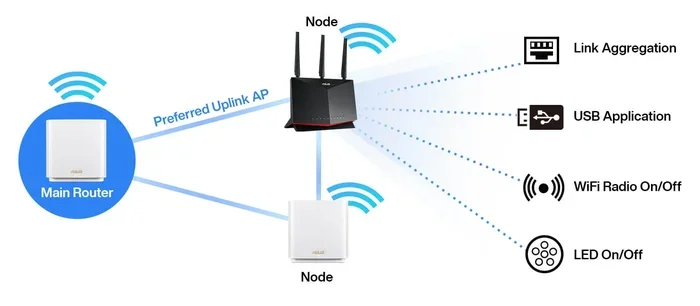
A mesh network uses multiple devices, called nodes, to spread Wi-Fi coverage throughout your home. Unlike a single router with an extender, mesh nodes talk to each other and share the load. This creates a single, unified network name (SSID). Your phone or laptop stays connected to the strongest node as you move around. There is no need to switch networks manually.
Mesh systems use a dedicated wireless backhaul channel to communicate between nodes. This keeps your main internet speed high. Some mesh systems also support wired backhaul for even better performance. The result is a reliable, fast connection in every room.
How Asus AiMesh Works
Asus developed AiMesh to let its routers work together as a mesh system. You can pair a main Asus router with one or more Asus satellites. The main router handles the internet connection and manages the network. The satellite nodes extend the Wi-Fi signal to hard-to-reach areas.
AiMesh uses a common interface, so you manage all nodes from one dashboard. You do not need separate apps for each router. This makes setup and troubleshooting much easier. The system automatically updates all nodes when new firmware is available.
Quick Tips
- Use the Asus Router app: It guides you through the mesh setup step by step.
- Keep nodes within range: Place your first satellite close to the main router during setup.
- Use the same band: For best results, connect satellites to the same frequency band as the main router.
How to Set Up Your Asus Router as a Mesh Node
Step-by-Step Setup Guide
Setting up your Asus router as a mesh node is straightforward. Follow these steps to get started.
- Check compatibility: Make sure your Asus router supports AiMesh. You can find the list on the Asus website.
- Update firmware: Log into your router’s web interface and install the latest firmware. This ensures stability and new features.
- Connect the main router: Plug your main Asus router into your modem. Configure it as you normally would for internet access.
- Add a satellite node: Open the Asus Router app, go to the AiMesh section, and select “Add Node.” Follow the on-screen prompts.
- Place the satellite: Once paired, move the satellite to the location where you need more coverage. Wait for the LED to show a solid white light, indicating a good connection.
The entire process takes about 10 to 15 minutes. You can add up to eight AiMesh routers to one system. Each new node expands your mesh network seamlessly.
Configuring the Main Router and Satellite Nodes
After adding all nodes, you can fine-tune your mesh network. Open the Asus Router app and go to the AiMesh settings. Here you can adjust band steering, which helps devices connect to the best frequency band. You can also set up parental controls, guest networks, and QoS (Quality of Service) rules that apply to the entire mesh.
Make sure all nodes use the same network name and password. This creates a truly seamless experience. Your devices will roam between nodes without dropping the connection.
Common Mistake
Placing the mesh node too far from the main router. During initial setup, keep the satellite within a few feet of the main router. Once it pairs successfully, you can move it to its final position. Moving it too far during setup can cause pairing failures.
| Asus Router Model | AiMesh Support | Max Nodes | Wi-Fi Standard |
|---|---|---|---|
| RT-AX86U | Yes | 8 | Wi-Fi 6 |
| RT-AC68U | Yes | 8 | Wi-Fi 5 |
| RT-AX56U | Yes | 8 | Wi-Fi 6 |
| RT-AC86U | Yes | 8 | Wi-Fi 5 |
| RT-AX58U | Yes | 8 | Wi-Fi 6 |
This table shows some popular Asus routers that support AiMesh. You can mix and match these models as your main router and satellites. Always check the Asus website for the latest list of compatible models.
Benefits of Using an Asus Router as a Mesh System
Seamless Roaming and Coverage
The biggest advantage of a mesh network is seamless roaming. When you walk from your living room to the bedroom, your device switches to the nearest node without dropping the connection. This is perfect for streaming videos, video calls, and online gaming.
A single Asus router might struggle to cover a large home. Walls, floors, and interference from other devices weaken the signal. By adding Asus routers as satellites, you blanket your home with strong Wi-Fi. Every room gets a reliable connection.
Cost Savings vs Buying a New Mesh System
Buying a dedicated mesh system can cost $200 to $500 or more. If you already own an Asus router, you can use it as a mesh node for free. This saves you a significant amount of money. You also avoid the hassle of setting up an entirely new network.
Even if you need to buy one additional Asus router to act as a satellite, the total cost is often lower than a two-pack mesh kit. You get the same performance and convenience at a fraction of the price.
Key Takeaways
- Whole-home coverage: Mesh nodes eliminate dead zones and extend Wi-Fi to every corner.
- Single network name: All nodes share the same SSID, so your devices roam automatically.
- Easy management: One app controls all nodes, making updates and troubleshooting simple.
- Scalable: Add more Asus routers as needed to cover larger areas.
Common Mistakes to Avoid
Using Incompatible Firmware
One of the biggest mistakes is running outdated or custom firmware on your Asus router. AiMesh requires the official Asus firmware. If you have flashed third-party firmware like DD-WRT or Tomato, you must revert to the stock Asus firmware before setting up mesh mode.
Always check for firmware updates in the router’s admin panel. Asus releases updates that improve mesh stability and add new features. Keeping your router updated ensures the best performance.
Poor Node Placement
Placing a mesh node in a basement, closet, or behind thick walls weakens the wireless backhaul. The node needs a clear line of sight to the main router and other nodes. Ideally, place it in an open area on the same floor as the main router.
A good rule of thumb is to place the first satellite halfway between the main router and the area with poor coverage. You can then add more nodes to fill in the gaps. Avoid placing nodes near microwaves, baby monitors, or cordless phones, which cause interference.
Expert Insight
Use wired backhaul when possible. If you can run an Ethernet cable between your main router and a satellite node, do it. Wired backhaul provides the fastest and most stable connection. It takes the load off the wireless backhaul channel, leaving more bandwidth for your devices.
Expert Tips for Optimizing Your Asus Mesh Setup
Firmware Updates and Settings
After setting up your mesh network, check the firmware regularly. Asus often releases updates that improve mesh performance and fix bugs. You can enable automatic updates in the router settings so you never miss a patch.
In the AiMesh settings, you can enable “Smart Connect.” This feature lets the router assign devices to the best band automatically. It simplifies the user experience and keeps older devices from slowing down the network.
Band Steering and QoS
Band steering encourages dual-band and tri-band devices to connect to the 5 GHz or 6 GHz band. These bands offer faster speeds and less congestion than the 2.4 GHz band. With AiMesh, band steering works across all nodes, not just the main router.
Quality of Service (QoS) lets you prioritize traffic for specific devices or applications. You can give your gaming console or video call app higher priority. This ensures smooth performance even when the network is busy. QoS settings apply to the entire mesh system, not just one node.
Quick Tips
- Name your nodes clearly: In the app, label each node by room (e.g., “Living Room,” “Bedroom”) for easy troubleshooting.
- Restart nodes occasionally: A simple reboot can fix minor connectivity issues and improve performance.
- Use the same channel width: Set all nodes to the same channel width (e.g., 80 MHz) for consistent speeds.
Conclusion
Can Asus Router Be Used As A Mesh system? Absolutely. With Asus AiMesh, your existing router becomes a powerful part of a whole-home mesh network. You get seamless roaming, extended coverage, and easy management, all without spending extra money on a new mesh kit.
Setting up your Asus router as a mesh node is quick and straightforward. Just check compatibility, update the firmware, and follow the simple steps in the Asus Router app. Place your nodes thoughtfully, keep the firmware updated, and enjoy a strong, reliable Wi-Fi connection in every room.
Take action today. Look up your Asus router model, verify AiMesh support, and start building your mesh network. You will wonder why you ever relied on a single router and an extender. A mesh system built with your Asus router is the smart, cost-effective choice for modern home connectivity.
Frequently Asked Questions
Can any Asus router be used as a mesh?
No, only Asus routers that support AiMesh can be used as a mesh system. Check the Asus website or your router’s manual to confirm compatibility. Most models released after 2016 support AiMesh.
Do I need to buy a special mesh kit?
No, you do not need a special kit. You can use your existing Asus router as the main hub and add other Asus routers as satellites. Just make sure all routers are AiMesh-compatible.
Will my internet speed drop with mesh?
Wireless mesh nodes may reduce speed slightly because the signal is shared. Using wired backhaul eliminates this loss. With proper placement, the speed drop is minimal and often unnoticeable for everyday tasks.
How many nodes can I add to an Asus mesh system?
You can add up to eight AiMesh routers to one system. This makes it easy to cover large homes or multi-story buildings. Each node expands the coverage area and strengthens the network.
Can I mix different Asus router models in a mesh?
Yes, AiMesh supports mixed models. You can pair an older RT-AC series router with a newer RT-AX series router. The system works together as a unified mesh network, though all nodes will operate at the capabilities of the oldest model.
Is it hard to set up an Asus router as a mesh node?
No, the setup is very simple. The Asus Router app walks you through the process in minutes. You just need to add the node, place it, and let the app handle the rest. No advanced technical skills are required.