Does A WiFi Repeater Create A New Network For Your Home
A WiFi repeater does not create a completely new network. It extends your existing network by rebroadcasting the same signal. Understanding how a WiFi repeater works helps you make smarter decisions about home network coverage and wireless signal strength.
Key Takeaways
- A WiFi repeater rebroadcasts your existing network: It does not generate a new network name or separate connection.
- Repeaters can reduce speed: Because they receive and retransmit data, some bandwidth loss is normal.
- Placement matters a lot: Positioning your repeater in the right spot makes a huge difference in performance.
- Mesh systems offer a better alternative: If you need seamless coverage, a mesh network may be a smarter choice.
- Security stays the same: Your repeater inherits the same encryption and password as your main router.
- Not all repeaters are equal: Single-band and dual-band repeaters behave very differently.
📑 Table of Contents
- Does A WiFi Repeater Create A New Network?
- How Does A WiFi Repeater Actually Work?
- Does A WiFi Repeater Create A New Network Name?
- How To Set Up A WiFi Repeater Properly
- WiFi Repeater vs. Other Options
- Does A WiFi Repeater Affect Network Security?
- When Should You NOT Use A WiFi Repeater?
- Common Mistakes People Make With WiFi Repeaters
- Can Environmental Factors Affect Repeater Performance?
- The Bottom Line
Does A WiFi Repeater Create A New Network?
Let’s get one thing straight right away. A WiFi repeater does not create a brand new network. Instead, it takes your existing WiFi signal and bounces it to areas where the signal is weak. Think of it like a mirror reflecting light. The light stays the same. It just goes somewhere new.
Many people assume that plugging in a repeater gives them a separate network. That is not how it works. Your home network stays the same. The repeater simply makes it reach further. This means your devices connect to the same network name, the same password, and the same settings.
So why does this matter? Because understanding what a repeater actually does helps you set realistic expectations. You will know exactly what to expect in terms of speed, coverage, and performance. Let us walk through everything you need to know.
How Does A WiFi Repeater Actually Work?
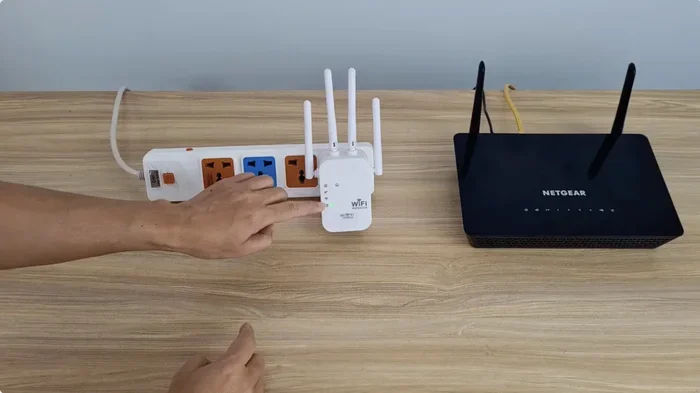
A WiFi repeater is a simple device. It sits between your router and the area with a weak signal. It picks up the signal from your router. Then it sends that same signal out again. That is literally it. No magic. No new network. Just a relay.
Here is a simple way to think about it. Imagine you are standing in a large room. You shout, and the person at the far end cannot hear you. Now imagine someone stands in the middle and repeats your shout. The message gets through. But it is still your voice. It is not a new message.
The Two-Band Problem
Most repeaters use the same radio frequency to receive and send data. This creates a bottleneck. The repeater has to listen and talk on the same channel. As a result, your speed can drop by up to 50%. That is a big deal if you care about performance.
Dual-band repeaters handle this better. They use one band to receive the signal and another band to transmit it. This reduces the speed loss significantly. If you are shopping for a repeater, look for a dual-band model. It makes a real difference.
Does A WiFi Repeater Create A New Network Name?
By default, most repeaters keep the same network name as your router. This is called “band steering” or “same SSID mode.” Your phone or laptop connects to the repeater without even noticing. The device just hops to the strongest signal available.
Some repeaters do create a separate network name. You might see something like “MyNetwork_EXT” added to your list of available networks. This happens when the repeater is set up in a specific mode. But this is not the default behavior on most modern devices.
Why Some People Prefer a Separate Network Name
There are a few reasons someone might want a separate network name. First, it lets you control which devices connect to the repeater. Second, it helps with troubleshooting. If something goes wrong, you can isolate the problem to either the main router or the repeater.
However, having two network names can confuse users. Guests might connect to the weaker network by mistake. For most households, keeping the same network name is the better choice. It is simpler and more intuitive.
How To Set Up A WiFi Repeater Properly
Setting up a repeater is not hard. But doing it right makes a massive difference. Follow these steps to get the best results.
- Plug the repeater in halfway between your router and the dead zone.
- Wait for the indicator light to show a strong connection.
- Use the WPS button on your router if your repeater supports it.
- Log into the repeater’s admin panel to fine-tune settings.
- Test the signal in the area you want to cover.
Placement Tips That Actually Work
Placement is the single most important factor. If you put the repeater too close to the router, it will not extend coverage. If you put it too far away, it will not get a strong enough signal to rebroadcast. The sweet spot is roughly halfway.
Also, keep the repeater away from thick walls and metal objects. These block wireless signals and reduce performance. A central location in your home usually works best. And remember, elevation matters. Placing the repeater on a shelf works better than hiding it on the floor.
One more tip. Check your WiFi signal strength before setting up. Use a free app on your phone to measure the signal in different spots. This tells you exactly where the repeater will be most effective.
WiFi Repeater vs. Other Options
A repeater is not your only option for extending coverage. Let us compare the main choices so you can pick the best one for your situation.
| Feature | WiFi Repeater | Mesh System | Powerline Adapter |
|---|---|---|---|
| Creates new network? | No | No | No |
| Speed loss | Moderate to high | Low | Moderate |
| Ease of setup | Easy | Moderate | Easy |
| Cost | Low | High | Medium |
| Best for | Small coverage gaps | Large homes | Homes with wiring |
Each option has its strengths. A WiFi repeater is the most affordable and easiest to set up. A mesh system delivers the best performance but costs more. A powerline adapter uses your home’s electrical wiring to carry the signal. It works well in homes where wireless signals struggle to penetrate walls.
If you are looking for a budget-friendly fix, a repeater is hard to beat. But if you need whole-home coverage with no speed loss, a mesh network is the way to go. You can also check whether you can buy a WiFi booster as another alternative to consider.
Does A WiFi Repeater Affect Network Security?
This is a question many people overlook. The short answer is no. A repeater does not change your security settings. It inherits the same encryption and password as your main router. Your home network stays just as secure with a repeater as it does without one.
That said, you should always use strong encryption. WPA3 is the latest and most secure option. If your router supports it, enable it. And never use WEP. It is outdated and easy to crack.
Can Someone Access Your Network Through A Repeater?
A repeater does not open any new doors to your network. It simply extends the existing one. Anyone trying to connect still needs the correct password. The repeater itself does not create a new entry point for hackers.
However, cheap or poorly configured repeaters can sometimes introduce vulnerabilities. Always buy from reputable brands. Keep your firmware updated. And change default admin passwords on any network device you add to your home.
When Should You NOT Use A WiFi Repeater?
Repeaters are great for many situations. But they are not the right solution for every home. Here are some cases where you should look for alternatives.
- Your home is very large. A single repeater will not cover a big house. You might need multiple repeaters or a full mesh system.
- You need consistent high speeds. If you are into gaming or 4K streaming, a repeater’s speed loss may be unacceptable.
- Your walls are very thick. Concrete or brick walls block signals badly. A repeater might struggle to get a usable signal in the first place.
- Your router is outdated. If your router only supports older WiFi standards, a repeater will not help much. You might be better off upgrading the router itself.
In these cases, a mesh system or a new router will serve you much better. You can also explore whether you can extend your WiFi to 200 feet away for longer-range solutions.
Common Mistakes People Make With WiFi Repeaters
Even though repeaters are simple devices, people still make avoidable mistakes. Here are the most common ones.
- Placing the repeater too far from the router. This results in a weak rebroadcast signal and terrible speeds.
- Putting the repeater in a closet or behind furniture. Walls and objects block the signal before it even reaches the repeater.
- Ignoring firmware updates. Manufacturers release updates that improve performance and fix bugs. Always keep your device current.
- Expecting miracles. A repeater extends coverage. It does not create signal out of thin air. If there is no signal to repeat, the repeater has nothing to work with.
- Using an old repeater with a new router. Older repeaters may not support newer WiFi standards. This limits your overall performance.
Avoid these mistakes and your repeater will work much better. A little planning goes a long way.
Can Environmental Factors Affect Repeater Performance?
Yes, they absolutely can. Your repeater is still dealing with wireless signals. And those signals are affected by the environment around them.
Thick walls, large metal objects, and even water can weaken the signal. Believe it or not, humidity can affect a WiFi signal too. Moisture in the air absorbs radio frequencies, which reduces signal strength over distance.
If you live in a humid climate or your repeater is near a bathroom or kitchen, this could be a factor. Try to place your repeater in a dry, open area for the best results.
Other electronics can also cause interference. Microwaves, baby monitors, and cordless phones all operate on similar frequencies. Keep your repeater away from these devices to avoid signal disruption.
The Bottom Line
A WiFi repeater does not create a new network. It extends your existing one. It rebroadcasts your current signal to reach areas that otherwise would have weak or no coverage. This makes it a simple and affordable solution for many homes.
However, a repeater is not perfect. It can reduce your speed, especially on single-band models. Placement is critical. And for larger homes, a mesh system might be a better long-term investment.
The good news is that setting up a repeater is easy. Most models work right out of the box. You do not need advanced technical skills. Just plug it in, follow the setup steps, and you are good to go.
Before you buy, evaluate your needs. How big is your home? Where are the dead zones? What speed do you need? Answer these questions and you will know exactly whether a repeater is the right choice for you. And if you are exploring other options, you might want to check whether you can connect a mesh router to an existing router for a more seamless setup.
A WiFi repeater is a practical tool. It solves a real problem. Just go in with the right expectations and you will be happy with the results.
Frequently Asked Questions
Does a WiFi repeater create a separate network?
No, a WiFi repeater does not create a separate network by default. It rebroadcasts your existing network using the same name and password. Some models can be configured to show a different network name, but this is not the standard setup.
Will a WiFi repeater slow down my internet?
Yes, a WiFi repeater can reduce your speed. This happens because the repeater receives and retransmits data on the same frequency. Dual-band repeaters minimize this speed loss compared to single-band models.
Can I use a WiFi repeater with any router?
Most WiFi repeaters work with any standard router. They do not need to be from the same brand. Just make sure your router and repeater support compatible WiFi standards for the best performance.
How many repeaters can I use in one home?
You can use more than one repeater, but too many will degrade your network. Each repeater adds a layer of signal processing. Two repeaters is usually the practical limit for most homes before you should consider a mesh system instead.
Is a WiFi repeater the same as a WiFi extender?
Yes, the terms are used interchangeably. A WiFi repeater and a WiFi extender do the same thing. They both take your existing signal and extend it to cover more area. The technical mechanism may vary slightly between brands.
Do I need to reset my repeater if I change my WiFi password?
Yes, you will need to reconfigure the repeater with the new password. The repeater stores your network credentials and will not automatically update when you change them. Access the repeater settings and enter the new password to restore the connection.
=== CONCLUSION ===
A WiFi repeater is a simple device that extends your existing network. It does not create a new one. Understanding this basic fact helps you set the right expectations and get the best results from your setup.
Whether you have dead zones in your bedroom or weak signal in the backyard, a repeater can help. Just remember to place it correctly, choose a dual-band model when possible, and keep your firmware updated. With the right approach, your home network will cover more of your space without the need for expensive upgrades.