Does Wifi 5 Or 6 Have Better Range For Your Home Network
WiFi 5 and WiFi 6 both serve home networks, but they handle range very differently. WiFi 5 offers solid coverage at longer distances, while WiFi 6 trades some range for faster speeds in crowded spaces. The right choice depends on your home size, device count, and internet habits. This guide walks you through everything you need to know.
When you are setting up or upgrading a home network, one question keeps popping up. Does WiFi 5 or 6 have better range? It sounds simple, but the answer is more layered than most people expect. Both standards have strengths, and your ideal choice depends on your home, your devices, and how you use the internet every day.
WiFi 5, also known as 802.11ac, has been around for a while. WiFi 6, or 802.11ax, is the newer kid on the block. Each one handles wireless signals in its own way. Some homes need raw speed. Others need steady coverage across every room. Let us dig into the details so you can make a smart decision.
Range is not just about how far your signal reaches. It also covers how well the signal holds up through walls, across floors, and in busy spaces with lots of connected devices. This article covers all of that. By the end, you will know exactly which standard fits your home best.
Key Takeaways
- WiFi 5 generally has better raw range: Its signals travel farther and penetrate walls more effectively than WiFi 6.
- WiFi 6 excels in dense environments: It handles many devices at once without slowing down, even if each device is closer to the router.
- Frequency bands matter a lot: The 2.4 GHz band reaches farther, while the 5 GHz band delivers faster speeds over shorter distances.
- Your home layout affects everything: Walls, floors, and furniture can weaken any wireless signal regardless of the WiFi standard.
- You don’t always need WiFi 6: If your home is small and you have few devices, WiFi 5 may be all you need.
- Mesh systems can bridge the gap: A mesh setup boosts range for both WiFi 5 and WiFi 6 networks.
📑 Table of Contents
- What Is WiFi 5 And WiFi 6?
- How Range Works In Wireless Networks
- Does WiFi 5 Or 6 Have Better Range?
- Factors That Affect WiFi Range In Your Home
- How To Improve Your WiFi Range
- Which One Should You Choose For Your Home?
- Quick Tips For Maximizing Your WiFi Range
- Common Mistakes That Hurt WiFi Range
- Expert Insights On WiFi Range
- Key Takeaways
- Conclusion
What Is WiFi 5 And WiFi 6?
Understanding WiFi 5 (802.11ac)
WiFi 5 came out in 2013 and quickly became the go-to standard for home networks. It operates mainly on the 5 GHz frequency band, though some routers also use 2.4 GHz. WiFi 5 brought faster speeds, better efficiency, and wider channels compared to older standards. Most households with routers from the last eight or nine years use WiFi 5 or a mix of WiFi 5 and older tech.
The wireless signal strength on WiFi 5 is reliable. It can push data at speeds up to 3.5 Gbps under ideal conditions. But real-world speeds are usually lower. Walls, distance, and interference from other devices all play a role. Still, for many homes, WiFi 5 delivers more than enough performance.
One big advantage of WiFi 5 is its range on the 5 GHz band. It holds up well over moderate distances. The 2.4 GHz band it supports also travels farther and penetrates obstacles better. This dual-band setup gives users flexibility.
Understanding WiFi 6 (802.11ax)
WiFi 6 arrived in 2019 and represents a big leap forward. It works on both the 2.4 GHz and 5 GHz bands, just like WiFi 5. But it uses smarter technology to manage data traffic. Think of it like a highway with better traffic control. More cars (devices) can move at once without gridlock.
WiFi 6 offers speeds up to 9.6 Gbps in theory. That is a huge jump from WiFi 5. It also uses a feature called OFDMA, which splits channels into smaller sub-channels. This lets multiple devices communicate with the router at the same time. For homes with many smart devices, this is a game changer.
But WiFi 6 also introduces new modulation and encoding methods. These can affect how far the signal travels. More on that in a moment. The key takeaway is that WiFi 6 focuses on efficiency and speed, sometimes at the cost of a few feet of range.
How Range Works In Wireless Networks
Before comparing WiFi 5 and WiFi 6 directly, it helps to understand what “range” actually means in a home network. Range is not just one number. It depends on several factors working together.
When your router sends out a wireless signal, that signal weakens as it travels. Thick walls, metal objects, and even water can absorb or bounce the signal. The further the signal goes, the weaker it gets. Eventually, it drops off entirely. That is why you might get full bars in the living room but no signal in the bedroom.
Frequency bands play a huge role here. The 2.4 GHz band travels farther and passes through obstacles better. The 5 GHz band delivers faster speeds but loses strength more quickly over distance. Both WiFi 5 and WiFi 6 use these same frequency bands. So the band you connect to matters just as much as the WiFi standard itself.
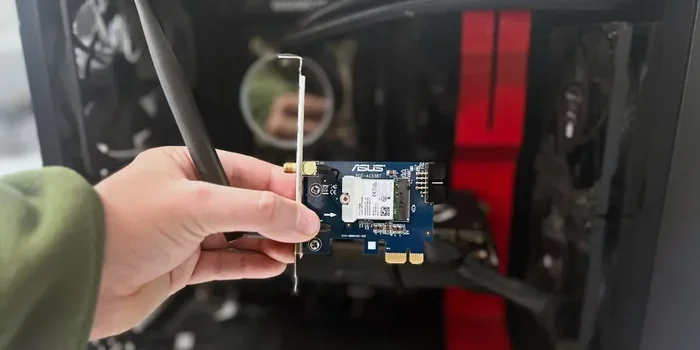
Another factor is antenna design. Routers with more antennas can focus signals better. This improves wireless connectivity across your space. External antennas often perform better than internal ones. But even the best antenna setup cannot overcome every obstacle in a home.
Does WiFi 5 Or 6 Have Better Range?
WiFi 5 Range Performance
When it comes to pure distance, WiFi 5 generally wins. Its signals on the 5 GHz band can reach about 50 to 70 feet indoors under normal conditions. On the 2.4 GHz band, that number jumps to around 100 to 150 feet. These are rough estimates, and your results will vary.
WiFi 5 signals tend to hold up well through drywall, wood furniture, and standard home construction. They struggle more with concrete walls and metal studs. But overall, the network coverage area for WiFi 5 is quite generous for most homes.
If you live in a smaller home or apartment, WiFi 5 range is usually more than enough. You can place the router in a central location and get solid coverage in most rooms. The signal stays strong enough for streaming, video calls, and online gaming.
WiFi 6 Range Performance
WiFi 6 is a bit different. It uses higher-density signal modulation, which means more data fits into each signal wave. This is great for speed. But it can also make the signal slightly more fragile over long distances. The trade-off is real but not dramatic.
In practical terms, WiFi 6 range is only a few feet shorter than WiFi 5 in most cases. You might notice the difference in a large home with thick walls. In a typical suburban house, the difference is barely noticeable. WiFi 6 still delivers strong wireless signal strength across normal home layouts.
Where WiFi 6 truly shines is not in raw distance but in maintaining performance at the edges of its range. Even when the signal is weaker, WiFi 6 devices often stay connected and functional longer than WiFi 5 devices would. This is thanks to better error correction and smarter signal handling.
Head-to-Head Range Comparison
Here is a simple comparison of how WiFi 5 and WiFi 6 stack up in terms of range and coverage.
- Indoor range (5 GHz): WiFi 5 reaches about 50 to 70 feet. WiFi 6 reaches about 45 to 65 feet.
- Indoor range (2.4 GHz): Both standards reach about 100 to 150 feet. The band matters more than the standard here.
- Wall penetration: WiFi 5 on 2.4 GHz penetrates walls slightly better. WiFi 6 on 2.4 GHz is close but not quite as strong.
- Edge performance: WiFi 6 maintains usable speeds at the edges better than WiFi 5.
- Crowded environments: WiFi 6 handles many devices without range degradation. WiFi 5 can slow down significantly.
So the short answer is this. WiFi 5 has a slight edge in raw range. WiFi 6 has a slight edge in maintaining usable speeds at the edges of that range. For most homes, either standard will work well.
Factors That Affect WiFi Range In Your Home
The WiFi standard you choose matters, but it is not the only factor. Many things in your home affect how far your wireless signal reaches. Understanding these can help you get the most out of any router.
Home Layout And Construction
The layout of your home is the biggest factor. A single-story ranch-style house is easier to cover than a two-story home with hallways and closed doors. Concrete or brick walls block signals much more than drywall. Homes with lots of rooms and corners create more WiFi dead zones.
If you live in an older home with thick plaster walls, you will notice range limitations with any standard. Newer construction with lighter materials tends to allow signals to travel farther. Knowing your home’s structure helps you set realistic expectations.
Device Count And Network Congestion
Every device connected to your network uses a share of the available bandwidth. A few years ago, most homes had five to ten connected devices. Today, the average home has 20 to 30 or more. Smart TVs, phones, tablets, smart speakers, security cameras, and even smart fridges all compete for airtime.
WiFi 5 handles this load but starts to struggle when too many devices are active at once. WiFi 6 was designed specifically for this problem. It manages multiple connections efficiently, which helps maintain network performance even when your home is full of busy devices.
Interference From Other Devices
Microwaves, baby monitors, cordless phones, and even Bluetooth devices can interfere with WiFi signals. Most of these operate on the 2.4 GHz band, which is the same band many routers use. This interference weakens your wireless signal strength and can reduce effective range.
Switching to the 5 GHz band reduces interference in most cases. Both WiFi 5 and WiFi 6 support the 5 GHz band. WiFi 6 also has better tools to manage interference automatically. This is another area where WiFi 6 pulls ahead, even if the raw range is similar.
Router Placement And Antenna Position
Where you put your router matters more than most people realize. Placing it in a corner, behind a TV, or inside a cabinet can cut your range dramatically. The best spot is usually a central, elevated location in your home.
For routers with external antennas, pointing them straight up gives the best horizontal coverage. Angling them slightly can help reach different floors. Good placement can make a standard router outperform a premium one in a poor location. This applies to both WiFi 5 and WiFi 6 setups.
How To Improve Your WiFi Range
No matter which WiFi standard you use, there are steps you can take to boost your range. These tips work for both WiFi 5 and WiFi 6 networks.
Use A Mesh WiFi System
A mesh system replaces your single router with multiple nodes placed around your home. Each node talks to the others and to your devices, creating a seamless home network with no dead zones. Mesh systems are available in both WiFi 5 and WiFi 6 versions.
If you have a large home or one with tricky layouts, a mesh system is the most effective solution. You can also look into a portable WiFi option if you need flexible coverage in specific areas of your home or on the go.
Upgrade Your Router Firmware
Router manufacturers release firmware updates that improve performance and range. These updates can fix bugs, optimize signal handling, and even add new features. Check your router’s admin panel regularly for updates. This simple step can make a noticeable difference in your wireless connectivity.
Switch To The Right Frequency Band
If you are close to your router, connect to the 5 GHz band for faster speeds. If you are far away or have walls between you and the router, switch to 2.4 GHz for better range. Many modern routers handle this automatically, but you can always adjust settings manually.
If you want to control which band your phone uses, you can force your phone to use the 2.4 GHz band for better range in distant rooms.
Add A Range Extender Or Access Point
A range extender picks up your existing signal and rebroadcasts it. It is an affordable way to extend coverage to areas your router cannot reach. However, extenders can cut your speed in half because they use the same radio to receive and send data.
A wired access point is a better option if you can run an Ethernet cable. It gives you full-speed coverage in the extended area. You can also use a Google WiFi point as an access point to extend your network without sacrificing much speed.
Reduce Interference
Keep your router away from other electronics that cause interference. Move it away from microwaves, cordless phone bases, and baby monitors. Changing your WiFi channel can also help if your neighbors are using the same channel. Most routers have an auto-select feature, but manually choosing a less crowded channel can improve performance.
Which One Should You Choose For Your Home?
Now that you understand the range differences, how do you decide? The answer depends on your specific situation. Here are some scenarios to help you choose.
If you live in a small to medium home with fewer than 15 connected devices, WiFi 5 is a solid choice. It offers great range, reliable speeds, and lower cost. Most WiFi 5 routers are also more affordable than WiFi 6 models. You will get excellent internet speed and coverage without paying a premium.
If you live in a larger home, have 20 or more connected devices, or stream a lot of high-bandwidth content, WiFi 6 is worth the investment. It handles heavy loads better and keeps performance strong even at the edges of your home. The slightly shorter range is rarely a dealbreaker, and the efficiency gains are significant.
If you are building a new home or doing a major renovation, consider wiring your home with Ethernet and setting up a mesh WiFi 6 system. This gives you the best of both worlds. Wired backhaul provides maximum speed, and mesh nodes ensure full coverage everywhere.
Either way, both WiFi 5 and WiFi 6 are capable standards. You cannot go wrong with either one for a typical home setup. The most important thing is to choose a good-quality router and place it well.
Quick Tips For Maximizing Your WiFi Range
- Place your router in a central, open location away from walls and furniture.
- Keep your router elevated on a shelf or mounted on a wall.
- Update your router firmware regularly for the best performance.
- Use the 2.4 GHz band for distant devices and the 5 GHz band for nearby ones.
- Reduce the number of devices competing for bandwidth when possible.
- Consider a mesh system if your home has dead zones.
- Restart your router periodically to clear memory and refresh connections.
- Avoid placing your router near metal objects or large appliances.
Common Mistakes That Hurt WiFi Range
Many people unknowingly do things that weaken their WiFi signal. Avoiding these mistakes can improve your range without buying new equipment.
- Hiding your router in a closet: Walls and doors block signals. Keep it out in the open.
- Placing it on the floor: Signals spread outward and downward. Elevation helps.
- Ignoring firmware updates: Updates often include range and performance improvements.
- Using an old router: Older WiFi standards have much shorter range and slower speeds.
- Overloading one band: Putting all your devices on 2.4 GHz creates congestion. Split them between bands.
- Not rebooting your router: Routers need occasional restarts to perform at their best.
Expert Insights On WiFi Range
Networking experts agree that the WiFi standard is only one piece of the puzzle. Router quality, home construction, and device placement all matter just as much. A high-quality WiFi 5 router in a great location can outperform a cheap WiFi 6 router in a poor spot.
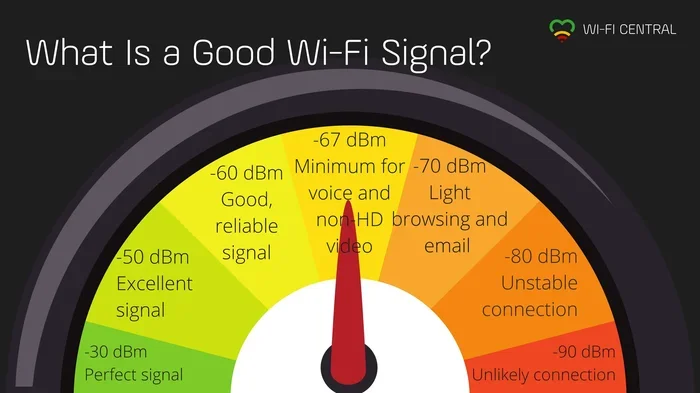
Experts also recommend testing your coverage before making any purchases. Walk around your home with your phone and check signal strength in each room. This gives you a clear picture of where you have gaps and where you do not. You can use free apps to measure signal strength and speed at different locations.
Another expert tip is to think about your needs for the next three to five years. WiFi 6 is forward-compatible with newer devices. Investing in WiFi 6 now means your network will handle future technology better. Even if range is slightly shorter, the long-term benefits often outweigh the small difference.
Key Takeaways
- WiFi 5 has slightly better raw range: Especially on the 2.4 GHz band and through standard home materials.
- WiFi 6 maintains better performance at the edges: Even when the signal is weaker, devices stay connected longer.
- Frequency band choice matters more than the standard: 2.4 GHz for range, 5 GHz for speed.
- Home layout and router placement are critical: A great router in a bad spot underperforms a good router in a great spot.
- Mesh systems solve most range problems: They work with both WiFi 5 and WiFi 6.
- Choose based on your device count and home size: WiFi 5 for small homes, WiFi 6 for larger or busier homes.
Conclusion
So, does WiFi 5 or 6 have better range? The honest answer is that WiFi 5 has a small advantage in raw distance, but WiFi 6 makes up for it with smarter technology and better edge performance. For most homes, the difference is small enough that other factors like price, features, and device compatibility should guide your decision.
Both standards are excellent choices for a home network. WiFi 5 is proven, affordable, and reliable. WiFi 6 is faster, more efficient, and ready for the future. Pick the one that fits your home and your budget. And remember, no matter which standard you choose, proper router placement and a little maintenance go a long way toward great wireless signal strength throughout your home.
Take some time to evaluate your space. Count your devices. Think about how you use the internet. Then choose the standard and setup that matches your life. A well-planned network gives you fast, reliable wireless connectivity everywhere you need it.
Frequently Asked Questions
Is WiFi 6 worth it if I only have a small home?
For a small home with fewer than 15 devices, WiFi 5 is usually sufficient. WiFi 6 shines in larger homes or spaces with many connected devices. If you plan to upgrade your devices soon, WiFi 6 is a smart future-proof choice even for smaller spaces.
Can I use a WiFi 5 device with a WiFi 6 router?
Yes, WiFi 6 routers are backward compatible with WiFi 5 devices. Your WiFi 5 phone or laptop will connect to a WiFi 6 router just fine. It will operate at WiFi 5 speeds, but you still benefit from the router’s improved traffic management.
Does the 2.4 GHz band always have better range than the 5 GHz band?
Yes, the 2.4 GHz band generally travels farther and penetrates walls better than the 5 GHz band. However, it is also more prone to interference from other devices. The 5 GHz band offers faster speeds but covers a shorter distance.
What is the main difference between WiFi 5 and WiFi 6 range?
WiFi 5 has a slight edge in raw range, especially over longer distances. WiFi 6 has a slightly shorter range but maintains better performance at the edges of coverage. The difference is usually only a few feet in real-world conditions.
How can I test my WiFi range at home?
Walk around your home with your phone and use a WiFi signal strength app. Check the signal in every room, including basements and attics. This helps you identify dead zones and decide whether you need a better router or a mesh system.
Will a WiFi 6 router improve my internet speed?
A WiFi 6 router can improve speeds if you have many devices or use high-bandwidth activities like 4K streaming. However, your internet speed also depends on your ISP plan and modem. A WiFi 6 router optimizes your local network, not your internet connection speed from your provider.