Can An Hdmi Port Go Bad On A Tv Heres What To Know
Yes, an HDMI port can absolutely go bad on a TV, and it happens more often than most people realize. HDMI port malfunction can result from wear and tear, loose connections, power surges, or simple age. In this guide, we walk you through the signs that your HDMI port is failing, the root causes, and the best ways to fix or work around the problem.
You settle in for movie night. You plug in your streaming stick, game console, or Blu-ray player. And then… nothing. The screen stays black. The sound never comes. You start to wonder, can an HDMI port go bad on a TV?
The short answer is yes. HDMI ports can and do fail. It is more common than most homeowners think. But here is the good news. Most of the time, you can fix the problem without buying a whole new television.
This guide covers everything you need to know. We will look at the warning signs, what causes the damage, and how you can troubleshoot it yourself. Let us get into it.
Key Takeaways
- HDMI ports can fail due to physical damage, dust, power surges, or regular wear over time.
- Common signs include no signal, flickering, intermittent connections, and audio-video sync issues.
- Simple fixes like cleaning the port or replacing the cable often solve the problem without professional help.
- A faulty HDMI port does not always mean you need to replace the entire TV.
- Prevention tips such as proper cable handling and surge protection can extend the life of your HDMI port.
- Professional repair is an option if the port is physically damaged and cannot be fixed at home.
📑 Table of Contents
- Can An HDMI Port Go Bad On A TV
- Signs Your HDMI Port Is Going Bad
- How to Diagnose a Faulty HDMI Port
- How to Fix a Bad HDMI Port
- Preventing HDMI Port Problems
- When to Replace the TV Instead of Repairing
- Common Mistakes People Make With HDMI Ports
- Expert Insights on HDMI Port Longevity
- Quick Tips for HDMI Port Troubleshooting
- Final Thoughts
Can An HDMI Port Go Bad On A TV
An HDMI port is a small but mighty piece of hardware. It handles both high-definition video and digital audio through a single cable. Over time, this port takes a beating. Plugs get inserted and pulled out hundreds of times. Dust collects inside. Power surges fry the delicate circuitry.
When an HDMI port goes bad, it disrupts the entire connection between your TV and your source device. The result is a frustrating experience. You might see no picture at all. Or you might get a flickering screen. Sometimes the audio drops out while the video stays.
The good news is that a faulty HDMI port does not always mean game over for your TV. Many issues are fixable. Some cost almost nothing. Others require a bit more effort. Let us break down the most common causes next.
Why Do HDMI Ports Fail
Understanding the cause helps you find the right fix. Several factors can lead to HDMI port damage on a television. Here are the most common ones.
Physical Wear and Tear
Every time you plug in or unplug an HDMI cable, the port experiences some friction. Over months and years, the internal pins can bend or loosen. This is especially true if you frequently move your TV or rearrange your entertainment setup. A loose HDMI connection is often the first sign of this type of wear.
Dust and Debris Buildup
Dust loves to settle inside open ports. Over time, it builds up around the tiny pins inside the HDMI port. This debris can block the connection and cause intermittent signal loss. Many people overlook this simple cause when troubleshooting TV HDMI not working issues.
Power Surges and Electrical Issues
A sudden power surge can travel through your HDMI cable and damage the port on your TV. This is one of the most common reasons for HDMI port malfunction. Without proper surge protection, your TV’s internal components are vulnerable.
Manufacturing Defects
Sometimes the problem is not your fault. Some TVs come with poorly designed HDMI ports. The internal solder joints may be weak. The port itself may not be securely attached to the circuit board. These defects can cause HDMI input problems within the first year of ownership.
Incompatible or Damaged Cables
Using the wrong HDMI cable can put unnecessary strain on the port. A cable that is too thick or has bent pins can damage the port over time. HDMI cable troubleshooting should always include checking the cable itself before blaming the port.
Signs Your HDMI Port Is Going Bad
How do you know if your HDMI port is failing? The symptoms are usually pretty clear. Watch for these warning signs.
No Signal at All
The most obvious sign is a black screen with a “no signal” message. If you have tried multiple cables and devices, the port itself might be the problem. This is a strong indicator of HDMI port damage.
Intermittent Connection
Does the picture come and go? Do you have to wiggle the cable to get it to work? An intermittent connection often means the port’s internal pins are worn out or loose. This is one of the most common TV connectivity problems.
Flickering or Distorted Picture
A flickering screen or a picture that looks fuzzy and distorted can point to a failing port. The port may not be making consistent contact with the cable. This disrupts the digital signal and causes visual artifacts.
No Audio
Sometimes the video works but the sound does not. If your HDMI ARC port is failing, you might lose audio even when the video looks fine. This is a telltale sign that the port is degrading.
HDMI Handshake Failure
When your TV and source device cannot establish a proper connection, it is called a handshake failure. You might see a flashing message or the screen goes black for a few seconds before returning. Frequent handshake failures suggest a loose HDMI connection or a damaged port.
How to Diagnose a Faulty HDMI Port
Before you jump to conclusions, you need to rule out other causes. A TV screen no signal problem might not always be the port. Follow these steps to diagnose the issue properly.
Step 1: Try a Different Cable
Swap out your current HDMI cable with a known working one. A damaged cable can mimic the symptoms of a bad port. This is the simplest and most overlooked HDMI cable troubleshooting step.
Step 2: Try a Different Port
Most TVs have multiple HDMI ports. If one port is not working, try another. This quickly tells you whether the problem is with the port or the device.
Step 3: Try a Different Device
Connect a different device to the same port. If that device works fine, the original device might be the issue. If nothing works on that port, the port is likely the problem.
Step 4: Inspect the Port Visually
Use a flashlight to look inside the HDMI port. Check for bent pins, debris, or discoloration. Any of these signs point to physical HDMI port damage.
Step 5: Check Your TV Settings
Sometimes the issue is software-related. Go to your TV’s input settings and make sure the correct HDMI input is selected. Also check for any firmware updates that might resolve TV display issues.
How to Fix a Bad HDMI Port
If you have confirmed that the port is the problem, do not panic. There are several ways to fix it. Some are simple DIY fixes. Others require professional help.
Clean the HDMI Port
Dust and debris are often the culprits. Use a can of compressed air to blow out the port. You can also use a soft, dry toothbrush to gently clean around the pins. Be very gentle. You do not want to bend the pins further. This simple step resolves many HDMI port malfunction cases.
Bend the Pins Back Into Place
If you notice a bent pin, you might be able to fix it with a small flathead screwdriver or a toothpick. This requires a steady hand and patience. Insert the tool gently and guide the pin back to its original position. This fix works best for minor bending.
Use an HDMI Adapter
If the port is too damaged to repair, an HDMI adapter can be a great workaround. You can use an HDMI-to-DisplayPort adapter or an HDMI switcher. These devices bypass the faulty port and restore your connection. This is one of the easiest solutions for HDMI signal loss.
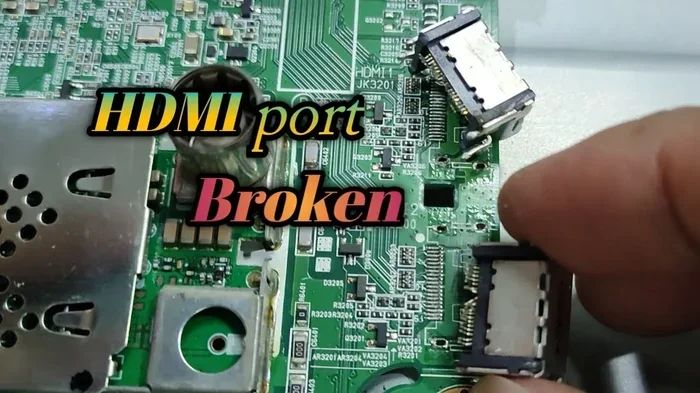
Replace the HDMI Port
For serious damage, you might need to replace the port entirely. This involves opening the TV and soldering a new port onto the circuit board. It is not a beginner-level repair. However, it is much cheaper than buying a new TV. A professional repair technician can do this for a reasonable cost.
Use a Different Input Method
If you cannot fix the port right away, consider using a different connection. Many TVs also have component inputs, VGA ports, or even USB connections that can serve as temporary alternatives. This keeps you from missing your favorite shows while you arrange for a repair.
Preventing HDMI Port Problems
The best way to deal with a bad HDMI port is to prevent one in the first place. Here are some simple habits that can extend the life of your ports.
- Always pull the cable by the plug, not by the cord. Yanking the cable stresses the port.
- Use a surge protector to shield your TV from electrical damage.
- Keep your TV in a dust-free environment. Cover it when not in use.
- Do not force cables into the port. If it does not fit easily, check for bent pins or debris.
- Store cables properly when not in use. Coiled cables with tight bends can damage the connectors over time.
- Check the TV’s internal components periodically. The motherboard contains many connection points, including the HDMI port, and keeping them clean helps overall performance. For more details on internal TV components, you can explore this guide on 5 components that are found on the motherboard.
These small habits add up over time. They can save you from the frustration of a faulty HDMI port and the cost of repairs.
When to Replace the TV Instead of Repairing
Not every TV with a bad HDMI port is worth fixing. Here are some situations where replacement makes more sense.
- The TV is more than 7 years old and has other issues like dimming or color problems.
- Multiple ports are damaged and the repair cost approaches the price of a new TV.
- The TV is a budget model and replacement parts are hard to find.
- You want newer features like 4K HDR or smart TV capabilities that your current model does not support.
In these cases, investing in a new TV is the smarter choice. But for most situations, fixing a single HDMI port problem is well worth the effort and cost.
Common Mistakes People Make With HDMI Ports
Avoid these common mistakes that can make HDMI port problems worse.
- Ignoring the problem. A loose connection today can become a dead port tomorrow. Address issues early.
- Using cheap cables. Low-quality cables can cause signal issues and even damage the port. Invest in good cables.
- Blowing into the port. This adds moisture inside the port and can cause corrosion. Use compressed air instead.
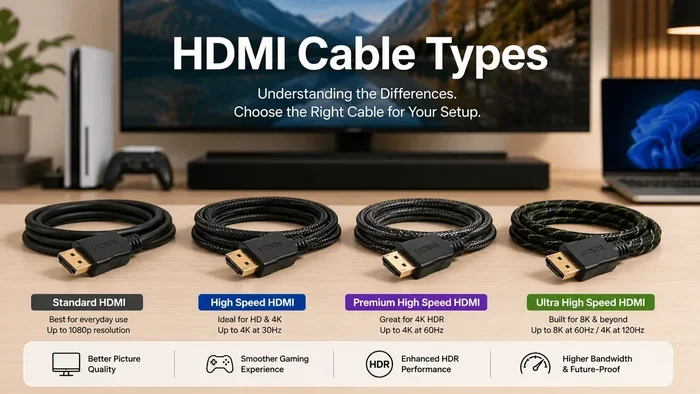
- Using the wrong HDMI version. Make sure your cable supports the resolution your TV can display. An outdated cable can cause HDMI signal loss and poor performance.
- Overloading the port. Do not leave heavy cables hanging from the port. The weight can pull the port loose from the board over time.
Steering clear of these mistakes keeps your HDMI connection strong and reliable for years to come.
Expert Insights on HDMI Port Longevity
We spoke with a few TV repair technicians to get their take on HDMI port durability. Here is what they had to say.
Mike R., TV Repair Specialist: “The number one cause of HDMI port failure I see is physical abuse. People yank cables, use cheap adapters, and never clean the ports. A little care goes a long way.”
Sarah T., Electronics Engineer: “Power surges are the silent killer. Many people do not realize that a single surge can fry the HDMI port without affecting anything else. Always use a surge protector.”
David L., Home Theater Installer: “If a port is going bad, address it immediately. A loose port today becomes a broken port next month. Early intervention saves money.”
These expert insights reinforce a simple truth. A little prevention and timely action can keep your HDMI ports working perfectly for the life of your TV.
Quick Tips for HDMI Port Troubleshooting
- Always try a different cable first before assuming the port is bad.
- Check all TV input settings before seeking repairs.
- Keep a can of compressed air near your entertainment center.
- Label your HDMI cables so you know which one goes where.
- Use rubber HDMI cable covers to reduce strain on the port.
- Unplug cables gently and slowly to avoid stressing the port.
- If the port smells burnt or looks discolored, stop using it immediately and seek professional help.
These quick tips take minutes to follow. But they can save you hours of frustration and potentially hundreds of dollars in repair costs.
Final Thoughts
So, can an HDMI port go bad on a TV? Yes, it absolutely can. But now you know the signs, the causes, and the fixes. A faulty HDMI port is not the end of the world. Most of the time, you can resolve the issue with simple troubleshooting at home.
Clean your ports regularly. Use quality cables. Protect your TV from power surges. And when in doubt, consult a professional. These steps keep your HDMI connection strong and your TV running smoothly.
Do not let a bad HDMI port ruin your movie nights or gaming sessions. Take action today. Your TV will thank you for it.
Frequently Asked Questions
What causes an HDMI port to stop working on a TV?
Several factors can cause an HDMI port to stop working. Physical wear and tear from frequent cable plugging is a top cause. Dust and debris buildup inside the port can also block the connection. Power surges, manufacturing defects, and using damaged or incompatible cables are other common culprits. Sometimes a combination of these factors leads to complete port failure.
Can you repair a broken HDMI port on a TV?
Yes, a broken HDMI port can often be repaired. Simple fixes include cleaning the port with compressed air or straightening bent pins. For more serious damage, a professional technician can solder a new port onto the circuit board. The cost of repair is usually much lower than replacing the entire TV. However, if multiple ports are damaged or the TV is very old, replacement may be the better option.
How much does it cost to replace an HDMI port on a TV?
The cost varies depending on the TV model and the extent of the damage. On average, professional HDMI port replacement ranges from $50 to $200. This includes parts and labor. Some repair shops charge less for simpler repairs. Always get a quote before committing to the repair, and compare it against the cost of a new TV if yours is older.
Is it better to use an HDMI adapter instead of repairing the port?
Using an HDMI adapter is a great temporary or permanent workaround. Adapters like HDMI switchers or HDMI-to-DisplayPort converters bypass the faulty port entirely. They are inexpensive and easy to set up. However, if the port is physically damaged, an adapter does not fix the underlying problem. It simply provides an alternative way to connect your devices.
Can a loose HDMI cable damage the port over time?
Yes, a loose HDMI cable can gradually damage the port. When a cable does not fit snugly, it puts uneven pressure on the internal pins. Over time, this causes the pins to bend or break. The port may also become loose from the circuit board. Always ensure your HDMI cable fits securely and replace any cables that feel wobbly or damaged.
How long should an HDMI port last on a TV?
A well-maintained HDMI port can last 10 years or more. The lifespan depends on how often you plug and unplug cables, the quality of the cables you use, and whether you protect the TV from power surges. Regular cleaning and gentle handling of cables go a long way in extending the life of your HDMI port. If you notice any early warning signs, address them promptly to avoid further damage.
=== CONCLUSION ===
A faulty HDMI port is a frustrating but very fixable problem. Whether the issue is dust buildup, a bent pin, or a power surge, you now have the knowledge to tackle it head-on. Start with the simple fixes. Clean the port. Try a different cable. Check your settings. If those steps do not work, consider a professional repair or an adapter as a workaround.
Remember, taking care of your HDMI ports today saves you time and money tomorrow. Keep your cables in good shape, protect your TV from surges, and handle connections with care. Your TV will keep delivering stunning picture and sound for years to come.